
Sapling
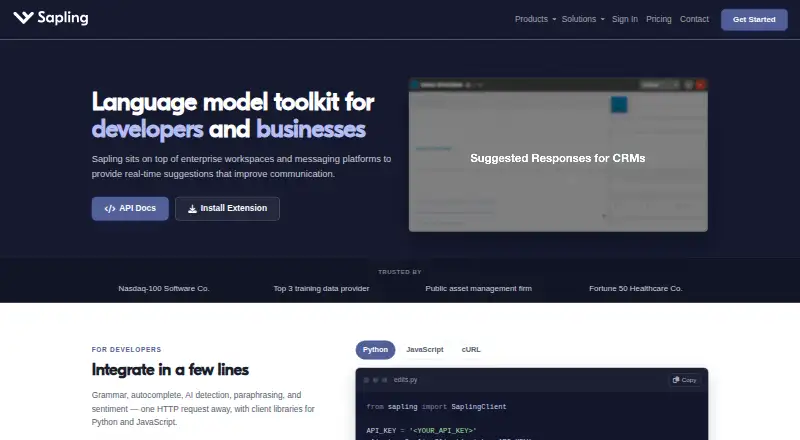
What Sapling is
Sapling combines writing assistance for teams with developer tools for adding language model-powered functions to applications. Writing features include grammar and spelling corrections, autocomplete, rephrasing, tone and sentiment checks, and AI content detection. Style suggestions and tone detection are available, with support for 14 languages. Developers can use HTTP API endpoints and SDK components, including Python and JavaScript client libraries. Sapling lists 73 integration guides, with examples for Zendesk, Salesforce, Slack, Google Docs, Microsoft Word and browser extensions. It is available on the web, through browser extensions and Windows, via API, and in self-hosted deployments. Sapling says it uses TLS encryption in transit and AES-256 encryption at rest, and describes GDPR compliance and SOC 2 Type II certification. Enterprise options include audit logs, role-based access, single sign-on and custom data retention. The free plan includes AI detector limits. Paid writing assistance starts at $12 per user per month billed annually, and a 30-day trial is listed. API trials have a character limit and expire after one month.
Who it suits
Sapling may suit teams seeking writing assistance and developers adding language model features through APIs or SDKs. Enterprise teams can consider its listed access controls, self-hosting and retention options.
What it does well
- Writing tools include grammar, spelling and rephrasing
- Supports 14 languages
- Offers Python and JavaScript client libraries
- Enterprise options include audit logs and single sign-on
What to know first
- Free plan limits AI detector checks, files and snippets
- API trial has a character limit and expires after one month
- Some API and self-hosted pricing requires contacting sales
Limits
The Free plan allows 2,000 AI detector characters per check, five detector files per batch, and 20 snippets. The API trial has a character limit and expires after one month.
Plans
| Plan | Billed and limits | Price |
|---|---|---|
| Pro | $144.00 per year (= $12.00/month, billed annually) · 100,000 AI detector characters per check · 10 AI detector files per batch · Unlimited snippets | $144 a year |
| Enterprise | Starts at 10 seats; pricing varies by seat count and contract duration · Advanced writing and AI detection · Team controls · Analytics · Support · 100,000 characters per detector check | $15 a month |
| Free | Basic writing assistance · AI detector checks up to 2,000 characters per check · 5 files per AI detector batch · 20 snippets | On request |
| API | Metered and usage-based; one-time $5 minimum · Language and AI detection APIs · API pricing varies by endpoint and usage | On request |
As sapling.ai lists them, read 5 Oct 2026. The maker's own page has the final word.
Getting started
- Open the Sapling website.
- Choose the Free plan, start the listed 30-day trial, or review paid options.
- Use the web product, browser extension, or Windows platform for writing assistance.
- For developer access, use the API or SDK components.
- For self-hosting, review the deployment options; on-premises deployments require Docker containers.
Sapling suits teams that want writing assistance inside workplace tools, and developers adding language features to applications. Its breadth is a strength, but its separate writing and API pricing—and firm detector caps on the free plan—make it worth matching the plan to the workload.
Overview
Sapling brings grammar and spelling corrections, autocomplete, rephrasing, tone and sentiment checks, and AI content detection together with developer APIs and SDKs. Its 73 integration guides include Zendesk, Salesforce, Slack, Google Docs, Microsoft Word, and browser extensions, giving teams several routes to fit assistance into existing workflows. Developers get HTTP endpoints and Python and JavaScript client libraries. That combination is more compelling for organizations than for a solo writer seeking only proofreading.
Key features
Writing assistance and detection
Style suggestions and tone detection support 14 languages, alongside the broader set of editing and detection tools. The free detector allowance is modest: 2,000 characters per check and five files per batch. Pro and Enterprise raise the check limit to 100,000 characters, although the Enterprise plan also has a 10-seat starting point. Teams processing long documents or batches should factor those ceilings into the choice.
Developer tools and deployment
The API and SDK toolkit is useful for teams building language functionality into their own applications rather than relying only on workplace integrations. API pricing is usage-based, with a one-time $5 minimum, but published pricing covers only some endpoints; other endpoints and self-hosted solutions require sales pricing. The API trial has a character limit and expires after one month, so it is a time-bounded evaluation rather than an open-ended production allowance.
Deployment options include cloud-premises support for AWS, Azure, and GCP, while on-premises deployment requires Docker containers. Enterprise accounts add audit logs, role-based access controls, and single sign-on. Sapling says it encrypts data in transit with TLS and at rest with AES-256, is GDPR compliant and SOC 2 Type II certified, and supports customers with HIPAA and PCI compliance requirements. It also says it removes numbers, email addresses, and URLs before processing, with an option to avoid storing data on disk. These controls make Sapling more relevant to organizations with deployment and governance needs than a lightweight consumer checker.
Pricing
Sapling has a free plan, a 30-day trial, and paid writing plans from $12/user/mo (annual). The plan prices and terms differ by product: writing assistance and API access should not be treated as one subscription.
| Plan | Price and terms | What it includes |
|---|---|---|
| Free | free (billed billed monthly) | 2,000 AI detector characters per check, five detector files per batch, and 20 snippets. A useful way to try the tools, but the detector caps constrain regular or large-scale use. |
| Pro | $25 a month (billed Annual ($12 / mon)) | Advanced writing assistance, detector checks up to 100,000 characters per check, 10 files per batch, and unlimited snippets. This is the clearest fit for teams needing higher detector limits and writing support; the annual billing term matters when comparing it with monthly-priced alternatives. |
| Enterprise | $15 a month (billed Starts at 10 seats; pricing varies by seat count and contract duration) | Advanced writing and AI detection, team controls, analytics, support, and 100,000 characters per detector check. The 10-seat minimum and variable contract pricing make this an organizational purchase, not a small-team upgrade by default. |
| API | $5 a month (billed One-time $5 minimum) | Usage-based language APIs, AI detection APIs, and developer access. This is for integration work, but pricing for some endpoints and self-hosted solutions requires contacting sales. |
The pricing page lists email and ticket support for paid tiers, with a dedicated support contact for Enterprise. Buyers should distinguish the writing plans’ per-user pricing from API usage charges and confirm the applicable terms for the endpoints and deployment they need.
Platforms
Sapling supports API, browser extension, self-hosted, web, and Windows use, with a desktop app and browser extension. That mix covers both embedded team workflows and standalone access, while self-hosted and on-premises options address organizations that need deployment control.
Who it's for
Sapling is strongest for teams that want writing assistance across workplace apps, or organizations that need language APIs alongside security, access, and deployment controls. It is less suited to an individual who only needs a basic grammar checker, or to an API buyer who needs transparent pricing for every endpoint before engaging sales.
Pros and cons
- Broad workflow coverage: 73 integration guides and browser-extension support help bring writing assistance into existing tools.
- Developer flexibility: HTTP APIs and Python and JavaScript libraries support application integrations, with cloud and self-hosted deployment options.
- Enterprise controls: Audit logs, role-based access, single sign-on, and stated security and compliance measures address organizational requirements.
- Free detector limits are tight: 2,000 characters per check and five files per batch make the free plan a limited option for sustained detection work.
- Pricing is split and partly opaque: API charges are usage-based, published API pricing covers only some endpoints, and Enterprise starts at 10 seats with variable terms.
Alternatives
Choose Trinka instead if its freemium offering and support across API, extension, macOS, self-hosted, web, and Windows better match your platform needs. Choose Grammarly if its published Pro price of $12 a month and 2,000 AI prompts per member per month better fit an individual or team comparing writing-assistance subscriptions. ZeroTrue is an alternative for readers who want a free plan with 100 detections per month, API access, a web dashboard, and community support.
AI Detect is a free alternative for local use without an API key or usage limits. AI Detector Pro offers a freemium web option with three AI scans per month on its free plan. GPTZero is worth considering for a free allowance of 10,000 words per month and 50,000 characters, with API, extension, and web platforms. Heynotai has a free plan capped at 100 tokens per month and includes AI text and image detection. IA Checker combines paraphrasing, grammar checking, translation, summaries, and AI text detection in its free plan for iOS and web users.
The internal category pages for AI Detection Software, AI Paraphrasing Tools, Grammar checkers, Writing Style Checkers, AI Grammar Checkers, and AI writing assistants can help compare products by use case.
Verdict
Choose Sapling if your team needs writing assistance across workplace tools or you are building language features and value its API, deployment, and enterprise controls. Its breadth is the main reason to choose it; the free detector caps, 10-seat Enterprise minimum, and sales-gated API pricing are the reasons to look elsewhere when needs are smaller or costs must be fully predictable.
Verdict
Sapling brings team writing tools together with developer APIs, integrations and enterprise deployment options. Review the free-plan limits and the distinct API and writing-assistance pricing details before choosing a plan.
Questions
Does Sapling have a free plan?
Yes. The Free plan includes 2,000 AI detector characters per check, five files per batch, and 20 snippets.
How much does Sapling cost?
Pro is listed at $25 per month with annual billing of $12 per month. Enterprise starts at 10 seats and is listed at $15 per month, with pricing varying by seat count and contract duration. API access has a one-time $5 minimum.
Is there a free trial?
Yes. A 30-day trial is listed. The API trial has a character limit and expires after one month.
Which platforms does Sapling support?
It lists API, browser extension, self-hosted, web, and Windows platforms.
Can Sapling be self-hosted?
Yes. Self-hosted deployments are available. Cloud-premises deployments support AWS, Azure, and GCP; on-premises deployments require Docker containers.
What security and compliance features does Sapling describe?
Sapling states that it uses TLS encryption in transit and AES-256 encryption at rest, and says it is GDPR compliant and SOC 2 Type II certified. It also says it supports customers with HIPAA and PCI compliance requirements.
Facts from Sapling's own pages
- API pricing limit
- The API pricing page covers only a subset of endpoints and directs customers to sales for pricing on other endpoints and self-hosted solutions. · sapling.ai, 2 Oct 2026
- API trial limit
- The API trial has a character limit and expires after one month. · sapling.ai, 2 Oct 2026
- Browser extension
- Yes · sapling.ai, 20 Sept 2026
- Company background
- Sapling says the team's work comes from the Berkeley and Stanford AI labs and that the company is backed by Y Combinator and partnered with OpenAI. · sapling.ai, 2 Oct 2026
- Data handling
- Sapling says it discards numbers, email addresses, and URLs before processing, and offers an option where data is never stored on disk. · sapling.ai, 2 Oct 2026
- Deployment
- The documentation says cloud-premises deployments support AWS, Azure, and GCP, while on-premises deployments require Docker containers. · sapling.ai, 2 Oct 2026
- Desktop app
- Yes · sapling.ai, 20 Sept 2026
- Developer access
- The developer platform offers HTTP API endpoints and SDK components, including client libraries for Python and JavaScript. · sapling.ai, 2 Oct 2026
- Enterprise controls
- Enterprise accounts include audit logs, role-based access controls, and single sign-on; self-hosted deployments and custom data-retention options are available. · sapling.ai, 2 Oct 2026
- Free plan
- Yes · sapling.ai, 20 Sept 2026
- Free trial
- Individuals can start a free one-month Pro trial without a credit card; the billing FAQ says the trial cancels automatically if no payment method is added. · sapling.ai, 2 Oct 2026
- Healthcare and payment compliance
- Sapling says it supports customers with HIPAA and PCI compliance requirements. · sapling.ai, 2 Oct 2026
- Integrations
- Sapling lists 73 integration guides, including integrations for Zendesk, Salesforce, Slack, Google Docs, Microsoft Word, and browser extensions. · sapling.ai, 2 Oct 2026
- Languages supported
- 14 · sapling.ai, 20 Sept 2026
- Product
- Sapling provides an API/SDK toolkit for integrating language model-powered functionality into applications, alongside writing assistance for teams. · sapling.ai, 2 Oct 2026
- Security
- Sapling states that it uses TLS encryption in transit and AES-256 encryption at rest, and that it is GDPR compliant and SOC 2 Type II certified. · sapling.ai, 2 Oct 2026
- Paid from
- 12 · sapling.ai, 20 Sept 2026
- Style suggestions
- Yes · sapling.ai, 20 Sept 2026
- Support
- The pricing page lists email and ticket support for paid tiers, and dedicated support contact for Enterprise. · sapling.ai, 2 Oct 2026
- Tone detection
- Yes · sapling.ai, 20 Sept 2026
- Writing tools
- Its tools include grammar and spelling corrections, autocomplete, rephrasing, tone and sentiment checks, and AI content detection. · sapling.ai, 2 Oct 2026
Where Sapling stands on Freedom251
- Grammar checkers#6 of 88
- Writing Style Checkers#8 of 29
- AI Detection Software#10 of 30
- AI writing assistants#10 of 25
- Proofreading Software#13 of 30
- AI Paraphrasing Tools#11 of 24
- AI Grammar Checkers#14 of 26