
Ginger
by Ginger
What Ginger is
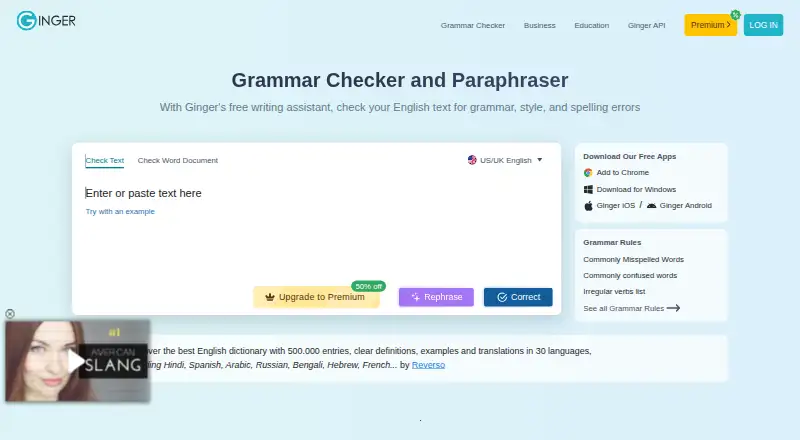
Ginger is an English-focused grammar and spell checker with tools for revising sentences, proofreading, and translation. Its writing features include grammar, spelling, and punctuation checks, a synonyms dictionary, online proofreading, essay checking, a text reader, and Personal Trainer. Core writing support covers UK and American English. Premium adds unlimited corrections and sentence rephrasing, plus translation between over 40 languages. Ginger offers a limited free tier and paid plans, including Monthly at $7.99 a month and Annual at $4.99 a year, billed as one payment of 59.88 USD. Other listed options include Premium Monthly at $13 a month, Premium Annual at $7.50 a year, Premium Quarterly at $9.99 a month, and Premium 2 years at $6 a year. It is available on desktop, mobile, web, and through browser extensions and an API. Windows users can integrate it with Word, PowerPoint, and Outlook; Chrome and Edge extensions work with services including Gmail and Google Docs. Ginger requires a stable internet connection to analyze and correct text.
Who it suits
Ginger may suit native and non-native English speakers, students, professionals, and people who struggle with writing, including people with dyslexia. Its API and local deployment option may suit organizations processing text at high volume.
What it does well
- Checks grammar, spelling, punctuation, and essays.
- Supports sentence rephrasing and proofreading.
- Premium translates text between over 40 languages.
- Works with Windows Office apps and browser extensions.
- API can be installed on customer servers.
What to know first
- Core writing features focus only on English.
- Text analysis requires a stable internet connection.
- Free tier has limited essential functions.
- No free trial is listed.
Limits
The free version provides essential functions with limitations. Premium plans provide unlimited corrections and rephrasing, while translation and other listed enhancements depend on the selected paid plan.
Plans
Ginger's published prices are being re-checked against the maker's own page.
| Plan | Billed and limits | Price |
|---|---|---|
| Premium Monthly | Billed every month · Unlimited enhanced Rephrase · Full-sentence corrections · Translation in 40+ languages | Price being re-checked |
| Premium Annual | Annual billing · Unlimited enhanced Rephrase · Full-sentence corrections · Translation in 40+ languages | Price being re-checked |
| Premium Annual | Annual billing · Unlimited enhanced Rephrase · Full-sentence corrections · Translation in 40+ languages | Price being re-checked |
| Premium Quarterly | Quarterly plan · Unlimited enhanced Rephrase · Full-sentence corrections · Translation in 40+ languages | Price being re-checked |
| Premium 2 years | Two-year plan · Unlimited enhanced Rephrase · Full-sentence corrections · Translation in 40+ languages | Price being re-checked |
| Premium 2 years | Two-year plan · Unlimited enhanced Rephrase · Full-sentence corrections · Translation in 40+ languages | Price being re-checked |
| Annual | Billed as one payment of $59.88 · unlimited grammar check · unlimited rephrasing · unlimited synonyms · translation to 40+ languages | Price being re-checked |
| Two Years | Billed as one payment of $143.76 · unlimited grammar check · unlimited rephrasing · unlimited synonyms · translation to 40+ languages | Price being re-checked |
The first 8 of 9 plans, as gingersoftware.com lists them, read 20 Sept 2026. The maker's own page has the final word. Every plan
Getting started
- Open Ginger on the web or choose a desktop, mobile, or browser-extension version
- Create or access the free plan, or select a Premium plan
- Install the Windows, macOS, Android, or iOS app when appropriate
- Add the Chrome or Edge extension for supported websites
- Connect supported Windows applications such as Word, PowerPoint, or Outlook
- Organizations can request the API and install it on their own servers
Overview
Ginger is an English-focused writing assistant for people who want corrections and rephrasing across everyday writing tools. It suits English learners, students and professionals especially well; its main drawback is that grammar support does not extend beyond English.
It brings proofreading, rephrasing and translation together, but the price menu includes several terms and billing structures that deserve close comparison before subscribing.
Key features
Corrections and rewriting
Grammar, spelling and punctuation checks sit alongside online proofreading, essay checking and sentence rephrasing. That combination is useful when a writer needs both error correction and help finding a different formulation. Personal Trainer is also among Ginger’s writing tools. The free version offers essential functions with limitations; Premium removes correction and rephrasing caps, making it a better fit for sustained use.
Language and translation
Ginger’s core writing enhancements focus on English, with UK and American English options. Premium translation covers more than 40 languages, but that breadth applies to translation rather than grammar checking. Readers seeking corrections in other languages should look elsewhere.
Where it works
On Windows, Ginger integrates with Word, PowerPoint and Outlook. Chrome and Edge extensions work on sites including Gmail, Google Docs, Facebook and LinkedIn, which puts the checker close to common writing tasks. Desktop, mobile and web apps broaden its reach. An API supports organizations with high-volume text processing, full-document proofreading and LMS, CRM or internal-system integration; it can also be installed on a customer's own servers.
Ginger requires a stable internet connection to analyze and correct text. It says text is sent to correction servers and returned without being stored or transferred to third parties, and that it follows GDPR principles including data minimization and storage limitation. Its support team aims to respond within 48 hours.
Pricing
Ginger has a free plan and no free trial. The free tier is a sensible way to try essential tools, but its limitations make it less suitable for frequent correction or rephrasing. Premium plans include unlimited enhanced rephrasing, full-sentence corrections and translation in 40+ languages; other plan descriptions also include unlimited synonyms.
- Premium Monthly: $13 a month, billed every month. Best for short-term use without a longer commitment.
- Premium Quarterly: $9.99 a month on a quarterly plan. It lowers the monthly rate against Premium Monthly but commits the buyer to a quarterly term.
- Premium Annual: $7.50 a year with annual billing. Its stated rate is lower than the monthly and quarterly options, but the billing term is longer.
- Premium 2 years: $6 a year on a two-year plan. This is the lowest rate among the Premium-labeled options, in exchange for the longest commitment.
- Annual: $4.99 a year, billed as one payment of $59.88. It includes unlimited grammar checks, rephrasing and synonyms, plus translation to 40+ languages.
- Two Years: $5.99 a year, billed as one payment of $143.76, with the same stated tool set as Annual.
- Monthly: $7.99 a month, automatically renewing monthly, with unlimited grammar checks, rephrasing and synonyms, plus translation to 40+ languages.
The overlapping plan names, rates and billing terms make it important to distinguish the stated per-year rate from the amount and frequency charged. In particular, the one-payment annual and two-year options differ from the Premium Annual and Premium 2 years terms. Choose a plan based on its actual billing commitment, not just its displayed rate.
Platforms
Ginger lists Android, iOS, macOS, Windows, web, browser extension, API and self-hosted availability. Desktop and mobile apps, plus Chrome and Edge extensions, suit writers who move between devices and documents. The API and local deployment are more relevant to institutions or businesses with text-processing workflows than individual users.
Who it's for
Ginger is aimed at native and non-native English speakers, students, professionals and people who struggle with writing, including people with dyslexia. It is most compelling for someone who wants English correction and rephrasing in several work contexts, or an organization that needs API integration. It is a poor fit for offline editing or multilingual grammar correction.
Pros and cons
- Pros: Corrections, rephrasing, proofreading and translation are combined, reducing the need to switch among separate writing tools.
- Pros: Windows Office integrations and Chrome and Edge extensions bring checking into common writing environments.
- Pros: Premium removes correction and rephrasing limits, and translation spans more than 40 languages.
- Pros: API access and self-hosted deployment address organizational workflows as well as individual writing.
- Cons: Grammar and writing enhancement is English-only, limiting its value for writers working in other languages.
- Cons: A stable internet connection is required, ruling out disconnected correction.
- Cons: Multiple plan labels and billing structures make price comparison less straightforward than a single monthly-versus-annual choice.
Alternatives
Consider LanguageTool if its character limits suit your editing: Basic allows 2,000 characters per text field, while Premium allows 150,000. GrammarCheck.ai is another freemium option; its Free Plan provides 5,000 credits and 650 words per submission, while Lite costs $4 a month for 40,000 credits and 2,000 words per submission.
ORFO is an alternative to consider. Outwrite offers a free tier with spelling and grammar, a thesaurus, Google Docs, Microsoft Word, browser extensions and a web app, and it also offers a free trial. Sapling is a freemium option with API, extension and self-hosted availability; its free tier includes 2,000 AI detector characters per check, five detector files per batch and 20 snippets.
Trinka is a freemium alternative with API and self-hosted options. Wordvice AI may suit readers who can work within a defined monthly allowance: its free Basic plan allows 5,000 words per month and 500 words per submission. Grammarly is another freemium alternative, with a free plan that includes 100 AI prompts per month and a Pro plan at $12 a month.
For more choices, browse AI Grammar Checkers or Grammar checkers.
Verdict
Ginger is a strong fit for people who write in English and want correction, rewriting and broad translation in one service, particularly if they work across browser, desktop and mobile environments. Its organizational API and local deployment also give it a case beyond individual use. Look elsewhere if you need grammar checking in multiple languages, offline editing or a simpler subscription menu.
Verdict
Ginger brings English proofreading, rephrasing, and translation into desktop, mobile, web, and organizational workflows. Compare the listed plan terms carefully, as multiple paid options are provided.
Questions
Is there a free plan?
Yes. Ginger has a free version with essential functions and some limitations.
How much does Ginger cost?
Pricing notes list paid plans from $6/mo (annual). Listed options include Premium Monthly at $13 a month and Premium Annual at $7.50 a month.
Which languages does Ginger support?
Core grammar and writing enhancement focuses on English, with UK and American English options. Premium translation works between over 40 languages.
What platforms are available?
Ginger supports Android, iOS, Windows, macOS, web, browser extensions, API, and self-hosted deployment.
Does Ginger offer an API?
Yes. Its API supports high-volume processing, full-document proofreading, LMS, CRM, and internal-system integrations, with local installation on customer servers.
Does Ginger require internet access?
Yes. A stable internet connection is required to analyze and correct text.
Facts from Ginger's own pages
- API
- Ginger offers an API for businesses, institutions, and organizations with high-volume text-processing needs, including full-document proofreading and LMS, CRM, and internal-system integration. · help.gingersoftware.com, 28 Sept 2026
- Browser extension
- Yes · gingersoftware.com, 20 Sept 2026
- Company history
- Ginger says it was founded in 2010 and has received $25 million in investments. · gingersoftware.com, 28 Sept 2026
- Connectivity limit
- Ginger requires a stable internet connection to analyze and correct text. · help.gingersoftware.com, 28 Sept 2026
- Core language
- Ginger's core grammar and writing enhancement features focus solely on English, with UK and American English options. · help.gingersoftware.com, 28 Sept 2026
- Desktop app
- Yes · gingersoftware.com, 20 Sept 2026
- Founded
- 2010 · gingersoftware.com, 28 Sept 2026
- Free plan
- Yes · gingersoftware.com, 20 Sept 2026
- Free tier
- The free version provides essential functions with some limitations. · help.gingersoftware.com, 28 Sept 2026
- GDPR
- Ginger says it follows GDPR principles including purpose limitation, data minimization, storage limitation, and integrity and confidentiality safeguards. · help.gingersoftware.com, 28 Sept 2026
- Integrations
- Ginger integrates with Microsoft Word, PowerPoint, and Outlook on Windows and provides browser extensions for Chrome and Edge that work on sites including Gmail, Google Docs, Facebook, and LinkedIn. · help.gingersoftware.com, 28 Sept 2026
- Languages supported
- 1 · gingersoftware.com, 20 Sept 2026
- Local deployment
- The Ginger API can be installed locally on customers' own servers. · help.gingersoftware.com, 28 Sept 2026
- Mobile app
- Yes · gingersoftware.com, 20 Sept 2026
- Premium limits
- Premium provides unlimited corrections, unlimited sentence rephrasing, translation, a synonyms dictionary, and a text reader. · help.gingersoftware.com, 28 Sept 2026
- Security and privacy
- Ginger says text is sent to correction servers and returned corrected, and that it does not store the text or transfer it to third parties. · help.gingersoftware.com, 28 Sept 2026
- Style suggestions
- Yes · gingersoftware.com, 20 Sept 2026
- Support
- Ginger says its customer support team aims to respond to requests within 48 hours. · help.gingersoftware.com, 28 Sept 2026
- Target users
- Ginger says it serves native and non-native English speakers, students, professionals, and people with writing struggles such as dyslexia. · gingersoftware.com, 28 Sept 2026
- Tone detection
- Yes · gingersoftware.com, 20 Sept 2026
- Translation
- Premium users can translate text between over 40 languages. · help.gingersoftware.com, 28 Sept 2026
- What it does
- Ginger is an AI-powered grammar and spell checker focused on English. · gingersoftware.com, 28 Sept 2026
- Writing tools
- Ginger lists grammar checking, sentence rephrasing, translation, punctuation checking, spell checking, Personal Trainer, online proofreading, and essay checking among its features. · gingersoftware.com, 28 Sept 2026
Where Ginger stands on Freedom251
- Grammar checkers#5 of 88
- AI Grammar Checkers#3 of 26
- Proofreading Software#4 of 30