Freedom251 › Green Screen Software
RVM-Web
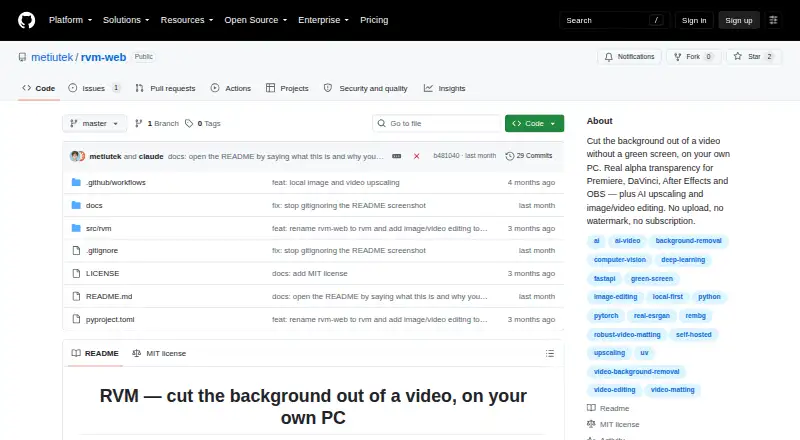
What RVM-Web is
RVM-Web is a free tool for removing backgrounds from video and images on your own computer. Video matting offers MobileNetV3 and ResNet50 models, with exports as an MP4 composition, an alpha mask, or a PNG sequence. For images, it uses rembg/U2Net and produces PNGs with full alpha transparency. Image and video upscaling supports 2× and 4× through Lanczos or Real-ESRGAN; video upscaling retains the original audio track. Image editing includes crop, resize, rotate and flip, adjustments, filters, and format conversion. Video tools cover trimming, cropping, resizing, speed changes, compression, GIF export, audio extraction, muting, and reversing. The project says processing is local, footage stays on the computer, and no account or server is needed. CUDA acceleration is supported with automatic CPU fallback, though processing runs slower without a GPU. Transparent output can be used in Premiere, DaVinci Resolve, After Effects, or OBS. Installation uses uv and opens the app in a browser at http://localhost:7860. The software is free under the MIT License, with no stated usage cap or watermark.
Who it suits
RVM-Web suits creators, streamers, editors, and anyone working with footage they do not want to upload. It is also suited to users who want transparent exports and image or video editing tools on Linux, macOS, or Windows.
What it does well
- Local processing keeps footage on the user's computer.
- Exports video composition, alpha masks, or PNG sequences.
- Video upscaling preserves the original audio track.
- Image and video upscaling supports 2× and 4×.
- Free plan with no stated usage cap or watermark.
What to know first
- Processing runs slower without a GPU.
- Requires installation with uv before launch.
Plans
| Plan | Billed and limits | Price |
|---|---|---|
| RVM | No subscription · no watermark · no usage cap stated | Free |
As github.com lists them, read 5 Oct 2026. The maker's own page has the final word.
Getting started
- Install RVM-Web with uv, following the instructions for Windows, Linux, or macOS.
- Enable CUDA auto-detection using the shell guidance for your platform, if applicable.
- Launch the app; it opens in a browser at http://localhost:7860.
RVM-Web is a free, locally installed background-removal and editing tool for images and video. It is best suited to creators, streamers, editors, and privacy-conscious teams working with footage that should stay on one computer. The strongest case is transparent video output without subscriptions, queues, or watermarks; the main compromise is slower processing without CUDA acceleration.
Overview
RVM-Web combines video matting, image cutouts, upscaling, and practical image and video utilities in one self-hosted application. Because processing runs locally and requires neither an account nor a server, it fits projects where uploading source footage is unacceptable. Its MIT License also makes it a permissively licensed option for users comfortable installing and running software themselves.
The local design changes the workflow compared with cloud background removers. There are no per-minute charges, web queues, watermarks, or stated resolution caps, but performance depends on the computer doing the work. CUDA-capable hardware gets acceleration; otherwise RVM falls back to the CPU, with the maker warning that this is slower.
Key features
Video and image transparency
Video matting offers MobileNetV3 and ResNet50 models, giving users a choice of models within the application. Exports include a composed MP4, an alpha mask, or a PNG sequence. That makes RVM useful both for a finished clip and for compositing workflows in Premiere, DaVinci Resolve, After Effects, or OBS.
For still images, rembg/U2Net removes the background and produces PNG files with full alpha transparency. The result is suited to overlays, product assets, and other designs that need a genuinely transparent file rather than a replacement background.
Upscaling and editing
Images and videos can be enlarged 2× or 4× with Lanczos or Real-ESRGAN. Video upscaling keeps the original audio track, avoiding a separate audio-replacement step. These are useful finishing tools, although upscaling cannot recover detail that is absent from the source.
Image controls cover cropping, resizing, rotation and flipping, adjustments, filters, and format conversion. Video controls include trimming, cropping, resizing, speed changes, compression, GIF export, audio extraction, muting, and reversing. This breadth can reduce trips to a second utility for routine edits, while dedicated editors remain more appropriate for complex timelines.
Pricing
The RVM plan costs free. It has no subscription, no watermark, and no stated usage cap. There is no free trial because the product is already offered as a free plan. For recurring personal or production work, that removes the credit and renewal calculations common to hosted services.
The trade-off is operational rather than financial: users supply their own hardware and install the application. CUDA acceleration is supported with automatic CPU fallback, so a compatible GPU can materially affect turnaround time.
Platforms
RVM-Web supports Linux, macOS, Windows, web access through its local interface, and self-hosted use. Installation uses uv and launches an app in a browser at http://localhost:7860. The maker provides Windows, Linux, and macOS shell guidance for enabling CUDA auto-detection. It is therefore cross-platform, but not a hosted web service that runs processing on a remote machine.
Who it's for
Choose RVM-Web if you create streams, edit video, or handle sensitive footage and want background removal without uploading media. It is particularly compelling for people who need alpha-channel video, PNG sequences, or direct use in professional compositing and broadcasting software.
It is less suitable when you need instant cloud processing on a low-powered computer, a managed service for nontechnical users, or advanced editing beyond its listed utility functions. CPU-only systems can still run it, but slower processing may undermine high-volume work.
Pros and cons
- Pro: Local processing keeps footage on the user's computer and requires no account or server.
- Pro: Video exports include MP4 composition, alpha masks, and PNG sequences for different compositing needs.
- Pro: The free plan has no watermark, subscription, or stated usage cap.
- Pro: Upscaling, audio preservation, and everyday image and video edits are included alongside matting.
- Con: Processing is slower without a CUDA-capable GPU, making hardware an important productivity factor.
- Con: Local installation with uv and shell-based CUDA setup is less convenient than a purely hosted service.
Alternatives
Green Screen Software is the broader category guide for comparing tools beyond RVM-Web.
Cutout.Pro is a better fit when you want freemium access across Android, iOS, web, desktop, and API channels, with a 5.00 USD monthly plan providing 80 credits.
Slazzer suits users who prefer a hosted freemium service: its free tier is limited to personal use, evaluation, and two credits, with a 100-credit subscription tier also offered.
BackgroundRemover is the closest alternative for a free, open-source local installation available through pip or source code, though its stated scope centers on background removal.
Clipdrop is for users wanting a cloud-oriented mobile, API, and web suite with free daily quotas for background removal, upscaling, cleanup, relighting, and related tools.
Pixelcut fits mobile and web users seeking limited background removal and upscaling with free exports without a watermark.
Bria Video Background Removal is an option for cloud-only deployment with 100 free generations, queue-based latency, and a 10-requests-per-minute limit.
Erase.bg suits occasional image work through Android, API, or web, starting with three free credits and three free downloads for personal use.
Knockout API is aimed at developers needing API endpoints, with a recurring free allowance of 30 images per month and metered usage beyond it.
Verdict
RVM-Web is a strong choice for creators and editors who need transparent image or video output, local privacy, and unrestricted free use. Choose it when keeping footage on-device and avoiding watermark or quota-based services matters most. Look elsewhere if you need cloud convenience, remote processing, or faster throughput on hardware without CUDA acceleration.
Verdict
RVM-Web combines local background removal with image and video editing, upscaling, and transparent exports. Its local processing and free plan may suit people who want to keep footage on their computer.
Questions
How much does RVM-Web cost?
The RVM plan is free, with no subscription. The project states there is no watermark or usage cap.
Does RVM-Web have a free plan or trial?
It has a free plan. There is no free trial.
Which platforms does it support?
The listed platforms are Linux, macOS, self-hosted, web, and Windows. Installation guidance covers Windows, Linux, and macOS.
Does it process video locally?
Yes. The project says processing runs locally and footage does not leave the user's computer; it also says there is no account or server.
What does it export after video background removal?
It can export an MP4 composition, an alpha mask, or a PNG sequence.
Is RVM-Web open source?
The repository is published under the MIT License.
Facts from RVM-Web's own pages
- Audience
- The project describes creators, streamers, editors, and people handling footage they do not want to upload as its intended users. · github.com, 5 Oct 2026
- Editing
- Image tools include crop, resize, rotate/flip, adjustments, filters, and format conversion; video tools include trim, crop, resize, speed changes, compression, GIF export, audio extraction, mute, and reverse. · github.com, 5 Oct 2026
- Hardware
- RVM supports CUDA GPU acceleration with automatic CPU fallback, and the README says it runs slower without a GPU. · github.com, 5 Oct 2026
- Image background removal
- Image background removal uses rembg/U2Net and outputs a PNG with full alpha transparency. · github.com, 5 Oct 2026
- Installation
- The maker instructs users to install with uv and launch the app, which opens in a browser at http://localhost:7860. · github.com, 5 Oct 2026
- Integrations
- The README says transparent output can be used in Premiere, DaVinci Resolve, After Effects, or OBS. · github.com, 5 Oct 2026
- License
- The repository is published under the MIT License. · github.com, 5 Oct 2026
- Limitations
- The maker says web background removers impose resolution caps, watermarks, queues, or per-minute charges, while RVM has no cap, watermark, or queue. · github.com, 5 Oct 2026
- Platform support
- The installation instructions include Windows, Linux, and macOS shell guidance for enabling CUDA auto-detection. · github.com, 5 Oct 2026
- Privacy
- The project says processing runs locally and footage does not leave the user's computer; it says there is no account or server. · github.com, 5 Oct 2026
- Purpose
- RVM removes video backgrounds on the user's own computer and outputs clips with real alpha transparency. · github.com, 5 Oct 2026
- Upscaling
- Image and video upscaling support 2× and 4× using Lanczos or Real-ESRGAN, and video upscaling preserves the original audio track. · github.com, 5 Oct 2026
- Video background removal
- Video matting offers MobileNetV3 or ResNet50 models and exports MP4 composition, alpha mask, or a PNG sequence. · github.com, 5 Oct 2026
Where RVM-Web stands on Freedom251
- Green Screen Software#14 of 30