Freedom251 › AI Video Background Removers
GoStudio AI Video Background Remover
Visit GoStudio AI Video Background Remover Alternatives Pricing
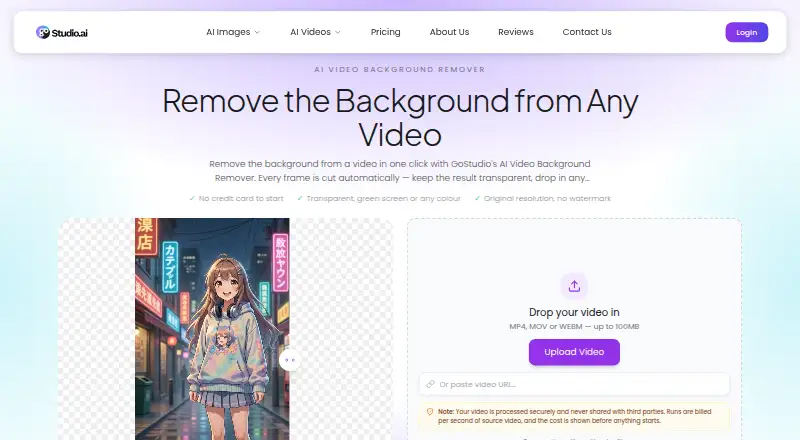
What GoStudio AI Video Background Remover is
GoStudio AI Video Background Remover is a web tool that removes the background from video frame by frame without a green screen, masking or rotoscoping. Upload an MP4, MOV or WEBM file up to 100MB, or paste a video URL. Export a transparent WebM with an alpha channel or select one of eleven solid colours, including green, for a composited MP4. The result retains the source resolution, frame rate, length and audio, and downloads without a GoStudio watermark. Removal costs 1 credit per second of source video, with the price shown before a job starts. Eligible new accounts receive 10 free credits without a credit card. Monthly plans are Lite at $4.90 a month for 80 credits, Pro at $6.90 a month for 150 credits, and Max at $19 a month for 500 credits; each includes access to all AI image and video models. GoStudio describes uses in creator and social media work, e-commerce, agencies, advertising and post-production. The product page says uploaded videos are processed securely and not shared with third parties.
Who it suits
It suits creators, e-commerce teams, agencies and post-production users who need to remove video backgrounds or prepare footage with a transparent or solid backdrop. It runs on the web and accepts video files or a pasted URL.
What it does well
- Works without a green screen, masking or rotoscoping.
- Accepts MP4, MOV and WEBM up to 100MB.
- Exports transparent WebM or MP4 with eleven background colours.
- Preserves source resolution, frame rate, length and audio.
- Eligible new accounts receive 10 credits without a card.
What to know first
- Background removal uses 1 credit per second of video.
- Free credits are limited to eligible new accounts.
- No free trial is listed.
Limits
Eligible new accounts receive 10 free credits. Each second of source video costs 1 credit; the monthly plans provide 80 credits for $4.90 a month, 150 credits for $6.90 a month, or 500 credits for $19 a month.
Plans
| Plan | Billed and limits | Price |
|---|---|---|
| Max | Billed monthly · 500 credits/month · full access to all AI image & video models | $19 a month |
| Lite | Billed monthly · 80 credits/month · full access to all AI image & video models | $4.90 a month |
| Pro | Billed monthly · 150 credits/month · full access to all AI image & video models | $6.90 a month |
As gostudio.ai lists them, read 9 Oct 2026. The maker's own page has the final word.
Getting started
- Open the GoStudio AI Video Background Remover website.
- Create an eligible new account to receive 10 free credits without a credit card, or choose a monthly plan.
- Upload an MP4, MOV, or WEBM file up to 100MB, or paste a video URL.
- Review the displayed price, calculated at 1 credit per second of source video, before running the job.
- Choose transparent WebM output or a solid background colour for composited MP4, then download the result.
Verdict
GoStudio combines frame-by-frame background removal with transparent and solid-colour export options. Check the credit cost shown before processing and the monthly plan credits against your video needs.
Questions
Is GoStudio AI Video Background Remover free?
Eligible new accounts receive 10 free credits without a credit card. Background removal costs 1 credit per second of source video.
What do the monthly plans cost?
Lite costs $4.90 a month for 80 credits, Pro costs $6.90 a month for 150 credits, and Max costs $19 a month for 500 credits. Each plan includes full access to all AI image and video models.
What video formats can I use?
It accepts MP4, MOV, and WEBM videos up to 100MB. You can also paste a video URL.
What output formats are available?
You can export a transparent WebM with an alpha channel or a composited MP4 with one of eleven solid background colours.
What platforms does it support?
GoStudio AI Video Background Remover is available on the web.
Who makes GoStudio?
GoStudio.ai describes itself as an indie, founder-led company and identifies Kanika Bhatt as its founder. The company says it is based in Bengaluru, India.
Facts from GoStudio AI Video Background Remover's own pages
- Company
- GoStudio.ai describes itself as an indie, founder-led company and identifies Kanika Bhatt as its founder. · gostudio.ai, 9 Oct 2026
- Company launch
- The company story says its first AI headshot tool launched on Reddit in February 2025. · gostudio.ai, 9 Oct 2026
- Company location
- GoStudio says it is based in Bengaluru, India. · gostudio.ai, 9 Oct 2026
- Cost of background removal
- Background removal costs 1 credit per second of source video, and the price is shown before the job runs. · gostudio.ai, 9 Oct 2026
- Free credits
- Eligible new accounts receive 10 free credits without a credit card. · gostudio.ai, 9 Oct 2026
- Function
- The tool automatically removes a video background on every frame without requiring a green screen, masking, or rotoscoping. · gostudio.ai, 9 Oct 2026
- Headquarters
- Bangalore, India · gostudio.ai, 28 Sept 2026
- Intended users
- The page describes use cases for creators and social media, e-commerce and product video, agencies, advertising, and post-production. · gostudio.ai, 9 Oct 2026
- Output options
- Users can export transparency as a WebM with an alpha channel or choose one of eleven solid background colours, including green, composited as MP4. · gostudio.ai, 9 Oct 2026
- Output quality
- The result retains the source resolution, frame rate, length, and audio, and the download has no GoStudio watermark. · gostudio.ai, 9 Oct 2026
- Privacy policy
- GoStudio says originals are retained only as long as needed to provide the service and images are not used for other purposes without explicit authorization. · gostudio.ai, 9 Oct 2026
- Privacy statement
- The product page says uploaded videos are processed securely and never shared with third parties. · gostudio.ai, 9 Oct 2026
- Support
- The product page says users can email [email protected], and the company page states a guaranteed 24-hour support response. · gostudio.ai, 9 Oct 2026
- Third-party processing
- The privacy policy says personal information may be shared as necessary with payment, analytics, and cloud storage providers, and data may be transferred internationally with safeguards. · gostudio.ai, 9 Oct 2026
- Upload formats and size
- It accepts MP4, MOV, or WEBM videos up to 100MB and also provides a field to paste a video URL. · gostudio.ai, 9 Oct 2026
Where GoStudio AI Video Background Remover stands on Freedom251
- AI Video Background Removers#15 of 29
- Green Screen Software#16 of 30