Freedom251 › Minecraft Add-on Editors
Resource Pack Creator
What Resource Pack Creator is
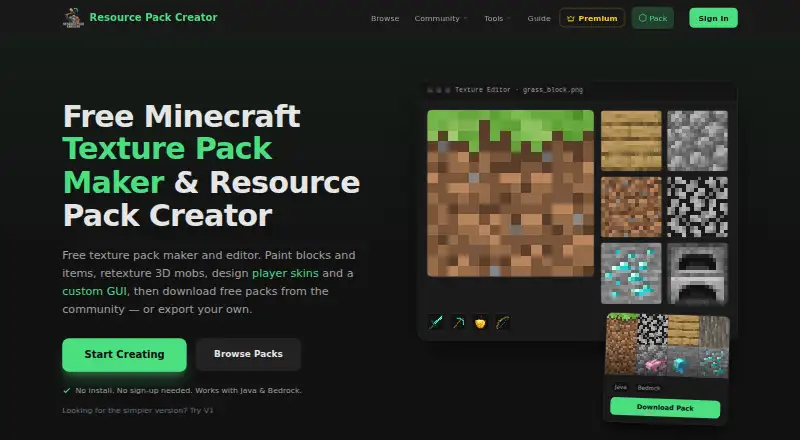
Resource Pack Creator is a web editor for building and changing Minecraft resource packs, with export options for both Java and Bedrock editions. It can open existing .zip and .mcpack packs, and its visual pixel-art tools cover built-in blocks, items, mobs, GUI textures, and other assets. Live 3D previews show how edited textures appear. Creators can make animations frame by frame, import GIFs, and replace game sounds with their own audio.
Editing and downloading do not require an account. Work created while signed out is saved on the user’s device. Signing in with Google or Discord adds cloud backup and sync, community sharing, and the ability to follow creators. Users can publish packs and textures, as well as browse work shared by others.
The free plan allows four projects and 1,000 textures per pack, with ads. Creator costs $4.99 a month and raises those caps; Studio costs $9.99 a month and raises them further. The product is designed and run by Kyle, who describes it as a fan-made tool unaffiliated with Mojang or Microsoft and not an official Minecraft product.
Who it suits
It suits Minecraft players, server owners, young creators, beginners, and experienced artists who want to build or overhaul resource packs. It is also a fit for creators who want to share work with a community or keep editing locally without an account.
What it does well
- Exports packs for Java as .zip and Bedrock as .mcpack.
- Edits blocks, items, mobs, GUI textures, and more.
- Shows live 3D previews while editing.
- Supports frame-by-frame animation, GIF import, and sound replacement.
- Signed-out editing and downloads work without an account.
What to know first
- The free plan is capped at 4 projects and 1,000 textures per pack.
- The free plan includes ads.
- Paid plans start at $4.99 a month.
Limits
The free plan permits 4 projects and 1,000 textures per pack, plus 50 sounds per pack at up to 2 MB each. After a paid plan ends, content above the free limits remains, but adding projects or textures is unavailable until the account is within the free caps or subscribed again.
Plans
| Plan | Billed and limits | Price |
|---|---|---|
| Free | forever · 1,000 textures per pack · 4× block and item upscaling (64px) · 50 sounds per pack, 2 MB each · 4 projects · 5 collaborators per project · ads | Free |
| Creator | $4.99 /mo; $49 /yr Save 18% · 3,000 textures per pack · 8× upscaling (128px) · 20 projects · 25 collaborators per project · 500 sounds per pack, 20 MB each · 50 MB published sound bytes · GIF imports up to 512px · ad-free | $4.99 a month |
| Studio | $9.99 /mo; $99 /yr Save 17% · 10,000 textures per pack · 32× upscaling (512px) · 100 projects · 25 collaborators per project · 2,000 sounds per pack, 20 MB each · 250 MB published sound bytes · GIF imports up to 1,024px · ad-free | $9.99 a month |
As resourcepackcreator.com lists them, read 7 Oct 2026. The maker's own page has the final word.
Getting started
- Open https://resourcepackcreator.com/ in a web browser.
- Start editing without an account, or sign in with Google or Discord for cloud backup and sync.
- Create a pack or import an existing .zip or .mcpack file.
- Edit textures, animations, or sounds, then export for Java or Bedrock.
- Choose Creator or Studio if you need higher project or content limits.
Verdict
Choose Resource Pack Creator if you want a browser-based editor with Java and Bedrock exports, texture animation, and sound editing. Its free plan covers smaller projects; creators who need higher project, texture, or sound limits can consider Creator or Studio.
Questions
Is Resource Pack Creator free?
Yes. Its Free plan costs nothing, billed forever, and includes ads. Paid plans start at $4.99 a month.
Which Minecraft editions can I export for?
It exports Java packs as .zip files and Bedrock packs as .mcpack files.
Do I need an account to edit?
No. Editing and downloading work without an account, and signed-out work is saved on the user’s device. Google and Discord sign-in add cloud backup and sync.
What are the plan prices?
Creator costs $4.99 a month, or $49 per year. Studio costs $9.99 a month, or $99 per year.
Who makes Resource Pack Creator?
The product is designed, built, and run by one person named Kyle. The maker says it is a fan-made product unaffiliated with Mojang or Microsoft.
Facts from Resource Pack Creator's own pages
- Account integrations
- Google and Discord sign-in are offered for cloud backup and sync, community sharing, and following creators. · resourcepackcreator.com, 7 Oct 2026
- Animation and sound
- Users can animate textures frame by frame, import GIFs, and replace game sounds with their own. · resourcepackcreator.com, 7 Oct 2026
- Community
- Users can publish and share packs and textures with the community, and discover other creators' work. · resourcepackcreator.com, 7 Oct 2026
- Data collected
- When users sign in, the service receives limited profile information such as display name, email address, and account identifier, and it collects usage data through Google Analytics. · resourcepackcreator.com, 7 Oct 2026
- Import and export
- Users can import an existing .zip or .mcpack resource pack and export packs for Java as .zip or Bedrock as .mcpack. · resourcepackcreator.com, 7 Oct 2026
- Intended users
- The maker describes the tool as suitable for players, server owners, young creators, beginners, and experienced artists working on full overhauls. · resourcepackcreator.com, 7 Oct 2026
- Limits
- The free tier allows 4 projects and 1,000 textures per pack; after a paid plan ends, content above the free limits remains but users cannot add projects or textures until under the cap or subscribed again. · resourcepackcreator.com, 7 Oct 2026
- Local use
- Editing and downloading work without an account, and signed-out work is saved on the user's device. · resourcepackcreator.com, 7 Oct 2026
- Maker
- The product is designed, built, and run by one person named Kyle. · resourcepackcreator.com, 7 Oct 2026
- Purpose
- Resource Pack Creator is a free browser-based editor for creating and customizing Minecraft resource packs, with Java and Bedrock export. · resourcepackcreator.com, 7 Oct 2026
- Relationship to Minecraft
- The maker states that the tool is fan-made and is not an official Minecraft product or affiliated with Mojang or Microsoft. · resourcepackcreator.com, 7 Oct 2026
- Security and privacy
- The privacy policy says the service does not access Google or Discord passwords, does not sell personal data, and stores data on servers in the United States. · resourcepackcreator.com, 7 Oct 2026
- Support
- Support and bug reports are accepted by email, and the maker says messages are read with replies aimed within a few days; Discord is offered for faster help. · resourcepackcreator.com, 7 Oct 2026
- Texture editing
- The editor supports pixel-art editing of built-in blocks, items, mobs, GUI textures, and more, with live 3D previews. · resourcepackcreator.com, 7 Oct 2026
Where Resource Pack Creator stands on Freedom251
- Minecraft Add-on Editors#23 of 26