Freedom251 › Minecraft Add-on Editors

Minecraft Creator Tools
What Minecraft Creator Tools is
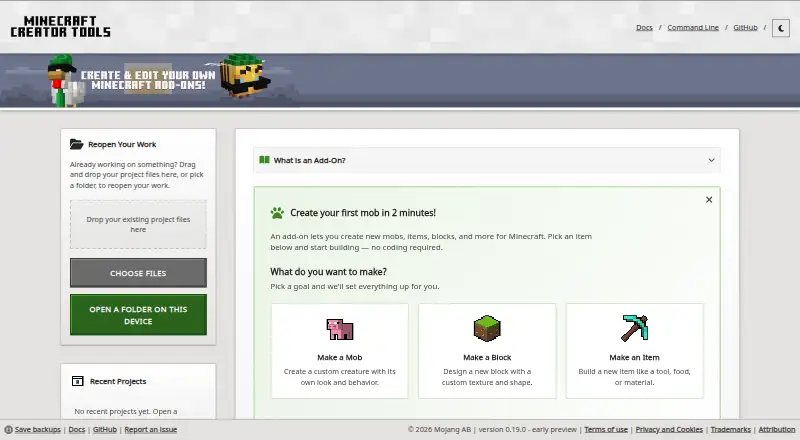
Minecraft Creator Tools is a free, open-source web toolset for creating, editing, validating, and managing Minecraft projects. Creators can begin with a mob, block, or item, choose a template, or follow a guided route that does not require coding. Templates range from beginner to advanced, including add-on starters, TypeScript projects, and Editor add-ons. The hybrid editor supports JavaScript, TypeScript, and JSON, with Minecraft type autocomplete and code snippets. A validation suite checks projects against rules and exports reports as CSV or HTML. The website Inspector processes submitted files locally in the browser. Projects and edits are kept in browser storage, which the browser may clear, so creators are advised to download backups. The command-line package requires Node.js 22 or later and can render assets to PNG, manage world settings, and package projects as .mcaddon files. The tools can also run as a local Model Context Protocol server for AI-assisted inspection, add-on generation, and validation. The published package is in pre-release alpha.
Who it suits
The toolset is intended for Minecraft creators from beginners to people building complex add-on projects. Its guided starts and templates offer entry points for users with different levels of experience.
What it does well
- Guided starts include a no-coding path
- Editor supports JavaScript, TypeScript, and JSON
- Validation reports export as CSV or HTML
- Inspector processes files locally in the browser
- CLI supports rendering and .mcaddon packaging
What to know first
- Browser storage may be cleared
- CLI requires Node.js 22 or later
- Published package is in pre-release alpha
- Support is limited to GitHub Issues and Discussions
Limits
Website projects and edits remain in browser storage, which the browser may clear; downloading backups is advised. Command-line use requires Node.js 22 or later, and the published package is in pre-release alpha.
Getting started
- Open https://mctools.dev/ in a web browser
- Choose a mob, block, item goal, guided start, or project template
- Edit JavaScript, TypeScript, or JSON in the hybrid editor
- Run validation and export a CSV or HTML report
- Download backups of projects stored in browser storage
- Install Node.js 22 or later before using the @minecraft/creator-tools CLI
Verdict
Minecraft Creator Tools offers guided project starts, code editing, validation, and command-line automation in a free, open-source package. Keep downloadable backups because browser storage may be cleared, and note the pre-release alpha status.
Questions
Is Minecraft Creator Tools free?
Yes. It is described as free and open source, with no free trial.
Which platforms are supported?
It is available on the web. Chrome and Edge can open folders directly on devices, including mobile devices.
What Minecraft content can it handle?
The toolset supports behavior packs and resource packs, plus custom entity tools and scripting support.
What does the CLI require?
The @minecraft/creator-tools package requires Node.js 22 or later.
Can it use AI tools?
Yes. It can run as a local Model Context Protocol server so AI tools can inspect projects, generate add-on files, or validate content.
Where is support provided?
Bugs and feature requests go to GitHub Issues, while questions go to GitHub Discussions.
Facts from Minecraft Creator Tools's own pages
- AI integration
- The tools can run as a local Model Context Protocol server so AI tools can interact with a project through structured tool calls. · learn.microsoft.com, 5 Oct 2026
- Audience
- The documentation describes templates for creators ranging from people new to add-ons to experienced creators working with behavior packs and scripting. · learn.microsoft.com, 5 Oct 2026
- Automation
- CLI capabilities include validation, local server and deployment workflows, rendering models and Minecraft assets to PNG, and packaging projects as .mcaddon files. · learn.microsoft.com, 5 Oct 2026
- Browser storage
- The website stores projects and edits in browser storage, which the browser may clear; the documentation advises creators to back up and download projects they want to keep. · learn.microsoft.com, 4 Oct 2026
- Browser storage limit
- Website projects and edits are stored in browser storage, which the browser may clear; the documentation advises backing up and downloading projects. · learn.microsoft.com, 5 Oct 2026
- CLI
- A command-line tool is available for PowerShell or Terminal and requires Node.js 22 or later, according to its setup documentation. · learn.microsoft.com, 5 Oct 2026
- Create without coding
- The website offers guided starts for making a mob, block, or item, including a path described as requiring no coding. · mctools.dev, 5 Oct 2026
- Editor
- The project editor handles JavaScript, TypeScript, and JSON, with autocomplete for Minecraft types and code snippets. · learn.microsoft.com, 5 Oct 2026
- Local processing
- The website's validation processes files locally in the browser and does not send them elsewhere. · learn.microsoft.com, 5 Oct 2026
- Mobile browser support
- In Chrome and Edge, the website can open folders directly on a device, including mobile devices. · learn.microsoft.com, 4 Oct 2026
- Project setup
- Creators can start from a goal such as a mob, block, or item, or choose a project template. · learn.microsoft.com, 4 Oct 2026
- Purpose
- Minecraft Creator Tools is a Mojang-produced open-source toolset for creating Minecraft Bedrock Edition content and add-ons. · learn.microsoft.com, 5 Oct 2026
- Release status
- The published package describes the project as being in pre-release alpha state. · npmjs.com, 4 Oct 2026
- Support
- The project repository directs users with issues to create a GitHub issue. · github.com, 5 Oct 2026
- Templates
- Templates include beginner, intermediate, and advanced projects, such as add-on starters, TypeScript projects, and Editor add-ons. · learn.microsoft.com, 5 Oct 2026
- Validation
- A built-in validation suite is available on the website and through the CLI, and reports can be exported as CSV or HTML. · learn.microsoft.com, 5 Oct 2026
- Who it is for
- The project documentation describes it as designed for creators ranging from beginners to people working on complex add-on projects. · learn.microsoft.com, 4 Oct 2026
Where Minecraft Creator Tools stands on Freedom251
- Minecraft Add-on Editors#24 of 26