Freedom251 › Soundboard Software
Resanance
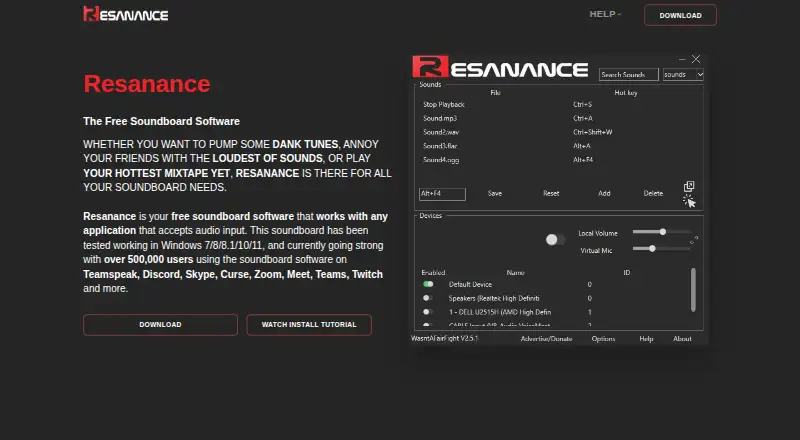
What Resanance is
Resanance is free soundboard software for use with applications that accept audio input. Users can add unlimited sounds and hotkeys, route audio to multiple devices at once, and adjust local and microphone volume separately. Controls include individual sound and button volume, button sizing, borders, and button colours. The feature list also includes MIDI soundboard support and text to speech. Users can sort sounds by name, search them, or trigger a random sound with a hotkey. The site names TeamSpeak, Discord, Skype, Curse, Zoom, Meet, Teams, and Twitch as compatible app examples, and says the software has been tested on Windows 7, 8, 8.1, 10, and 11. Listed platforms are Android, web, and Windows. Help links point to Discord, Reddit, and a YouTube tutorial. Its privacy notice says it may collect IP address, device and usage information, and cookies for operations, security, analytics, and reporting. That notice also says complete security of transmission or storage cannot be guaranteed and was last updated February 13, 2021.
Who it suits
Resanance suits people who want a configurable soundboard for applications that accept audio input. It may also suit users who need multiple audio outputs, hotkeys, or MIDI and text-to-speech features.
What it does well
- Unlimited sounds and hotkeys are supported.
- Audio can play to multiple devices simultaneously.
- Local and microphone volume are controlled separately.
- Includes MIDI soundboard support and text to speech.
- Sound search, sorting, and random playback are available.
What to know first
- Privacy notice says complete security cannot be guaranteed.
- Privacy notice was last updated February 13, 2021.
- Privacy notice says IP, device, usage, and cookie data may be collected.
Plans
| Plan | Billed and limits | Price |
|---|---|---|
| Resanance | free soundboard · unlimited sounds and hotkeys | Free |
As resanance.com lists them, read 15 Oct 2026. The maker's own page has the final word.
Getting started
- Visit https://resanance.com/.
- Choose the Windows, Android, or web platform.
- Add sounds and assign hotkeys.
- Set output devices and adjust local, microphone, sound, or button volume.
- Use the Discord or Reddit help links or the YouTube tutorial if needed.
Overview
Resanance is a soundboard for feeding audio into apps that accept audio input. It is a good fit for callers and streamers who want to build a large sound library and trigger clips from hotkeys. Its standout is the freedom to add sounds and hotkeys without a stated cap; the trade-off is that the privacy notice describes collection of device and usage data.
Key features
Users can route playback to multiple devices at once and adjust local and microphone volume separately. Per-sound and per-button volume controls offer finer balancing, while resizing, borders, and button colours let users tailor the board’s layout. These controls make Resanance more adaptable than a simple clip launcher, particularly when soundboard audio needs to sit alongside a live microphone.
Search and name-based sorting help manage a large collection, and a hotkey can play a random sound. MIDI soundboard support and text to speech broaden the ways users can make audio, beyond playing stored clips. Resanance is intended for applications that accept audio input; named examples include TeamSpeak, Discord, Skype, Curse, Zoom, Meet, Teams, and Twitch. Help is linked through Discord, Reddit, and a YouTube tutorial.
Pricing
The Resanance plan costs nothing and includes the soundboard, unlimited sounds and hotkeys, and multiple output devices. There is no free trial because the product is free, and no cheaper tier that gives up these core allowances. No paid plan or separate usage quota is described, making it a straightforward choice for users who want an expandable soundboard without a subscription.
Platforms
Resanance is presented for Android, web, and Windows, with both desktop and browser apps. The site says it has been tested on Windows 7, 8, 8.1, 10, and 11. Its app examples span calls and streaming, but the stated testing range is Windows-focused; readers relying on another platform should weigh that before choosing it.
Who it's for
Choose Resanance if you want unlimited sound and hotkey additions, multiple output routing, and individual playback controls at no cost. It is particularly suited to people using soundboard audio in calls or streams. It is a weaker fit for anyone who needs more assurance about data handling: the privacy notice says the service may collect IP address, device and usage information, and cookies for operations, security, analytics, and reporting. It says personal information is not kept for a purpose longer than 90 days unless law requires or permits longer retention, and acknowledges that transmission and storage cannot be guaranteed completely secure. The notice was last updated February 13, 2021.
Pros and cons
- Pros: Unlimited sounds and hotkeys, with no charge for the Resanance plan.
- Pros: Multiple simultaneous output devices and separate local and microphone volume controls support more deliberate audio balancing.
- Pros: Search, sorting, and per-button customization help users manage and tune a growing board.
- Cons: The privacy notice describes collection of IP, device, usage, and cookie data, and does not promise complete transmission or storage security.
- Cons: The published Windows testing range does not establish the same testing coverage for other platforms.
Alternatives
Soundboard Software is a useful starting point for comparing the category. Consider Blerp instead if you want a freemium option with a free trial, broad platform coverage, and a free tier that includes a 500-plus voice library, basic voice filters, a moderation queue, and word censorship. SoundTools Soundboard is another free option; its free plan specifies no account, no install, no watermarks, and no limits, and it supports a wider set of named platforms.
Sound Show may suit users who prefer a tabbed board with a free allowance of up to 10 tabs and 40 sounds per tab, or want its paid Pro tier. EXP Soundboard is a free alternative whose plan specifically names Windows and MP3/WAV support. Stadium Sound is another free option. Voicemod AI Voice Cleaner is the more relevant alternative if the priority is a free AI voice cleaner rather than a soundboard. Amplitude Soundboard is a free, open-source soundboard for Windows, Linux, and macOS. AudioPad is a free alternative for Linux and Windows.
Verdict
Resanance is a strong no-cost pick for callers and streamers who want an uncapped sound library, flexible hotkeys, and control over several audio outputs. Choose it for those practical playback controls; look elsewhere if the Windows-focused testing range or the privacy notice’s data collection and security caveat is a deal-breaker.
Verdict
Resanance offers a free soundboard with extensive sound and hotkey controls, plus multiple output routing. Readers should note the privacy notice's stated data collection and security caveat.
Questions
How much does Resanance cost?
The Resanance plan is free. A free plan is available.
Does Resanance offer a free trial?
No. The listed free trial availability is no; the product has a free plan.
Which platforms does Resanance support?
The listed platforms are Android, web, and Windows. The site says it has been tested on Windows 7, 8, 8.1, 10, and 11.
Which apps does Resanance work with?
The site names TeamSpeak, Discord, Skype, Curse, Zoom, Meet, Teams, and Twitch as compatible app examples.
What information may Resanance collect?
Its privacy notice says it may collect IP address, device and usage information, and cookies for operations, security, analytics, and reporting.
Facts from Resanance's own pages
- Advertising model
- The FAQ says donations and advertising fund servers, licences, certificates, developers and support staff. · beta.resanance.com, 15 Oct 2026
- Android companion
- The Android app controls Resanance remotely and currently works only with beta 2.6.3-or-later button profiles. · play.google.com, 15 Oct 2026
- Audio routing
- Resanance can play audio to multiple devices simultaneously and control local and microphone volume individually. · resanance.com, 30 Sept 2026
- Audio setup
- Setup requires selecting CABLE Output as the recording device and configuring microphone listening in Windows. · beta.resanance.com, 15 Oct 2026
- Button customization
- Buttons can be resized, given borders and recoloured, with individual button volume settings. · beta.resanance.com, 15 Oct 2026
- Compatibility
- The site says it has been tested on Windows 7, 8, 8.1, 10, and 11. · resanance.com, 30 Sept 2026
- Developer legal name
- Google Play identifies the developer as WASNTAFAIRFIGHT LTD. · play.google.com, 15 Oct 2026
- Documentation depth
- The official help content is a troubleshooting FAQ covering audio devices, hotkeys, push-to-talk and memory behavior. · beta.resanance.com, 15 Oct 2026
- Google Play data safety
- Google Play reports no third-party data sharing, possible collection of device IDs, encryption in transit and no user deletion option. · play.google.com, 15 Oct 2026
- Headquarters
- Google Play lists the developer address as 20-22 Wenlock Road, London N1 7GU, United Kingdom. · play.google.com, 15 Oct 2026
- Installation
- The Windows installer is an MSI inside a ZIP archive and prompts installation of VB-Cable. · beta.resanance.com, 15 Oct 2026
- Licence
- Wikipedia lists Resanance as proprietary software for Microsoft Windows rather than open source. · en.wikipedia.org, 15 Oct 2026
- Limit: audio problems
- Reddit users report echo, very quiet or missing audio, crashes when adding sounds and hotkeys failing inside games. · reddit.com, 15 Oct 2026
- Limit: hotkeys
- The FAQ says some keys, including mouse buttons, are unsupported for push-to-talk and recommends restarting as administrator for in-game hotkeys. · beta.resanance.com, 15 Oct 2026
- Limit: microphone routing
- The FAQ says microphone problems may require installing and configuring Voicemeeter. · beta.resanance.com, 15 Oct 2026
- Limit: mobile controls
- Chrome-Stats reproduces reviews requesting zoom, sorting and view options and reporting that the app did not work properly. · chrome-stats.com, 15 Oct 2026
- Limit: mobile interface
- A Google Play reviewer said the mobile app mainly offered QR rescanning and pause or stop controls, with clipped interface elements. · play.google.com, 15 Oct 2026
- Limit: simultaneous playback
- The FAQ says playback is capped at 15 simultaneous sounds to avoid memory leaks. · beta.resanance.com, 15 Oct 2026
- MIDI
- The feature list includes MIDI soundboard support. · resanance.com, 15 Oct 2026
- MIDI and TTS
- The feature list includes MIDI soundboard support and text to speech. · resanance.com, 30 Sept 2026
- Multiple outputs
- Audio can be played to multiple devices at the same time. · resanance.com, 15 Oct 2026
- Named integrations
- The maker names TeamSpeak, Discord, Skype, Curse, Zoom, Google Meet, Microsoft Teams and Twitch as compatible applications. · resanance.com, 15 Oct 2026
- Per-sound volume
- Each sound can have its own volume setting. · resanance.com, 15 Oct 2026
- Praise: low cost
- A Reddit user described the free soundboard as having very non-intrusive ads while praising its usefulness. · reddit.com, 15 Oct 2026
Where Resanance stands on Freedom251
- Soundboard Software#7 of 26