Freedom251 › Soundboard Software
Go Button
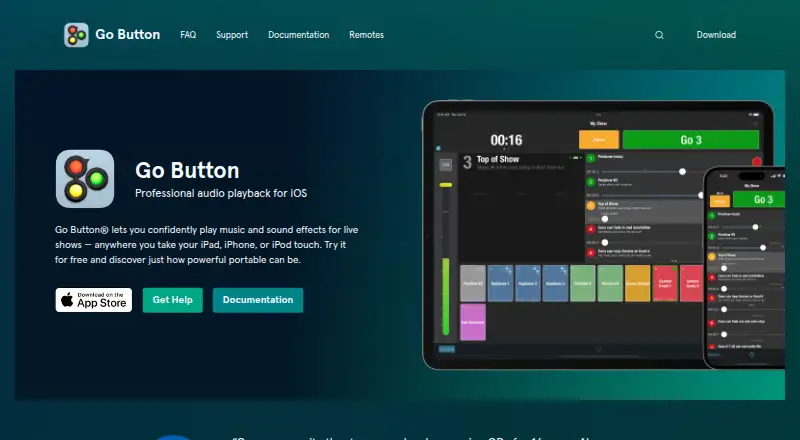
What Go Button is
Go Button creates and plays sound cue playlists for live performances on iPad, iPhone, and iPod touch. It can play several sounds at the same time, advance through a sequence with the GO button, or trigger ad-libbed sounds with Hit buttons. For each cue, users can set automatic stopping, fades, looping, or ducking, and adjust volume, pan, speed, and pitch independently. Playback can be controlled with compatible iOS remotes, Bluetooth keyboards and accessories, MIDI input, OSC commands, or hotkeys. Shows can be shared through AirDrop or Files, imported from iCloud Drive or Dropbox, and brought into QLab. Supported audio includes WAV, AIFF, M4A, MP3, MOV, and FLAC, among other formats; copy-protected audio is not supported. Go Button requires iOS 15 or later, and system alerts such as calls or texts may interrupt playback. The Free Version costs nothing and allows one saved playlist. The Pro License is $99.99, paid once, billed as a one-time in-app purchase, for unlimited playlists.
Who it suits
Go Button suits people running sound for theater, dance recitals, weddings, church services, puppetry, or magic shows. It is for iOS users who need cue playback on an iPad, iPhone, or iPod touch.
What it does well
- Plays multiple sounds at once.
- Cues can fade, loop, duck, or auto-stop.
- Supports MIDI, OSC, compatible remotes, and hotkeys.
- Free Version includes all functionality without ads or time limits.
What to know first
- Requires iOS 15 or later.
- Free Version saves one show playlist.
- System alerts may interrupt a show.
- Cannot play copy-protected audio.
Limits
The Free Version allows one saved show playlist. The 99.99 USD one-time Pro License allows unlimited playlists.
Plans
| Plan | Billed and limits | Price |
|---|---|---|
| Free Version | One saved show playlist · all functionality · no ads or time limits | Free |
| Pro License | One-time in-app purchase · Unlimited show playlists | $99.99, paid once |
As gobutton.app lists them, read 4 Oct 2026. The maker's own page has the final word.
Getting started
- Install Go Button on an iPad, iPhone, or iPod touch running iOS 15 or later.
- Use the Free Version, which allows one saved show playlist, or purchase the Pro License for unlimited playlists.
- Create a show and add audio files in a supported format.
- Import audio from services such as iCloud Drive or Dropbox, or use files already available to the app.
- Set cue behavior and connect a supported remote, keyboard, MIDI input, or OSC command if needed.
Verdict
Go Button combines sequenced and ad-lib sound playback with detailed cue controls and several remote-control options. The free plan is limited to one saved playlist; unlimited playlists require the $99.99, paid once Pro License.
Questions
Does Go Button have a free plan?
Yes. The Free Version costs nothing and permits one saved show playlist, with all functionality, no ads, and no time limits.
How much does the Pro License cost?
It costs $99.99, paid once as a one-time in-app purchase and allows unlimited show playlists.
Which devices does Go Button support?
It runs on iPad, iPhone, or iPod touch and requires iOS 15 or later. There is no desktop or browser app.
Can Go Button import or export shows?
Shows can be shared through AirDrop or the iOS Files app, imported from services such as iCloud Drive or Dropbox, and imported into QLab. Users can choose to export shows to services such as iCloud Drive or Dropbox.
Which audio formats can it play?
It supports WAV, AIFF, AIFC, M4A, AAC, MP3, MOV, CAF, 3GP, MPEG4 audio, and FLAC. Copy-protected audio cannot be played.
Who makes Go Button?
Figure 53 makes Go Button. The company says it offers email support and typically replies within an hour on weekdays from 9am to 7pm Eastern US time.
Facts from Go Button's own pages
- Audio formats
- It supports WAV, AIFF, AIFC, M4A, AAC, MP3, MOV, CAF, 3GP, MPEG4 audio, and FLAC, but cannot play copy-protected audio. · gobutton.app, 4 Oct 2026
- Cue controls
- Cues can be set to auto-stop, fade in or out, loop, or duck, with independent volume, pan, speed, and pitch adjustments. · gobutton.app, 4 Oct 2026
- Founded
- 2006 · gobutton.app, 28 Sept 2026
- Headquarters
- Baltimore, Maryland, USA · gobutton.app, 28 Sept 2026
- Integrations
- Shows can be shared through AirDrop or the iOS Files app, imported from services such as iCloud Drive or Dropbox, and imported into QLab. · gobutton.app, 4 Oct 2026
- Intended users
- The maker lists theater, dance recitals, weddings, church services, puppetry, and magic shows as uses for Go Button. · apps.apple.com, 4 Oct 2026
- Operational limitation
- System alerts such as calls or texts may interrupt a show, and Figure 53 recommends running the device offline to reduce interruptions. · gobutton.app, 4 Oct 2026
- Playback
- It can play multiple sounds at once, run cues in sequence with the GO button, and play ad-libbed sounds using Hit buttons. · gobutton.app, 4 Oct 2026
- Privacy
- Figure 53 says Go Button saves show data in an internal database and imported audio files inside the app on disk; users can choose to export shows to services such as iCloud Drive or Dropbox. · gobutton.app, 4 Oct 2026
- Purpose
- Go Button creates and plays sound cue playlists for live performances on iPad, iPhone, or iPod touch. · gobutton.app, 4 Oct 2026
- Remote control
- It supports iOS-compatible remotes, Bluetooth keyboards and accessories, MIDI input, and OSC commands. · gobutton.app, 4 Oct 2026
- Requirements
- Go Button requires iOS 15 or later. · gobutton.app, 4 Oct 2026
- Security
- Shows can be passcode-locked to prevent unauthorized edits. · gobutton.app, 4 Oct 2026
- Support
- Figure 53 offers email support and says it typically replies within an hour on weekdays from 9am to 7pm Eastern US time. · gobutton.app, 4 Oct 2026
Where Go Button stands on Freedom251
- Soundboard Software#8 of 26