Freedom251 › Soundboard Software
Amplitude Soundboard
What Amplitude Soundboard is
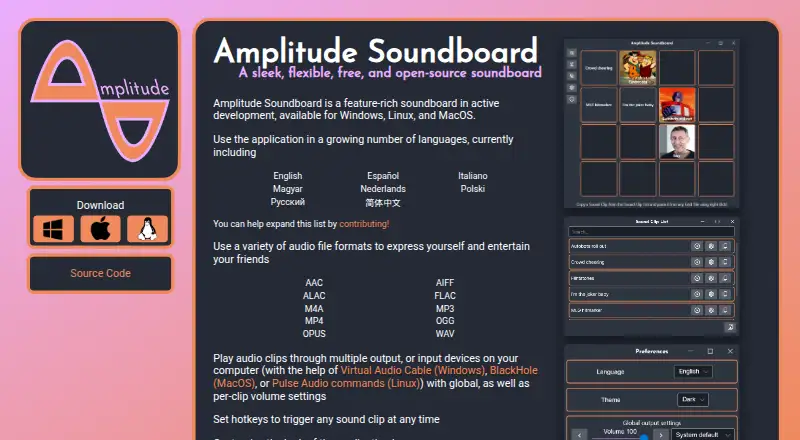
Amplitude Soundboard is a free desktop app for playing audio clips to express yourself or entertain friends. It runs on Linux, macOS, and Windows, with downloads listed for Linux x64, Windows x64, and macOS on Apple Silicon or Intel. Supported formats include AAC, AIFF, ALAC, FLAC, M4A, MP3, MP4, OGG, OPUS, and WAV. Clips can play through multiple output or input devices, with volume controls for the whole app and individual clips. Users can assign hotkeys to sounds. The interface offers light and dark themes, custom tile backgrounds, and controls for tile size and grid dimensions. Listed languages are English, Spanish, Italian, Hungarian, Dutch, Polish, Russian, and Simplified Chinese. The project is GPL-3.0 licensed and describes startup notices for available updates, plus automatic updating on Windows. Sending sound to an input such as a microphone requires separate routing software: Virtual Audio Cable on Windows, BlackHole on macOS, or a PulseAudio sink on Linux.
Who it suits
Amplitude Soundboard suits people who want a desktop soundboard with hotkey-triggered clips and customizable tiles. It is available for Linux, macOS, and Windows, though some platform-specific setup requirements apply.
What it does well
- Supports ten listed audio formats.
- Hotkeys can trigger individual sound clips.
- Offers light and dark themes.
- Free and open-source under GPL-3.0.
What to know first
- Linux hotkeys work under X11, not Wayland.
- macOS hotkeys require accessibility permission and restart.
- macOS app may trigger an unsigned-app warning.
- Microphone routing requires additional software.
Plans
| Plan | Billed and limits | Price |
|---|---|---|
| Free | Free and open-source soundboard · Windows, Linux, and macOS | Free |
As amplitude-soundboard.dan0v.com lists them, read 8 Oct 2026. The maker's own page has the final word.
Getting started
- Open the Amplitude Soundboard website.
- Choose a download for Windows x64, macOS Apple Silicon or Intel, or Linux x64.
- Install and open the desktop app.
- Add audio clips in a supported format.
- Set hotkeys and adjust playback devices, volume, and tile appearance as needed.
- For microphone routing, configure Virtual Audio Cable on Windows, BlackHole on macOS, or a PulseAudio sink on Linux.
Verdict
Amplitude Soundboard provides clip playback, hotkeys, multiple audio formats, and tile customization across three desktop platforms. Check the platform-specific hotkey and audio-routing requirements before relying on those workflows.
Questions
How much does Amplitude Soundboard cost?
The Free plan costs nothing.
Which platforms does it support?
It has downloads for Windows x64, Linux x64, and macOS on Apple Silicon or Intel.
Which audio formats can it play?
It supports AAC, AIFF, ALAC, FLAC, M4A, MP3, MP4, OGG, OPUS, and WAV.
Can I trigger sounds with hotkeys?
Yes. Users can assign hotkeys to sound clips. Linux hotkeys currently work under X11, and macOS hotkeys require accessibility permission and an app restart.
Is Amplitude Soundboard open source?
Yes. The maker’s project page identifies the repository as GPL-3.0 licensed.
Can it send sound to a microphone input?
The installation instructions describe routing through Virtual Audio Cable on Windows, BlackHole on macOS, or a PulseAudio sink on Linux.
Facts from Amplitude Soundboard's own pages
- Appearance
- Users can choose light or dark themes, set custom backgrounds for sound tiles, and configure tile size and grid dimensions. · amplitude-soundboard.dan0v.com, 8 Oct 2026
- Audio formats
- It supports AAC, AIFF, ALAC, FLAC, M4A, MP3, MP4, OGG, OPUS, and WAV files. · amplitude-soundboard.dan0v.com, 8 Oct 2026
- Audio routing
- For routing sound to an input such as a microphone, the installation instructions describe using Virtual Audio Cable on Windows, BlackHole on macOS, or a PulseAudio sink on Linux. · github.com, 8 Oct 2026
- Automatic updates
- The project page says the app can notify users of available updates at startup and describes automatic updating for Windows. · github.com, 8 Oct 2026
- Hotkeys
- Users can set hotkeys to trigger any sound clip. · amplitude-soundboard.dan0v.com, 8 Oct 2026
- Languages
- The site lists English, Spanish, Italian, Hungarian, Dutch, Polish, Russian, and Simplified Chinese as available languages. · amplitude-soundboard.dan0v.com, 8 Oct 2026
- Linux hotkey limit
- The project page says Linux hotkeys currently work under X11, not Wayland. · github.com, 8 Oct 2026
- macOS permissions
- The project page says hotkeys on macOS require accessibility permission and the app must be restarted after granting it. · github.com, 8 Oct 2026
- macOS signing
- The project page says the macOS app is not signed with an Apple Developer ID, so a security warning may need to be bypassed to open it. · github.com, 8 Oct 2026
- Open source
- The maker’s project page identifies the repository as GPL-3.0 licensed. · github.com, 8 Oct 2026
- Platform downloads
- The maker’s project page lists Windows x64, macOS Apple Silicon and Intel, and Linux x64 downloads. · github.com, 8 Oct 2026
- Playback devices
- It can play audio through multiple output or input devices, with global and per-clip volume settings. · amplitude-soundboard.dan0v.com, 8 Oct 2026
- Purpose
- Amplitude Soundboard is a feature-rich soundboard for playing audio clips to express yourself and entertain friends. · amplitude-soundboard.dan0v.com, 8 Oct 2026
Where Amplitude Soundboard stands on Freedom251
- Soundboard Software#1 of 26