Freedom251 › Soundboard Software

EXP Soundboard
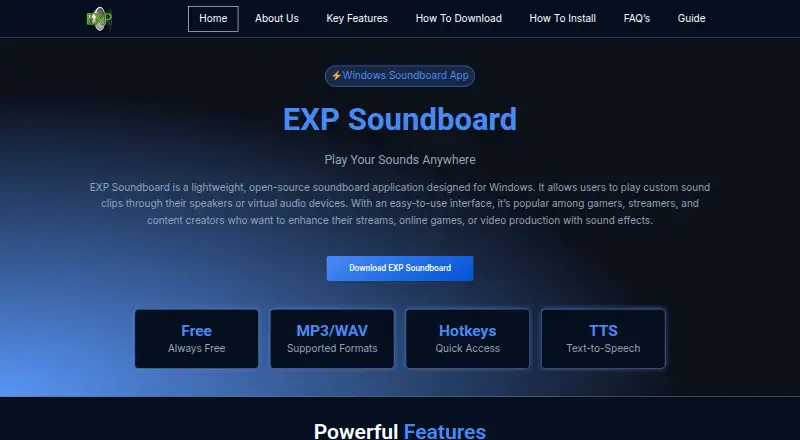
What EXP Soundboard is
EXP Soundboard is a free, open-source soundboard for playing custom audio clips through speakers or virtual audio devices. It supports MP3 and WAV files, and lets users assign hotkeys, adjust individual sound volumes, and configure playback output. A text-to-speech feature plays custom messages. The software is intended for gamers, streamers, and content creators; audio can optionally be routed to Discord or OBS using Virtual Audio Cable or a similar tool. It is designed for Windows, with Windows 7, 8, 10, and 11 listed as compatible. The site also lists Linux, macOS, and web access: Mac or Linux use requires a virtual machine or Wine, while browser use runs through OnWorks in a virtual Windows environment. After installation, it works offline, except through OnWorks. Listed minimum requirements include Windows 7, a 1 GHz Intel or AMD CPU, 1 GB RAM, 50 MB disk space, and Java Runtime Environment 8 or later. The site advises downloading from trusted sources because antivirus software may flag the installer.
Who it suits
It suits gamers, streamers, and content creators who want hotkey-triggered clips or custom spoken messages. Windows is its designed platform; Mac and Linux use requires a virtual machine or Wine.
What it does well
- Supports MP3 and WAV audio files.
- Assign hotkeys for quick playback.
- Adjust individual sound volume and output.
- Includes text-to-speech for custom messages.
- Works offline after installation.
What to know first
- Mac and Linux require a virtual machine or Wine.
- OnWorks browser use requires a virtual Windows environment.
- Antivirus software may flag the installer.
- Requires Java Runtime Environment 8 or later.
Limits
The listed free plan is always free and specifies Windows with MP3/WAV support. Minimum requirements include Windows 7, a 1 GHz Intel or AMD CPU, 1 GB RAM, 50 MB of disk space, and Java Runtime Environment 8 or later.
Plans
| Plan | Billed and limits | Price |
|---|---|---|
| Free | Always free · Windows · MP3/WAV | Free |
As expsoundboard.com lists them, read 8 Oct 2026. The maker's own page has the final word.
Getting started
- Open the EXP Soundboard website.
- Choose a Windows installation or use the OnWorks browser environment.
- For Mac or Linux, use Wine or a virtual machine.
- Add MP3 or WAV sounds and assign hotkeys as needed.
- Configure sound volumes and playback output.
- For Discord or OBS routing, optionally set up Virtual Audio Cable or a similar tool.
EXP Soundboard is a free, open-source soundboard for triggering custom audio clips through speakers or virtual audio devices. It fits gamers, streamers, and content creators who need keyboard-driven effects and simple message playback. Its Windows-first design and optional audio-routing setup make it less suitable for anyone seeking a turnkey, equally native experience on every platform.
Overview
The app concentrates on the core soundboard job: load MP3 or WAV files, map them to hotkeys, adjust each sound’s volume, and choose where playback goes. That focused approach works well for a personal collection of cues, reactions, or short stings. It is not presented as a full audio-production environment, so users wanting broader editing or mixing capabilities should look elsewhere.
Text-to-speech lets you play custom messages alongside prerecorded clips, which is useful when a stream or game session needs an announcement without preparing another audio file. Audio can be routed to Discord or OBS through Virtual Audio Cable or a similar utility. Because that routing is optional but external, the app is more flexible for streaming than it is frictionless.
Key features
- Hotkey triggering: Assign keys to individual sounds for immediate playback. This suits live sessions where reaching for an on-screen list would interrupt gameplay or commentary.
- MP3 and WAV support: These common formats keep importing straightforward, though the published format support is limited to those two types.
- Per-sound volume: Set volume independently for each clip, helping balance a loud effect against quieter material without changing every sound.
- Configurable output: Choose the playback output, including speakers or a virtual audio device, so cues can be directed to the intended audience or application.
- Text-to-speech: Play custom typed messages, adding dynamic announcements to a library of fixed recordings.
- Streaming integrations: Discord and OBS routing is possible through Virtual Audio Cable or comparable tools. The capability is valuable for creators, but the extra utility and configuration are part of the setup.
- Offline operation: After installation, the application works without an internet connection. Online use is separate and runs through OnWorks in a virtual Windows environment.
Pricing
EXP Soundboard has one plan: Free at free, always free, for Windows with MP3/WAV support. There are no paid tiers, subscription renewals, seat charges, or usage quotas described. That makes it a clear fit for individuals who want the full stated feature set without a budget commitment. The trade-off is that there is no paid tier promising expanded capabilities or a more managed experience.
Platforms
The desktop app is designed for Windows and supports Windows 7, 8, 10, and 11. Minimum requirements are a 1 GHz Intel or AMD processor, 1 GB of RAM, 50 MB of free disk space, and Java Runtime Environment 8 or later. Mac and Linux users can run it through a virtual machine or Wine rather than a native build. A browser route is available through OnWorks, which supplies a virtual Windows environment; that is the exception to offline use after installation.
The software is not signed with a commercial certificate, and its installer may trigger antivirus warnings. Downloading from a trusted source and reviewing any security alert is therefore important before installation.
Who it's for
Choose EXP Soundboard if you are a Windows gamer, streamer, or creator who values instant hotkey playback, individual volume controls, and text-to-speech at no cost. It also suits people who need an offline soundboard and are comfortable directing audio through a virtual device when using Discord or OBS.
It is a weaker fit for Mac or Linux users who want native installation, for anyone unwilling to configure an external virtual-audio utility, and for workflows that require audio formats beyond MP3 and WAV or production features beyond playback.
Pros and cons
- Pro: Always-free pricing removes subscription and renewal concerns.
- Pro: Hotkeys, per-sound volume, output selection, and text-to-speech cover the main needs of live sound cues.
- Pro: Installed use works offline, which is useful for dependable sessions without an internet connection.
- Con: Windows is the native focus; Mac and Linux require Wine or a virtual machine.
- Con: Discord and OBS routing depends on Virtual Audio Cable or a similar external tool, adding configuration work.
- Con: The unsigned installer can prompt antivirus warnings, so installation requires extra trust and checking.
- Con: Published audio support centers on MP3 and WAV, limiting format flexibility.
Alternatives
Browse the Soundboard Software directory when you want a wider set of soundboard choices.
- Blerp is the better pick for broad device coverage, including mobile and browser platforms, and its free TTS plan includes a 500-plus voice library, basic voice filters, moderation queue, and word censorship.
- SoundTools Soundboard suits users who want a free, no-account, no-install browser-oriented option with no watermarks or limits.
- Sound Show is worth considering when you need a richer presentation workflow; its free plan allows up to 10 tabs and 40 sounds per tab, while Pro is a 45.00 EUR one-time purchase.
- Resanance fits Windows and web users seeking unlimited sounds and hotkeys plus multiple output devices at no cost.
- Stadium Sound is another free, open-source alternative.
- Voicemod AI Voice Cleaner is a freemium option focused on AI voice cleaning.
- Amplitude Soundboard is a free, open-source choice for Windows, Linux, and macOS.
- AudioPad is a free alternative for Linux and Windows.
Verdict
EXP Soundboard is a sensible choice for Windows-based gamers and creators who want dependable hotkey sound playback, basic per-clip control, and text-to-speech without paying. Look elsewhere if native Mac or Linux support, effortless Discord/OBS routing, broader format support, or a signed installer matters more than its compact, always-free design.
Verdict
EXP Soundboard provides sound playback controls, hotkeys, and text-to-speech at no cost. Check its platform requirements and installer warning before choosing it.
Questions
Is EXP Soundboard free?
Yes. Its Free plan is listed as free and described as always free.
Which platforms does it support?
It is listed for Linux, macOS, web, and Windows. The software is designed for Windows; Mac and Linux use can involve Wine or a virtual machine, while web access is through OnWorks.
What audio formats can I use?
EXP Soundboard supports MP3 and WAV audio files.
Can it send sounds to Discord or OBS?
Audio can optionally be routed to Discord or OBS using Virtual Audio Cable or a similar tool.
Does it work offline?
The application works offline after installation. Use through OnWorks is the exception.
Who makes EXP Soundboard, and how can I contact support?
The site lists [email protected] for support questions.
Facts from EXP Soundboard's own pages
- Audio controls
- The site says users can adjust volume for individual sounds and configure playback output. · expsoundboard.com, 8 Oct 2026
- Audio formats
- It supports MP3 and WAV audio files. · expsoundboard.com, 8 Oct 2026
- Hotkeys
- Users can assign hotkeys to sounds for quick playback. · expsoundboard.com, 8 Oct 2026
- Integrations
- The site describes routing audio to Discord or OBS through Virtual Audio Cable or similar tools; it says this setup is optional. · expsoundboard.com, 8 Oct 2026
- Intended users
- The site describes it as useful for gamers, streamers, and content creators. · expsoundboard.com, 8 Oct 2026
- Offline use
- The FAQ says the application works offline after installation, except when used online through OnWorks. · expsoundboard.com, 8 Oct 2026
- Online use
- The site describes running EXP Soundboard in a browser through OnWorks using a virtual Windows environment. · expsoundboard.com, 8 Oct 2026
- Other operating systems
- The site says EXP Soundboard is designed for Windows but can be run on Mac or Linux using a virtual machine or Wine. · expsoundboard.com, 8 Oct 2026
- Security and trust
- The site says the software is not signed with a commercial certificate and advises downloading it from trusted sources; it also says antivirus software may flag the installer. · expsoundboard.com, 8 Oct 2026
- Support
- The site invites support questions by email and lists [email protected] as its contact address. · expsoundboard.com, 8 Oct 2026
- System requirements
- The listed minimum requirements include Windows 7, a 1 GHz Intel or AMD CPU, 1 GB RAM, 50 MB free disk space, and Java Runtime Environment 8 or later. · expsoundboard.com, 8 Oct 2026
- Text to speech
- It includes a text-to-speech feature for playing custom messages. · expsoundboard.com, 8 Oct 2026
- What it does
- EXP Soundboard is a lightweight, open-source soundboard for playing custom clips through speakers or virtual audio devices. · expsoundboard.com, 8 Oct 2026
- Windows support
- The site lists Windows 7, 8, 10, and 11 as compatible operating systems. · expsoundboard.com, 8 Oct 2026
Where EXP Soundboard stands on Freedom251
- Soundboard Software#3 of 26