Freedom251 › Social Media Template Libraries

Renderforest AI Video Generator
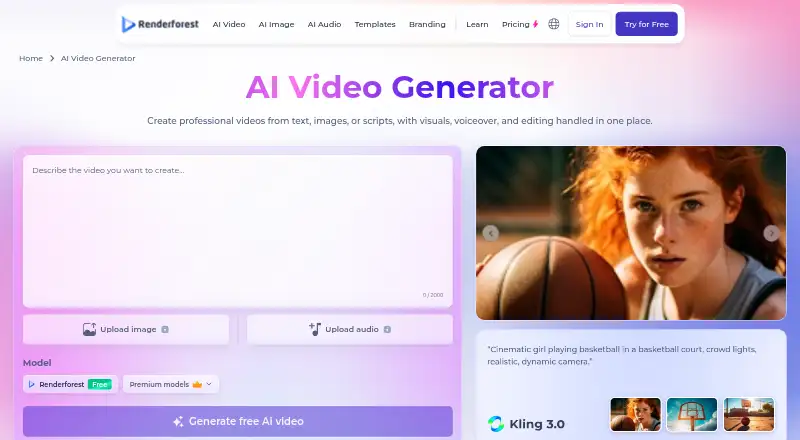
What Renderforest AI Video Generator is
Renderforest AI Video Generator turns text prompts, uploaded images, or audio such as music into videos, then lets users refine them in an editor. The listed AI models include Google Veo 3.1, Kling 3.0, Seedance 2.5, MiniMax H3, Pixverse, and Renderforest’s own model. Editing tools support trimming and joining scenes, replacing visuals, regenerating shots, and adding logos, brand colors, subtitles, and licensed music. A single generation can produce a video up to 12 minutes long. Voiceovers support more than 50 languages, with tone and emotion controls. AI-generated output is HD, while pre-made video projects can be created up to 4K. The browser-based service processes work on Renderforest’s infrastructure, and video maker apps are available for Android and iOS. Its free plan offers unlimited HD generation with the Renderforest model and requires no credit card. Paid plans start at $8/mo (annual).
Who it suits
The maker names content creators, marketing and business teams, ecommerce businesses, educators, agencies, and smaller organizations as intended users. It may suit people who want to generate and edit video in a browser or mobile app.
What it does well
- Accepts text, image, and audio inputs.
- Offers editing tools for scenes and branding.
- Voiceovers support more than 50 languages.
- Free plan includes unlimited HD generation.
- Commercial use is permitted under stated terms.
What to know first
- AI generation currently outputs HD.
- Free videos include a watermark.
- Free plan has basic features.
- Submitted materials may be sent to third-party AI providers.
Limits
The free plan provides HD videos with a watermark and basic features. Lite lists 800 AI credits per month, five HD720 template exports, and 10 GB of cloud storage; AI generation currently outputs HD.
Plans
| Plan | Billed and limits | Price |
|---|---|---|
| Free | HD videos with watermark · basic features | Free |
| Pro | Monthly price shown as $24; yearly price shown as $39/month · 2,400 AI credits/month · unlimited HD720 AI video creations with Renderforest Fast · unlimited Full HD1080 template exports · 50 GB cloud storage | $24 a month |
| Business | Monthly price shown as $49; yearly price shown as $79/month · 6,000 AI credits/month · unlimited HD1080 AI video creations with Renderforest Fast · unlimited Ultra HD 4K template exports · team management · 100 GB cloud storage | $49 a month |
| Lite | Monthly price shown as $9; yearly price shown as $15/month · 800 AI credits/month · 5 HD720 template exports · premium AI models · 10 GB cloud storage | $9 a month |
As renderforest.com lists them, read 4 Oct 2026. The maker's own page has the final word.
Getting started
- Open the generator in a web browser, or use the Android or iOS video maker app.
- Start with a text prompt, an uploaded image, or audio such as a music track.
- Choose from the listed AI models for generation.
- Use the editor to trim or join scenes, replace visuals, regenerate shots, or add branding, subtitles, and music.
- Choose a plan based on its listed AI credits, export options, and storage.
Overview
Renderforest AI Video Generator turns prompts, images, or audio into video and brings the result into a full editor. It is best for creators and teams that want generation and branded finishing in one browser workflow. Its main trade-off is that AI output is limited to HD, while the free plan adds a watermark.
Key features
Projects can start from text, an uploaded image, or an audio track. Users can choose from Google Veo 3.1, Kling 3.0, Seedance 2.5, MiniMax H3, Pixverse, and Renderforest’s own model. A single generation can produce a video up to 12 minutes long, which makes the tool relevant to explainers and lessons as well as short social content.
The connected editor supports trimming and stitching scenes, swapping visuals, regenerating shots, and adding logos, brand colors, subtitles, and licensed music. Voiceovers cover more than 50 languages and offer tone and emotion controls. With 4,104 video templates, stock media, and a brand kit, Renderforest also provides a template-based route to branded work. Exports are MP4, with TikTok, YouTube Shorts, Instagram Reels, Facebook, and LinkedIn among the supported channels.
AI-generated videos currently top out at HD, but pre-made video projects can reach 4K. That distinction matters for teams with resolution requirements: Renderforest’s 4K option is for template-based projects, not AI-generated footage.
The browser-based service processes work on Renderforest’s infrastructure, so it does not require installation or a GPU. Mobile video-maker apps are available for iOS and Android. Renderforest’s privacy policy describes encryption in transit, access controls, secure infrastructure, and contractual protections for third-party AI providers. Submitted material may be sent to those providers to generate outputs, though they are not authorized to use it for independent marketing or advertising.
Pricing
The Free plan costs nothing and includes unlimited HD generation with Renderforest’s model, basic features, and HD videos with a watermark. No credit card is required. It is a useful way to explore generation, but the watermark makes it a poor fit for finished client or brand work.
Lite is shown at $9 a month, with 800 AI credits monthly, five HD720 template exports, premium AI models, and 10 GB of cloud storage. The pricing page also shows a monthly price of $9 and a yearly price of $15/month; the separate paid-from figure is $8/mo. Lite suits lighter use of premium models, but its limited template exports and credit allowance constrain frequent production.
Pro is shown at $24 a month, with 2,400 AI credits monthly, unlimited HD720 AI video creations using Renderforest Fast, unlimited Full HD1080 template exports, and 50 GB of cloud storage. The page also shows a monthly price of $24 and a yearly price of $39/month. It is the more capable fit for regular output, though AI video remains HD rather than 4K.
Business is shown at $49 a month, with 6,000 AI credits monthly, unlimited HD1080 AI video creations using Renderforest Fast, unlimited Ultra HD 4K template exports, team management, and 100 GB of cloud storage. The pricing page also shows a monthly price of $49 and a yearly price of $79/month. Team management and the higher quotas make it the clearest fit for organizations; the 4K export allowance applies to templates, not generated videos. Renderforest directs further plan questions to its support team.
Platforms
The generator runs in a browser, with video-maker apps for Android and iOS. MP4 export and support for TikTok, YouTube Shorts, Instagram Reels, Facebook, and LinkedIn make it suited to social publishing workflows.
Who it's for
Renderforest names content creators, marketing and business teams, ecommerce businesses, educators, agencies, and smaller organizations as its intended users. It is particularly well suited to people who need to generate and finish branded video in one place, or who can use templates when they need 4K. It is less suitable for anyone whose core requirement is 4K AI-generated footage.
Pros and cons
- Pros: Text, image, and audio inputs offer different starting points; a wide model selection and editing tools keep generation and finishing together.
- Pros: Voiceovers in more than 50 languages and controls for tone and emotion support varied audiences and styles.
- Pros: The free plan offers unlimited HD generation with Renderforest’s model and requires no card, making it possible to explore before paying.
- Cons: AI output is HD-only, even though template projects can export at up to 4K.
- Cons: Free exports carry a watermark, and Lite limits template exports to five at HD720.
- Cons: Submitted materials may be transmitted to third-party AI providers, a consideration for sensitive projects.
Alternatives
For a broader social media template library, see Social Media Template Libraries. Choose Content Drifter instead if the priority is AI-assisted social posting: its free plan includes eight AI posts, ten publishes, eight AI images, and one workspace per month. CapCut is an alternative for mobile-focused editing, with free templates and cloud storage on its Standard plan.
PosterMyWall may suit users focused on design and publishing, with free downloads, more than one million design and email templates, and publishing to one social account on its free plan. VEED is another option; its free plan exports at 720p with a watermark.
Vimeo may fit a storage-focused workflow: its free plan has one seat and 1 GB of storage, while Starter includes one user, 2 TB of storage, and 2 TB of monthly bandwidth for $12 a month. Kapwing is an alternative with a free plan capped at 10 credits, four-minute exports, and 720p. Mojo offers free templates and royalty-free music, photos, and videos, with sharing across social platforms. SCRL is another freemium alternative.
Verdict
Choose Renderforest if you want a browser-based path from varied AI inputs to edited, branded videos, with multilingual voiceovers and a free way to explore. Look elsewhere if your work depends on 4K AI-generated footage or if the free watermark is unacceptable; Renderforest reserves 4K for template projects and requires a paid plan for watermark-free work.
Verdict
The generator combines multiple input types with editing tools, voiceover controls, and mobile apps. Note the HD limit for AI output and the free plan’s watermark; commercial use is subject to Renderforest’s terms and guidelines.
Questions
Is there a free plan?
Yes. It includes unlimited HD generation with Renderforest’s model, requires no credit card, and the listed Free plan includes HD videos with a watermark and basic features.
What do paid plans cost?
The pricing note says paid plans start at $8/mo (annual). The listed plans show Lite at $9 per month with a monthly billing price and $15/month with a yearly price; Pro at $24 monthly or $39/month yearly; and Business at $49 monthly or $79/month yearly.
Which platforms are available?
The product is available on web, Android, and iOS. The generator runs in a browser, and Renderforest says its video maker app is available for iOS and Android.
Can I use the videos commercially?
Renderforest says generated and edited videos may be used for commercial projects under its Terms of Service and usage guidelines.
What export quality does it support?
AI generation currently outputs HD. Pre-made video projects can be created up to 4K.
How does Renderforest handle submitted materials?
Its privacy policy describes encryption in transit, access controls, and secure infrastructure. Submitted materials may be sent to third-party AI providers to generate outputs; those providers are not authorized to use them for independent marketing or advertising.
Facts from Renderforest AI Video Generator's own pages
- AI models
- The page lists Google Veo 3.1, Kling 3.0, Seedance 2.5, MiniMax H3, Pixverse, and Renderforest’s own model. · renderforest.com, 4 Oct 2026
- Browser based
- The generator runs in a browser with processing on Renderforest’s infrastructure, and the page says no installation or GPU is required. · renderforest.com, 4 Oct 2026
- Commercial use
- The FAQ says generated and edited videos may be used for commercial projects subject to Renderforest’s Terms of Service and usage guidelines. · renderforest.com, 4 Oct 2026
- Data protection
- Renderforest’s privacy policy describes encryption in transit, access controls, secure infrastructure, and contractual data protection obligations for third-party AI providers. · renderforest.com, 4 Oct 2026
- Editing
- The editor supports trimming and stitching scenes, replacing visuals, regenerating shots, adding logos, brand colors, subtitles, and licensed music. · renderforest.com, 4 Oct 2026
- Founded
- 2013 · renderforest.com, 28 Sept 2026
- Free use
- The product FAQ says the free plan includes unlimited HD generation with the Renderforest model and requires no credit card. · renderforest.com, 4 Oct 2026
- Headquarters
- Yerevan, Armenia · renderforest.com, 28 Sept 2026
- Inputs
- Users can start with a text prompt, an uploaded image, or audio such as a music track. · renderforest.com, 4 Oct 2026
- Mobile apps
- Renderforest says its video maker app is available for iOS and Android devices. · renderforest.com, 4 Oct 2026
- Output quality
- The FAQ says AI generation currently outputs HD, while pre-made video projects can be created up to 4K. · renderforest.com, 4 Oct 2026
- Support
- The pricing page directs users to Renderforest’s support team for further questions. · renderforest.com, 4 Oct 2026
- Third-party AI processing
- The privacy policy says submitted materials may be transmitted to third-party AI providers to generate requested outputs and that those providers are not authorized to use them for independent marketing or advertising. · renderforest.com, 4 Oct 2026
- Video length
- The page says a single generation can produce a complete video up to 12 minutes long. · renderforest.com, 4 Oct 2026
- Voiceovers
- Renderforest says its voiceovers support more than 50 languages with tone and emotion controls. · renderforest.com, 4 Oct 2026
- What it does
- The AI video generator turns text prompts, images, or audio into videos and connects AI models to a full editor. · renderforest.com, 4 Oct 2026
- Who it is for
- The maker names content creators, marketing and business teams, ecommerce businesses, educators, agencies, and smaller organizations as users. · renderforest.com, 4 Oct 2026
Where Renderforest AI Video Generator stands on Freedom251
- Social Media Template Libraries#19 of 41