Freedom251 › Screen Recording Software
Recordly
What Recordly is
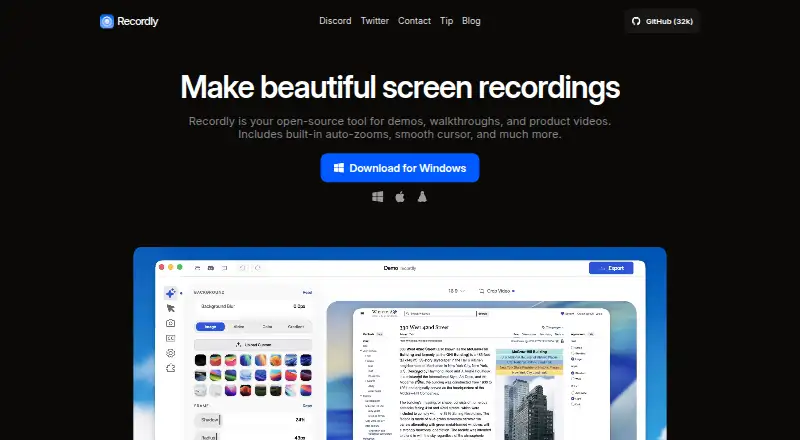
Recordly is a free, open-source desktop screen recorder and editor for demos, walkthroughs, and product videos. It records an entire display or one application window with microphone and system audio, and can place webcam footage in an overlay bubble. Its timeline editor provides trimming, zooms, speed regions, annotations, extra audio regions, and cropping. Cursor controls include smoothing, motion blur, click bounce, sway, and looping. Webcam overlays can be positioned, mirrored, resized, rounded, and given shadows. Recordly exports MP4 and GIF files with quality and dimension controls; GIFs also support frame-rate and loop settings. Projects reopen as .recordly files while preserving editor state. A community extension marketplace adds options such as click sounds, device frames, browser mockups, and wallpapers. The Free plan costs nothing, with no paywalls or hidden limits, and the repository uses AGPL 3.0.
Who it suits
Recordly suits people creating narrated screen demos or product videos on macOS, Windows, or Linux. It is also suited to users who want open-source software and editable project files.
What it does well
- Records full displays or individual application windows
- Captures microphone, system audio, and webcam overlays
- Timeline includes trims, annotations, zooms, and cropping
- Exports MP4 and GIF with output controls
- Free plan has no paywalls or hidden limits
What to know first
- Linux capture cannot hide the cursor
- Linux system audio generally requires PipeWire
- Minimum macOS version is 14.0
Plans
| Plan | Billed and limits | Price |
|---|---|---|
| Free | Fully free · no paywalls or hidden limits | Free |
As recordly.dev lists them, read 11 Oct 2026. The maker's own page has the final word.
Verdict
Recordly provides recording, editing, webcam overlays, cursor effects, and MP4 or GIF export at no cost. Linux users should account for its cursor and PipeWire limitations.
Facts from Recordly's own pages
- Audio limitation
- Linux system audio generally requires PipeWire. · github.com, 11 Oct 2026
- Cursor effects
- Cursor controls include smoothing, motion blur, click bounce, sway, and a loop mode. · github.com, 11 Oct 2026
- Editing
- Its timeline supports trims, zooms, speed regions, annotations, extra audio regions, and cropping. · github.com, 11 Oct 2026
- Exports
- Recordly exports MP4 and GIF, with settings for quality and output dimensions; GIFs also have frame-rate and loop options. · github.com, 11 Oct 2026
- Extensions
- A community extension system and marketplace support add-ons such as cursor click sounds, device frames, browser mockups, and wallpapers. · github.com, 11 Oct 2026
- Free plan
- Yes · recordly.dev, 22 Sept 2026
- License
- The repository states that Recordly is licensed under AGPL 3.0. · github.com, 11 Oct 2026
- Microphone recording
- Yes · recordly.dev, 22 Sept 2026
- Platform limitation
- Linux desktop capture does not currently support cursor hiding, so exports may show both the real and rendered cursor. · github.com, 11 Oct 2026
- Supported platforms
- macOS,Windows,Linux · recordly.dev, 22 Sept 2026
- Projects
- Projects can be saved and reopened as .recordly files that preserve editor state. · github.com, 11 Oct 2026
- Purpose
- Recordly is an open-source desktop screen recorder and editor for demos, walkthroughs, and product videos. · github.com, 11 Oct 2026
- Recording
- It can record an entire display or a single app window and capture microphone and system audio. · github.com, 11 Oct 2026
- Support
- The site directs users to open an issue on GitHub for support; its contact page says app issues go through GitHub. · recordly.dev, 11 Oct 2026
- System audio
- Yes · recordly.dev, 22 Sept 2026
- System requirements
- The listed minimums are macOS 14.0, Windows 10 Build 19041, or a modern Linux distribution. · github.com, 11 Oct 2026
- Webcam
- Webcam footage can be added as an overlay bubble with controls for position, mirroring, size, roundness, and shadow. · github.com, 11 Oct 2026
- Webcam recording
- Yes · recordly.dev, 22 Sept 2026
Where Recordly stands on Freedom251
- Screen Recording Software#28 of 131