Freedom251 › Screen Recording Software
RecordCast
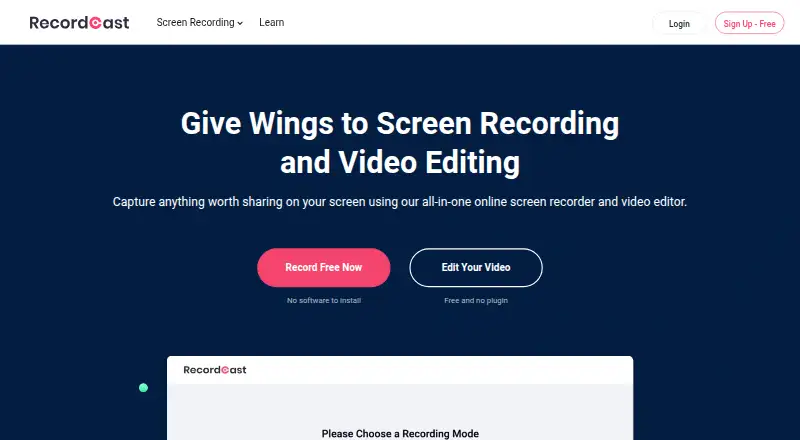
What RecordCast is
RecordCast is a web-based screen recorder and video editor that works without downloaded software or an extension. It records screen and webcam together, screen only, or webcam only, with microphone and system-audio options. The editor trims recordings and adds text effects, overlays, dynamic elements, music, and background colors. Recordings can be downloaded as MP4 and shared, with Dropbox and YouTube options. The maker presents it for meetings, tutorials, e-learning, gameplay, and presentations. Videos are stored locally on the client side rather than on RecordCast servers. The service may collect registration and usage information and use third-party analytics or advertising services. RecordCast works only on desktop and recommends Google Chrome. The Free plan costs nothing, allows 12 projects, limits recordings to five minutes, and provides 480p downloads.
Who it suits
RecordCast suits desktop users who need browser-based recording and basic editing for meetings, tutorials, lessons, gameplay, or presentations. It is useful when local video storage is preferred.
What it does well
- No download or extension required
- Screen, webcam, microphone, and system audio
- Built-in trimming and effects
- MP4 downloads and sharing
- Free plan available
What to know first
- Desktop-only
- Free recordings limited to five minutes
- Free downloads limited to 480p
- Privacy policy allows analytics and advertising
Plans
| Plan | Billed and limits | Price |
|---|---|---|
| FREE | 5 mins video recording · 480p SD downloads · Maximum 12 projects | Free |
| PLUS | $47.88 billed annually · 30 mins video recording · 720p and 1080p downloads · Unlimited projects · Custom watermark · No RecordCast intro | $3.99 a month |
As recordcast.com lists them, read 7 Oct 2026. The maker's own page has the final word.
Verdict
RecordCast combines browser capture with straightforward video editing and sharing. Desktop-only use and the Free plan’s recording and resolution limits should guide selection.
Facts from RecordCast's own pages
- Data collection
- The privacy policy says it may collect registration and usage information and use third-party analytics or advertising services including Google Analytics and AdMob. · recordcast.com, 7 Oct 2026
- Desktop requirement
- RecordCast says it now works only on desktop and recommends Google Chrome. · recordcast.com, 7 Oct 2026
- Export
- The homepage describes downloading recordings as MP4 at 1080p and sharing them. · recordcast.com, 7 Oct 2026
- Free plan
- Yes · recordcast.com, 21 Sept 2026
- Integrations
- The editor page provides options to upload exported videos to Dropbox and share them to YouTube. · recordcast.com, 7 Oct 2026
- Max recording length
- 30 · recordcast.com, 21 Sept 2026
- Microphone recording
- Yes · recordcast.com, 21 Sept 2026
- Capture platforms
- web · recordcast.com, 21 Sept 2026
- Privacy
- The privacy policy says videos are stored locally on the client side rather than on RecordCast servers. · recordcast.com, 7 Oct 2026
- Product
- RecordCast is a web-based screen recorder and video editor that works without downloading software or an extension. · recordcast.com, 7 Oct 2026
- Recording limit
- The pricing page limits Free recordings to 5 minutes per video and Plus recordings to 30 minutes per video. · recordcast.com, 7 Oct 2026
- Recording modes
- It offers screen plus webcam, screen only, and webcam only recording, with microphone and system audio options. · recordcast.com, 7 Oct 2026
- Security
- The privacy policy describes physical, electronic, and procedural safeguards, while stating that absolute security cannot be guaranteed. · recordcast.com, 7 Oct 2026
- Support
- The privacy policy lists [email protected] for privacy and security questions. · recordcast.com, 7 Oct 2026
- System audio
- Yes · recordcast.com, 21 Sept 2026
- Use cases
- The maker presents RecordCast for recording online meetings, tutorials, e-learning, gameplay, and presentations. · recordcast.com, 7 Oct 2026
- Video editing
- The built-in editor can trim recordings and add text effects, overlays, dynamic elements, music, and background colors. · recordcast.com, 7 Oct 2026
- Maximum video quality
- 1080p · recordcast.com, 21 Sept 2026
- Webcam recording
- Yes · recordcast.com, 21 Sept 2026
Where RecordCast stands on Freedom251
- Screen Recording Software#66 of 131
- Screen and Video Capture Software#19 of 29
- Screen recorders#18 of 27