Readspace
What Readspace is
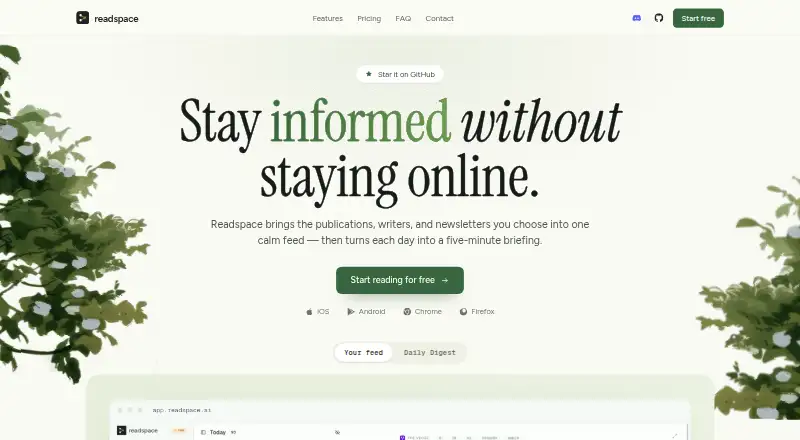
Readspace brings the publications, writers, and newsletters you follow into one feed and prepares a five-minute daily briefing. Its chronological feed contains only followed sources, without engagement ranking or suggested posts. The Daily Digest combines coverage of the same development across selected sources and links back to them. Readers can explore more than 120,000 sources by name, topic, or description, import and export subscriptions in OPML format, and use the browser extension to find a site's RSS feed when available. The reading tools provide article summaries, key point highlighting, and translation. Newsletters can be sent to a private Readspace email alias and are placed in a Newsletters folder. Readspace is open source and can be self-hosted, with the option to disable AI features. Self-hosting has no usage limits, but does not include the hosted catalog: sources must be imported via OPML, and AI is billed through the user's provider. Readspace has web, iOS, Android, and browser extension access, and self-hosting supports the extension and mobile apps. The maker says reading has no ads or trackers and that reading activity is not sold or used for targeting. The site credits independent developer @kamui-fin. Pro is listed at $5.99 a month, billed monthly, with fair-use limits.
Who it suits
Readspace suits people who want news, analysis, and writing from selected publications, blogs, and writers gathered in one reading space. It may also fit readers who want to manage newsletters, use cross-device apps, or self-host an open-source reader.
What it does well
- Chronological feed shows only followed sources.
- Daily Digest groups related coverage and links to sources.
- Explore more than 120,000 sources.
- Import and export subscriptions using OPML.
- Open source with a self-hosted option.
- Supports web, iOS, Android, and browser extensions.
What to know first
- Basic limits readers to 10 feeds and 50 saved articles at a time.
- Basic daily caps apply to summaries, translations, highlights, and clean article views.
- Self-hosting lacks the hosted catalog and requires OPML imports.
- Pro has fair-use limits.
Limits
Basic includes 10 feeds, saves up to 50 articles at a time, allows 5 summaries, translations, or highlights a day and 5 clean article views a day, and includes 3 Daily Digests a month. Pro has fair-use limits. Self-hosting has no usage limits, but has no hosted catalog, requires importing sources via OPML, and bills AI through the user's provider.
Plans
| Plan | Billed and limits | Price |
|---|---|---|
| Free | RSS and news reading · Save articles for later · Feed discovery · Cross-device sync | On request |
| Readspace Pro | Summaries · Highlights · Translations · Daily Digest | On request |
| Basic | 10 feeds · Save up to 50 articles at a time · 5 summaries, translations, or highlights a day · 5 clean article views a day · 3 Daily Digests a month · Full source catalog search · Web, iOS, Android, browser extensions | Free |
| Self-hosted | No usage limits · Bring your own API key and server · Extension and mobile apps supported · No hosted catalog; import via OPML · AI billed by your provider | Free |
| Pro | Monthly · Generous feed limit · Summaries, translations, highlights, and clean article views without daily caps · Newsletters · Daily Digests every day · Fair-use limits apply | $5.99 a month |
As readspace.ai lists them, read 22 Sept 2026. The maker's own page has the final word.
Getting started
- Visit readspace.ai to choose hosted access or self-hosting.
- For hosted use, start with the free Basic plan or choose Pro at $5.99 a month, billed monthly.
- Use the web, iOS, Android, or browser extension access.
- Follow or discover sources, or import subscriptions in OPML format.
- For self-hosting, provide your own API key and server, then import sources via OPML.
Readspace is a focused reading service for people who want publications, writers, newsletters, and RSS feeds in one controlled stream. It suits readers who prefer chronological coverage over engagement-driven recommendations, while its summaries, translations, and daily digests add useful context. The main trade-off is a capped free hosted tier, although a self-hosted installation removes usage limits at the cost of server and provider setup.
Overview
Readspace combines followed publications, writers, and newsletters into a single feed, then produces a five-minute briefing from the day’s reading. Its Digest groups reports about the same development across your chosen sources and links back to those sources, making it easier to compare coverage without opening every item separately.
The feed is strictly chronological and contains only sources you follow. There is no engagement ranking or suggested-post stream, so Readspace is better for deliberate reading than for algorithmic discovery. Discovery remains available separately: the service says its catalog contains more than 120,000 sources searchable by name, topic, or description.
Key features
- Reading and context tools: Article summaries, key-point highlighting, and translation work inside the reader. These are practical for catching up quickly or reading across languages, but their daily availability depends on your plan.
- Daily Digest: Coverage of one development is grouped across selected sources into a briefing. Pro makes this a daily feature; Basic allows three digests per month.
- RSS and OPML: You can import and export subscriptions in OPML format. The browser extension can locate a site’s RSS feed when one is available, which helps build a controlled feed from sites that do not advertise their feed prominently.
- Newsletters: A private Readspace email alias lets you subscribe to mailing lists and routes incoming issues to a dedicated Newsletters folder. This keeps newsletters alongside, but separate from, the main feed.
- Privacy and control: Readspace says reading has no ads or trackers, does not sell reading activity, and does not use that activity for targeting. The project is open source, and self-hosted instances can disable AI features.
Pricing
Readspace’s plan structure separates basic reading from AI-assisted processing.
| Plan | Price | What you get |
|---|---|---|
| Free | Custom pricing | RSS and news reading, save-for-later, feed discovery, and cross-device sync. |
| Readspace Pro | Custom pricing | Summaries, highlights, translations, and Daily Digest. |
| Basic | free | 10 feeds; up to 50 saved articles; five summaries, translations, or highlights per day; five clean article views per day; three Daily Digests per month; full catalog search; web, iOS, Android, and browser extensions. |
| Self-hosted | free | No usage limits, with your own server and API key; extension and mobile app support; no hosted catalog; OPML import required; AI billed by your provider. |
| Pro | $5.99 a month, billed monthly | Generous feed limit; uncapped daily summaries, translations, highlights, and clean article views; newsletters; daily Digests. Fair-use limits apply. |
Basic is suitable for a small reading list and occasional AI assistance, but five daily processing actions and five clean views can constrain heavy readers. Pro is the straightforward choice for daily briefing users and newsletter subscribers who need frequent processing. Self-hosted is financially attractive for technically capable readers with infrastructure and an AI provider; it gives up the hosted catalog and shifts operating and AI costs to you. The separately named Free and Readspace Pro plans have custom pricing rather than published rates.
Platforms
Readspace runs on the web, Android, iOS, and browser extensions. A self-hosted edition also supports the extension and mobile apps, allowing the same reading surfaces without hosted usage caps.
Who it's for
Choose Readspace if your reading starts with selected publications, blogs, writers, or newsletters and you want a quiet, chronological place to follow them. It is particularly well suited to people who value source-based briefings, private reading, and OPML portability. It is less suitable if you want an unlimited hosted free service, a recommendation-heavy discovery feed, or a hands-off self-hosting experience.
Pros and cons
Pros
- Source-first feed: Chronological ordering and no engagement ranking keep attention on chosen sources.
- Useful consolidation: Digests, summaries, highlights, and translations reduce the work of processing a large reading queue.
- Strong portability: OPML import/export and self-hosting make subscriptions easier to move and retain.
- Privacy position: Ad-free, tracker-free reading and no sale or targeting of reading activity address common concerns with feed products.
Cons
- Basic caps are tight: Ten feeds, 50 saved articles, and five daily AI or clean-view actions favor light use.
- Self-hosting requires maintenance: You provide the server and API key, import sources yourself, and pay your AI provider.
- Hosted catalog is unavailable when self-hosted: Discovery is limited to sources you bring through OPML.
- Fair-use applies on Pro: Even the paid tier is not an unlimited-processing promise.
Alternatives
For a broader shortlist, see Read-It-Later Apps. Pick wallabag instead if you want a free, self-hostable read-later service with Android, iOS, web, extension, API, and Linux support. Burn 451 is a freemium alternative with explicit daily save, storage, and MCP-request allowances across web, iOS, macOS, extension, and API.
Omnivore fits readers seeking a free self-hosted option, since its cloud application was deprecated in November 2024. Choose PaperSpan for offline mobile reading, highlights, and one-at-a-time Kindle sending. Reminde is another freemium option built around saving, with a one-slot free plan and unlimited savings. Savr is a free app available on web, mobile, extension, and self-hosted deployments. Couch targets Apple users with unlimited saves on its free tier and a lifetime Pro option. Freezetab suits users who want local, offline browser storage for tabs, links, articles, quotes, and feeds.
Verdict
Readspace is a strong choice for readers who want a private, source-controlled feed with built-in summaries and a useful daily briefing. Choose Basic for a modest list, Pro for regular AI-assisted reading and newsletters, or self-hosted when eliminating usage caps matters more than convenience and catalog discovery. Look elsewhere if you need generous unlimited use without setup, or if saving individual pages matters more than following a curated information stream.
Verdict
Choose Readspace if you want a focused feed of selected sources, reading tools, and a daily briefing across web and mobile. The free Basic plan has usage caps; self-hosting removes usage limits but requires bringing a server and API key and does not include the hosted catalog.
Questions
Is Readspace free?
Yes. Basic is listed as free, and a self-hosted plan is also listed as free.
What does Pro cost?
Pro costs $5.99 a month, billed monthly, and fair-use limits apply.
What are the Basic plan limits?
Basic includes 10 feeds, up to 50 saved articles at a time, 5 summaries, translations, or highlights a day, 5 clean article views a day, and 3 Daily Digests a month.
Can Readspace be self-hosted?
Yes. It is open source, and self-hosting supports the extension and mobile apps. It requires your own API key and server, lacks the hosted catalog, requires OPML imports, and bills AI through your provider.
Which platforms does Readspace support?
It supports web, iOS, Android, and browser extensions. The self-hosted option also supports extension and mobile apps.
Who makes Readspace?
The site says it is built and maintained by one independent developer and credits @kamui-fin.
Facts from Readspace's own pages
- Audience
- The maker describes Readspace as intended for people who want news, analysis, and writing from selected publications, blogs, and writers in a dedicated place. · readspace.ai, 8 Oct 2026
- Browser extension
- Yes · github.com, 22 Sept 2026
- Daily Digest
- The Digest groups coverage of the same development across chosen sources and links back to those sources. · readspace.ai, 8 Oct 2026
- Discovery
- Readspace says users can explore more than 120,000 sources and search by name, topic, or description. · readspace.ai, 8 Oct 2026
- Feed
- The feed is chronological and contains only sources the user follows, without engagement ranking or suggested posts. · readspace.ai, 8 Oct 2026
- Free plan
- Yes · github.com, 22 Sept 2026
- Highlighting
- Yes · github.com, 22 Sept 2026
- Maker
- The site says Readspace is built and maintained by one independent developer and credits “@kamui-fin.” · readspace.ai, 8 Oct 2026
- Mobile apps
- Yes · github.com, 22 Sept 2026
- Newsletters
- Users can subscribe to mailing lists with a private Readspace email alias, which places received newsletters in a Newsletters folder. · readspace.ai, 8 Oct 2026
- Open source and hosting
- Readspace is open source, can be self-hosted, and permits disabling AI features on a self-hosted instance. · readspace.ai, 8 Oct 2026
- Privacy
- The maker says reading has no ads or trackers and that it does not sell reading activity or use it for targeting. · readspace.ai, 8 Oct 2026
- Product
- Readspace combines followed publications, writers, and newsletters in one feed and creates a five-minute daily briefing. · readspace.ai, 8 Oct 2026
- Reading tools
- The reader offers article summaries, key point highlighting, and translation without leaving Readspace. · readspace.ai, 8 Oct 2026
- RSS and OPML
- Users can import and export subscriptions in OPML format, and the browser extension can find a site's RSS feed when available. · readspace.ai, 8 Oct 2026
- Self-hosted limits
- The self-hosted option has no usage limits but lacks the hosted catalog, requires importing sources via OPML, and bills AI through the user's provider. · readspace.ai, 8 Oct 2026
- Support
- The site directs users with questions to GitHub Discussions. · readspace.ai, 8 Oct 2026
Where Readspace stands on Freedom251
- Read-later apps#15 of 28
- Read-It-Later Apps#16 of 28