PaperSpan
by PaperSpan
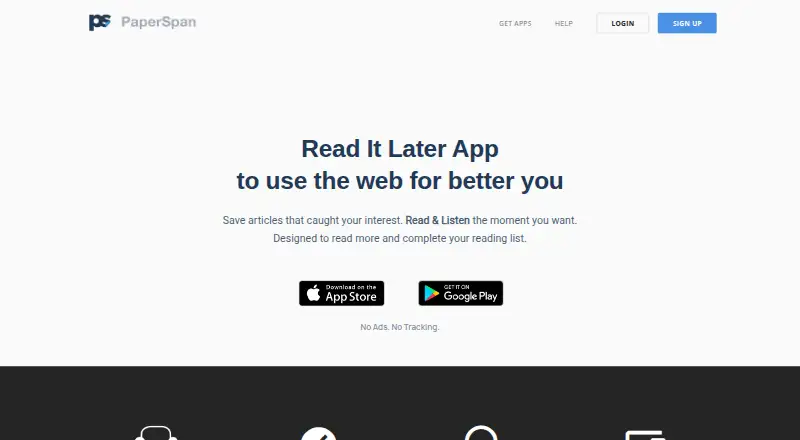
What PaperSpan is
PaperSpan is a read-later service for saving articles and returning to them on iPhone, iPad, Android, the web, Chrome, and Firefox. Browser extensions and a bookmarklet let readers save pages; saved articles can be read, listened to, or managed offline, with changes syncing automatically afterward. Readers can highlight passages for later review, and text-to-speech can read articles aloud. PaperSpan can send articles to a Kindle device or app, including several arranged as a book. The free plan supports saving and reading, mobile offline reading, highlights, and sending one article at a time to Kindle. Premium adds full-text, author, notes, and other advanced search, listening playlists, more Kindle options, and advanced statistics. Premium costs $8.99 per year as an auto-renewing subscription; the price may vary by location. It renews unless canceled at least 24 hours before the period ends, and cannot be canceled during an active period. The website says PaperSpan has no ads or tracking.
Who it suits
PaperSpan suits people who save articles to read later across mobile, browser, and web, including readers who want offline access, audio, highlights, or Kindle delivery. Premium may suit readers who want advanced search, playlists, and reading insights.
What it does well
- Free plan available on mobile and web.
- Offline reading, listening, and management sync afterward.
- Highlights can be reviewed later.
- Can send articles to Kindle.
- No ads or tracking, according to the website.
What to know first
- Premium costs $8.99 per year.
- Premium auto-renews unless canceled at least 24 hours early.
- Cannot cancel during an active subscription period.
Limits
The free plan supports offline reading on mobile, highlights, and sending one article at a time to Kindle. Premium costs $8.99 per year, renews automatically unless canceled at least 24 hours before the period ends, and cannot be canceled during an active period.
Plans
| Plan | Billed and limits | Price |
|---|---|---|
| Free | Save and read articles · Offline reading on mobile · Highlights · Send one article at a time to Kindle | On request |
| Premium | auto-renewing subscription · Full-text search · Unlimited offline actions · Text-to-speech playlists · Send multiple articles to Kindle · Advanced statistics | On request |
| PaperSpan Premium | billed annually at $8.99 | $8.99 a year |
As paperspan.com lists them, read 28 Sept 2026. The maker's own page has the final word.
Getting started
- Visit https://www.paperspan.com/ or use PaperSpan on iPhone, iPad, Android, or web.
- Add a browser extension or use the bookmarklet to save articles from a browser.
- Save articles to read, listen to, or manage them later, including offline.
- Highlight passages to review them again.
- Choose Premium for advanced search, playlists, statistics, or multiple-article Kindle sending.
Overview
PaperSpan is a read-it-later service for capturing web articles and keeping them available across mobile, browser, and web platforms. It suits readers who want to switch between offline reading, audio, and Kindle, with a free plan for core use and a low annual Premium price for deeper search and listening tools.
Its strength is giving a saved article several lives: as a highlighted text, an offline read, an audio listen, or a Kindle send. The trade-off is that useful upgrades such as advanced search and playlists sit behind an auto-renewing subscription with restrictive cancellation terms.
Key features
Browser extensions and a bookmarklet capture articles directly from the web. On mobile, saved articles can be read, managed, and listened to without a connection, then synced automatically afterward. That suits commutes and travel, though the stated offline reading support is specifically on mobile.
Highlighting lets readers mark passages and return to them later; highlights can also be exported. Text-to-speech is useful when screen time is inconvenient, while Premium playlists keep articles playing consecutively for listeners who want a queue rather than selecting each item individually.
Kindle delivery works with a Kindle device or app. Free users can send one article at a time; Premium can bundle multiple articles into a crafted book. Premium also adds full-text, author, notes, and other advanced search, plus statistics on reading rate, peak reading time, categories, and popular sites. Those are meaningful tools for people with a large saved library, but less persuasive for occasional readers who mainly need a place to keep articles.
PaperSpan’s website says the service has no ads and no tracking. Support is available through a contact form and by email at [email protected].
Pricing
Free covers saving and reading articles, offline reading on mobile, highlights, and sending one article at a time to Kindle. It is a capable starting point for readers who do not need advanced search, continuous audio playlists, multi-article Kindle sends, or advanced statistics.
PaperSpan Premium costs $8.99 per year, billed annually as an auto-renewing subscription; the price may vary by location. It adds full-text and other advanced search, unlimited offline actions, text-to-speech playlists, multi-article Kindle delivery, and advanced statistics. The annual price is modest, but the terms matter: renewal is automatic unless canceled at least 24 hours before the period ends, and cancellation is not allowed during an active period.
Platforms
PaperSpan supports iPhone, iPad, Android, the web, Chrome, and Firefox. The free service is available on iPhone, iPad, Android, and web; browser extensions support saving from Chrome and Firefox. This broad mix works for readers who collect on a desktop browser and continue on a phone.
Who it's for
PaperSpan is a good fit for people with a regular article-reading habit who want offline access, highlights, audio, or an easy path from web articles to Kindle. The free tier should be enough for a straightforward save-and-read routine. Premium is better suited to readers who search across a substantial library, listen through playlists, or send grouped reading to Kindle. It is less compelling for readers who rarely save articles or who want advanced tools without an annual auto-renewing plan.
Pros and cons
- Pros: Offline mobile reading, listening, and management with automatic syncing make saved articles useful away from a connection.
- Pros: Highlights can be revisited and exported, adding a way to carry useful passages beyond the initial read.
- Pros: Kindle delivery is available on Free, with Premium adding multi-article book creation.
- Cons: Full-text and advanced search, uninterrupted playlists, and advanced statistics require Premium.
- Cons: The subscription renews automatically, requires cancellation at least 24 hours before renewal, and cannot be canceled during an active period.
Alternatives
Omnivore is the alternative to consider if a free, self-hosted read-it-later service and its wider platform range—including macOS and API support—matter more; its cloud application was deprecated in November 2024.
Burn 451 may suit readers who want a free tier with explicit daily and library caps, or a $4.99 a month Pro plan, rather than PaperSpan’s annual Premium subscription.
Couch is worth considering for readers focused on iOS and macOS who want unlimited saves on its free plan and an option for lifetime access to advanced features.
Instapaper is another freemium read-it-later option for Android and iOS.
Matter is an option for readers looking for a freemium service across iOS and web.
ReadNever is an alternative with a free tier, browser extensions, and iOS support.
Reminde is a freemium option for web, iOS, and Android.
Gistory is a freemium option for web, iOS, and Android, with a Premium plan priced at $7.99 a month.
See more options in Read-It-Later Apps.
Verdict
Choose PaperSpan if you want one saved-article library that supports offline mobile reading, highlighting, audio, and Kindle delivery, with a free plan that covers the essentials. Premium makes sense for frequent readers who will use advanced search, playlists, or multi-article Kindle books. Look elsewhere if those tools are not worth an annual subscription with automatic renewal and limited cancellation flexibility.
Verdict
PaperSpan combines article saving with offline access, highlighting, audio, and Kindle delivery. Its free plan covers core reading, while advanced search, playlists, and statistics require Premium.
Questions
Is PaperSpan free?
Yes. PaperSpan is available free on iPhone, iPad, Android, and web.
How much does Premium cost?
PaperSpan Premium costs $8.99 per year as an auto-renewing subscription. The price may vary by location.
Which platforms does PaperSpan support?
It supports iPhone, iPad, Android, web, Chrome, and Firefox.
Can I use PaperSpan offline?
Yes. Articles can be read, listened to, and managed offline, with changes syncing afterward.
Can PaperSpan send articles to Kindle?
Yes. The free plan sends one article at a time; Premium supports multiple articles as a crafted book.
How do I cancel Premium?
The subscription must be canceled at least 24 hours before the period ends to avoid renewal. It cannot be canceled during an active period.
Facts from PaperSpan's own pages
- Article highlighting
- Users can highlight important phrases and review them later. · apps.apple.com, 28 Sept 2026
- Browser extension
- Yes · paperspan.com, 22 Sept 2026
- Browser extensions
- Browser extensions and a bookmarklet let users save articles directly. · paperspan.com, 28 Sept 2026
- App developer
- The App Store lists Sravan Kumar as the developer and seller. · apps.apple.com, 28 Sept 2026
- Free availability
- Available for free on iPhone, iPad, Android, and Web. · paperspan.com, 28 Sept 2026
- Free plan
- Yes · paperspan.com, 22 Sept 2026
- Full-text search
- Yes · paperspan.com, 22 Sept 2026
- Headquarters
- Bangaluru, Karnataka, India · paperspan.com, 28 Sept 2026
- Highlight export
- Yes · paperspan.com, 22 Sept 2026
- Highlighting
- Yes · paperspan.com, 22 Sept 2026
- Kindle integration
- Articles can be sent to a Kindle device or app, including multiple articles as a crafted book. · apps.apple.com, 28 Sept 2026
- Mobile apps
- Yes · paperspan.com, 22 Sept 2026
- Offline access
- Yes · paperspan.com, 22 Sept 2026
- Offline reading
- Articles can be read, listened to, and managed while offline, with automatic syncing afterward. · apps.apple.com, 28 Sept 2026
- Premium playlist
- Premium provides uninterrupted article playlists for listening during activities. · apps.apple.com, 28 Sept 2026
- Premium price
- Premium costs $8.99 per year through an auto-renewing subscription. · apps.apple.com, 28 Sept 2026
- Premium search
- Premium adds full-text, author, notes, and other advanced search options. · apps.apple.com, 28 Sept 2026
- Pricing model
- Free to download and use, with an optional Premium subscription. · apps.apple.com, 28 Sept 2026
- Privacy positioning
- The website says PaperSpan has no ads and no tracking. · paperspan.com, 28 Sept 2026
- Reading statistics
- Reading insights include read rate, peak reading time, categories, and popular sites. · apps.apple.com, 28 Sept 2026
- Cancellation limit
- A subscription cannot be canceled during the active period. · apps.apple.com, 28 Sept 2026
- Renewal condition
- Subscriptions renew automatically unless canceled at least 24 hours before the period ends. · apps.apple.com, 28 Sept 2026
- Support contact
- Support is available through a contact form and [email protected]. · paperspan.com, 28 Sept 2026
- Supported platforms
- The service supports iPhone, iPad, Android, Web, Chrome, and Firefox. · paperspan.com, 28 Sept 2026
Where PaperSpan stands on Freedom251
- Read-later apps#4 of 28
- Read-It-Later Apps#10 of 28