Freedom251 › Read-It-Later Apps
Burkmak
What Burkmak is
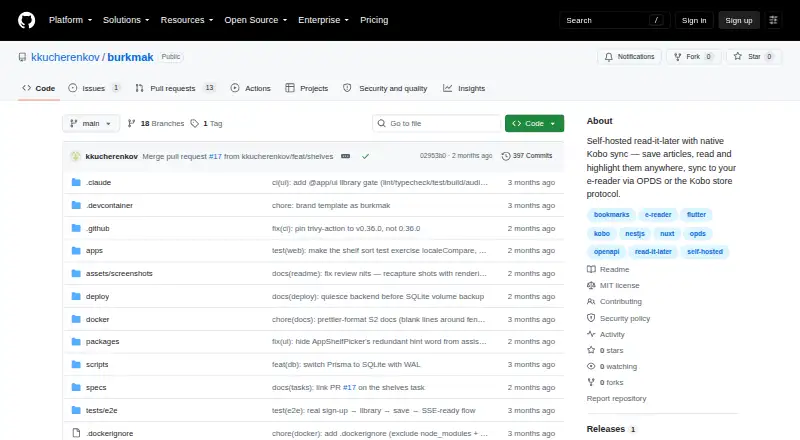
Burkmak is a self-hosted read-it-later app for collecting links, reading articles, highlighting passages and keeping notes. Its clean reader view extracts articles, while tags, read states and favorites help organize searchable libraries for individual users. Links can be saved from the web app, Android share sheet or a desktop browser bookmarklet. An iOS share extension is listed as a follow-up.
Readers can send material to Kobo through an OPDS catalog, which offers EPUB and KEPUB downloads, or use native store-protocol sync with reading-state write-back. Native Kobo sync requires HTTPS, and the physical-device pass is still pending. An Obsidian plugin sends article notes, highlights and metadata to a vault through Burkmak’s export API.
The project is MIT licensed and free. Its Docker Compose deployment uses backend and web containers, with a data volume for the SQLite database, cached articles, images and EPUBs; published images support amd64 and arm64. Product requirements say there are no third-party analytics and that server-fetched content stays on the self-hosted instance. The intended audience includes self-hosters, Kobo readers and note-takers who want highlights in Obsidian. The design is for one self-hosted instance, with horizontal scaling and multi-instance high availability outside its stated goals.
Who it suits
Burkmak suits self-hosters who want a searchable library for saved articles, along with Kobo readers who want reading-state sync or EPUB and KEPUB downloads. It also fits note-takers who want article notes, highlights and metadata synced into an Obsidian vault.
What it does well
- Free and MIT licensed.
- Captures links from the web app, Android share sheet and desktop bookmarklet.
- Reader supports highlights and notes.
- Kobo integration includes OPDS downloads and native sync.
- Obsidian plugin syncs notes, highlights and metadata.
- Docker images are published for amd64 and arm64.
What to know first
- Requires self-hosting and is designed for a single instance.
- Native Kobo sync requires HTTPS.
- Physical-device pass for native Kobo sync is pending.
- An iOS share extension is listed as a follow-up.
Limits
The free Self-hosted plan is for a single instance and a small number of accounts. The product requirements exclude horizontal scaling and multi-instance high availability; native Kobo sync also requires HTTPS, and its physical-device pass is pending.
Plans
| Plan | Billed and limits | Price |
|---|---|---|
| Self-hosted | single instance · small number of accounts | Free |
As github.com lists them, read 9 Oct 2026. The maker's own page has the final word.
Getting started
- Open the Burkmak GitHub website.
- Deploy the backend and web containers with the provided Docker Compose setup.
- Use the data volume for the database, cached articles, images and EPUBs.
- Save links from the web app, Android share sheet or desktop browser bookmarklet.
- Connect Kobo or configure the Obsidian plugin if those integrations fit your workflow.
Verdict
Choose Burkmak if you want to host your own read-it-later library and connect saved articles with Kobo or Obsidian. Its free, MIT-licensed setup includes article reading, highlights and notes. Look elsewhere if you need horizontal scaling or multi-instance high availability.
Questions
How much does Burkmak cost?
The Self-hosted plan is free. The pricing model is free, and the project is open source.
Is Burkmak open source?
Yes. The repository identifies the project as MIT licensed.
Which platforms does it support?
The listed platforms are Android, API, self-hosted and web. An iOS share extension is listed as a follow-up.
Can Burkmak sync with Kobo?
It provides an OPDS catalog for EPUB and KEPUB downloads and native store-protocol sync with reading-state write-back. Native sync requires HTTPS, and the physical-device pass is pending.
Can it send notes to Obsidian?
Yes. An Obsidian plugin syncs article notes, highlights and metadata into a vault through Burkmak’s export API.
Is there a free trial?
No. The product is free, and the listed plan is Self-hosted.
Facts from Burkmak's own pages
- Architecture limit
- The product requirements specify a single self-hosted instance and list horizontal scaling and multi-instance high availability as non-goals. · github.com, 9 Oct 2026
- Browser extension
- No · github.com, 22 Sept 2026
- Capture
- Links can be saved from the web app, Android share sheet, or desktop browser bookmarklet; an iOS share extension is listed as a follow-up. · github.com, 9 Oct 2026
- Data storage
- The deployment stores its SQLite database, cached articles, images, and EPUBs in the burkmak-data volume. · github.com, 9 Oct 2026
- Deployment
- The maker provides a Docker Compose deployment with backend and web containers, a data volume, and published amd64 and arm64 images. · github.com, 9 Oct 2026
- Full-text search
- Yes · github.com, 22 Sept 2026
- Highlight export
- Yes · github.com, 22 Sept 2026
- Highlighting
- Yes · github.com, 22 Sept 2026
- Intended users
- The product requirements describe self-hosters, Kobo readers, and note-takers who want highlights in Obsidian as target users. · github.com, 9 Oct 2026
- Kobo integration
- Kobo support includes an OPDS catalog with EPUB/KEPUB downloads and native store-protocol sync with reading-state write-back. · github.com, 9 Oct 2026
- Kobo limitation
- Native Kobo sync requires HTTPS, and the physical-device pass is still pending. · github.com, 9 Oct 2026
- Library
- Users can organize saved links with tags, read states, favorites, and searchable per-user libraries. · github.com, 9 Oct 2026
- License
- The repository identifies the project as MIT licensed. · github.com, 9 Oct 2026
- Mobile apps
- Yes · github.com, 22 Sept 2026
- Obsidian integration
- An Obsidian plugin syncs article notes, highlights, and metadata into a vault through Burkmak’s export API. · github.com, 9 Oct 2026
- Privacy
- The product requirements state there are no third-party analytics and that content fetched server-side stays on the self-hosted instance. · github.com, 9 Oct 2026
- Purpose
- Burkmak is a self-hosted, multi-user read-it-later app for saving links, reading articles, highlighting text, syncing with Kobo, and exporting notes to Obsidian. · github.com, 9 Oct 2026
- Reader
- The app extracts articles into a clean reader view and supports highlights and notes. · github.com, 9 Oct 2026
Where Burkmak stands on Freedom251
- Read-It-Later Apps#2 of 28
- Read-later apps#13 of 28