Freedom251 › Read-It-Later Apps
Freezetab
What Freezetab is
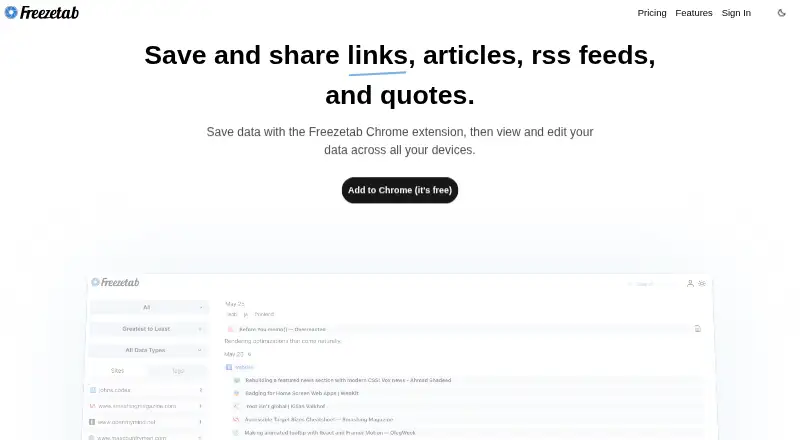
Freezetab saves links, articles, RSS and Atom feeds, and quotes from websites, then gives users ways to organize and find that saved material. Articles can be edited in a rich text editor, content can be highlighted, and full-text search is available. Filters for time period, tags, sites, and data type help narrow a collection. Freezetab is offered as a browser extension, on iOS, and on the web; an iOS or iPadOS shortcut can save links and quotes. The free extension supports offline use and can be used locally without logging in, with data stored on the user’s machine and no connection to Freezetab’s servers. Users can mark saved data private or enable privacy mode for new saves. Pro adds cloud backup, sync across browsers and devices, web access, saving links without the extension, and mobile link saving. Pro costs $2.99 per month after a 7-day free trial. Stripe handles billing information, and Freezetab says it does not store card numbers or security codes on its servers.
Who it suits
Freezetab suits people who save articles, links, feeds, or quotes and want search, highlighting, and filters to manage them. Its local offline option fits users who want to keep saved data on their own machine; Pro is for those who want cloud backup and syncing.
What it does well
- Saves links, articles, feeds, and quotes
- Full-text search and highlighting
- Filters by time, tags, sites, and data type
- Free extension supports local offline use
- Seven-day free trial for Pro
What to know first
- Cloud backup and syncing require Pro
- Pro costs $2.99 per month
- Hub contact details specify email support
Limits
The free offering is described as a local extension; cloud backup, syncing, web access, saving links without the extension, and mobile link saving are included with Pro at $2.99 a month. Pro is offered after a 7-day free trial.
Plans
| Plan | Billed and limits | Price |
|---|---|---|
| Free | Chrome extension · Local use without an internet connection · Save links, tabs, tab groups, articles, quotes, and feeds | On request |
| Freezetab Pro | $2.99 / month · Cloud backup · Sync across browsers and devices · Web access · Save links without extension · Mobile link saving | $2.99 a month |
As freezetab.com lists them, read 22 Sept 2026. The maker's own page has the final word.
Getting started
- Open https://freezetab.com/.
- Install the Freezetab browser extension for free use.
- Use the extension locally without logging in, including offline.
- Start the 7-day free trial of Freezetab Pro if you want its paid features.
- Choose Pro at $2.99 a month for cloud backup, syncing, web access, or mobile link saving.
Verdict
Freezetab combines collection tools with local use and privacy controls, while Pro adds cloud backup and cross-device sync. The free extension is a fit for local saving; Pro costs $2.99 per month after a 7-day trial.
Questions
Is Freezetab free?
Yes. Freezetab describes its extension as free, and it offers a 7-day free trial of Pro.
How much does Freezetab Pro cost?
Freezetab Pro costs $2.99 a month.
Which platforms does Freezetab support?
Freezetab lists an extension, iOS, and web access. Links and quotes can also be saved with an iOS or iPadOS shortcut.
Can I use Freezetab offline?
Yes. The Free plan supports local use without an internet connection, and the extension can be used without logging in.
What does Pro add?
Pro adds cloud backup, syncing across browsers and devices, web access, saving links without the extension, and mobile link saving.
Facts from Freezetab's own pages
- Articles
- Users can save articles and edit them with a rich text editor. · freezetab.com, 4 Oct 2026
- Browser extension
- The Chrome extension saves links and tab groups. · freezetab.com, 4 Oct 2026
- Cloud backup
- Pro backs up saved data to the cloud and syncs the extension across multiple browsers and devices. · freezetab.com, 4 Oct 2026
- Feeds
- Freezetab supports saving RSS and Atom feeds. · freezetab.com, 4 Oct 2026
- Filtering
- Saved content can be filtered by time period, tags, sites, and data type. · freezetab.com, 4 Oct 2026
- Free offering
- The site describes the Freezetab extension as free. · freezetab.com, 4 Oct 2026
- Free plan
- Yes · freezetab.com, 22 Sept 2026
- Full-text search
- Yes · freezetab.com, 22 Sept 2026
- Highlighting
- Yes · freezetab.com, 22 Sept 2026
- Local use
- The privacy policy says the extension can be used locally without logging in, with its data stored on the user's machine and no connection to Freezetab's servers. · freezetab.com, 4 Oct 2026
- Mobile shortcut
- The site says links and quotes can be saved using an iOS/iPadOS shortcut. · freezetab.com, 4 Oct 2026
- Offline access
- Yes · freezetab.com, 22 Sept 2026
- Payments
- The privacy policy says Stripe handles billing information and Freezetab does not store card numbers or security codes on its servers. · freezetab.com, 4 Oct 2026
- Privacy controls
- The privacy policy says users can mark saved data private so it is not sent to Freezetab’s servers, and can enable privacy mode for newly saved data. · freezetab.com, 4 Oct 2026
- Purpose
- Freezetab saves and shares links, articles, RSS feeds, and quotes. · freezetab.com, 4 Oct 2026
- Quotes
- Users can save quotes from websites. · freezetab.com, 4 Oct 2026
- Security
- The privacy policy says Freezetab uses HTTPS, firewalls, IP allowlists, virtual private networks, and periodic encrypted backups, among other security measures. · freezetab.com, 4 Oct 2026
- Paid from
- 2.99 · freezetab.com, 22 Sept 2026
- Support
- The Chrome Web Store listing gives [email protected] as the developer contact. · chromewebstore.google.com, 4 Oct 2026
- Trial
- Freezetab Pro is offered after a 7 day free trial. · freezetab.com, 4 Oct 2026
Where Freezetab stands on Freedom251
- Read-It-Later Apps#6 of 28
- Read-later apps#18 of 28