Freedom251 › Accounts Payable Automation Software

Ramp Bill Pay
What Ramp Bill Pay is
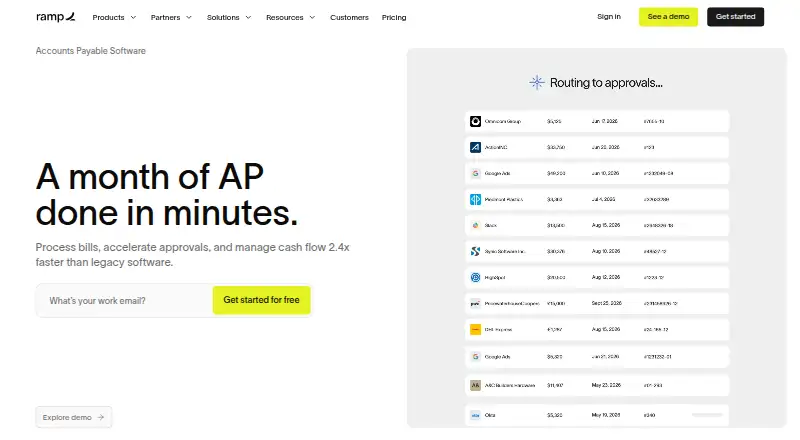
Ramp Bill Pay is an accounts payable tool for handling invoices, approvals, vendors and payments. Ramp says its OCR captures invoice details and line items with 99% accuracy, and it can match those line items against purchase orders using two-way or three-way matching. Bills can be routed through configurable, multi-stage approval flows with defined roles and permissions. Payments are available by card, ACH, check or wire, including international payments; check payments are mailed by Ramp. The service integrates with accounting and ERP products including QuickBooks, Xero, Sage Intacct, NetSuite and Microsoft Business Central. It is available on Android, iOS and web. The Free plan includes the software with no monthly fee, though payment fees vary and certain ERP integrations require Ramp Plus. Plus is listed at $15 a month and adds advanced accounts-payable features; annual billing is listed with a 20% saving. Ramp lists 24/7 chat support and says it undergoes annual SOC 2 Type II audits and complies with PCI standards.
Who it suits
Ramp describes Bill Pay for small and growing businesses, mid-sized companies and multi-entity organizations. It may suit teams that need invoice matching, approval workflows and several vendor payment methods.
What it does well
- OCR captures invoice details with 99% accuracy, Ramp says.
- Supports two-way and three-way purchase-order matching.
- Offers card, ACH, check and wire payments.
- Available on Android, iOS and web.
- Free plan has no monthly software fee.
What to know first
- Payment fees vary by method.
- Certain ERP integrations require Ramp Plus.
- Does not support Zelle payments.
- Ramp mails checks; customers cannot print them.
Limits
The Free plan has no monthly software fee, but payment fees vary by method and certain ERP integrations require Ramp Plus. Plus is listed at $15 a month and includes advanced AP features; Enterprise uses custom pricing.
Plans
| Plan | Billed and limits | Price |
|---|---|---|
| Free | Ramp Bill Pay included with no monthly software fee · payment fees vary by method · certain ERP integrations require Ramp Plus | Free |
| Plus | Save 20% with annual billing · Advanced AP features include auto-coded line items, AI-driven approval recommendations, automated batch payments and payment release approvals | $15 a month |
| Enterprise | Annual billing · Custom pricing · contact sales | On request |
As ramp.com lists them, read 2 Oct 2026. The maker's own page has the final word.
Getting started
- Open the Ramp Bill Pay website.
- Choose the Free plan or review Plus and Enterprise options.
- Start the listed 30-day trial if it fits your plan choice.
- Use the web service or access Ramp Bill Pay on Android or iOS.
Overview
Ramp Bill Pay brings invoice handling, purchase-order checks, approvals, supplier management and payments into one accounts-payable workflow. It is a strong fit for businesses that need configurable controls and several ways to pay; the free plan lowers the barrier to entry, though payment fees and ERP requirements can affect its economics.
Ramp was founded in 2019. Its Bill Pay service supports card, ACH, check and wire payments, including international payments. It does not support Zelle, and customers cannot print checks themselves: Ramp mails them.
For a wider comparison of this category, see Accounts Payable Automation Software.
Key features
Invoice processing and approvals
Ramp says its OCR captures invoice details and line items with 99% accuracy. That can reduce manual entry, while two-way and three-way matching checks invoice lines against purchase orders before payment. Automatic routing and configurable, multi-stage approval flows, roles and permissions give teams room to reflect their own sign-off responsibilities.
Plus adds auto-coded line items, AI-driven approval recommendations, automated batch payments and payment release approvals. These are useful extensions for teams handling larger payment volumes or seeking tighter release controls, but the Free plan does not include those listed advanced AP capabilities.
Payments and integrations
The range of card, ACH, check and wire options, including international payments, gives businesses flexibility across supplier needs. The mailed-check arrangement is less convenient for customers who need to print checks themselves, and the absence of Zelle may rule Ramp out for a business built around that payment method.
Accounting connections include QuickBooks Online and Desktop, Xero, Sage Intacct, NetSuite, Microsoft Business Central and Acumatica; Ramp also names Zoho Books and Microsoft Dynamics 365 Business Central among its accounting integrations. The Free plan has no monthly software fee, but certain ERP integrations require Ramp Plus, so businesses should weigh the desired connection against the upgrade cost.
Security and support
Ramp says it undergoes annual SOC 2 Type II audits and complies with PCI security standards. It supports SSO through Okta, Google and Microsoft Azure, and says MFA is available for every user. Ramp lists 24/7 chat support in its plan comparison. Plus includes 24/7 phone support for travel bookings, a narrower benefit than general-purpose AP phone support.
Pricing
Ramp uses a freemium model, with a 30-day trial and paid plans from $15/user/mo. The plan terms give more detail on the software fee and billing options:
| Plan | Price | What it means |
|---|---|---|
| Free | free | Ramp Bill Pay is included with no monthly software fee. Payment fees vary by method, and certain ERP integrations require Ramp Plus. It suits businesses that want the core AP workflow without a monthly software charge, provided the payment costs and integration needs fit. |
| Plus | $15 a month | Advanced AP features include auto-coded line items, AI-driven approval recommendations, automated batch payments and payment release approvals. Ramp says annual billing saves 20%. This is the step up for teams that need those capabilities; the published plan price is per month, while the pricing note expresses the paid starting price per user per month. |
| Enterprise | Custom pricing | Annual billing; contact sales. This suits organizations seeking an enterprise arrangement, but there is no fixed published price to compare with the other plans. |
The Free plan is not necessarily fee-free in operation: payment fees depend on method, and access to certain ERP integrations means upgrading. Plus is the relevant plan when its advanced AP tools are needed, while Enterprise requires a sales conversation and annual billing.
Platforms
Ramp Bill Pay is available on web, Android and iOS, giving users access beyond desktop. The listed platforms make it a practical option for teams that need mobile access as well as browser-based work.
Who it's for
Ramp describes Bill Pay as suitable for small and growing businesses, mid-sized companies and multi-entity organizations. Its configurable approvals, matching and multiple payment methods make it most compelling for teams that want invoice controls and payment execution together. Smaller businesses can start without a monthly software fee, while growing teams may find Plus worthwhile when automated coding, batch payments or release approvals matter. Businesses that rely on Zelle, need to print their own checks or require an ERP connection gated behind Plus should consider those constraints before choosing it.
Pros and cons
- Pros: Invoice capture, purchase-order matching, approvals and supplier payments sit in one service, reducing the need to separate those AP steps across tools.
- Pros: Two-way and three-way matching plus configurable multi-stage approvals provide useful checks for teams with formal purchasing controls.
- Pros: Card, ACH, check and wire payments, including international payments, cover a broad range of supplier payment needs.
- Pros: A Free plan with no monthly software fee lets businesses begin using Bill Pay without a subscription charge.
- Cons: Payment fees vary by method, so the absence of a monthly fee does not mean every payment is free.
- Cons: Certain ERP integrations require Ramp Plus, which can make the lower-cost plan unsuitable for companies dependent on those connections.
- Cons: Ramp does not support Zelle, and its check payments are mailed rather than printed by the customer.
Alternatives
For a no-subscription option, Rho has a free plan with $0 subscription, per-user and platform fees, though foreign-currency transfers carry a 1% fee. Nanonets Accounts Payable Automation may suit teams seeking a usage-based option: its Starter plan supports up to 3 users, while Starter paid usage is $100 a month for 100 credits. Settle offers a free Launch plan with unlimited seats and transactions, with international wires at $15.00; its Accelerate plan is $199 a month, billed monthly.
For other approaches, consider Coupa Accounts Payable, PairSoft AP Automation, AppZen or AvidXchange. BILL Accounts Payable is another paid option with no free plan, a free trial and an Essentials plan at $49 a month, billed monthly.
Verdict
Ramp Bill Pay is a good choice for businesses that want invoice capture, matching, approvals and several payment methods in a single AP service, especially if its Free plan covers their workflow. Its main trade-offs are method-dependent payment fees, Plus-gated ERP integrations and the inability to use Zelle or print checks. Choose Ramp when those controls and payment options outweigh the constraints; look elsewhere if your required payment method or accounting connection pushes you into an unsuitable plan.
Verdict
Ramp Bill Pay combines invoice capture, matching, approvals and multiple payment methods in one accounts-payable service. The Free plan has no monthly software fee, but payment fees and some integration requirements still apply.
Questions
Is Ramp Bill Pay free?
The Free plan includes Ramp Bill Pay with no monthly software fee. Payment fees vary by method, and certain ERP integrations require Ramp Plus.
How much does Plus cost?
Plus is listed at $15 a month. Annual billing is listed with a 20% saving.
What payment methods does it support?
Bill Pay supports card, ACH, check, and wire payments, including international payments. Ramp mails check payments, and Zelle is not supported.
Which accounting systems does it integrate with?
Listed integrations include QuickBooks Online and Desktop, Xero, Sage Intacct, NetSuite, Microsoft Business Central, Acumatica, and Zoho Books.
Which devices can I use?
Ramp Bill Pay is available on Android, iOS, and web.
What login protections are available?
Ramp supports SSO for Okta, Google, and Microsoft Azure, and says MFA is available for every user.
Facts from Ramp Bill Pay's own pages
- Approvals
- Ramp automatically routes bills to approvers and supports configurable approval flows, roles, and permissions. · ramp.com, 2 Oct 2026
- Company location
- Ramp Business Corporation lists its address as 28 West 23rd Street, Floor 2, New York, NY 10010. · ramp.com, 2 Oct 2026
- Founded
- 2019 · ramp.com, 23 Sept 2026
- Integrations
- Ramp lists accounting integrations including NetSuite, Sage Intacct, Zoho Books, Xero, QuickBooks, and Microsoft Dynamics 365 Business Central. · ramp.com, 2 Oct 2026
- Intended users
- Ramp describes Bill Pay as suitable for small businesses, growing companies, mid-sized companies, and multi-entity organizations. · ramp.com, 2 Oct 2026
- Invoice capture
- Ramp says its OCR captures invoice details and line items with 99% accuracy. · ramp.com, 2 Oct 2026
- Limits
- Ramp does not support Zelle payments, and Bill Pay check payments are mailed by Ramp rather than printed by the customer. · support.ramp.com, 2 Oct 2026
- Login protection
- Ramp supports SSO for Okta, Google, and Microsoft Azure and says MFA is available for every user. · ramp.com, 2 Oct 2026
- Matching
- Ramp checks invoice line items against purchase orders using two-way and three-way matching. · ramp.com, 2 Oct 2026
- Payment methods
- Bill Pay supports card, ACH, check, and wire payments, including international payments. · ramp.com, 2 Oct 2026
- Product
- Ramp Bill Pay is an AI-powered accounts payable solution for invoice processing, approvals, vendor management, and payments. · ramp.com, 2 Oct 2026
- Security
- Ramp says it undergoes annual SOC 2 Type II audits and complies with PCI security standards. · ramp.com, 2 Oct 2026
- Support
- Ramp lists 24/7 chat support in its plan comparison; Plus includes 24/7 phone support for travel bookings. · ramp.com, 2 Oct 2026
Where Ramp Bill Pay stands on Freedom251
- Accounts Payable Automation Software#4 of 32
- Invoice Automation#4 of 25