Freedom251 › Audio Mixing Software

RØDE UNIFY
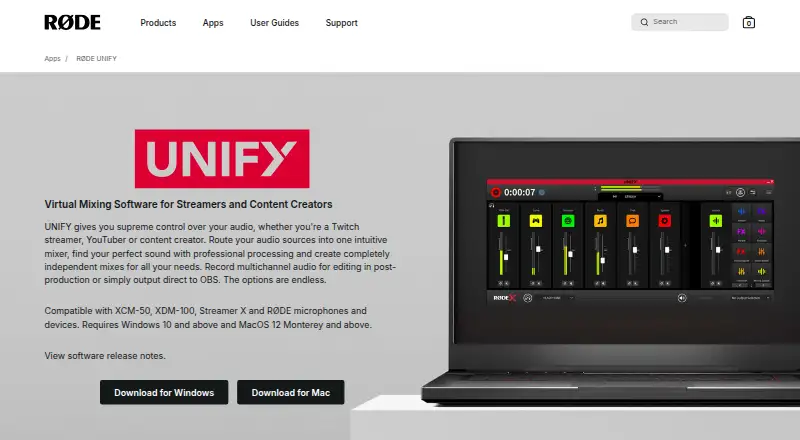
What RØDE UNIFY is
RØDE UNIFY is free virtual mixing software for streamers and content creators using Windows or macOS. It routes, mixes, processes, and records audio, combining up to four microphones with six virtual audio devices, such as Spotify, Discord, and gameplay. Independent sub-mixes can feed different outputs, and UNIFY can send audio directly to OBS. It records each track as a separate audio file for multichannel post-production. Processing tools include a compressor, noise gate, high-pass filters, and APHEX Aural Exciter and Big Bottom processing. Advanced DSP processing is available only with RØDE USB-C microphones. With compatible RØDE microphones, processing can run on a microphone’s DSP chip to reduce CPU load and provide zero-latency headphone monitoring. The app requires Windows 10 or later or macOS 12 Monterey or later. RØDE lists compatibility with a range of its microphones and wireless products. Its support section offers setup, routing, sub-mix, recording, and troubleshooting articles, plus a contact option.
Who it suits
UNIFY suits Twitch streamers, YouTubers, and other content creators who want to mix microphones and virtual audio sources. It is also aimed at users with compatible RØDE equipment who need its advanced DSP processing.
What it does well
- Mixes up to four microphones and six virtual devices.
- Provides independent sub-mixes for different outputs.
- Records each track as a separate audio file.
- Can send audio directly to OBS.
- Free on Windows and macOS.
What to know first
- Advanced DSP requires RØDE USB-C microphones.
- Requires Windows 10 or later or macOS 12 Monterey or later.
- Zero-latency monitoring requires compatible RØDE microphones.
Limits
The free plan is described as free UNIFY streaming software for compatible RØDE X microphones. Advanced DSP processing is available with RØDE USB-C microphones only.
Plans
| Plan | Billed and limits | Price |
|---|---|---|
| Free | free UNIFY streaming software · compatible with RØDE X microphones | Free |
| Free with RØDE X microphone | Free with RØDE X microphones · RØDE X microphone required for included licence · Windows/macOS desktop software | Free |
| Annual subscription | AU$69.99 (U$45.31) per year · For users without a RØDE X microphone · historical price reported November 2022 | $45.31 a year |
| Monthly subscription | AU$7.99 (U$5.17) per month · For users without a RØDE X microphone · historical price reported November 2022 | $5.17 a month |
As rode.com lists them, read 1 Oct 2026. The maker's own page has the final word.
Getting started
- Visit the RØDE UNIFY website.
- Choose the Windows or macOS version for your operating system.
- Use Windows 10 or later, or macOS 12 Monterey or later.
- Connect compatible RØDE microphones if using their DSP processing or headphone monitoring.
- Set up microphone and virtual audio sources, then configure routing or sub-mixes.
Overview
RØDE UNIFY is a virtual audio mixer for streamers and creators who need to manage microphone and computer audio together. It suits people building a Windows or Mac streaming workflow, especially those with a compatible RØDE microphone; its main compromise is that the most advanced processing is hardware-dependent.
The mixer handles up to four microphones and six virtual audio devices, such as chat, music and gameplay. Independent mixes, direct OBS output and separate-track recording make it more useful for production than a simple volume-control utility. Without compatible RØDE hardware, however, its advanced DSP and zero-latency monitoring advantages are out of reach.
Key features
Routing, output mixes and recording
UNIFY can route and mix microphone inputs alongside virtual sources, then send audio directly to OBS. Independent sub-mixes let creators prepare different balances for separate outputs instead of forcing every destination to use the same blend. Recording each track to its own audio file is valuable for editing and multichannel post-production, though it adds less for creators who only need a finished live mix.
Processing and monitoring
The processing toolkit includes a compressor, noise gate, high-pass filters, noise reduction and a three-band equalizer, alongside APHEX Aural Exciter and Big Bottom processing. That breadth can help shape voice audio within the mixer. Advanced DSP processing is limited to compatible RØDE USB-C microphones. With compatible microphones, processing can run on the microphone’s DSP chip, reducing computer CPU load and enabling zero-latency headphone monitoring. Buyers should treat microphone compatibility as a deciding requirement, not a minor extra.
Compatibility and support
RØDE lists support for NT-USB Mini, NT-USB+, NT1 5th Gen, VideoMic NTG, AI-Micro, VideoMic GO II, Wireless GO II, Wireless ME, Wireless PRO, PodMic USB, XDM-100 and XCM-50. Setup requires Windows 10 or later, or macOS 12 Monterey or later. RØDE provides setup, routing, sub-mix, recording and troubleshooting articles, plus a contact option.
Pricing
UNIFY is free: its Free plan costs nothing and includes the free UNIFY streaming software for compatible RØDE X microphones. There are no paid tiers to weigh against it. The important qualification is hardware: the plan’s stated compatibility is for RØDE X microphones, while advanced DSP is limited to compatible RØDE USB-C microphones. Check that your microphone is supported before choosing UNIFY for those capabilities.
Platforms
UNIFY runs on Windows and macOS, with minimum requirements of Windows 10 and macOS 12 Monterey. It is not a fit for a Linux-only setup.
Who it's for
UNIFY is best for Twitch streamers, YouTubers and other creators who combine several audio sources, want distinct mixes for different outputs, or need separate tracks for editing after a session. It is particularly well matched to compatible RØDE microphone owners who want processing and zero-latency monitoring within the same workflow. If you need advanced DSP but do not use compatible RØDE hardware, its strongest advantage does not apply.
Pros and cons
- Pros: Free software combines multi-source mixing, independent output sub-mixes, direct OBS output and separate-track recording, reducing the need to split those jobs across tools.
- Pros: Compatible RØDE microphones can handle processing on their DSP chip, lowering CPU load and enabling zero-latency headphone monitoring.
- Cons: Advanced DSP processing depends on compatible RØDE USB-C microphones, limiting its appeal as a hardware-neutral processing choice.
- Cons: Windows 10 or later and macOS 12 or later requirements rule out older systems and Linux.
Alternatives
Elgato Wave Link is a strong alternative for Windows and Mac users who want free mixing software that works with any microphone or audio interface and has no subscription or feature gates. EasyEffects suits Linux users instead, provided they have the PipeWire audio server; some effects also require separately installed plugin packages.
eqMac is a macOS-only freemium option for readers who prefer a free tier with community support and no Pro features. FxSound is a free Windows option for readers looking for software in that platform’s audio-enhancement category. NVIDIA Broadcast is another Windows choice for AI audio and video effects, but requires an RTX PC or workstation.
NVIDIA ShadowPlay is a free Windows alternative for readers whose priority is its NVIDIA App workflow and who meet the GeForce 551.52 driver or later and supported-GPU requirements. SteelSeries Moments is another free Windows alternative. Buddi is a free budgeting application, not an audio-mixing substitute.
Browse more options in Audio Mixing Software or Audio Enhancement Software.
Verdict
Choose UNIFY if you want a free Windows or Mac mixer for a multi-source streaming setup, particularly when you use compatible RØDE microphones and will benefit from hardware DSP, independent mixes and separate-track recording. Look elsewhere if you need advanced processing without RØDE hardware, or if you use Linux.
Verdict
UNIFY combines multichannel mixing, separate-track recording, and direct OBS output for creators. Its advanced DSP and zero-latency monitoring depend on compatible RØDE microphones.
Questions
How much does RØDE UNIFY cost?
The Free plan costs nothing.
Which operating systems does UNIFY support?
It supports Windows and macOS. It requires Windows 10 or later or macOS 12 Monterey or later.
Can UNIFY send audio to OBS?
Yes. It can output directly to OBS.
Does UNIFY record separate tracks?
Yes. It records each track as a separate audio file for multichannel post-production.
Which microphones are compatible?
RØDE lists compatibility with NT-USB Mini, NT-USB+, NT1 5th Gen, VideoMic NTG, AI-Micro, VideoMic GO II, Wireless GO II, Wireless ME, Wireless PRO, PodMic USB, XDM-100 and XCM-50.
When is DSP processing available?
Advanced DSP processing is available with RØDE USB-C microphones. Compatible RØDE microphones can run processing on their DSP chip for reduced CPU load and zero-latency headphone monitoring.
Facts from RØDE UNIFY's own pages
- API and SDK availability
- The official support index lists user-operation articles but does not list a public API, SDK or developer documentation. · help.rode.com, 15 Oct 2026
- Audio processing
- Processing controls include a compressor, noise gate, high-pass filtering and APHEX Aural Exciter and Big Bottom effects. · rode.com, 15 Oct 2026
- Audio routing
- The support guide describes assigning applications to named virtual channels and sending the Stream Input device to streaming software. · rode.com, 15 Oct 2026
- Audio sources
- UNIFY can mix up to four microphones and six virtual audio devices, including sources such as Spotify, Discord and gameplay. · rode.com, 1 Oct 2026
- Company founding
- LinkedIn lists RØDE as founded in 1967. · linkedin.com, 15 Oct 2026
- Company headquarters and size
- LinkedIn lists headquarters in Silverwater, New South Wales and a company size of 201–500 employees. · linkedin.com, 15 Oct 2026
- Company ownership
- LinkedIn describes RØDE as wholly Australian-owned, with product design and most manufacturing in Sydney. · linkedin.com, 15 Oct 2026
- Company status
- LinkedIn identifies RØDE as privately held and operating in computers and electronics manufacturing. · linkedin.com, 15 Oct 2026
- Compatibility
- RØDE lists compatibility with NT-USB Mini, NT-USB+, NT1 5th Gen, VideoMic NTG, AI-Micro, VideoMic GO II, Wireless GO II, Wireless ME, Wireless PRO, PodMic USB, XDM-100 and XCM-50. · help.rode.com, 1 Oct 2026
- Current release
- RØDE's release notes list UNIFY version 1.3.47, released January 12, 2026. · update.rode.com, 15 Oct 2026
- Current version
- RØDE's software table lists UNIFY version 1.3.47. · help.rode.com, 1 Oct 2026
- Documented support
- The support index includes articles for virtual-channel setup, OBS and Discord, submixes, output devices, recording, crash troubleshooting and uninstalling. · help.rode.com, 15 Oct 2026
- DSP limitation
- RØDE states that advanced DSP is available only with its USB-C microphones. · rode.com, 15 Oct 2026
- Founded
- 1990 · rode.com, 28 Sept 2026
- Hardware DSP
- Compatible RØDE microphones can perform processing on an onboard DSP chip, reducing computer load and enabling zero-latency headphone monitoring. · rode.com, 15 Oct 2026
- Headquarters
- Sydney, Australia · rode.com, 28 Sept 2026
- Independent mixes
- UNIFY provides independent sub-mixes for different outputs. · rode.com, 1 Oct 2026
- Independent submixes
- Users can create separate mixes for outputs such as a stream, headphones and chat. · rode.com, 15 Oct 2026
- Integrations
- UNIFY can output directly to OBS and supports audio sources such as Spotify, Discord and gameplay. · rode.com, 1 Oct 2026
- Integration with OBS and Discord
- RØDE provides a dedicated support article explaining UNIFY use with OBS and Discord. · help.rode.com, 15 Oct 2026
- Limit: ecosystem confusion
- Another Reddit reviewer reported unclear responsibility between RØDE Central, UNIFY and Connect, competing virtual devices and difficulty getting UNIFY to connect to a microphone. · reddit.com, 15 Oct 2026
- Limit: noise suppression
- A Reddit user using an XDM-100 said UNIFY felt cluttered, its noise suppression caused problems and keyboard noise was captured. · reddit.com, 15 Oct 2026
- Limit: settings reset
- A Reddit user reported Windows setups sometimes reverted to factory channel order, mute states and levels; RØDE replied that third-party software can prevent the settings file from being saved. · reddit.com, 15 Oct 2026
- Limit: Streamer X conflicts
- A Reddit user said UNIFY created sound-pad conflicts with the RØDECaster app and made Streamer X Transfer Mode unusable for that workflow. · reddit.com, 15 Oct 2026
Where RØDE UNIFY stands on Freedom251
- Audio Mixing Software#11 of 28
- Audio Enhancement Software#14 of 30