Freedom251 › Parental control apps

Qustodio
by Qustodio
What Qustodio is
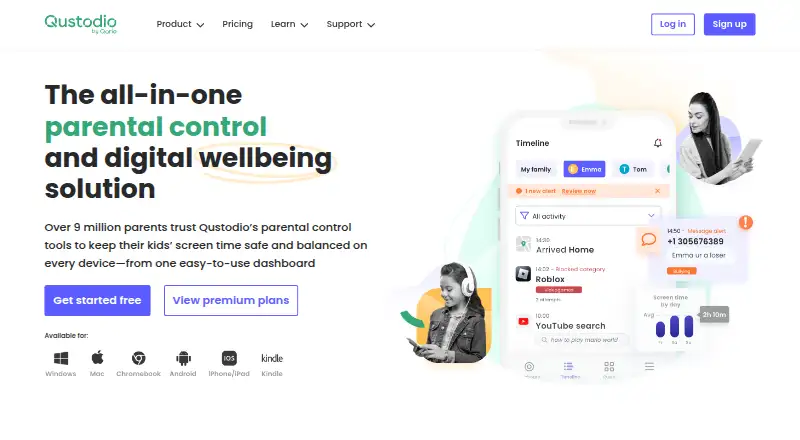
Qustodio is parental-control software for managing children’s device use across Windows, Android, iOS, Mac, and Kindle. It can filter content, block or limit apps and websites, track activity, and set screen-time schedules. Families can apply time limits, schedule breaks, pause internet access, and create screen-free routines. Activity monitoring covers browsing, social media, location, and more in real time; activity reports and location tracking are also listed. Social monitoring includes WhatsApp, Instagram, and Line, while the Premium comparison also lists TikTok, Snapchat, and X chat alerts. Some features have platform requirements: calls and messages monitoring on iOS requires a Windows or Mac computer, while the panic button and certain social alerts are Android-only. The free version protects one device with basic features. Basic costs $72.94 a year and covers up to five devices; Complete costs $104.95 a year and covers unlimited family devices. Qustodio offers a 30-day money-back guarantee and invites free-account users to try Premium features. The maker is based in Barcelona, Spain, and was founded in 2010.
Who it suits
Qustodio suits families who want to manage screen time, app and website access, and activity across children’s devices. Check platform requirements if calls, messages, or Android-only alerts matter to you.
What it does well
- Free version protects one device
- Includes content filtering and app blocking
- Supports screen-time schedules and internet pauses
- Offers location tracking and activity reports
- Complete covers unlimited family devices
What to know first
- Free version is limited to one device
- Basic costs $72.94 a year
- iOS calls and messages monitoring requires a computer
- Panic button and certain alerts are Android-only
Limits
The free plan protects one device with basic features. Basic covers up to five devices; Complete has no device limit. The free-account Premium feature trial is offered, and Qustodio provides a 30-day money-back guarantee.
Plans
| Plan | Billed and limits | Price |
|---|---|---|
| Basic | billed annually · 5 devices | $72.94 a year |
| Complete | billed annually · Unlimited family devices | $104.95 a year |
| Free | — | On request |
As qustodio.com lists them, read 20 Sept 2026. The maker's own page has the final word.
Getting started
- Visit the Qustodio website.
- Create a free account to access the Premium feature trial.
- Choose the free plan, Basic, or Complete based on device coverage needs.
- Use Qustodio on Windows, Android, iOS, Mac, or Kindle.
Overview
Qustodio is a parental-control service for families who want to combine device rules with activity and location monitoring. It suits parents seeking more than a screen-time timer, particularly when they need to cover several platforms. Its broad controls are useful, but the right plan depends on how many devices a family needs to protect.
Made by Qustodio, founded in 2010 and headquartered in Barcelona, the service has a free tier and two annual paid plans. The free option is a limited way to start; families with multiple devices will need a paid plan.
For a wider category comparison, see our Parental control apps list.
Key features
Content and time controls
Qustodio can block or limit inappropriate websites and apps, set time limits, schedule breaks, pause internet access, and create screen-free routines. That range gives parents more ways to shape daily use than a single time allowance. It is a strong fit for families who want both content restrictions and planned downtime; those who need only a basic timer may find the broader controls unnecessary.
Activity and location monitoring
Monitoring covers browsing, social media, and location in real time, alongside other activity. This gives parents visibility into both device use and location, though some features are platform-dependent. Social monitoring covers WhatsApp, Instagram, and Line; the Premium comparison also includes TikTok, Snapchat, and X chat alerts.
Platform-specific caveats
Calls and messages monitoring on iOS requires access to a Windows or Mac computer. The panic button and certain Instagram, TikTok, Snapchat, and X alerts are Android-only. These constraints matter for households mixing devices: check that the features you expect are supported on each child’s device before choosing Qustodio.
Pricing
Qustodio is freemium. The free plan protects one device with basic protection features, making it a narrow starting point rather than a practical household-wide option.
- Basic: $72.94 a year, billed annually, for up to 5 devices. It suits a smaller household that can stay within that device cap.
- Complete: $104.95 a year, billed annually, for unlimited family devices. The higher price is easier to justify for larger households or families who do not want to manage a five-device ceiling.
Qustodio invites new users to create a free account and try Premium features; a 30-day money-back guarantee also applies. Premium purchasers can use code SMART10 for 10% off Premium. Payment methods include Visa, Mastercard, American Express, PayPal, Google Pay, and Apple Pay, depending on location. Support includes email, a Help Center, and Care Plus upon request.
Platforms
Qustodio supports Windows, Android, iOS, Mac, and Kindle. Its coverage across desktop and mobile systems is a practical advantage for families with mixed devices, but the iOS computer requirement for calls and messages monitoring and Android-only alerts limit feature parity. Confirm that a desired feature works on the specific platform in use.
Who it's for
Qustodio is best suited to parents who want a combination of web and app controls, scheduled screen-time rules, activity reports, and location tracking across multiple device types. Basic is a sensible fit for up to five devices; Complete is the better match when the household needs unlimited coverage. The one-device free plan can serve as an introduction, but it is not suited to protecting a larger family’s devices.
Pros and cons
- Pros: Combines content filtering, app blocking, time controls, reports, and location tracking, so parents can manage several aspects of device use in one service.
- Pros: Supports Windows, Android, iOS, Mac, and Kindle, with Complete removing the device-count ceiling.
- Cons: Free protection is limited to one device, while Basic caps coverage at five; larger households must pay for Complete.
- Cons: Some monitoring is platform-dependent, including the computer requirement for iOS calls and messages monitoring and Android-only alerts.
Alternatives
OurPact is worth considering for an Android or iOS household that wants a free tier for one child device, with five manual blocks per month and one automated block schedule.
Kaspersky Safe Kids may suit families looking for a free option with basic parental-control features and unlimited use across web, desktop, and mobile platforms.
Safe Lagoon is an Android-only alternative with free web filtering; its Premium plan is $6.99 a month, billed monthly, and includes five profiles.
Kids Dashboard is another Android option, with a free plan for three devices and a paid plan for ten devices at £5 a year.
KidSafe360 may suit Android users who want a free one-device option with latest-record caps, sync intervals of two or more hours, and a daily photo limit.
iKeyMonitor offers a free basic plan covering call history, SMS, GPS locations, geofencing, and contacts across a wider set of platforms.
Mobicip is a cross-platform alternative with a free trial and a Basic plan for two managed devices; its Lite plan is $2.99 a month, billed annually.
Wondershare FamiSafe may suit families seeking a paid cross-platform option with a three-day free trial and a yearly plan for ten devices at $59.99 a year.
Verdict
Choose Qustodio if you want web and app controls, flexible screen-time rules, activity monitoring, and location tracking across a mix of device platforms. Basic covers up to five devices, while Complete is the plan for unlimited family coverage. Look elsewhere if a one-device free tier is not enough and the paid device limits or platform-specific monitoring constraints do not fit your household.
Verdict
Qustodio combines content controls, screen-time tools, and activity monitoring across several device platforms. Compare the device coverage and platform requirements before choosing a plan.
Questions
Is there a free plan?
Yes. The free plan provides basic protection for one device.
How much do the paid plans cost?
Basic costs $72.94 per year and Complete costs $104.95 per year.
Which devices does Qustodio support?
It lists Windows, Android, iOS, Mac, and Kindle.
Can I try Premium features?
Qustodio invites users to create a free account and try Premium features.
How many devices do the paid plans cover?
Basic protects up to five devices. Complete covers unlimited family devices.
What payment methods are available?
Visa, Mastercard, American Express, PayPal, Google Pay, and Apple Pay are listed, depending on location.
Facts from Qustodio's own pages
- Activity monitoring
- Tracks browsing, social media, location, and more in real time. · qustodio.com, 27 Sept 2026
- Activity reports
- Yes · qustodio.com, 20 Sept 2026
- Android-only features
- Panic button and certain Instagram, TikTok, Snapchat, and X alerts are Android-only. · qustodio.com, 27 Sept 2026
- App blocking
- Yes · qustodio.com, 20 Sept 2026
- Calls and messages
- Calls and messages monitoring for iOS requires a Windows or Mac computer. · qustodio.com, 27 Sept 2026
- Company locations
- Qustodio lists offices in Barcelona, Spain, and Charlotte, USA. · qustodio.com, 27 Sept 2026
- Company status
- Qustodio is a registered trademark of Qustodio LLC. · qustodio.com, 27 Sept 2026
- Complete coverage
- Complete has no limit on the number of devices protected. · qustodio.com, 27 Sept 2026
- Content controls
- Blocks or limits inappropriate apps and websites. · qustodio.com, 27 Sept 2026
- Content filtering
- Yes · qustodio.com, 20 Sept 2026
- Device coverage
- Basic protects up to 5 devices; Complete protects unlimited devices. · qustodio.com, 27 Sept 2026
- Device limit
- 5 · qustodio.com, 20 Sept 2026
- Founded
- 2010 · qustodio.com, 23 Sept 2026
- Free plan
- Yes · qustodio.com, 20 Sept 2026
- Free plan limit
- The free version protects one device and includes basic protection features. · qustodio.com, 27 Sept 2026
- Headquarters
- Barcelona, Spain · qustodio.com, 23 Sept 2026
- Location tracking
- Yes · qustodio.com, 20 Sept 2026
- Payment methods
- Visa, Mastercard, American Express, PayPal, Google Pay, and Apple Pay, depending on location. · qustodio.com, 27 Sept 2026
- Premium discount
- 10% off Premium with code SMART10. · qustodio.com, 27 Sept 2026
- Industry recognition
- The site lists Mom’s Choice Awards 2025, PTPA winner status, and Trusted Partner of Internet Matters 2025. · qustodio.com, 27 Sept 2026
- Refund policy
- Qustodio offers a 30-day money-back guarantee. · qustodio.com, 27 Sept 2026
- Screen-time schedules
- Yes · qustodio.com, 20 Sept 2026
- Screen-time tools
- Provides time limits, scheduled breaks, internet pauses, and screen-free routines. · qustodio.com, 27 Sept 2026
- Social integrations
- Social monitoring covers WhatsApp, Instagram, and Line; Premium comparison also lists TikTok, Snapchat, and X chat alerts. · qustodio.com, 27 Sept 2026
Where Qustodio stands on Freedom251
- Parental control apps#1 of 107