Freedom251 › Parental control apps
KidSafe360
What KidSafe360 is
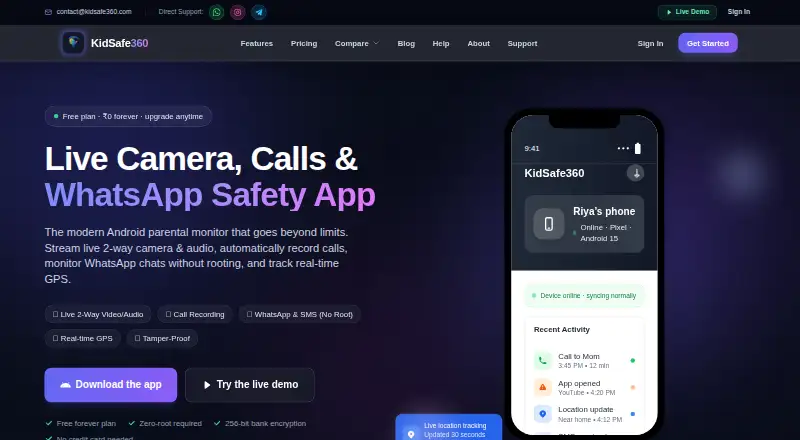
KidSafe360 pairs a child’s Android app with a web dashboard for parents. The dashboard offers real-time GPS location, location history, and geofencing alerts for selected safe zones. Parents can set screen-time limits and schedules, block apps and websites, and receive safety alerts. The feature list also includes contacts, call history, SMS and app messages, photos, media, browser history, app usage, and secure cloud backup; call recordings are listed as a Premium feature. The child app is distributed as an APK from the site rather than through the Play Store, and the installation guide lists a 17.6 MB download. The maker says its full monitoring app is for Android, with iPhone support limited by Apple’s restrictions on this kind of app. The free plan costs ₹0 /forever and covers one device, the latest 20 records per data type, sync intervals of two hours or longer, and 10 photos per day. Premium plans are single up-front payments: ₹499 total for one month, ₹1,199 total for three months, ₹1,999 total for six months, or ₹2,999 total for twelve months. Premium includes unlimited devices and records, full history, real-time sync, screenshots and file access, CSV export, priority support, and no ads. The maker says data is encrypted in transit, stored securely, and not shared with third parties.
Who it suits
KidSafe360 is aimed at parents or guardians managing child devices, with the maker advising use on devices they own or manage and that the child is informed. Its described full monitoring features are for Android.
What it does well
- Free plan is available indefinitely.
- Includes screen-time schedules and app blocking.
- Dashboard provides GPS history and geofencing alerts.
- Premium includes unlimited records and full history.
- Premium includes CSV export and priority support.
What to know first
- Free plan covers one device.
- Free plan limits records and photo uploads.
- Child app is an APK, not on the Play Store.
- Full monitoring app is for Android.
Limits
The free plan covers one device, shows the latest 20 records per data type, syncs at intervals of two hours or longer, and allows 10 photos per day. Premium plans include unlimited devices and records and full history. Call recordings are listed as a Premium feature.
Plans
| Plan | Billed and limits | Price |
|---|---|---|
| Free | ₹0 /forever · 1 device · Latest 20 records per data type · 2+ hour sync intervals · 10 photos per day · Email support | Free |
| Premium - 1 Month | ₹499 total; single up-front payment · Unlimited devices · Unlimited records and full history | ₹499 a month |
| Premium - 3 Months | ₹1,199 total; single up-front payment; save 20% · Unlimited devices · Unlimited records and full history | ₹400 a month |
| Premium - 6 Months | ₹1,999 total; single up-front payment; save 33% · Unlimited devices · Unlimited records and full history | ₹333 a month |
| Premium - 12 Months | ₹2,999 total; single up-front payment; save 50% · Unlimited devices · Unlimited records and full history | ₹2,999 a year |
| Premium — 12 Months | ₹2,999 total · save 50% · Unlimited devices · Unlimited records & full history · Real-time sync · Screenshots & file access · Data export (CSV) · Priority support · No ads | ₹2,999 a year |
| Premium — 6 Months | ₹1,999 total · save 33% · Unlimited devices · Unlimited records & full history · Real-time sync · Screenshots & file access · Data export (CSV) · Priority support · No ads | ₹333 a month |
| Premium — 3 Months | ₹1,199 total · save 20% · Unlimited devices · Unlimited records & full history · Real-time sync · Screenshots & file access · Data export (CSV) · Priority support · No ads | ₹400 a month |
The first 8 of 9 plans, as kidsafe360.com lists them, read 7 Oct 2026. The maker's own page has the final word. Every plan
Getting started
- Visit https://www.kidsafe360.com/.
- Choose the free plan or a Premium term.
- Download the child app APK from the website; the installation guide lists a 17.6 MB download.
- Install the child app on the Android device and use the web dashboard for parents.
- Set screen-time schedules, app or website blocks, and location safe zones as needed.
KidSafe360 is a parental-control service pairing an Android child app with a browser dashboard for parents and guardians. It is best suited to families managing one or more Android phones that need both routine screen rules and extensive activity records. Its broad monitoring and location tools are useful, but the Android-only full experience and APK installation require a deliberate setup.
Overview
The dashboard combines content filtering, screen-time schedules, app blocking, activity reports and location tracking. Parents can set daily usage limits, schedule allowed periods, block specific apps and websites, and receive safety alerts. Location features include real-time GPS, location history and geofencing alerts for selected safe zones, making it more suitable for ongoing whereabouts awareness than a simple screen-time timer.
KidSafe360 is intended for devices owned or managed by a parent or guardian, with the child informed. That is important because its monitoring scope is unusually wide: contacts, call history, SMS and app messages, photos, media, browser history, app usage and secure cloud backup are all covered. Call recordings are a Premium feature. Data is encrypted in transit, stored securely and not shared with third parties.
Key features
Controls and monitoring
Screen-time schedules and daily limits help establish predictable routines, while app and website blocking gives parents direct control over distracting or unsuitable services. Activity reports bring usage and communications into one place, but the breadth of collection makes informed consent essential rather than optional.
Location and records
Live GPS, historical locations and safe-zone alerts provide practical tools for school runs, travel and recurring check-ins. Premium adds call recordings, real-time synchronisation, screenshots and file access, CSV export and unlimited records with full history. Those additions suit guardians who need searchable records or faster visibility; they are unnecessary for families seeking only basic time limits.
Pricing
The Free plan costs ₹0 forever. It covers one device, the latest 20 records per data type, sync intervals of two hours or more, 10 photos per day and email support. This is enough for a trial or a single child where historical depth and immediacy are not priorities, but the record cap and slow synchronisation quickly limit detailed monitoring.
Premium is sold as a single upfront payment rather than a recurring monthly renewal:
- Premium - 1 Month: ₹499 total, shown as ₹499 per month.
- Premium - 3 Months: ₹1,199 total, shown as ₹400 per month, saving 20%.
- Premium - 6 Months: ₹1,999 total, shown as ₹333 per month, saving 33%.
- Premium - 12 Months: ₹2,999 total, shown as ₹250 per month, saving 50%.
All Premium terms allow unlimited devices and unlimited records with full history. The Premium listings also include real-time sync, screenshots and file access, CSV export, priority support and no ads. The annual term is the clearest value for multi-device households willing to commit upfront; the one-month option costs more per month but avoids a longer commitment.
Platforms
The parent dashboard runs on the web, while the full monitoring app is for Android. The child app is installed as a 17.6 MB APK downloaded directly from the website, not through Google Play, so guardians must be comfortable with sideloading and the associated setup responsibility. iPhone support is limited by Apple's restrictions on this category of monitoring, making KidSafe360 a poor fit for families whose children primarily use iOS.
Who it's for
Choose KidSafe360 if you manage Android devices and want screen rules, location awareness and deep activity records in one service. It is particularly suited to households that need multiple devices or long-term history on Premium. The Free plan fits a basic, one-device introduction. Look elsewhere if you require a native iPhone experience, app-store installation or only lightweight supervision without communications and media monitoring.
Pros and cons
- Pro: Combines schedules, filtering, blocking, reports and geofencing instead of offering only one control type.
- Pro: Premium provides unlimited devices, complete history, faster sync, exports and file access.
- Pro: Encryption in transit, secure storage and a no-third-party-sharing commitment address core privacy concerns.
- Con: Full functionality is Android-only, excluding households centred on iPhones.
- Con: The child app must be sideloaded as an APK rather than installed from Google Play.
- Con: Free access is restricted to one device, 20 recent records per type, delayed syncing and 10 photos daily.
Alternatives
For a wider cross-platform service with published device tiers, consider Qustodio: its Basic plan covers five devices at $72.94 per year and Complete supports unlimited family devices at $104.95 per year.
Kaspersky Safe Kids is a freemium option spanning Android, iOS, macOS, web and Windows, with unlimited-use basic controls free and a Premium tier for its full feature set.
Pick OurPact when you want cross-platform scheduling with a free tier for one child device, five manual blocks monthly and one automated schedule; Premium costs $69.99 per year.
Google Family Link is the straightforward free choice for Android, iOS and web supervision, while Apple Screen Time is the built-in option for Apple devices using Family Sharing.
Safe Lagoon focuses on Android web filtering, free at its basic level and $6.99 per month for Premium with five profiles. Kids Dashboard offers Android plans covering three free devices or 10 devices for £5 per year. Kroha is another Android, iOS and web alternative with five-device plans.
Verdict
KidSafe360 is a strong choice for guardians of Android users who want location tools and unusually comprehensive records alongside everyday screen controls. Premium makes the most sense for multiple devices and full-history monitoring, while the Free plan is a constrained introduction. Choose another service if iPhone coverage, app-store delivery or simpler, less intensive supervision matters more than breadth.
Verdict
KidSafe360 combines device controls, activity information, and location tools in a parent dashboard. Its free tier is limited, while Premium expands device and record access; the full monitoring app is for Android.
Questions
Is KidSafe360 free?
Yes. Its Free plan costs nothing, billed ₹0 forever, and covers one device.
What does Premium cost?
The listed options are ₹499 total for one month, ₹1,199 total for three months, ₹1,999 total for six months, and ₹2,999 total for twelve months. Each is a single up-front payment.
Which platforms does it support?
The child app is for Android and the parent dashboard is on the web. The maker says iPhone support is limited by Apple’s restrictions on this kind of app.
How is the Android app installed?
The child app is distributed as an APK directly from the website and is not on the Play Store. The installation guide lists a 17.6 MB download.
What does Premium add?
Premium plans list unlimited devices and records, full history, real-time sync, screenshots and file access, CSV data export, priority support, and no ads.
How does KidSafe360 describe its privacy and intended use?
The pricing page says data is encrypted in transit, stored securely, and never shared with third parties. The maker describes it for parents or guardians managing devices they own or manage, with the child informed.
Facts from KidSafe360's own pages
- Activity reports
- Yes · kidsafe360.com, 22 Sept 2026
- Android installation
- The child app is distributed as an APK directly from the site and is not on the Play Store; the installation guide lists a 17.6 MB download. · kidsafe360.com, 7 Oct 2026
- App blocking
- Yes · kidsafe360.com, 22 Sept 2026
- Call recordings
- Call recordings are listed as a Premium feature on the features page. · kidsafe360.com, 7 Oct 2026
- Content filtering
- Yes · kidsafe360.com, 22 Sept 2026
- Controls
- Parents can set daily screen-time limits and schedules, block specific apps and websites, and receive safety alerts. · kidsafe360.com, 7 Oct 2026
- Device platforms
- android · kidsafe360.com, 22 Sept 2026
- Free plan
- Yes · kidsafe360.com, 22 Sept 2026
- Intended users
- The maker describes the product as a family-safety tool for parents or guardians and says it should be used on devices they own or manage, with the child informed. · kidsafe360.com, 7 Oct 2026
- Location
- The dashboard provides real-time GPS, location history, and geofencing alerts for chosen safe zones. · kidsafe360.com, 7 Oct 2026
- Location tracking
- Yes · kidsafe360.com, 22 Sept 2026
- Maker description
- The About page describes KidSafe360 as built by a small product team of engineers and parents. · kidsafe360.com, 7 Oct 2026
- Monitoring
- The features page lists contacts, call history, SMS and app messages, photos, media, browser history, app usage, and secure cloud backup. · kidsafe360.com, 7 Oct 2026
- Platform limitation
- The maker says its full monitoring app is for Android and iPhone support is limited by Apple’s restrictions on this kind of app. · kidsafe360.com, 7 Oct 2026
- Product
- KidSafe360 combines a child’s Android app with a web dashboard for parents. · kidsafe360.com, 7 Oct 2026
- Screen-time schedules
- Yes · kidsafe360.com, 22 Sept 2026
- Security and privacy
- The pricing page says data is encrypted in transit, stored securely, and never shared with third parties. · kidsafe360.com, 7 Oct 2026
- Support
- The site lists email support for Free and priority support for Premium; it also provides contact email and WhatsApp, Instagram, and Telegram links. · kidsafe360.com, 7 Oct 2026
Where KidSafe360 stands on Freedom251
- Parental control apps#14 of 107