Freedom251 › Parental control apps
KidsNanny
What KidsNanny is
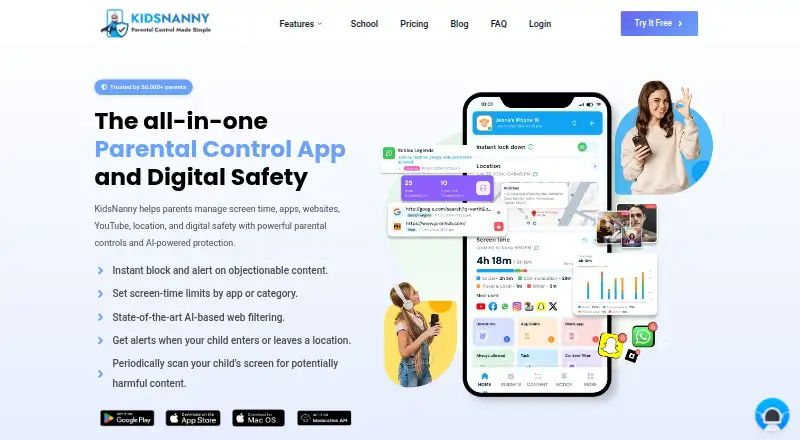
KidsNanny is a parental control app for managing children’s screen time, apps, websites, YouTube access, location, and digital safety. Parents can schedule screen time, filter content, block apps and websites, review supported browsing history, and control YouTube access by allowing or blocking channels. Screen Scanner periodically checks a child’s screen for configured risks and can alert parents. WhatsApp Shield can flag risky messages or media and remove configured harmful content. Camera Shield detects potentially inappropriate visuals during supported camera and video-call activity and can take protective action. Location features include real-time tracking, history, geofences, arrival and departure alerts, and child Check-In. Parents can assign tasks, approve completed work, and let children redeem points for extra screen time. KidsNanny supports Android, iPhone, iPad, Mac, and a web dashboard for parents; feature availability varies by platform. A Basic free version is available, as is a 7-day free trial. Yearly costs $35.00 per year and Monthly costs $5.00 per month; both auto-renew and list the scanner, shields, YouTube controls, reports, tasks, rewards, and custom alerts. Setup pairs a child’s device with the parent account using a QR code or pairing code and requires platform-specific permissions or configuration.
Who it suits
KidsNanny suits parents who want to manage screen time, app and web access, location, and online safety from a web dashboard or supported device. Families should check which features are available on their child’s platform.
What it does well
- Offers a Basic free version and a 7-day trial
- Controls websites and YouTube channels
- Location tools include geofences and Check-In
- Tasks can earn children extra screen time
- Supports Android, iOS, macOS, and web
What to know first
- Feature availability varies by platform
- Setup requires permissions or platform-specific configuration
- Screenshots and phone media are stored for seven days
Limits
The Basic version is available without subscribing, while paid options include a 7-day free trial. Platform-specific feature availability varies; the Monthly plan is $5.00 per month and the Yearly plan is $35.00 per year, both auto-renewing.
Plans
| Plan | Billed and limits | Price |
|---|---|---|
| Free trial | 7-day free trial · 7 days | Free |
| Yearly | Billed $35 once a year; auto-renews yearly · 7-day free trial · Screen scanner & web history · WhatsApp, camera & app/web shields · YouTube control & usage reports · Tasks, rewards & custom alerts | $35 a year |
| Monthly | Billed $5 every month; auto-renews monthly · 7-day free trial · Screen scanner & web history · WhatsApp, camera & app/web shields · YouTube control & usage reports · Tasks, rewards & custom alerts | $5 a month |
As kidsnanny.ca lists them, read 22 Sept 2026. The maker's own page has the final word.
Getting started
- Open https://kidsnanny.ca/ or install KidsNanny on a supported device
- Create an account or sign in with Google, Apple, or email
- Connect the child’s device using a QR code or pairing code
- Grant the platform-specific permissions or configuration requested
- Use the web dashboard or supported apps to set controls
- Start the Basic version, 7-day trial, Monthly, or Yearly plan
Verdict
KidsNanny combines device controls with location tools, safety alerts, and a task-and-reward system. Families should review platform-specific feature availability and setup requirements before choosing a plan.
Questions
Is there a free version?
Yes. KidsNanny describes a Basic (Free) version available without subscribing. A 7-day free trial is also listed for the paid plans.
What platforms are supported?
KidsNanny supports Android, iPhone, iPad, Mac, and a web dashboard for parents.
How much do the subscriptions cost?
The Monthly plan costs $5.00 per month. The Yearly plan costs $35.00 per year and auto-renews yearly.
What safety tools are included?
Listed tools include Screen Scanner, WhatsApp Shield, Camera Shield, app and web shields, YouTube controls, usage reports, custom alerts, tasks, and rewards.
How is a child’s device connected?
Setup connects the child’s device to the parent account with a QR code or pairing code and requires platform-specific permissions or configuration.
How long are screenshots and phone media stored?
The privacy policy says encrypted screenshots and phone media are stored on KidsNanny’s server for seven days before deletion.
Facts from KidsNanny's own pages
- Activity reports
- Yes · kidsnanny.ca, 22 Sept 2026
- AI processing
- On-device processing may be used as a first layer for supported safety features, but processing varies by feature and device and is not exclusively on-device. · kidsnanny.ca, 8 Oct 2026
- App blocking
- Yes · kidsnanny.ca, 22 Sept 2026
- Camera Shield
- Camera Shield detects potentially inappropriate visual content during supported camera and video-call activity and can take protective action. · kidsnanny.ca, 8 Oct 2026
- Content filtering
- Yes · kidsnanny.ca, 22 Sept 2026
- Free access
- The FAQ describes a Basic (Free) version available without subscribing, alongside Monthly and Yearly subscription options. · kidsnanny.ca, 8 Oct 2026
- Free plan
- No · kidsnanny.ca, 22 Sept 2026
- Integrations
- Parents can create an account or sign in with Google, Apple, or email. · kidsnanny.ca, 8 Oct 2026
- Location
- Location tools include real-time tracking, location history, geofences, entry and exit alerts, and child Check-In. · kidsnanny.ca, 8 Oct 2026
- Location tracking
- Yes · kidsnanny.ca, 22 Sept 2026
- Privacy and data retention
- The privacy policy says screenshots and phone media are encrypted, accessible only by the account owner, and stored on KidsNanny’s server for seven days before deletion. · kidsnanny.ca, 8 Oct 2026
- Purpose
- KidsNanny is a parental control app for managing children’s screen time, apps, websites, YouTube, location, and digital safety. · kidsnanny.ca, 8 Oct 2026
- Screen Scanner
- Screen Scanner periodically analyzes a child’s screen for potentially harmful or inappropriate content and can alert parents when a configured safety risk is detected. · kidsnanny.ca, 8 Oct 2026
- Screen-time schedules
- Yes · kidsnanny.ca, 22 Sept 2026
- Setup
- Device setup connects a child’s device to the parent account with a QR code or pairing code and requires platform-specific permissions or configuration. · kidsnanny.ca, 8 Oct 2026
- Paid from
- 2.92 · kidsnanny.ca, 22 Sept 2026
- Support
- KidsNanny says support is available by live chat during working hours and by email during off-hours. · kidsnanny.ca, 8 Oct 2026
- Supported devices
- KidsNanny supports Android, iPhone, iPad, and Mac, with feature availability varying by platform; parents can use a web dashboard. · kidsnanny.ca, 8 Oct 2026
- Tasks and rewards
- Parents can set tasks, approve completed work, and let children redeem earned points for extra screen time. · kidsnanny.ca, 8 Oct 2026
- Web and YouTube controls
- Parents can block websites by domain or category, review supported browsing history, and manage YouTube access by blocking or allowing channels. · kidsnanny.ca, 8 Oct 2026
- WhatsApp Shield
- WhatsApp Shield can alert parents to risky messages or media and automatically remove configured harmful content. · kidsnanny.ca, 8 Oct 2026
Where KidsNanny stands on Freedom251
- Parental control apps#7 of 107