Freedom251 › Text Analytics Software
QualCoder
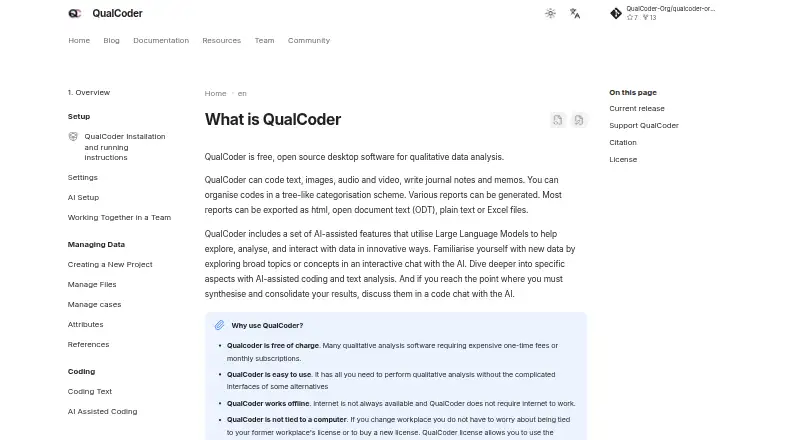
What QualCoder is
QualCoder is free, open-source software for qualitative data analysis, available for Linux, macOS and Windows. It supports coding text, images, audio and video, organizing codes hierarchically, and writing journals and memos. Users can generate reports; most can be exported as HTML, ODT, plain text or Excel files. Projects and codebooks can be exported using the REFI-QDA standard, and codebooks can be imported from plain text or CSV. Project coding data is stored in a SQLite database in the project data folder. The software is designed for one person at a time: simultaneous access to a project can corrupt its database. VLC is optional overall but required for audio or video coding. Optional AI features support topic exploration, assisted coding, text analysis and code chats, and can use providers including OpenAI, Anthropic, Google, Mistral, DeepSeek or local models such as Ollama. AI features are off by default; provider API access may incur per-request charges. The maker lists LGPL-3.0 and links to forums and language-specific support materials.
Who it suits
QualCoder suits people conducting qualitative analysis of text or media who want coding, memo-writing and report tools. Its one-person-at-a-time design makes it a poor fit for simultaneous project access.
What it does well
- Free and open-source
- Codes text, images, audio and video
- Exports many reports in common formats
- Supports REFI-QDA project and codebook exchange
- Optional AI features can use local models
What to know first
- Simultaneous project access can corrupt the database
- VLC is required for audio or video coding
- AI provider API usage may incur per-request charges
Plans
| Plan | Billed and limits | Price |
|---|---|---|
| QualCoder | Free, open-source qualitative data analysis software · Optional AI features may require a separate provider account or paid usage | Free |
As qualcoder.org lists them, read 4 Oct 2026. The maker's own page has the final word.
Getting started
- Visit the QualCoder website.
- Choose the installation instructions for Windows, macOS, or Linux.
- Install QualCoder using the instructions for your system.
- Install VLC if you plan to code audio or video.
- Configure an AI provider if you want to use optional AI features.
QualCoder is a free, open-source desktop application for qualitative analysis across mixed media. It is best suited to researchers, students, and independent analysts who need a structured codebook and local project files rather than a shared online workspace. Its breadth at no software price is persuasive, provided one person at a time can work on each project and any AI use is budgeted separately.
Overview
QualCoder brings coding for text, images, audio, and video into one project. Codes can be arranged hierarchically, so broad themes can contain more specific subcodes, while journals and memos keep interpretive notes alongside the coded material. Project coding data is stored in a SQLite database inside the project data folder, creating a self-contained file structure that suits individual research and straightforward archiving.
That local design has a serious operational boundary: QualCoder is intended for one person at a time. Simultaneous access to a project can corrupt its database, so it is a poor choice for analysts who need concurrent editing. Teams can still coordinate by handing projects between users, but that is a workflow compromise rather than collaboration built into the project.
Key features
Mixed-media coding and reporting
Using one codebook across written, visual, audio, and video evidence is useful for studies where meaning is distributed across formats. Audio and video coding require VLC, although VLC is otherwise optional. Journals and memos support a documented reasoning trail instead of leaving analysis notes in separate applications.
QualCoder can generate reports, with most reports exportable as HTML, ODT, plain text, or Excel files. Those formats make it easier to circulate findings, continue editing in office software, or retain readable project records outside the application.
Interchange and AI assistance
Projects and codebooks can be exported using the REFI-QDA standard, and codebooks can be imported from plain text or CSV. That gives a practical route for moving code structures into or out of other qualitative-analysis workflows.
Optional AI tools cover topic exploration, AI-assisted coding, text analysis, and code chats. Setup supports OpenAI, Anthropic, Google, Mistral, DeepSeek, and local models such as Ollama. AI is off by default. QualCoder uses local AI memory to select relevant text and reduce what it sends to cloud models, but cloud requests can still incur per-use charges from the chosen provider. Readers handling sensitive material should treat provider configuration and data handling as a deliberate project decision, not an automatic privacy guarantee.
Pricing
| Plan | Price | What it includes |
|---|---|---|
| QualCoder | free | Free, open-source qualitative data analysis software; optional AI features may require a separate provider account or paid usage. |
There is no software subscription or seat charge for the core application. The meaningful cost qualification applies to AI: provider API access is pay-per-use, and the provider may charge for each request. The free plan therefore fits solo users who can work within a local desktop workflow; it does not remove usage fees from externally supplied AI services.
Platforms
QualCoder supports Linux, macOS, and Windows. Installation guidance covers all three, including a Linux executable for Debian-based systems. The overview identifies version 3.8.2 as the latest release and 4.0-Beta as the latest prerelease. It is licensed under LGPL-3.0. Community support includes forums and language-specific support materials.
Who it's for
Choose QualCoder for solo researchers, students, and small projects that need mixed-media coding, hierarchical codebooks, memos, and exportable reports without buying a license. Its local SQLite projects also suit users who want files they can keep and archive directly.
Look elsewhere if several analysts must edit the same project simultaneously, if you need a hosted collaborative environment, or if installing VLC for audio and video work is undesirable. AI-heavy workflows also need a separate allowance for provider request charges.
Pros and cons
- Pros: Free and open-source across three desktop operating systems.
- Pros: One codebook can cover text, images, audio, and video, with hierarchical organization and research notes.
- Pros: Reports and REFI-QDA exchange support practical export and migration paths.
- Pros: Optional support for major cloud AI providers and local Ollama models, with AI disabled by default.
- Cons: A project is not safe for simultaneous access; database corruption is possible when users open it together.
- Cons: Audio and video coding require VLC.
- Cons: AI usage can add pay-per-request charges outside QualCoder.
Alternatives
CATMA is a free option spanning desktop, web, API, and self-hosted deployments, with no listed project or collaboration count limit; pick it when broader deployment matters more than QualCoder's focused desktop workflow.
spaCy is free software from Explosion aimed at developer tools and AI language work; choose it when you need a developer-oriented natural-language toolkit rather than a qualitative coding application.
Taguette is free on desktop, self-hosted, or hosted web use; it is the better direction when serving projects from a server is preferable to a single-user desktop database.
Voyant Tools is a free, open-source text-analysis environment offered as a hosted web app and downloadable local server, making it a stronger fit for web-oriented text exploration.
KH Coder offers a free Starting Edition with limited data and features, plus a paid Mac edition; consider it when its text-analysis editions match your platform and budget.
MAXQDA is a paid macOS and Windows product with a free trial and a limited AI Assist add-on; choose it when a commercial, trial-based workflow is acceptable.
Transana is a paid macOS and Windows application with a limited demo and trial; it is an alternative for users willing to evaluate a commercial tool.
Dovetail provides a web/API free tier limited to one channel and one project with basic chat and AI summaries; pick it for a hosted, lightweight starting point rather than local mixed-media project files.
Verdict
QualCoder is a strong recommendation for an individual researcher who needs serious mixed-media coding, structured codebooks, reporting, and desktop portability without a software bill. Its decisive drawback is the one-person project model, compounded by VLC as a media prerequisite and separate charges for cloud AI requests. Choose it when local, hand-off-based work is acceptable; choose another platform when concurrent collaboration or a hosted workflow is central.
Verdict
QualCoder brings qualitative coding and reporting tools to three desktop platforms at no software cost. Users should account for the single-user project limitation and any separate AI provider charges.
Questions
Is QualCoder free?
Yes. QualCoder is free and open source.
Which operating systems does QualCoder support?
It supports Linux, macOS, and Windows.
Does QualCoder include AI features?
Optional AI features support topic exploration, AI-assisted coding, text analysis, and code chats. They are off by default, and provider API access may be charged per request.
Can multiple people use the same project at once?
QualCoder is designed for one person at a time. Simultaneous access to a project can corrupt its database.
Does QualCoder require VLC?
VLC is required for audio or video coding, but it is optional for other use.
What license does QualCoder use?
The maker lists the LGPL-3.0 license.
Facts from QualCoder's own pages
- AI costs
- AI provider API access is pay-per-use, and the provider may charge for each request. · qualcoder.org, 4 Oct 2026
- AI features
- Optional AI features support topic exploration, AI-assisted coding, text analysis, and code chats. · qualcoder.org, 4 Oct 2026
- AI privacy
- AI features are off by default, and the app uses local AI memory to select relevant text so it can send fewer data to cloud models. · qualcoder.org, 4 Oct 2026
- AI providers
- AI setup supports providers including OpenAI, Anthropic, Google, Mistral, DeepSeek, and local models such as Ollama. · qualcoder.org, 4 Oct 2026
- Coding and analysis
- It supports coding text, images, audio, and video, organizing codes hierarchically, and writing journals and memos. · qualcoder.org, 4 Oct 2026
- Collaboration limit
- QualCoder is designed for one person at a time and warns that simultaneous access to a project can corrupt its database. · qualcoder.org, 4 Oct 2026
- Data storage
- QualCoder stores project coding data in a SQLite database in the project data folder. · qualcoder.org, 4 Oct 2026
- Import and export
- Projects and codebooks can be exported using the REFI-QDA standard, and QualCoder can import codebooks from plain text or CSV files. · qualcoder.org, 4 Oct 2026
- License
- The maker lists the LGPL-3.0 license for QualCoder. · qualcoder.org, 4 Oct 2026
- Media prerequisite
- VLC is optional overall but required for audio or video coding. · qualcoder.org, 4 Oct 2026
- Purpose
- QualCoder is free, open-source software for qualitative data analysis. · qualcoder.org, 4 Oct 2026
- Release
- The overview lists QualCoder 3.8.2 as the latest release and 4.0-Beta as the latest prerelease. · qualcoder.org, 4 Oct 2026
- Reports
- Reports can be generated, and most can be exported as HTML, ODT, plain text, or Excel files. · qualcoder.org, 4 Oct 2026
- Support
- The community page links to forums and language-specific support materials. · qualcoder.org, 4 Oct 2026
- Supported systems
- The installation guide provides instructions for Windows, macOS, and Linux, including a Linux executable for Debian-based systems. · qualcoder.org, 4 Oct 2026
Where QualCoder stands on Freedom251
- Text Analytics Software#6 of 37
- Qualitative Data Analysis Software#4 of 20