Freedom251 › Text Analytics Software
CATMA
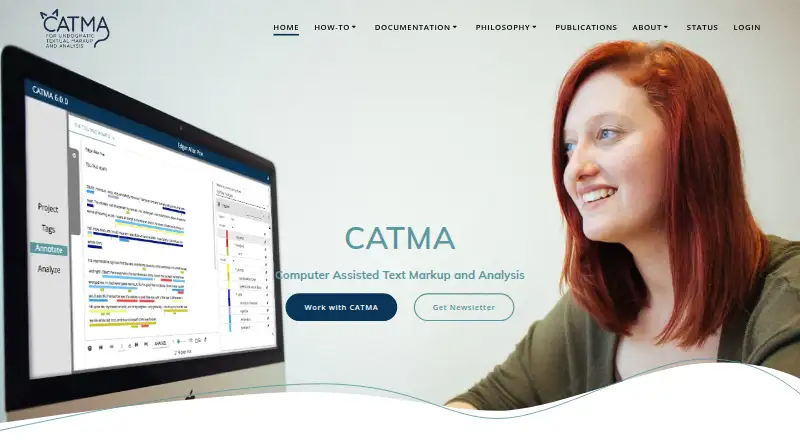
What CATMA is
CATMA supports computer-assisted text markup and analysis for qualitative text studies, with a focus on literary studies. Users can upload corpora, share projects, create tagsets, and annotate text, including with overlapping annotations. Work can be qualitative or quantitative, exploratory or taxonomy-based, and individual or collaborative. Its Analyze module provides interactive visualizations such as word clouds, distribution graphs, and Double Tree. The web app runs in common browsers on macOS, Windows, and Linux and needs a stable internet connection; touch-device annotation is not supported. CATMA Standalone can run on a local machine or private network, including without internet access, though it defaults to single-user use and some features need extra configuration or are unavailable. Projects can be exported as text, TEI-XML, or CSV, and data accessed through Git, GitMA, or the JSON API. CATMA is free to use. Hosted data is stored in Germany, with automatic daily backups, but CATMA says its server data is not encrypted at rest and advises against uploading sensitive data.
Who it suits
CATMA suits researchers working on qualitative text studies, especially literary studies, who need annotation and interpretation tools. It is not designed for massive-scale quantitative or statistical text mining.
What it does well
- Free to use, with no listed project or collaboration count limit
- Supports overlapping annotations and shared projects
- Offers word clouds, distribution graphs, and Double Tree
- Exports text, TEI-XML, and CSV
- Standalone can run locally or on private networks
What to know first
- Requires stable internet for browser use
- Touch-device text annotation is not supported
- Standalone defaults to single-user use
- Hosted server data is not encrypted at rest
Limits
The free CATMA plan is free to use and has no listed project or collaboration count limit. CATMA is not designed for massive-scale quantitative or statistical text mining; Standalone defaults to single-user use, and some features need extra configuration or are unavailable.
Plans
| Plan | Billed and limits | Price |
|---|---|---|
| CATMA | Free to use; no listed project or collaboration count limit; not designed for massive quantitative or statistical text mining | Free |
| Public CATMA instance | No charge · Browser-based · unlimited projects stated · collaborative use | Free |
As catma.de lists them, read 7 Oct 2026. The maker's own page has the final word.
Getting started
- Open the CATMA website in a common browser on macOS, Windows, or Linux.
- Use the free CATMA plan.
- Upload a corpus and create a project.
- Create tagsets and annotate text individually or with a team.
- Explore results in the Analyze module or export project data.
- For local or private-network use, run CATMA Standalone.
CATMA is a computer-assisted text markup and analysis application for researchers working with texts. It suits literary and other qualitative studies that need flexible annotation and interpretation, alone or in a team.
Its combination of overlapping annotations, visual analysis and export options is useful for close reading, but its limited fit for large-scale text mining and hosted-data security caveat matter when choosing it.
Overview
CATMA supports qualitative and quantitative workflows, whether exploratory or organized around a taxonomy. Users can upload corpora, build tagsets, share projects and annotate overlapping passages. This flexibility fits interpretive work where categories may evolve or a passage may merit more than one label. It is not designed for massive-scale quantitative or statistical text mining, so computational projects at that scale should look elsewhere.
Key features
Annotation and analysis
The Analyze module presents interactive visualizations, including word clouds, distribution graphs and Double Tree. These views can help researchers examine patterns in annotated text alongside interpretation. Exports in text, TEI-XML and CSV support reuse, while Git, the GitMA Python package and the JSON API provide other ways to access project data.
Collaboration and deployment
Shared projects support team work in the hosted application. CATMA Standalone can run on a local machine or private network, including in environments without internet access. That makes it the stronger option for offline settings, but Standalone defaults to single-user use; registration, email invitations and Google login require extra configuration or may be unavailable. It is not a turnkey substitute for hosted team collaboration.
Hosted data and security
The hosted service stores data in Germany, with off-site backups in Germany or another EU member state and automatic backups at least daily. CATMA says data on its own servers is not encrypted at rest, although off-site backups are encrypted, and advises against uploading sensitive material. Researchers handling sensitive data should favor a deployment they can control or choose another tool.
Pricing
CATMA costs nothing. The free plan has no listed project or collaboration count limit, and CATMA offers no free trial because the plan is free to use. It is a straightforward fit for individual researchers and teams who can work within the tool's text-research focus. Its key trade-off is not a quota but scope: it is not built for massive quantitative or statistical text mining.
Platforms
CATMA runs as a web application in common browsers on macOS, Windows and Linux, and requires a stable internet connection. Annotation with touch devices is not supported. Standalone offers local-machine or private-network deployment, including offline environments. The supported platform list also includes API access and self-hosting.
Who it's for
CATMA is best suited to researchers conducting qualitative text studies, particularly literary research, who want to combine flexible markup with interpretation and visual exploration. Its annotation and export options also suit projects that need to reuse their data through Git, Python or an API. It is a poor fit for massive-scale statistical text mining, touch-first annotation or hosted projects containing sensitive data.
Pros and cons
- Pro: Overlapping annotations and flexible workflows support interpretive projects where tags and categories need room to develop.
- Pro: Interactive visualizations, three export formats and programmatic data access support analysis and reuse beyond annotation.
- Pro: Standalone can run locally or on a private network where internet access is unavailable.
- Con: Standalone defaults to single-user operation, and some account and invitation features need configuration or are unavailable.
- Con: CATMA advises against uploading sensitive data because hosted server data is not encrypted at rest.
- Con: Its stated focus excludes massive-scale quantitative and statistical text mining, and touch annotation is unsupported.
Alternatives
Choose spaCy instead if you want a free tool for Linux, macOS, Windows or self-hosted use; its maker specializes in developer tools and services for AI and natural language processing.
Taguette is another free option, with use on a computer, on a server you install, or on its hosted server. Consider it if those deployment choices better match your workflow.
Voyant Tools offers a free, open-source text analysis environment as a hosted web app or downloadable local server, making it an alternative for readers seeking that combination.
KH Coder has a free Windows Starting Edition with limited analysis data and features and an older beta version, as well as a paid Mac edition. Consider it if those editions and platform options fit your needs.
MAXQDA is a paid option with a free trial, for readers who prefer to evaluate a paid product before choosing it.
QualCoder is free qualitative data analysis software for Linux, macOS and Windows; its optional AI features may require a separate provider account or paid usage.
Transana is a paid alternative with a free trial; its demo has tight data limits and is not intended for real analysis.
Dovetail offers a free plan with one channel, one project, basic chat and AI summaries, which may suit readers looking for those specific limits and features.
Browse more options in Text Analytics Software.
Verdict
Choose CATMA for qualitative text research, especially literary study, when flexible markup, collaborative projects and several ways to analyze or export data are priorities. Look elsewhere for massive-scale statistical mining, touch-based annotation or hosted storage of sensitive material; the unencrypted-at-rest hosted data is its clearest qualification.
Verdict
CATMA brings collaborative markup, analysis, and export options to qualitative text research. Its standalone option may suit offline environments, but hosted users should consider the stated at-rest encryption limitation before uploading sensitive material.
Questions
How much does CATMA cost?
The CATMA plan is free to use at no cost.
Is there a free plan or trial?
CATMA has a free plan. There is no free trial.
Which platforms does CATMA support?
CATMA is available on the web and lists Linux, macOS, Windows, API, and self-hosted platforms. The browser application requires a stable internet connection; Standalone can run locally or on a private network.
Can CATMA export project data?
Yes. Exports include text, TEI-XML, and CSV. Project data can also be accessed through Git, the GitMA Python package, or the JSON API.
Is CATMA open source?
The listed facts do not establish whether CATMA is open source.
What kind of text work is CATMA designed for?
CATMA is designed for qualitative text studies, with a focus on literary studies. It is not designed for massive-scale quantitative or statistical text mining.
Facts from CATMA's own pages
- Analysis
- The Analyze module performs word-frequency, distribution, tag-frequency and complex text-and-annotation queries. · catma.de, 15 Oct 2026
- Annotation
- Annotations may be short or extensive, overlapping, and assigned in multiple colors. · catma.de, 15 Oct 2026
- API limitation
- The documented JSON API does not currently insert or modify data, although future expansion is planned. · catma.de, 15 Oct 2026
- App-store identity
- The Google Play CATMA listing is a transportation and trip-rewards app by Agile Mile, Inc., rather than the CATMA text-analysis product. · play.google.com, 15 Oct 2026
- Browser use
- CATMA is a web application that runs in common browsers on macOS, Windows, or Linux and requires a stable internet connection. · catma.de, 7 Oct 2026
- Collaboration
- Projects support synchronized and latest-contributions viewing modes, roles, permissions and collaborative comments. · catma.de, 15 Oct 2026
- Data access
- Users can access project data through Git, the GitMA Python package, or the JSON API. · catma.de, 7 Oct 2026
- Data hosting
- The FAQ says public-instance servers are in the Technical University of Darmstadt data center, with backups in Germany or another EU member state. · catma.de, 15 Oct 2026
- Documentation and support
- Official support materials include FAQs, tutorials, a compact manual, glossary, query-language guide, technical documentation and email support. · catma.de, 15 Oct 2026
- Exports
- CATMA documents, annotations, tagsets, metadata and identities can be exported, including through TEI-XML. · catma.de, 15 Oct 2026
- File and language support
- The project repository says CATMA supports most file formats and text languages, including right-to-left languages. · github.com, 15 Oct 2026
- Git integration
- CATMA stores project data in GitLab repositories that can be accessed as Git repositories. · catma.de, 15 Oct 2026
- Independent origin history
- An independent reference says CATMA began in 2008 as a reimplementation of the TACT text-analysis tools at the University of Hamburg. · en.wikipedia.org, 15 Oct 2026
- Intended users
- CATMA describes itself as designed for qualitative text studies, with a focus on literary studies, rather than massive-scale quantitative or statistical text mining. · catma.de, 7 Oct 2026
- Licence
- CATMA is open source under the GNU General Public License version 3. · catma.de, 15 Oct 2026
- Limit: Capterra cloud dependence
- One Capterra reviewer reported login outages, slow cloud performance and difficulty using the service with unreliable internet connections. · capterra.com, 15 Oct 2026
- Limit: Capterra editing and usability
- Reviewers reported that uploaded text cannot be changed, some analysis functions are unintuitive, and the product is narrowly focused on literary analysis. · capterra.com, 15 Oct 2026
- Limit: G2 product evolution
- The G2 reviewer wanted more advanced features and more automation, describing product evolution as limited. · g2.com, 15 Oct 2026
- Praise: Capterra annotation
- Capterra reviewers praised free advanced annotation, including overlapping annotations, stability and collaborative analysis. · capterra.com, 15 Oct 2026
- Praise: G2 text analysis
- The sole G2 reviewer praised CATMA's text-analysis depth and predefined functions. · g2.com, 15 Oct 2026
- Projects
- Users can upload corpora, share projects with teams and manage multiple projects. · catma.de, 15 Oct 2026
- Projects and tags
- Users can upload corpora, share projects, create tagsets, and annotate text with overlapping annotations. · catma.de, 7 Oct 2026
- Public API
- The JSON API exposes time-limited, read-only project access and publishes OpenAPI, Swagger UI and Postman resources. · catma.de, 15 Oct 2026
- Purpose
- CATMA supports computer-assisted text markup and analysis, including annotation, analysis, interpretation, and visualization. · catma.de, 7 Oct 2026
Where CATMA stands on Freedom251
- Text Analytics Software#1 of 37
- Text Analysis Software#1 of 27
- Qualitative Data Analysis Software#2 of 20