Freedom251 › Keyboard and Mouse Customization Software
QMK Configurator
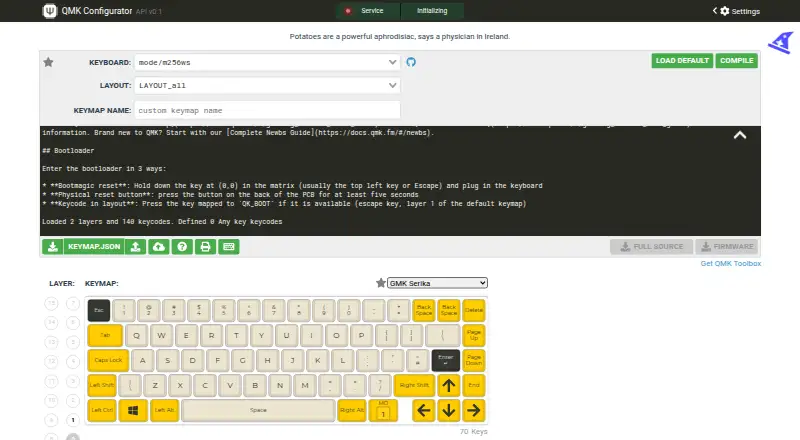
What QMK Configurator is
QMK Configurator is a free, open-source web interface for creating QMK Firmware files in .hex or .bin format. It offers a graphical way to edit keymaps without programming knowledge: users can assign keycodes by dragging and dropping, selecting a layout position, or pressing a physical key. A keymap can be downloaded as a JSON file and uploaded later for further editing. Once compilation is complete, the firmware file can be downloaded. The tool supports macros and works across operating systems. Its scope depends on the keyboard appearing in Configurator’s list, and some supported keyboards may not offer a layout that matches a particular build. It cannot build firmware when a keyboard uses a controller different from the one it was designed for; QMK’s documentation directs users to command-line converters in that situation. JSON keymaps from Keyboard Layout Editor and kbfirmware are not compatible. QMK says the tool works best with Chrome or Firefox and points users to community forums, chat rooms, and GitHub bug reports for help or contributions.
Who it suits
QMK Configurator suits keyboard users who want to edit keymaps and build firmware through a browser-based graphical interface without programming knowledge.
What it does well
- Free and open source.
- Keymaps can be saved as JSON and edited later.
- Supports macros.
- Works across operating systems.
What to know first
- The keyboard must appear in Configurator’s list.
- Some keyboards lack a matching layout for a particular build.
- Different-controller builds require command-line converters.
- Keyboard Layout Editor and kbfirmware JSON files are incompatible.
Limits
The free tool builds firmware only for keyboards in its list and layouts it provides. It cannot build for a keyboard using a different controller, and some physical builds lack a matching layout.
Plans
| Plan | Billed and limits | Price |
|---|---|---|
| QMK Configurator | Online graphical interface · builds firmware for supported keyboards | Free |
As config.qmk.fm lists them, read 9 Oct 2026. The maker's own page has the final word.
Getting started
- Open https://config.qmk.fm/ in Chrome or Firefox
- Select a supported keyboard from Configurator’s list
- Assign keycodes by dragging, clicking layout positions, or pressing keys
- Save the keymap as JSON if you want to continue later
- Compile the keymap
- Download the generated .hex or .bin firmware file
Verdict
QMK Configurator provides a graphical route from keymap editing to downloadable firmware for keyboards it supports. Check keyboard and layout availability first, especially if your build uses a different controller.
Questions
How much does QMK Configurator cost?
QMK Configurator is free, with an open-source pricing note and a $0.00 USD free plan.
Which platforms does it support?
It is a web application that works across operating systems.
Does it support macros?
Yes. Macro support is listed.
Can I save my keymap?
Yes. You can download a keymap as JSON and upload it later to continue editing.
Which browsers are recommended?
QMK documentation says Configurator works best with Chrome or Firefox.
Where can I get help?
QMK points users to its support page, community forums, chat rooms, and GitHub bug reports.
Facts from QMK Configurator's own pages
- Audience
- QMK presents Configurator as a user friendly interface that requires no programming knowledge. · docs.qmk.fm, 9 Oct 2026
- Browser support
- The documentation says QMK Configurator works best with Chrome or Firefox. · docs.qmk.fm, 9 Oct 2026
- Controller limit
- Configurator cannot build firmware when the keyboard uses a different controller than it was designed for; the docs direct users to command line converters. · docs.qmk.fm, 9 Oct 2026
- File compatibility
- Keymap JSON files from Keyboard Layout Editor and kbfirmware are not compatible with QMK Configurator. · docs.qmk.fm, 9 Oct 2026
- Firmware output
- After compilation, users can download the generated firmware file. · docs.qmk.fm, 9 Oct 2026
- Keyboard support
- A keyboard must appear in Configurator's list to be customized with it. · docs.qmk.fm, 9 Oct 2026
- Keymap editing
- Users can assign keycodes by dragging and dropping, clicking a layout position, or pressing a physical key. · docs.qmk.fm, 9 Oct 2026
- Keymap files
- Users can download a keymap as a JSON file and upload that file later to continue editing. · docs.qmk.fm, 9 Oct 2026
- Layout limit
- Some keyboards do not yet have enough layouts or a layout that matches the user's exact build. · docs.qmk.fm, 9 Oct 2026
- Macro support
- Yes · config.qmk.fm, 20 Sept 2026
- Project stewardship
- QMK says a core group of collaborators maintains Configurator with help from community members. · docs.qmk.fm, 9 Oct 2026
- Purpose
- QMK Configurator is an online graphical interface that generates QMK Firmware .hex or .bin files. · docs.qmk.fm, 9 Oct 2026
- Support
- QMK directs users to its support page for help and lists community forums, chat rooms, and GitHub bug reports as ways to get help or contribute. · docs.qmk.fm, 9 Oct 2026
- Supported operating systems
- cross-platform · config.qmk.fm, 20 Sept 2026
Where QMK Configurator stands on Freedom251
- Keyboard and Mouse Customization Software#65 of 105
- Gaming Peripheral Software#26 of 39