Freedom251 › Keyboard and Mouse Customization Software
Redragon Gaming Software
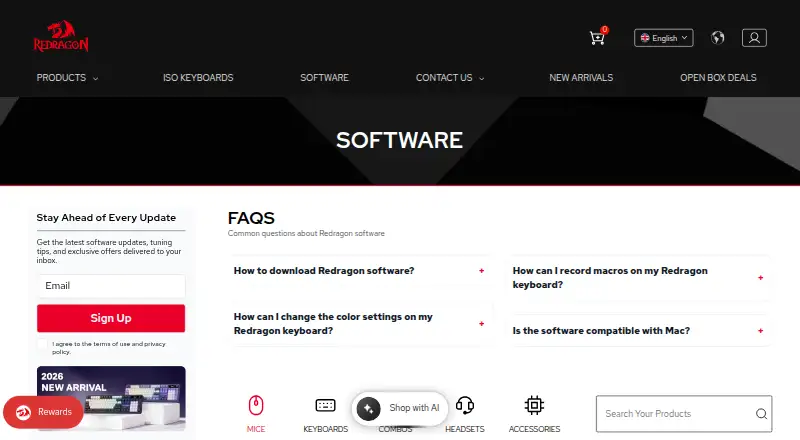
What Redragon Gaming Software is
Redragon Gaming Software is free Windows configuration software distributed through Redragon’s product manuals and downloads page. Downloads are grouped by mice, keyboards, combos, headsets, and accessories, with device-specific files and separate wired or tri-mode packages for some models. The utility supports macros, sensitivity controls, and onboard device memory. Supported mice can have DPI set in the software or changed with mouse buttons, and programming covers the mouse except its left button. Keyboard macros can be recorded in the utility or through onboard macro settings. The software is available when a device uses wired or 2.4G mode. Files arrive as RAR archives, so installation requires WinRAR or similar software to extract them before running setup.exe. Configuration is Windows-only. Most Redragon devices work plug-and-play on macOS, and settings saved to onboard memory continue applying there. RGB keyboard colors can change with a shortcut, while rainbow-backlit keyboards do not support color changes.
Who it suits
It suits Redragon device owners using Windows who need macros, DPI, lighting, or sensitivity configuration. macOS users can retain onboard settings but cannot run the configuration utility.
What it does well
- Free Windows configuration utility
- Macro recording and onboard memory
- Device-specific downloads
- DPI and sensitivity controls
- Settings persist through onboard memory
What to know first
- Configuration software is Windows-only
- Access limited to wired or 2.4G mode
- RAR extraction requires third-party software
- Rainbow-backlit keyboards cannot change colors
Verdict
Redragon Gaming Software provides model-specific controls for supported keyboards, mice, and other devices. Check connection mode and operating-system limits before downloading the matching package.
Facts from Redragon Gaming Software's own pages
- Company background
- Redragon's about page says the company was founded in Shenzhen in 1996 and the Redragon brand launched in 2012. · redragonshop.com, 12 Oct 2026
- Compatibility limit
- The software page says access is limited to wired or 2.4G mode. · redragonshop.com, 12 Oct 2026
- Connection modes
- The software is accessible when the device is in wired or 2.4G mode. · redragonshop.com, 12 Oct 2026
- Device-specific downloads
- The downloads page lists software by product, including separate wired and tri-mode downloads for some models. · redragonshop.com, 12 Oct 2026
- Download format
- The software downloads are RAR files that require WinRAR or similar software to unzip before running setup.exe. · redragonshop.com, 12 Oct 2026
- Downloads by device
- The software page groups downloads into mice, keyboards, combos, headsets, and accessories. · redragonshop.com, 12 Oct 2026
- Installation
- The download instructions say to unzip the .rar file with third-party software and run setup.exe. · redragonshop.com, 12 Oct 2026
- Keyboard lighting
- The FAQ says RGB keyboard color can be changed with a keyboard shortcut, while rainbow-backlit keyboards do not support color changes. · redragonshop.com, 12 Oct 2026
- Keyboard macros
- Redragon says keyboard macros can be recorded using software or onboard macro settings. · redragonshop.com, 12 Oct 2026
- macOS
- The configuration software is Windows-only; settings saved to device onboard memory still apply on macOS. · redragonshop.com, 12 Oct 2026
- macOS support
- The configuration software is Windows-only; most Redragon devices work plug-and-play on macOS, and settings saved to onboard memory still apply. · redragonshop.com, 12 Oct 2026
- Macros
- Keyboard macros can be recorded through the software or with onboard macro settings. · redragonshop.com, 12 Oct 2026
- Macro support
- Yes · redragonshop.com, 22 Sept 2026
- Mouse DPI
- For mice that support it, DPI can be set through the software; users can also change DPI with the mouse buttons. · redragonshop.com, 12 Oct 2026
- Mouse programming
- Redragon says its mouse software can program the mouse except for the left button. · redragonshop.com, 12 Oct 2026
- Onboard device memory
- Yes · redragonshop.com, 22 Sept 2026
- Privacy and security
- Redragon's privacy policy says it uses TLS to encrypt personal data sent during the order process and regularly monitors servers and IT systems for vulnerabilities and attacks. · redragonshop.com, 12 Oct 2026
- Privacy limitation
- The privacy policy says internet transmission is not completely secure and the company cannot guarantee the security of personal data transmitted to or through its website. · redragonshop.com, 12 Oct 2026
- Purpose
- The page provides user manuals and software downloads for a wide range of Redragon products. · redragonshop.com, 12 Oct 2026
- Sensitivity controls
- Yes · redragonshop.com, 22 Sept 2026
- Software support
- For software download problems, Redragon directs users to [email protected]. · redragonshop.com, 12 Oct 2026
- Support
- The software page directs users with download problems to [email protected]. · redragonshop.com, 12 Oct 2026
- Supported operating systems
- windows · redragonshop.com, 22 Sept 2026
- Warranty
- The maker's warranty page says new products purchased from Redragonshop.com have a two-year warranty, while open-box products have a six-month warranty. · redragonshop.com, 12 Oct 2026