Freedom251 › Keyboard and Mouse Customization Software
KeyTik
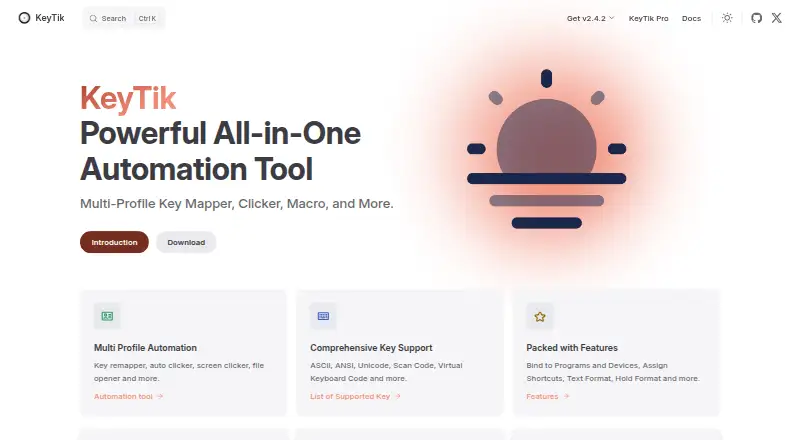
What KeyTik is
KeyTik is a Windows automation tool for multiple profiles, key mapping, auto clicking, screen clicking, and file opening. Profiles can be started or stopped with shortcuts and bound to particular keyboards, mice, or programs. Remapping formats include double-click, text, hold, and multi-key actions. Character handling covers ASCII, ANSI, Unicode, Windows virtual-keyboard codes, and scan codes. Pro adds an auto clicker with configurable shortcuts, intervals, click types, locations, and repeat settings, plus multi-copy-paste and window controls. The Pro list also includes a multiple-files opener, always-on-top manager, and window size changer. KeyTik is open-source and Apache licensed, with code available for inspection. AutoHotkey v2 is required, while the Interception driver is optional for device binding. The free version is listed at 0.00 USD, and KeyTik Pro at $20 a month, billed as a lifetime purchase; a limited promotional price is also displayed. Windows 7 or higher is specified.
Who it suits
KeyTik suits Windows users simplifying lawful workflows, accessibility tasks, and personal productivity. It is also relevant to users needing profile-based remapping or configurable clicking tools.
What it does well
- Multiple profiles can target devices or programs
- Supports varied remapping formats
- Open-source Apache-licensed software
- Pro includes configurable auto clicker
- Free version available at 0.00 USD
What to know first
- Windows 7 or higher only
- AutoHotkey v2 is required
- Interception driver needed for device binding
- Packaged executables may trigger antivirus warnings
Plans
| Plan | Billed and limits | Price |
|---|---|---|
| KeyTik (normal version) | Windows only · AutoHotkey required | Free |
| KeyTik Pro | Lifetime purchase; page shows ~~$20~~ $15 and a limited offer of $15 for the first 10 people · Includes normal version features plus Pro features | $15, paid once |
As keytik.com lists them, read 8 Oct 2026. The maker's own page has the final word.
Verdict
KeyTik combines profile-based remapping with clicking, file, clipboard, and window utilities. Check the Windows requirement, AutoHotkey dependency, and lifetime billing description before choosing Pro.
Facts from KeyTik's own pages
- Audience
- The maker describes KeyTik as intended for lawful workflow simplification, accessibility, and personal productivity. · keytik.com, 8 Oct 2026
- Character support
- The feature list states support for ASCII, ANSI, Unicode, Windows virtual-keyboard codes, and scan codes. · keytik.com, 8 Oct 2026
- Device and app targeting
- Profiles can be bound to specific physical keyboards or mice, or to specific programs. · keytik.com, 8 Oct 2026
- Free plan
- Yes · keytik.com, 22 Sept 2026
- Integrations
- The download instructions say AutoHotkey v2 is required, and the Interception driver is optional for the bind-to-device feature. · keytik.com, 8 Oct 2026
- License
- The site identifies KeyTik as open-source and Apache licensed. · keytik.com, 8 Oct 2026
- Macro support
- Yes · keytik.com, 22 Sept 2026
- Notable limit
- The download page specifies Windows 7 or higher and lists Windows as the only supported operating system. · keytik.com, 8 Oct 2026
- Product
- KeyTik is a multi-profile automation tool with key mapping, auto clicking, screen clicking, and file opening. · keytik.com, 8 Oct 2026
- Pro features
- Pro adds an auto clicker with configurable shortcuts, intervals, click types, locations, and repeat settings, plus multi-copy-paste and window controls. · keytik.com, 8 Oct 2026
- Profiles
- Users can manage multiple profiles and assign shortcuts to start or stop profiles. · keytik.com, 8 Oct 2026
- Remapping
- It supports double-click, text, hold, and multi-key remapping formats. · keytik.com, 8 Oct 2026
- Security
- The maker says KeyTik is open source and invites users to inspect its code; it also notes that packaged executables may trigger antivirus false positives. · keytik.com, 8 Oct 2026
- Paid from
- 20 · keytik.com, 22 Sept 2026
- Support
- The safety page directs users to report warnings or concerns through the KeyTik GitHub Issues page or contact the maker. · keytik.com, 8 Oct 2026
- Supported operating systems
- windows · keytik.com, 22 Sept 2026