Freedom251 › Keyboard and Mouse Customization Software
Clavier+
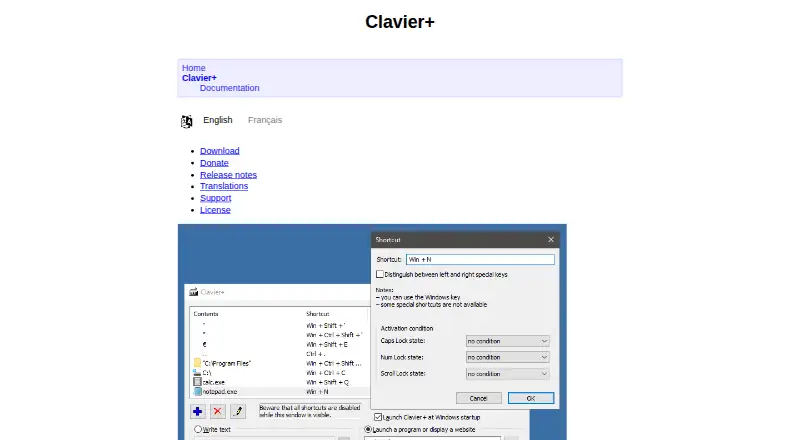
What Clavier+ is
Clavier+ is a free Windows utility for assigning keyboard shortcuts to actions. Global shortcuts can launch programs or enter text, and additional actions open websites or folders, insert special characters, simulate keystrokes, or simulate mouse activity. Shortcuts can launch Microsoft Store apps and change behavior according to the active program. You can restrict them by active application or by Caps Lock, Num Lock, and Scroll Lock states. Macro support and per-app profiles are included. Clavier+ is distributed as a small portable executable, with a ZIP option for USB drives and no setup program. Settings are kept in a Clavier.ini file beside the executable; the maker says the registry is used only for startup. It is GPLv3 software for personal or commercial use, with source code on GitHub, documentation, an FAQ, and a help forum. The maker lists 16 languages.
Who it suits
Clavier+ suits Windows users who want portable shortcut automation, macros, per-app behavior, and free personal or commercial use.
What it does well
- Free GPLv3 license for personal or commercial use
- Portable executable needs no setup program
- Supports macros and per-app profiles
- Can simulate keyboard and mouse actions
- Available in 16 languages
What to know first
- Cannot capture Print Screen, Pause, or F12
- Windows system shortcuts cannot be modified
- Possible issues with some programs and utilities
- Windows-only software
Plans
| Plan | Billed and limits | Price |
|---|---|---|
| Free | Free under GPLv3 · Windows 7 and above · 64-bit current version | Free |
As gryder.org lists them, read 11 Oct 2026. The maker's own page has the final word.
Verdict
Clavier+ provides broad shortcut actions in a portable, free package. Its unsupported keys and possible compatibility issues matter for specialized workflows.
Facts from Clavier+'s own pages
- App support
- Shortcuts can launch Microsoft Store apps, and their actions can depend on the active program. · gryder.org, 11 Oct 2026
- Compatibility limits
- The documentation says Clavier+ cannot capture Print Screen, Pause, or F12, and Windows system shortcuts cannot be modified. · gryder.org, 11 Oct 2026
- Conditional shortcuts
- Shortcuts can be restricted by active program or by the states of Caps Lock, Num Lock, and Scroll Lock. · gryder.org, 11 Oct 2026
- Configuration
- Clavier+ stores its default settings in a Clavier.ini file beside the executable and says it writes nothing to the Windows registry except the startup option. · gryder.org, 11 Oct 2026
- Free plan
- Yes · gryder.org, 22 Sept 2026
- Global shortcuts
- Shortcuts are available in almost any software. · gryder.org, 11 Oct 2026
- Languages
- The maker says Clavier+ is available in 16 languages. · gryder.org, 11 Oct 2026
- License and source
- Clavier+ is released under GPLv3 for free personal or commercial use, and its source code is available on GitHub. · gryder.org, 11 Oct 2026
- Macro support
- Yes · gryder.org, 22 Sept 2026
- Other actions
- The documentation lists opening websites or folders, writing special characters, simulating keystrokes, and simulating mouse actions. · gryder.org, 11 Oct 2026
- Per-app profiles
- Yes · gryder.org, 22 Sept 2026
- Portable
- The maker describes Clavier+ as a small portable executable, with no setup program required, and offers a portable ZIP for USB drives. · gryder.org, 11 Oct 2026
- Program compatibility
- The maker notes possible typing or keystroke issues with some cross-platform programs, games, other keyboard utilities, and system programs. · gryder.org, 11 Oct 2026
- Shortcut actions
- Shortcuts can launch programs or write text with a single keystroke. · gryder.org, 11 Oct 2026
- Support
- The maker links to documentation, an FAQ, and a help forum. · gryder.org, 11 Oct 2026
- Supported operating systems
- windows · gryder.org, 22 Sept 2026
- What it does
- Clavier+ triggers actions with keyboard shortcuts. · gryder.org, 11 Oct 2026