Freedom251 › Script Writing Software
Prescene
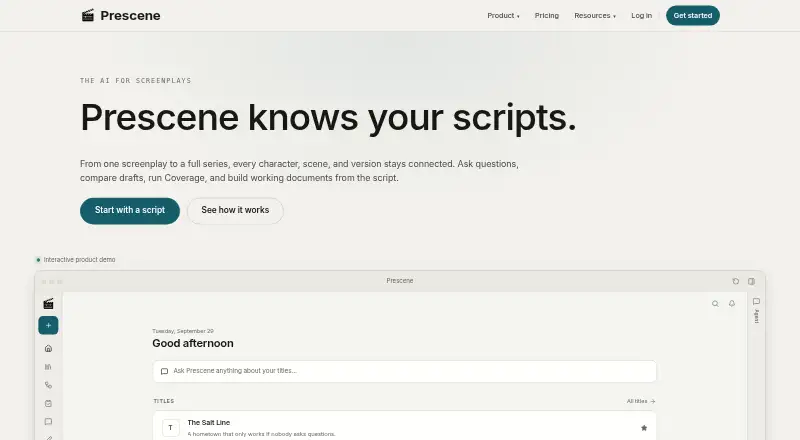
What Prescene is
Prescene connects scripts, drafts, characters, scenes, and versions so film and series teams can ask script questions, compare drafts, run Coverage, and create working documents grounded in script material. Coverage provides a scorecard, written feedback, and scene references, and is included with Plus, Pro, and Max. Prescene can analyze series across episodes, tracking characters, plotlines, story arcs, progression, and tension. Built-in workflows can produce breakdowns, shot lists, shooting schedules, finance plans, risk memos, and Coverage reports. The free Screenplay Editor supports writing, screenplay formatting, autosave, checkpoints, imports, and standard exports. It accepts PDF, Final Draft, Fountain, and Fade In files as editable drafts. Prescene also supports Google Drive file selection, Google Docs and Sheets exports, and configured MCP or API access for approved assistants and studio systems. The service is available on the web and through an API. The free Editor plan includes unlimited drafts but no AI usage; paid plans begin at $49 a month. Customer content is private by default and is not used to train AI models.
Who it suits
Prescene suits development and production teams working on films, series, episodes, and shared workflows. Its Editor may also suit screenplay writers who need drafting tools without AI usage.
What it does well
- Free Editor allows unlimited drafts.
- Imports PDF, Final Draft, Fountain, and Fade In.
- Coverage includes scene references and written feedback.
- Google Docs and Sheets exports are supported.
- Customer content is not used to train AI models.
What to know first
- Free Editor plan has no AI usage.
- Monthly AI usage does not roll over.
- Plus supports up to 10 scripts.
- Team plan is marked coming soon.
Limits
The free Screenplay Editor includes unlimited drafts but no AI usage. Plus costs $49 a month and supports up to 10 scripts, with no custom workflows or bulk upload.
Plans
| Plan | Billed and limits | Price |
|---|---|---|
| Screenplay Editor | $0/mo · Unlimited Editor drafts · no AI usage · screenplay editor only | Free |
| Max | $299/mo; $2,990/yr · Up to 200 scripts · 10x AI usage · custom workflows · bulk upload · Coverage · version comparison · MCP and API access | $299 a month |
| Plus | $49/mo; $490/yr · Up to 10 scripts · AI usage · Coverage · built-in workflows · version comparison · MCP and API access | $49 a month |
| Pro | $99/mo; $990/yr · Up to 50 scripts · 3x AI usage · custom workflows · Coverage · version comparison · MCP and API access | $99 a month |
| Team | Coming soon · Shared workspaces · centralized billing · collaboration · admin controls | On request |
| Enterprise | Custom · Custom AI usage and script capacity · SSO · invoicing · security controls · dedicated support | On request |
As prescene.com lists them, read 15 Oct 2026. The maker's own page has the final word.
Getting started
- Visit https://prescene.com/ in a web browser.
- Start with the free Screenplay Editor or choose a paid plan.
- Write in the Editor or import a PDF, Final Draft, Fountain, or Fade In file.
- Choose Plus, Pro, or Max for AI usage and API access.
Overview
Prescene combines a screenplay editor with script-grounded analysis and production document workflows for film and series teams. It is best suited to writers, development staff, and production departments that need one connected record from draft through planning. Choose it for that breadth; look elsewhere if you only need a lightweight scheduling or call-sheet tool.
Key features
Prescene links scripts, drafts, characters, scenes, and versions so users can ask questions, compare drafts, run Coverage, and create working documents tied to the underlying script. Coverage supplies a scorecard, written feedback, and scene references, and is included in Plus, Pro, and Max. Series analysis follows characters, plotlines, arcs, progression, and tension across episodes, making it more relevant to continuing series than a single-script reader.
Built-in workflows generate script breakdowns, shot lists, shooting schedules, finance plans, risk memos, and Coverage reports. Breakdown work includes cast and crew tracking and location management, with scheduling presented in table views. This gives a team a broad production starting point, although custom workflows and bulk processing depend on the plan.
The free Screenplay Editor supports writing, screenplay formatting, autosave, checkpoints, imports, and standard exports. PDF, Final Draft, Fountain, and Fade In files can be brought in as editable drafts. Editor drafts and checkpoints do not count toward script limits, so the free editor remains useful for ongoing writing even without AI. Google Drive file selection, Google Docs and Sheets exports, and configured MCP or API access extend the workflow into existing storage, documents, assistants, and studio systems.
API access on Plus, Pro, and Max supports uploading scripts, reading story data, and running workflows from code. Customer content is private by default and is not used to train AI models; Prescene states that every AI provider processing a script has zero data retention. Enterprise organizations can add configured SSO, organization controls, and permissioned access.
Pricing
Screenplay Editor — free (billed $0/mo) provides unlimited Editor drafts but no AI usage. It suits writers who need a capable screenplay workspace without analysis or automated production workflows.
Plus — $49 a month (annual option priced at 10 months, $490 a year) allows up to 10 scripts and adds AI usage, Coverage, and API access. It is the entry point for individuals or small teams assessing a limited slate; it excludes custom workflows and bulk upload.
Pro — $99 a month (annual option priced at 10 months, $990 a year) raises capacity to 50 scripts, provides 3x the Plus AI usage, custom workflows, Coverage, and API access. It fits development teams that need tailored automation, but still has no bulk upload.
Max — $299 a month (annual option priced at 10 months, $2,990 a year) supports up to 200 scripts, 10x AI usage, bulk upload, custom workflows, Coverage, and API access. This is the practical tier for larger catalogues or teams processing many scripts at once.
Team has custom pricing (billed Coming soon) and is planned around shared workspaces, centralized billing, collaboration, and admin controls. Enterprise uses custom pricing and adds custom AI usage and script capacity, SSO, invoicing, security controls, and dedicated support.
Unused monthly AI usage does not roll over. AI features pause when a quota is exhausted until usage is added, the plan is upgraded, or the next renewal arrives. Each film revision or episode revision counts as one script; Editor drafts and checkpoints do not.
Platforms
Prescene is offered through the web and an API. Its integrations include Google Drive selection, Google Docs and Sheets exports, and configured MCP or API connections.
Who it's for
Prescene is a strong fit for film and television development or production teams moving between films, series, episodes, and shared workflows. It also suits a writer who wants the free editor and may later add AI analysis. Teams that need mobile-native access, or whose work is limited to scheduling, should consider a more focused alternative.
Pros and cons
- Pros: Script-linked analysis connects draft comparison and Coverage with breakdowns, schedules, finance plans, and risk documents.
- Pros: PDF, Final Draft, Fountain, and Fade In imports reduce the need to reformat existing drafts.
- Pros: Private-by-default content, no AI-provider data retention, and enterprise security controls address sensitive production material.
- Cons: The free plan has no AI usage, so Coverage and automated analysis require a paid subscription.
- Cons: AI quotas expire monthly, and exhausted usage pauses AI features.
- Cons: Plus omits custom workflows and bulk upload, while Pro still omits bulk upload; those capabilities require Max.
Alternatives
For a broader starting point, browse Film Production Scheduling Software. CineLog is the better choice when you want Android, iOS, macOS, web, and Windows coverage, with a free tier limited to one active project, 50 MB of media, and two collaborators.
Choose Gorilla Scheduling when scheduling collaboration, reports, exports, fringes, and an integrated Ratebook matter more than script analysis. Production Slate suits small productions needing mobile apps and a free allowance of two projects, 15 crew, and five shoot days.
Cinetech is a web-only option with a free demo project and 100 assistant credits. Filmustage is worth considering when a free trial and a free plan with partial AI breakdown are priorities. MoviePrepper is another freemium web alternative. Shamel Studio offers a limited free project and editing tools, with call sheets and production reports as a paid add-on. Slatefox is a web option with a free trial and script breakdown on its €19 a month Indie plan.
Verdict
Choose Prescene if your work spans screenplay development and production planning and you want analysis, documents, and integrations grounded in the same scripts. Its main advantage is the connected workflow, while its main reason to look elsewhere is the cost and quota structure once you need regular AI, custom automation, or bulk processing.
Verdict
Prescene combines screenplay editing and script-based analysis with production document workflows. The free Editor has no AI usage, while paid plans add AI features and begin at $49 a month.
Questions
Is Prescene free?
Yes. The Screenplay Editor costs nothing and includes unlimited Editor drafts, but no AI usage.
How much do paid plans cost?
Plus is $49 a month, Pro is $99 a month, and Max is $299 a month. Annual options are priced at 10 months: $490/yr, $990/yr, and $2,990/yr respectively.
Which platforms does Prescene support?
Prescene is available on the web and through an API.
What files can I import?
PDF, Final Draft, Fountain, and Fade In files can be imported as editable drafts.
Does Prescene offer API access?
API access is available on Plus, Pro, and Max. It supports uploading scripts, reading story data, and running workflows from code.
How does Prescene handle customer content?
Customer content is private by default and is not used to train AI models. Prescene states that it has zero data retention with every AI provider that processes a script.
Facts from Prescene's own pages
- AI usage limits
- Unused monthly AI usage does not roll over, and AI features pause when usage runs out unless the user adds usage, upgrades, or waits for renewal. · prescene.com, 4 Oct 2026
- API access
- API access is available on Plus, Pro, and Max, and supports uploading scripts, reading story data, and running workflows from code. · prescene.com, 4 Oct 2026
- API availability
- API access is included in paid Plus, Pro and Max plans, while studios and enterprise customers can receive custom deployment support. · prescene.com, 15 Oct 2026
- Company founding information
- Product Hunt lists the Prescene product as launched in 2023; the opened LinkedIn company page does not state a founding year. · producthunt.com, 15 Oct 2026
- Company headquarters
- LinkedIn lists Prescene headquarters in Austin, Texas. · linkedin.com, 15 Oct 2026
- Company legal name
- Prescene identifies AI Labs Inc. as the legal entity doing business as Prescene. · prescene.com, 15 Oct 2026
- Company size
- LinkedIn lists Prescene as a privately held company with 2–10 employees. · linkedin.com, 15 Oct 2026
- Compliance status
- Prescene says it is pursuing SOC 2 Type 2 attestation rather than claiming that certification is complete. · prescene.com, 15 Oct 2026
- Coverage
- Coverage reports provide scores, strengths, risks, rationale and source evidence for development decisions. · prescene.com, 15 Oct 2026
- Data retention
- Deleted production content is removed within 30 days and disaster-recovery copies are purged within 90 days, while some account records can remain for up to seven years. · prescene.com, 15 Oct 2026
- Documentation
- The help center documents onboarding, uploads, revisions, episodes, bulk upload, analysis, versions, series organization, coverage, workflows, editor use, assistant behavior, connectors, billing and deletion. · prescene.com, 15 Oct 2026
- Editor
- The free Screenplay Editor supports writing, screenplay formatting, autosave, checkpoints, imports, and standard exports. · prescene.com, 4 Oct 2026
- External integrations
- Configured deployments can expose Prescene tools to Claude, ChatGPT, Gemini, Higgsfield, Slack and customer applications through MCP or API. · prescene.com, 15 Oct 2026
- G2 review availability
- G2 says there are not enough Prescene reviews to provide buying insight. · g2.com, 15 Oct 2026
- Google Drive integration
- Google Drive import uses a picker so users select individual files rather than granting access to the whole Drive. · prescene.com, 15 Oct 2026
- Import formats
- Users can import PDF, Final Draft, Fountain, or Fade In files as editable drafts. · prescene.com, 4 Oct 2026
- Integrations
- Prescene supports Google Drive file selection, Google Docs and Sheets exports, and configured MCP or API access for approved assistants and studio systems. · prescene.com, 4 Oct 2026
- Intended users
- Prescene describes its studio and team offering for development and production teams working across films, series, episodes, and shared workflows. · prescene.com, 4 Oct 2026
- Licence
- The terms reserve ownership of the service software and prohibit copying, reverse engineering, scraping and creating derivative works, indicating a proprietary service rather than open-source software. · prescene.com, 15 Oct 2026
- Limit: AI output reliability
- The terms describe coverage scores, recommendations and reports as subjective opinions and disclaim reliance on them as the sole basis for significant decisions. · prescene.com, 15 Oct 2026
- Limit: confidentiality terms
- Submitting material does not create a confidential or fiduciary relationship beyond the specific privacy and security commitments in the policies. · prescene.com, 15 Oct 2026
- Limit: coverage relevance
- Another Trustpilot reviewer complained that responses were generic, did not match the scripts and were expensive for the quality delivered. · uk.trustpilot.com, 15 Oct 2026
- Limit: editing scope
- A Product Hunt commenter asked about real-time script editing, while the maker clarified that the product focused on analyzing completed scripts at that launch. · producthunt.com, 15 Oct 2026
- Named employees
- LinkedIn identifies Dylan Nikol and Samir Epili among Prescene employees. · linkedin.com, 15 Oct 2026
Where Prescene stands on Freedom251
- Script Writing Software#11 of 25
- Film Production Scheduling Software#11 of 24