Freedom251 › Film Production Scheduling Software

Cinetech
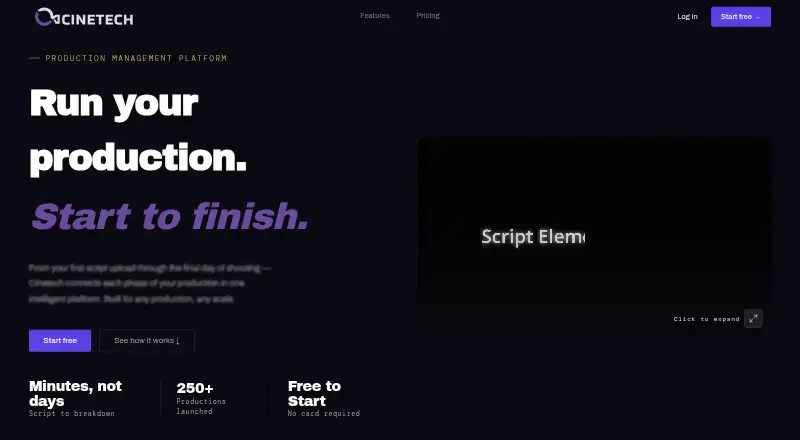
What Cinetech is
Cinetech is a cloud-based, AI-powered production management service for film and video projects. It links visualization, production planning, and team coordination in a shared project knowledge base. Script breakdown tags production elements, analyzes scenes, and tracks versions. Scheduling builds a baseline shooting schedule and can produce stripboards, One-Liners, Day-Out-Of-Days, call sheets, and PDFs. Storyboarding can suggest panels, create visuals in artistic styles, and animate panels via Runway. Shot Lists & DP Tools include script lining, shoot mode, take tracking, a digital clapper, and routing for continuity and editor notes. Teams can share projects with view or edit permissions, get real-time notifications, and communicate in the app. Cinetech says scripts and production data are not used to train AI models, and that Anthropic and OpenAI process content under zero data retention policies. The free account is read-only, has 100 assistant credits, and does not include script breakdowns. Paid modules start at $15/mo. Solo Creator is $49 per month and Team is $149 per month.
Who it suits
Cinetech suits film and video productions needing planning, script breakdown, storyboarding, scheduling, or on-set tools. The service identifies work such as narrative films, documentaries, shorts, commercials, music videos, corporate video, social and digital projects, and web series.
What it does well
- Scheduling outputs include call sheets and PDFs.
- Team sharing offers view or edit permissions.
- Shot tools include take tracking and a digital clapper.
- Free account includes 100 assistant credits.
What to know first
- Free account is read-only.
- Free account excludes script breakdowns.
- Free account has 100 assistant credits.
- No free trial is listed.
Limits
The free account is read-only, has 100 assistant credits, and does not include script breakdowns. Scheduling, Shot Lists & DP Tools, and Storyboarding each include 100 credits on activation; Solo Creator includes 500 signup bonus credits plus 250 credits per month. The Team plan includes five members, with up to 25 available at $25 per seat.
Plans
| Plan | Billed and limits | Price |
|---|---|---|
| Free account | no expiry · auto-seeded demo project · assistant 100 credits · read-only · no trial | Free |
| Team | monthly · 5 members included · additional seats $25 each up to 25 · pooled credits · centralized billing · 1TB storage · email support | $149 a month |
| Scheduling | monthly · scheduler · stripboards · One-Liners · Day-Out-Of-Days · call sheets · PDF exports · 100 credits on activation | $15 a month |
| Shot Lists & DP Tools | monthly · shot-list builder · script lining · shoot mode · take tracking · note routing · digital clapper · 100 credits on activation | $15 a month |
| Storyboarding | monthly · panels · AI generation · artist styles · Runway animation · 100 credits on activation | $15 a month |
| Script breakdown | one-time per script · AI breakdown · element tagging · scene analysis · permanent access · 100 credits included | $19, paid once |
| Budgeting | when released · coming soon · budget builder · ATL/BTL breakdown · top sheet · actuals tracking · schedule sync · AI cost reports | $25 a month |
| Solo Creator | monthly · all 3 modules · 500 signup credits · 250 credits/month · $0.02/credit · 100GB storage · email support | $49 a month |
The first 8 of 9 plans, as cinetech.ai lists them, read 15 Oct 2026. The maker's own page has the final word. Every plan
Getting started
- Open the Cinetech website in a web browser.
- Start with the free account or choose a paid module or plan.
- Use a Scheduling plan for schedules, stripboards, call sheets, and PDF exports.
- Choose Shot Lists & DP Tools or Storyboarding for those respective workflows.
- Select Solo Creator or Team to bundle all three modules.
- Contact sales about the Studio plan.
Cinetech is a web service for connecting film and video production work, from script analysis through shoot-day coordination. It is a stronger fit for teams that want to add specific production tools as needed than for anyone looking for an editable free workspace. Its clearest advantage is the breadth of its connected workflow; its main drawback is that useful working access starts with paid plans.
Overview
Cinetech brings visualization, planning, and team coordination together in a project knowledge base. Its stated scope includes narrative films, documentaries, shorts, commercials, music videos, corporate video, social and digital work, and web series. That range makes it relevant to productions of different formats, but the modular approach means buyers should match the paid tools to their actual workflow rather than assume every capability comes with one entry-level subscription.
The free account is read-only, has no script breakdowns, and includes 100 assistant credits. It can serve as a demo, but not as a place to actively build a production plan. Additional assistant credits can be bought as top-ups.
For productions handling sensitive scripts or production data, Cinetech says that content is not used to train AI models and that Anthropic and OpenAI process it under zero data retention policies. Its privacy policy describes Supabase-managed PostgreSQL storage with row-level security, HTTPS encryption in transit, and production access restricted to authorized personnel.
Key features
From script to shooting schedule
AI script breakdown tags production elements, analyzes scenes, and includes version control. Scheduling builds an optimized baseline shooting schedule and can produce stripboards, One-Liners, Day-Out-Of-Days, call sheets, and PDF exports. Putting these jobs in one service can reduce handoffs between script analysis and scheduling; teams that only need one part can buy the corresponding module instead of paying for the full set.
Visualization and shoot-day work
Storyboarding can suggest panels with AI, generate visuals in artistic styles, and animate panels via Runway. Shot Lists & DP Tools cover script lining, shoot mode, take tracking, a digital clapper, and routing for continuity and editor notes. Together, these tools address both preparation and on-set coordination, though the three modules are sold separately unless a buyer chooses Solo Creator.
Team coordination
Teams can share projects with view or edit permissions, get real-time notifications, and communicate in-app. Cast and crew tracking, location management, and call-sheet support round out the production workflow. Solo and Team plans include email support; Studio adds priority support and a dedicated account manager.
Pricing
The free account costs nothing and includes a demo project and assistant with 100 credits, but is read-only, has no script breakdowns, and has no trial or expiry. It is useful for viewing the service, not for running an editable production.
Individual modules are billed monthly: Scheduling is $15 a month and includes the scheduler, stripboard, One-Liners, Day-Out-Of-Days, call sheets, PDF exports, and 100 credits on activation. Shot Lists & DP Tools is also $15 a month, with its shot list builder, script lining, shoot mode, take tracking, note routing, digital clapper, and 100 activation credits. Storyboarding is $15 a month for panels, AI generation, artist styles, animation via Runway, and 100 activation credits. These plans keep the starting price low if a production only needs one toolset, but buying all three separately costs more than the $49 a month Solo Creator plan.
Script breakdown is a one-time purchase at $19, paid once per script. It includes a full AI breakdown, element tagging, scene analysis, and 100 credits, making it a focused option for a one-off script rather than an ongoing planning subscription.
Solo Creator costs $49 a month and includes all three modules, a 500-credit signup bonus plus 250 credits per month, 100GB storage, and email support. It suits an individual creator who needs the full toolset without team seats. Team costs $149 a month, includes five members, pooled credits, 1TB pooled storage, and email support; it supports up to 25 members at $25/seat, making it the more appropriate tier for a shared production workspace.
Budgeting is priced at $25 a month, billed monthly, and marked coming soon. It is set to include a budget builder, ATL/BTL breakdown, top sheet, actuals tracking, schedule sync, and AI cost reports, so it is not a current option for teams needing those tools now. Studio has custom pricing and is billed through contact sales; it includes a private instance, dedicated database, enterprise SLA, white-label exports, custom branding, priority support, and a dedicated account manager.
Platforms
Cinetech runs on the web. Teams choosing it should be comfortable using a browser-based production workspace.
Who it's for
Cinetech is best suited to creators and production teams that want script, schedule, storyboard, and shoot-day information connected in one project. Solo Creator is the most direct fit for an individual needing all three core modules; Team is aimed at productions that need several members working together and shared storage. It is a poor fit for someone who needs a genuinely usable free plan or a non-web app.
Pros and cons
- Connected production workflow: script breakdown, scheduling, storyboarding, and on-set tools can live around the same project knowledge base.
- Flexible entry point: the $15 a month modules let a production pay for scheduling, shot-list tools, or storyboarding individually.
- Useful collaboration controls: view and edit permissions, notifications, in-app communication, and pooled Team resources support shared work.
- Free account is read-only: its demo project and 100 credits do not let a production build or edit its workflow.
- Modularity requires a choice: productions needing all three core modules must compare separate subscriptions with the $49 a month Solo Creator plan.
- Web only: Cinetech does not offer a listed desktop or mobile platform.
Alternatives
For a broader comparison of scheduling tools, see Film Production Scheduling Software. Choose CineLog if platform reach matters: its free plan supports Android, iOS, macOS, web, and Windows, with one active project, 50 MB of media storage, and up to two collaborators. Gorilla Scheduling is another option to consider if its free plan and free trial suit your evaluation; its free tier limits features, collaboration, certain reports and exports, fringes, and integrated Ratebook.
Choose Production Slate if its free plan's defined production caps fit your project: two projects, 50 budget items, 15 crew, five shoot days, and limited call-sheet sends and attachment sizes. Filmustage may suit a team prioritizing script breakdown on a free plan: it allows one active project and partial AI breakdown of 20% of scenes, alongside non-AI tools and a demo project with a full breakdown; its free trial is also available.
MoviePrepper is another freemium web option. Prescene may be a better fit for screenplay drafting: its free Screenplay Editor plan offers unlimited drafts without AI usage, while Plus is $49 a month. Shamel Studio has a free web plan with one limited project and full access to editing tools, and offers call sheets and production reports as a 12.00 option. Slatefox is a web-based paid option with a free trial; its Indie plan is €19 a month and includes script breakdown.
Verdict
Choose Cinetech if you want a web-based workspace that links script breakdown, scheduling, visualization, and shoot-day coordination, and are prepared to pay for the modules your production needs. Solo Creator is the strongest fit for an individual who wants all three core modules; Team makes more sense when several people need access. Look elsewhere if an editable free plan, mobile or desktop apps, or a single low-cost plan covering just one ongoing production workflow is your priority.
Verdict
Cinetech brings production planning and team coordination into one project workspace, with modular paid tools and a read-only free account. Consider whether the free account's limits fit your intended workflow.
Questions
Is Cinetech free?
Yes. Its free account costs nothing and includes a demo project, 100 assistant credits, and read-only access.
How much do paid plans cost?
Scheduling, Shot Lists & DP Tools, and Storyboarding each cost $15 a month. Solo Creator is $49 a month, Team is $149 a month, and script breakdown costs 19.00 USD once per script.
Which platforms does Cinetech support?
Cinetech is available on the web.
What production work can Cinetech help with?
Its tools cover script breakdown, scheduling, storyboarding, shot lists, and team collaboration. Scheduling can produce stripboards, One-Liners, Day-Out-Of-Days, call sheets, and PDFs.
How does Cinetech handle production data for AI?
Cinetech says it does not use scripts or production data to train AI models. It says Anthropic and OpenAI process content under zero data retention policies.
What does Team include?
Team costs $149 a month and includes five members, pooled credits, 1TB pooled storage, and email support. Up to 25 members are available at $25 per seat.
Facts from Cinetech's own pages
- AI data use
- Cinetech says scripts and production data are not used to train AI models, and that Anthropic and OpenAI process content under zero data retention policies. · cinetech.ai, 2 Oct 2026
- AI providers
- The privacy policy names Anthropic Claude and OpenAI as processors for AI features under stated zero-data-retention policies. · cinetech.ai, 15 Oct 2026
- Assistant
- The film-tuned assistant can generate concept art, help shape treatments, answer questions about production data and create PDF documents. · cinetech.ai, 15 Oct 2026
- Assistant update
- A LinkedIn post reports an upgrade making the assistant more connected to scripts, storyboards, schedules and planning tools. · linkedin.com, 15 Oct 2026
- Budgeting status
- Budgeting is listed as coming soon and is planned to include budget building, ATL/BTL tracking, top sheets and actuals tracking. · cinetech.ai, 15 Oct 2026
- Company legal name
- The maker identifies itself as Cinetech, LLC. · cinetech.ai, 15 Oct 2026
- Company size
- LinkedIn lists Cinetech as a privately held software-development company with 2–10 employees. · linkedin.com, 15 Oct 2026
- Connected knowledge base
- Concepts, breakdowns, schedules and shot lists are stored in one connected project knowledge base. · cinetech.ai, 15 Oct 2026
- Connected workflow
- The platform connects visualization, production planning, and team coordination in one project knowledge base. · cinetech.ai, 2 Oct 2026
- Content ownership
- Cinetech says users retain ownership of scripts, storyboards, schedules and other production materials. · cinetech.ai, 15 Oct 2026
- Credit model
- Credits power AI actions while editing, exports and manual scheduling do not consume credits. · cinetech.ai, 15 Oct 2026
- Data deletion
- The policy says account data is deleted or anonymized within 30 days after account deletion unless retention is legally required. · cinetech.ai, 15 Oct 2026
- Feature update
- A LinkedIn update describes live call sheets with PIN protection, link expiration, personalized access links and view tracking. · linkedin.com, 15 Oct 2026
- Founded year
- LinkedIn lists Cinetech as founded in 2024. · linkedin.com, 15 Oct 2026
- Founder background
- The maker says Jason Kunke has more than two decades as a camera technician and Timothy Kunke has 25 years building technology infrastructure. · cinetech.ai, 15 Oct 2026
- Headquarters
- The California business listing gives the legal address as 1712 Sinaloa Road, Apartment 206, Simi Valley, California 93065. · b2bhint.com, 15 Oct 2026
- Independent company description
- LinkedIn describes Cinetech as model-agnostic, using curated industry data, multimodal functionality, collaborative workspaces and a personal library. · linkedin.com, 15 Oct 2026
- Integration
- Runway is named for storyboard-panel animation. · cinetech.ai, 15 Oct 2026
- Intended users
- Cinetech says it is built for any production and identifies narrative film, documentaries, shorts, commercials, music videos, corporate video, social and digital work, and web series as use cases. · cinetech.ai, 2 Oct 2026
- Legal registration
- A California business-record listing shows CineTech L.L.C. as an active LLC incorporated on 21 August 2024. · b2bhint.com, 15 Oct 2026
- Limit: budgeting
- Budgeting is not yet available and has no active release date on the product page. · cinetech.ai, 15 Oct 2026
- Limit: free account
- The free account is read-only and includes no script breakdowns. · cinetech.ai, 15 Oct 2026
- Limits
- The free account is read-only, includes no script breakdowns, and has 100 assistant credits; additional credits are available as top-ups. · cinetech.ai, 2 Oct 2026
- Limit: Studio pricing
- Studio pricing is available only through sales contact. · cinetech.ai, 15 Oct 2026