Freedom251 › Film Production Scheduling Software
CineSched
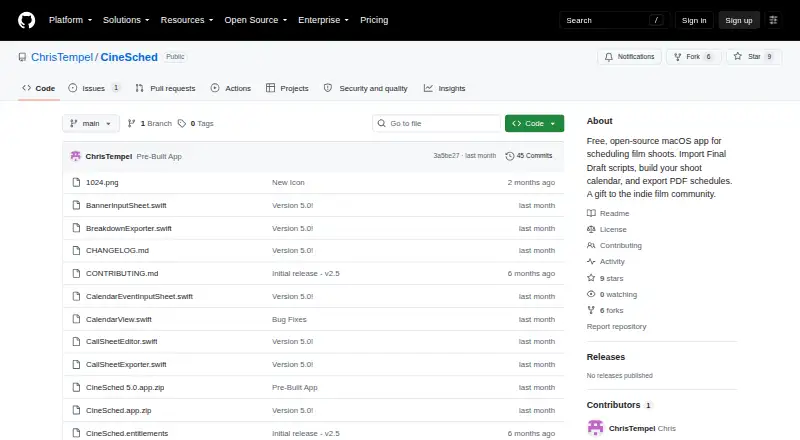
What CineSched is
CineSched is a free macOS app for scheduling film shoots. It imports Final Draft .fdx scripts and adds their scenes to a Boneyard, where scenes can be grouped by location, INT/EXT, cast or day/night. Users build a schedule by dragging scenes from the Boneyard onto calendar days. For a selected shoot day, CineSched can create and export a call sheet, and schedules can be exported as PDFs. Production setup can include a company name, director, contact number, crew and cast-to-character mappings. Projects save automatically, and users can also save or load them as JSON files. The repository lists macOS 13.0 (Ventura) or later and Xcode 14.0 or later as requirements. Installation involves downloading or cloning the source, opening CineSched.xcodeproj in Xcode and building the app. The project repository provides an Issues section.
Who it suits
CineSched suits film crews scheduling shoots on a Mac, particularly those working from Final Draft scripts and organizing scenes by production details. Users need macOS 13.0 or later and Xcode 14.0 or later for the listed build process.
What it does well
- Free, open-source macOS app.
- Imports Final Draft .fdx scripts.
- Creates and exports call sheets.
- Exports schedules as PDFs.
- Projects save automatically.
What to know first
- macOS 13.0 or later is required.
- Xcode 14.0 or later is required.
- Installation involves building from source.
Plans
| Plan | Billed and limits | Price |
|---|---|---|
| Free | Free, open-source macOS app | Free |
As github.com lists them, read 2 Oct 2026. The maker's own page has the final word.
Getting started
- Download or clone the project source from its GitHub repository.
- Open CineSched.xcodeproj in Xcode 14.0 or later.
- Build the app on macOS 13.0 Ventura or later.
- Import a Final Draft .fdx script to add scenes to the Boneyard.
- Drag scenes from the Boneyard onto calendar days.
Verdict
CineSched offers a focused shoot-scheduling workflow with scene organization, calendar scheduling and call-sheet exports. Its listed installation process requires Xcode and a macOS build.
Questions
How much does CineSched cost?
CineSched is free, with a listed plan price of $0.
Which platforms does CineSched support?
CineSched is for macOS 13.0 Ventura or later.
Is CineSched open source?
Yes. It is listed as a free, open-source macOS app.
What can I import into CineSched?
It imports Final Draft .fdx scripts and adds their scenes to the Boneyard.
What can CineSched export?
It can export call sheets for selected shoot days and schedules as PDFs. Projects can also be saved or loaded as JSON files.
How do I install CineSched?
Download or clone the source, open CineSched.xcodeproj in Xcode 14.0 or later, and build the app.
Facts from CineSched's own pages
- Call sheets
- The app can create and export a call sheet for a selected shoot day. · github.com, 2 Oct 2026
- Installation
- The repository describes cloning or downloading the source, opening CineSched.xcodeproj in Xcode, and building the app. · github.com, 2 Oct 2026
- Production details
- Production setup can include a company name, director, contact number, crew, and cast-to-character mappings. · github.com, 2 Oct 2026
- Project files
- Projects save automatically, and users can save or load projects as JSON files. · github.com, 2 Oct 2026
- Purpose
- CineSched is a macOS app for scheduling film shoots. · github.com, 2 Oct 2026
- Requirements
- The repository lists macOS 13.0 (Ventura) or later and Xcode 14.0 or later as requirements. · github.com, 2 Oct 2026
- Scene scheduling
- You can schedule scenes by dragging them from the Boneyard onto calendar days. · github.com, 2 Oct 2026
- Schedule export
- The app exports schedules as PDFs. · github.com, 2 Oct 2026
- Script import
- It imports Final Draft .fdx scripts and adds their scenes to the Boneyard. · github.com, 2 Oct 2026
- Security and compliance
- The repository page opened does not state security certifications or compliance standards. · github.com, 2 Oct 2026
- Sorting
- The Boneyard can group scenes by location, INT/EXT, cast, or day/night. · github.com, 2 Oct 2026
- Support
- The repository page provides an Issues section for the project. · github.com, 2 Oct 2026