Freedom251 › Motion Capture Software
PoseCap
What PoseCap is
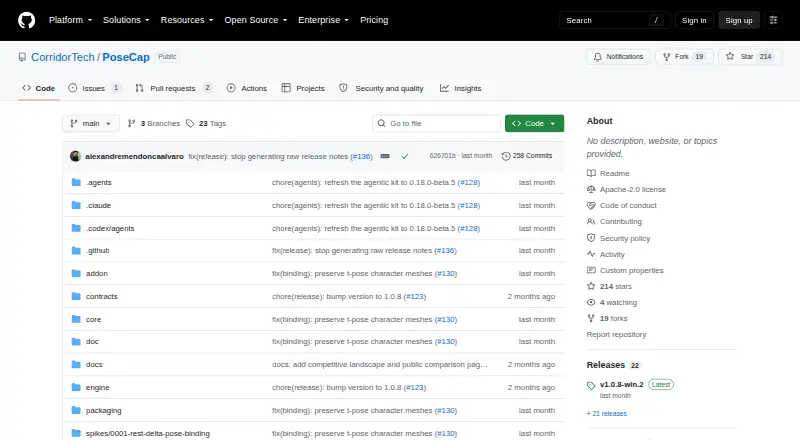
PoseCap is a free, open-source Blender extension that streams markerless full-body poses to a character in Blender in real time. It captures movement from a webcam or processes a video file, and can record motion as keyframes on Blender's timeline. The extension also supports live streaming, single-pose capture, and SMPL-X model management. Pose data travels from a separate engine process to Blender over a local connection.
PoseCap offers two capture backends. MediaPipe Lite is designed for CPU-first capture and does not require a GPU or provider account. PEAR provides higher-fidelity capture and requires an NVIDIA GPU with driver R570 or newer. The getting-started guide describes bringing in a Mixamo or Unreal character and converting it in one click. Blender 4.2 LTS or newer is required. The project lists Windows 10/11 as its current target and describes a native Linux installation path; macOS is not currently planned. SMPL, SMPL-X, and FLAME models are not included. Research use requires separate registration and acceptance of model terms, and commercial production requires a Meshcapade commercial license. PoseCap's monocular depth estimation locks poses to the pelvis, so general world translation is not available.
Who it suits
PoseCap suits Blender animators who want to capture body movement from a webcam or video without a mocap suit, markers, or external mocap software. It is also relevant to users who can run Blender 4.2 LTS or newer on Windows 10/11 or use the project's native Linux installation path.
What it does well
- Free and open source.
- Captures poses from a webcam or video file.
- MediaPipe Lite does not require a GPU or provider account.
- Records motion as Blender timeline keyframes.
- Supports live streaming and single-pose capture.
- Describes one-click character conversion for Mixamo or Unreal characters.
What to know first
- Requires Blender 4.2 LTS or newer.
- PEAR requires an NVIDIA GPU and driver R570 or newer.
- macOS is not currently planned.
- SMPL-family model licenses are separate.
Limits
PEAR capture requires an NVIDIA GPU and driver R570 or newer. SMPL, SMPL-X, and FLAME models are not distributed with PoseCap; research use requires separate registration and agreement to model terms, and commercial production requires a Meshcapade commercial license. Captured poses are pelvis-locked, without general world translation.
Plans
| Plan | Billed and limits | Price |
|---|---|---|
| Free and open source | Blender extension · MediaPipe Lite and PEAR capture backends · Webcam and video-file capture | Free |
| PoseCap | Free and open source · SMPL-family model licenses are separate | Free |
As github.com lists them, read 21 Sept 2026. The maker's own page has the final word.
Getting started
- Install Blender 4.2 LTS or newer on Windows 10/11, or use the native Linux installation path.
- Get PoseCap from its GitHub project.
- Choose MediaPipe Lite for CPU-first capture, or PEAR if you have an NVIDIA GPU and driver R570 or newer.
- Bring in a Mixamo or Unreal character and convert it in one click, as described in the getting-started guide.
- Connect a webcam or provide a video file, then use the Blender extension to stream, capture a pose, or record timeline keyframes.
- If using the Windows installer, compare its published SHA-256 file or use the provided GitHub CLI attestation verification command.
Verdict
Choose PoseCap if you want webcam or video-based body capture in Blender, with MediaPipe Lite available for CPU-first use. Look elsewhere if you need general world translation, macOS support, or bundled SMPL-family models; PEAR also depends on an NVIDIA GPU and a recent driver.
Questions
How much does PoseCap cost?
PoseCap is free and open source; its listed plans are free. SMPL-family model licenses are separate.
Which operating systems does PoseCap support?
The project lists Windows 10/11 as its current target and describes a native Linux installation path. macOS is not currently planned.
What software does PoseCap integrate with?
PoseCap runs as a Blender extension and requires Blender 4.2 LTS or newer. A separate engine process sends poses to Blender over a local connection.
Can I capture without an NVIDIA GPU?
MediaPipe Lite is CPU-first and does not require a GPU or provider account. PEAR requires an NVIDIA GPU and driver R570 or newer.
Are the SMPL-family models included?
No. SMPL, SMPL-X, and FLAME models are not distributed with PoseCap. Research use requires separate registration and acceptance of model terms; commercial production requires a Meshcapade commercial license.
Can PoseCap record video or motion?
PoseCap can process a video file or capture from a webcam. In Blender, it can stream live and record motion as timeline keyframes.
Facts from PoseCap's own pages
- Body-model licensing
- SMPL, SMPL-X, and FLAME models are not distributed with PoseCap; their research-use licenses require users to register and accept terms themselves, and commercial production requires a Meshcapade commercial license. · github.com, 4 Oct 2026
- Capture backends
- MediaPipe Lite provides CPU-first capture without a GPU or provider account, while PEAR is the higher-fidelity NVIDIA/CUDA backend. · github.com, 4 Oct 2026
- Character setup
- The getting-started guide says users can bring in a Mixamo or Unreal character and convert it in one click. · github.com, 4 Oct 2026
- Features
- The Blender extension supports live streaming, recording motion to keyframes, single-pose capture, and SMPL-X model management. · github.com, 4 Oct 2026
- Inputs and output
- PoseCap can capture from a webcam or process a video, and can record motion as Blender timeline keyframes. · github.com, 4 Oct 2026
- Integrations
- PoseCap runs as a Blender extension and streams poses from a separate engine process to Blender over a local connection. · github.com, 4 Oct 2026
- Intended users
- The project describes Blender animators seeking body animation without mocap suits, markers, or external mocap software as its target users. · github.com, 4 Oct 2026
- Notable limitation
- The README says poses are pelvis-locked because monocular depth estimation cannot recover trustworthy world position; world translation is not generally available yet. · github.com, 4 Oct 2026
- Platform support
- The latest release describes a native Linux installation path; the README lists Windows 10/11 as the current target and says macOS is not currently planned. · github.com, 4 Oct 2026
- Requirements
- The getting-started guide requires Blender 4.2 LTS or newer and lists Windows 10 or 11; PEAR requires an NVIDIA GPU and driver R570 or newer. · github.com, 4 Oct 2026
- Security and download verification
- The Windows installer is unsigned; the release instructs users to download it from GitHub, compare its published SHA-256 file, and offers a GitHub CLI attestation verification command. · github.com, 4 Oct 2026
- Support
- The support guide directs users to run PoseCap Doctor, create and review a Support Bundle, and file a bug report with build, Windows, Blender, GPU, reproduction, and diagnostic details. · github.com, 4 Oct 2026
- What it does
- PoseCap streams markerless full-body poses from a webcam to a character in Blender in real time. · github.com, 4 Oct 2026
Where PoseCap stands on Freedom251
- Motion Capture Software#16 of 63
- AI Motion Capture Software#14 of 27