PNGTuber Plus
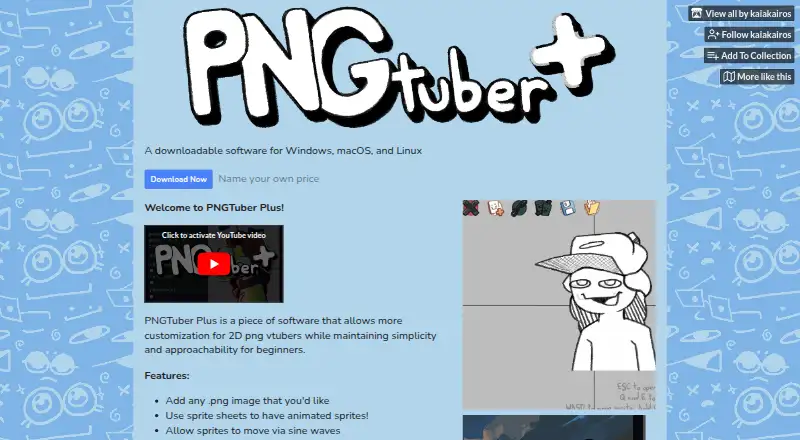
What PNGTuber Plus is
PNGTuber Plus is a free desktop app for customizing 2D PNG VTuber avatars, designed to remain approachable for beginners. Users can add PNG images or sprite sheets for animated sprites. Sprites can move with sine waves, attach to other sprites, trail behind movement, or bounce and jiggle. Individual sprites can appear or disappear in response to speaking or blinking, and lip sync is supported. The background color can be changed for transparency or green-screen use in OBS. Avatars can be saved and shared. Builds are available for Windows, macOS and Linux, and the maker links to a public GitHub repository containing the source code. The developer accepts optional support payments, but the software is free. Steam lists minimum Windows 10 requirements of a 64-bit processor and operating system, 4 GB RAM, 2 GB graphics and 100 MB storage. The maker asks users to report bugs, issues or suggestions through the itch.io community page.
Who it suits
It suits people making 2D PNG VTuber avatars, particularly beginners seeking sprite customization and motion options. It is available for Windows, macOS and Linux.
What it does well
- Free software with optional support payments.
- Supports animated sprite sheets.
- Sprites can react to speaking or blinking.
- Avatars can be saved and shared.
- Builds are available for three desktop platforms.
What to know first
- Steam lists minimum requirements for Windows 10.
- Windows minimums include 4 GB RAM and 2 GB graphics.
- Bug reports and suggestions are directed to the itch.io community page.
Limits
The free software accepts optional support payments. Steam lists Windows 10 minimum requirements of a 64-bit processor and operating system, 4 GB RAM, 2 GB graphics, and 100 MB storage.
Plans
| Plan | Billed and limits | Price |
|---|---|---|
| Free / name your own price | The software is free; the developer accepts optional support payments. · PNG avatar customization · Sprite sheets · Speaking and blinking reactions · Windows, macOS, and Linux builds | Free |
| Free | Steam listing · Windows 10 system requirements | Free |
| Name your own price | Name your own price · Windows, macOS and Linux downloads · PNGTuber Plus 1.4.5 builds | On request |
As kaiakairos.itch.io lists them, read 20 Sept 2026. The maker's own page has the final word.
Getting started
- Visit the PNGTuber Plus itch.io page.
- Choose a Windows, macOS, or Linux build.
- Add PNG images or sprite sheets for your avatar.
- Set sprite motion and speaking or blinking reactions.
- Change the background color if you need transparency or green-screen use in OBS.
- Save and share the avatar when ready.
PNGTuber Plus is a free 2D avatar tool for creators who want PNG-based characters with expressive motion rather than a full 3D rig. It suits beginners, streamers and developers who prefer a lightweight workflow across desktop operating systems. Its strongest case is straightforward sprite animation with speaking and blinking reactions; it is a weaker fit if you need webcam-driven tracking or an extensive commercial production suite.
Overview
PNGTuber Plus builds a reactive avatar from PNG artwork. You can import individual images, combine them into sprite sheets for animation, and save completed avatars for sharing with other people. The approach keeps the workflow focused on 2D assets, making it practical for PNGTubers who want more movement than a static overlay without learning a complex character system.
The software is presented as lightweight and approachable. That positioning matters for first-time creators: the feature set concentrates on assembling sprites and assigning reactions instead of adding a broad stack of production tools. A public GitHub repository provides access to the source code, while bug reports, issue reports and suggestions are directed to the maker’s itch.io community page.
Key features
Sprite-based animation
Sprite sheets let you turn several PNG frames into animated sprites. Individual sprites can move with sine-wave motion, attach to other sprites, trail behind movement, or bounce and jiggle. These behaviors provide visible life and secondary motion without requiring frame-by-frame animation for every action. They are best suited to expressive overlays and talking avatars, not detailed character animation pipelines.
Speaking and blinking reactions
Sprites can appear or disappear when the avatar is speaking or blinking. This supports separate mouth, eye or expression artwork and gives a PNG character recognizable reactions during a stream. The result is more responsive than a single static image, while remaining tied to the sprite assets you supply.
Scene and sharing controls
You can change the background color for transparency workflows or green-screen use in OBS. That is useful when compositing the avatar over gameplay or other scenes. Avatars can also be saved and shared, which helps collaborators exchange setups or move a character between installations.
Pricing
PNGTuber Plus is free. The “Free / name your own price” plan costs nothing; the developer accepts optional support payments. It includes PNG avatar customization, sprite sheets, speaking and blinking reactions, and Windows, macOS and Linux builds. The separate “Name your own price” and “Free” listings are also free, with the former covering Windows, macOS and Linux and the latter referring to the Steam listing and its Windows 10 requirements.
There are no paid tiers, seat charges, quotas, trial periods or renewal terms stated. The practical trade-off is simple: every published capability is available without payment, while support is voluntary rather than tied to additional functionality.
Platforms
Builds are available for Linux, macOS and Windows. Steam’s Windows minimum is Windows 10 with a 64-bit processor and operating system, 4 GB of RAM, 2 GB of graphics memory and 100 MB of storage. Those requirements give Windows users a concrete baseline; equivalent minimum specifications are not provided for macOS or Linux.
Who it's for
Choose PNGTuber Plus if you are starting with 2D PNG artwork and want animated motion, lip-sync-oriented speaking reactions and blinking without paying for software. It is also a sensible option for creators who need a transparent or green-screen-ready background and the ability to share avatar setups.
Look elsewhere if your priority is webcam or smartphone face tracking, a 3D avatar workflow, or a larger ecosystem of ready-made content. PNGTuber Plus centers on supplied sprites, so its value depends on having — or creating — the PNG assets you want to animate.
Pros and cons
- Pros: Free across Windows, macOS and Linux, with optional support rather than a subscription.
- Pros: Sprite sheets, sine-wave motion, attachments, trailing, bouncing and jiggling provide several ways to animate 2D artwork.
- Pros: Speaking and blinking visibility changes support recognizable live reactions.
- Pros: Background-color control works for transparency and OBS green-screen compositions.
- Cons: The workflow is sprite-based, so it does not replace a 3D or webcam-tracking system.
- Cons: Windows requirements are published, but equivalent macOS and Linux minimums are not.
Alternatives
Browse the VTuber Software list for a wider comparison of avatar tools, or the 2D Character Animation Software list when animation breadth matters more than a focused PNG workflow.
- Animaze is the better choice for Android, iOS or Windows support and a freemium model with 80-plus free items; its Plus plan costs $3.99 a month, billed as $47.88 per year, and removes the watermark.
- VTube Studio suits creators needing Live2D models, webcam or smartphone tracking, and voice-based lip-sync on Android, iOS, macOS or Windows.
- Webcam Motion Capture is aimed at tracking workflows across iOS, macOS and Windows, with all tracking features tryable on its free plan.
- XR Animator offers a free public version across Android, Linux, macOS, web and Windows.
- nizima LIVE has a free plan at 0 JPY per free for one user per month, but limits continuous camera use to 40 minutes and displays a logo.
- veadotube provides a free mini version for Windows x64, Linux x64 and macOS, with an early-access plan costing $8 a month.
- vTuber Kit is another free option for Linux, macOS and Windows with no paid tiers stated.
- LuppetX is a Windows-only free download with no account registration or license purchase required.
Verdict
PNGTuber Plus is a strong recommendation for beginners and PNG-based streamers who want expressive 2D avatars at no software cost. Its motion behaviors, speaking and blinking reactions, cross-platform builds and shareable avatars cover the essentials cleanly. Look elsewhere when webcam or smartphone tracking, Live2D or 3D support, or a broader animation toolkit is central to your setup.
Verdict
PNGTuber Plus offers sprite-based avatar customization, movement and speaking or blinking reactions at no software cost. Its listed Windows requirements are specific, while macOS and Linux builds are also available.
Questions
Is PNGTuber Plus free?
Yes. It is free, and the developer accepts optional support payments.
Which platforms are available?
Builds are available for Windows, macOS, and Linux.
Can I use sprite sheets and animate an avatar?
Yes. You can use sprite sheets and set sprites to move with sine waves, attach to other sprites, trail behind movement, or bounce and jiggle.
Does it support speaking reactions and lip sync?
Individual sprites can appear or disappear based on speaking or blinking, and lip sync is supported.
Is the source code public?
The maker links to a public GitHub repository containing the source code.
What are the stated Windows minimum requirements?
Steam lists Windows 10, a 64-bit processor and operating system, 4 GB RAM, 2 GB graphics, and 100 MB storage.
Facts from PNGTuber Plus's own pages
- API and SDK availability
- The maker links source code and a tutorial, but the linked product page does not advertise a public API, SDK or hosted service. · kaiakairos.itch.io, 15 Oct 2026
- Artwork replacement
- A sprite's image can be replaced without rebuilding the rest of the avatar. · kaiakairos.itch.io, 15 Oct 2026
- Avatar sharing
- Avatar configurations can be saved and shared with other people. · kaiakairos.itch.io, 15 Oct 2026
- Background
- The background color can be changed for transparency or green-screen use in OBS. · kaiakairos.itch.io, 7 Oct 2026
- Bounce and jiggle
- Sprites can receive bounce and jiggle effects. · kaiakairos.itch.io, 15 Oct 2026
- Developer technology
- The repository README says the project is a Godot 4.1.2 stable project and warns that the code is a slop project that may not work in future Godot versions. · github.com, 15 Oct 2026
- Download files
- The itch.io download includes Windows, macOS and Linux ZIP archives plus a defaultAvatar.save file. · kaiakairos.itch.io, 15 Oct 2026
- Drag physics
- The software supports positional and rotational drag behind movement. · kaiakairos.itch.io, 15 Oct 2026
- Images and animation
- Users can add PNG images and use sprite sheets for animated sprites. · kaiakairos.itch.io, 7 Oct 2026
- Independent feature summary
- The independent pngtuber.cc guide describes microphone reactions, blinking, physics, costumes, hotkeys, sprite sheets and OBS workflows. · pngtuber.cc, 15 Oct 2026
- Independent platform summary
- The independent guide says Windows 10+, macOS and Linux are supported and estimates about 100 MB of storage. · pngtuber.cc, 15 Oct 2026
- Independent rating
- Steambase reports a Player Score of 83 out of 100 from 411 Steam reviews, classified as Very Positive, using data last updated 21 November 2025. · steambase.io, 15 Oct 2026
- Intended users
- The maker describes the software as lightweight and easy to use, and says it is designed to remain approachable for beginners. · kaiakairos.itch.io, 7 Oct 2026
- Itch rating
- The itch.io listing is rated 4.7 out of 5 stars from 229 total ratings. · kaiakairos.itch.io, 15 Oct 2026
- License terms
- The repository license dedicates copyright to the public domain and permits copying, modification, compilation and commercial or non-commercial distribution without warranty. · github.com, 15 Oct 2026
- Limit: abandonment concerns
- Multiple Steam reviewers in 2025 described the software as abandoned or abandonware and recommended PNGTuber Remix instead. · steamcommunity.com, 15 Oct 2026
- Limit: CPU and stability
- Steam reviewers reported optimization problems, high CPU use, freezes, crashes with OBS and physics settings resetting between launches. · steamcommunity.com, 15 Oct 2026
- Limit: microphone detection
- Another reviewer said microphone detection could trigger on incidental noises, fail to react, or crash the computer when changing devices. · steamcommunity.com, 15 Oct 2026
- Limit: microphone latency
- One reviewer reported a one-to-two-second delay between speaking and the avatar beginning to talk. · steamcommunity.com, 15 Oct 2026
- Limit: voice activity filtering
- A Steam reviewer wanted voice-activity noise reduction such as Silero because non-voice sounds could activate the avatar. · steamcommunity.com, 15 Oct 2026
- Maker identity
- The maker presents as kaiakairos, an independent developer rather than a named software company. · kaiakairos.itch.io, 15 Oct 2026
- Maker location
- The developer's GitHub profile lists Omaha, Nebraska, United States. · github.com, 15 Oct 2026
- Maker profile
- The GitHub profile describes kaia as a game developer who mainly uses Godot and shows 14 repositories. · github.com, 15 Oct 2026
- OBS integration
- The app offers background-color options for transparent capture or green-screen use in OBS. · kaiakairos.itch.io, 15 Oct 2026
Where PNGTuber Plus stands on Freedom251
- VTuber Software#1 of 25
- 2D Character Animation Software#2 of 48