Freedom251 › Python Package Managers
pip-tools
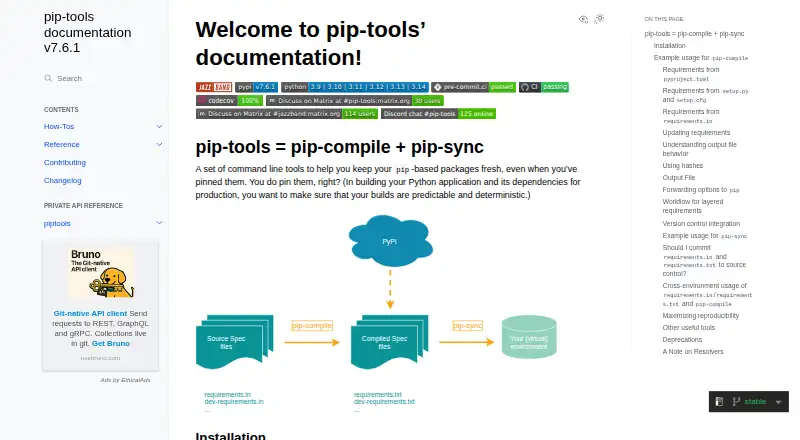
What pip-tools is
pip-tools is a free set of command-line tools for pinning pip-based dependencies and helping make builds predictable. Its two main commands are pip-compile and pip-sync. pip-compile creates requirements.txt files from pyproject.toml, setup.cfg, setup.py, or requirements.in, including project and optional dependencies declared in pyproject.toml. It can also generate hashes for pip hash-checking mode. pip-sync installs, upgrades, or removes packages to align a virtual environment with a compiled requirements.txt file. Defaults can be configured in .pip-tools.toml or pyproject.toml, and pip-compile can run as a pre-commit hook. The tools support Linux, macOS, and Windows, and require Python 3.9 or later. Compilation can produce different results across operating systems, Python versions, and implementations, so the project advises compiling separately for each target environment. The backtracking resolver is the default; the legacy resolver is deprecated. pip-tools is distributed under the BSD License and is classified for developers and system administrators.
Who it suits
It suits developers and system administrators managing pip-based dependencies in virtual environments. It is useful when teams want compiled requirements files and synchronized environments.
What it does well
- Compiles requirements from several common project files.
- pip-sync aligns virtual environments with compiled requirements.
- Can generate hashes for pip hash-checking mode.
- Supports Linux, macOS, and Windows.
What to know first
- Requires Python 3.9 or later.
- Compilation results can vary across target environments.
- The legacy resolver is deprecated.
Plans
| Plan | Billed and limits | Price |
|---|---|---|
| pip-tools | command-line tools · install per virtual environment · Python >=3.9 | Free |
As pip-tools.readthedocs.io lists them, read 1 Oct 2026. The maker's own page has the final word.
Getting started
- Open the pip-tools documentation site.
- Use Python 3.9 or later.
- Install pip-tools in the virtual environment where you want to use it.
- Create a requirements.txt with pip-compile from a supported project or requirements file.
- Use pip-sync to align the virtual environment with the compiled requirements.
pip-tools is a free command-line toolkit for pinning pip-based dependencies and bringing a virtual environment into line with a compiled requirements file. It suits developers and system administrators who want tighter control over pip workflows, rather than a tool that also manages environments. Its focused approach is useful, but projects targeting different Python and operating-system combinations need separate compilations.
Overview
The workflow pairs dependency compilation with environment synchronization: one command produces pinned requirements, and another adjusts an environment to match them. That division makes pip-tools a practical choice for teams already using pip and virtual environments. It is a narrower fit for people seeking a single tool to manage environments as well as dependencies.
pip-tools is distributed under the BSD License and maintained as a Jazzband project. The PyPI package requires Python >=3.9 and lists CPython and PyPy classifiers for Python 3.9 through 3.14. PyPI reports Trusted Publishing, a GitHub Actions signature, and an attestation for the release. Jazzband asks that security issues be sent privately by email rather than raised in public issues or pull requests; GitHub has no published security advisories.
Key features
Compile and pin requirements
pip-compile generates requirements.txt from requirements.in, pyproject.toml, setup.cfg, or setup.py. For pyproject.toml, it supports project and optional dependencies, and can pin dependencies for Setuptools, Hatch, and flit. This range of inputs lets teams keep declarations in their existing project files while producing a pinned output. The --generate-hashes option adds hashes for pip hash-checking mode, a useful safeguard for workflows that require it.
Synchronize a virtual environment
pip-sync installs, upgrades, and uninstalls packages until a virtual environment matches a compiled requirements.txt. That makes the file an actionable specification rather than just a record of chosen versions. The trade-off is scope: pip-tools aligns an existing virtual environment, but does not manage environments themselves.
Configure and integrate
Project defaults can live in .pip-tools.toml or pyproject.toml, and pip-compile can run as a pre-commit hook. These options suit teams that want compilation settings and checks tied to project workflows instead of relying on manual reminders.
Resolver and reproducibility
The default backtracking resolver is described as more robust, but generally slower. The legacy resolver is deprecated, so relying on it is not a sound long-term choice. Pinned output also does not guarantee one identical requirements file across every target: operating systems, Python versions, and implementations can change which dependencies apply. Compile separately for each environment the project supports.
Pricing
The pip-tools plan costs free and includes the command-line tools, with installation per virtual environment and a Python >=3.9 requirement. There is no paid tier to weigh against it; its practical limits are the Python requirement, its command-line scope, and the need to handle target environments separately. The package is classified as cross-platform, with Linux, macOS, and Windows listed as supported platforms.
Platforms
pip-tools supports Linux, macOS, and Windows. The package requires Python >=3.9 and lists both CPython and PyPy classifiers for versions 3.9 through 3.14. Cross-platform availability does not remove the need to compile separately when dependencies differ by operating system or Python implementation.
Who it's for
Choose pip-tools if you work with pip and want pinned requirements, a way to synchronize virtual environments to those pins, or a compilation step that fits project configuration and pre-commit workflows. Its PyPI audience classifications—developers and system administrators—match that focused use. Look elsewhere if you need environment management in the same tool or expect one compiled file to serve every operating system and Python implementation without adjustment.
Pros and cons
- Pros: Accepts four common dependency declaration formats, including project and optional dependencies in pyproject.toml, so teams can compile without first changing how they declare dependencies.
- Pros: pip-sync brings a virtual environment into line with compiled requirements by installing, upgrading, and uninstalling packages.
- Pros: Hash generation, project-level defaults, and pre-commit integration support more controlled and repeatable project workflows.
- Cons: Different operating systems, Python versions, and implementations may produce different results, requiring per-target compilation.
- Cons: The default backtracking resolver is more robust but generally slower, while the legacy resolver is deprecated.
- Cons: It does not manage environments, so users looking for that capability need another tool.
Alternatives
For a broader choice of tools in this category, browse Python Package Managers.
- ActiveState Platform is a freemium alternative with a free organization plan limited to public projects and a paid organization plan with custom pricing.
- Hatch is a free, MIT-licensed Python project manager for readers seeking a project manager rather than pip-tools' focused compilation and synchronization workflow.
- pip is a free alternative for readers who want pip itself; pip-tools adds compilation and environment synchronization around pip-based requirements.
- Pixi is a free alternative with package-hosting plans, including an open-source option with a global CDN, 100GB of public packages, and unlimited channel users.
- Spack is a free, open-source package manager and an alternative for readers considering another package manager.
- Twine is a free alternative for readers considering a Python package tool that requires Python >=3.10.
- uv is a free alternative for readers considering another open-source Python package tool.
- Astral offers free, open-source, permissively licensed tools including Ruff, uv, and ty for readers considering a broader tool set.
Verdict
Choose pip-tools if your project already relies on pip and you want pinned dependency files plus a command to make virtual environments match them, without paying for the tools. Look elsewhere if environment management is essential or you need one compilation to cover multiple platforms and Python implementations: pip-tools requires separate target-specific compilations.
Verdict
pip-tools provides a focused workflow for compiling pinned dependencies and aligning an environment to them. Compile separately for each target environment because results may differ across operating systems and Python implementations.
Questions
How much does pip-tools cost?
pip-tools is free: the listed plan is free.
Which platforms does it support?
It supports Linux, macOS, and Windows. The package requires Python 3.9 or later.
What do pip-compile and pip-sync do?
pip-compile creates requirements.txt files from supported project files. pip-sync installs, upgrades, and uninstalls packages to match a compiled requirements file.
Can it compile dependencies from pyproject.toml?
Yes. It supports project and optional dependencies declared in pyproject.toml, as well as dependency pinning for Setuptools, Hatch, and flit.
Does pip-tools support lockfiles and dependency groups?
Lockfile support and dependency groups are listed as supported. Environment management is listed as unsupported.
What license does pip-tools use?
pip-tools is distributed under the BSD License.
Facts from pip-tools's own pages
- Audience
- PyPI classifies the project for developers and system administrators. · pypi.org, 1 Oct 2026
- Configuration
- Project-level defaults can be configured in .pip-tools.toml or pyproject.toml. · pip-tools.readthedocs.io, 1 Oct 2026
- Core commands
- The project consists of pip-compile and pip-sync. · pip-tools.readthedocs.io, 1 Oct 2026
- Cross-environment limit
- Because dependencies can vary by operating system, Python version, and implementation, users should run pip-compile separately for each targeted environment. · pip-tools.readthedocs.io, 1 Oct 2026
- Dependency compilation
- pip-compile creates requirements.txt files from pyproject.toml, setup.cfg, setup.py, or requirements.in. · pip-tools.readthedocs.io, 1 Oct 2026
- Environment synchronization
- pip-sync installs, upgrades, and uninstalls packages so a virtual environment matches compiled requirements exactly. · pip-tools.readthedocs.io, 1 Oct 2026
- Hash security
- pip-compile can generate hashes for pip hash-checking mode with the --generate-hashes flag. · pip-tools.readthedocs.io, 1 Oct 2026
- License
- pip-tools is distributed under the BSD License and has an OS Independent classifier on PyPI. · pypi.org, 1 Oct 2026
- Maintainer model
- Jazzband is a collaborative community that shares responsibility for maintaining Python-based projects. · github.com, 1 Oct 2026
- Packaging integrations
- pip-compile supports pyproject.toml projects and can pin dependencies for Setuptools, Hatch, and flit. · github.com, 1 Oct 2026
- Pre-commit integration
- pip-compile can be used as a pre-commit hook. · github.com, 1 Oct 2026
- Purpose
- pip-tools is a set of command-line tools that keeps pinned pip-based packages fresh and helps make builds predictable and deterministic. · pip-tools.readthedocs.io, 1 Oct 2026
- Pyproject support
- pip-compile supports project dependencies and optional dependencies declared in pyproject.toml. · pip-tools.readthedocs.io, 1 Oct 2026
- Release provenance
- PyPI says the release was uploaded using Trusted Publishing and has a GitHub Actions signature and attestation. · pypi.org, 1 Oct 2026
- Reproducibility limit
- pip-compile can produce different requirements.txt results for different operating systems, Python versions, and Python implementations. · pip-tools.readthedocs.io, 1 Oct 2026
- Requirement compilation
- pip-compile generates requirements.txt from pyproject.toml, setup.cfg, setup.py, or requirements.in. · pip-tools.readthedocs.io, 1 Oct 2026
- Resolver behavior
- The backtracking resolver is the default and is more robust, while the legacy resolver is deprecated and may take less predictable paths. · pip-tools.readthedocs.io, 1 Oct 2026
- Resolver limit
- The legacy resolver is deprecated, while the backtracking resolver is the default and is described as more robust but generally slower. · github.com, 1 Oct 2026
- Security advisories
- The GitHub security page states that there are no published security advisories. · github.com, 1 Oct 2026
- Security reporting
- Jazzband asks users to report security issues privately by email to [email protected] rather than opening public issues or pull requests. · github.com, 1 Oct 2026
- Supported audience
- PyPI classifies pip-tools for developers and system administrators. · pypi.org, 1 Oct 2026
- Supported Python
- The PyPI package requires Python >=3.9 and lists CPython and PyPy classifiers for Python 3.9 through 3.14. · pypi.org, 1 Oct 2026
Where pip-tools stands on Freedom251
- Python Package Managers#13 of 27