Freedom251 › Photo Mosaic Software
Picture Mosaics Online Mosaic Tool
Visit Picture Mosaics Online Mosaic Tool Alternatives Pricing
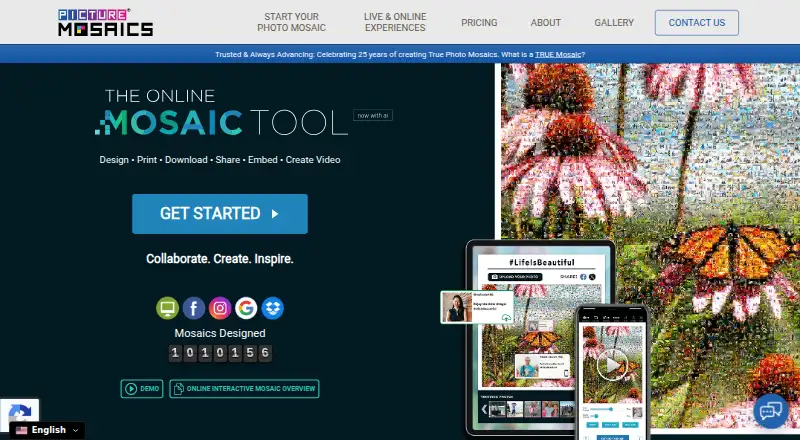
What Picture Mosaics Online Mosaic Tool is
Picture Mosaics Online Mosaic Tool creates photo mosaics, video mosaics, and interactive online mosaic experiences. Its S.M.A.R.T. technology analyzes photo colors and shapes and adapts the grid to place images in cells. Projects can be designed, printed, downloaded, shared, embedded on a website, or made into mosaic videos. For group work, users can invite collaborators or create a landing page for photo submissions. Campaigns can accept images from desktop and mobile devices, social posts and hashtags, YouTube, and Vimeo. An optional moderation tool lets an administrator approve or deny photos before or after they are added. Mosaics can be public, semi-public, or private, with different viewing, sharing, printing, and download permissions. The maker provides an API for third-party integrations, and online platforms can be embedded using an iframe. Creating a mosaic is free with an account, while downloads, prints, and video files are paid. After ordering a print, video, or digital file, a project is locked; making changes requires duplicating it and purchasing the changed output.
Who it suits
The tool suits beginners and professionals creating mosaics for occasions such as weddings, graduations, or marketing campaigns. Collaboration, submission, moderation, and privacy controls support group projects.
What it does well
- Free mosaic creation with an account
- Supports collaboration and photo submission landing pages
- Optional moderation lets administrators approve or deny photos
- Mosaics can be public, semi-public, or private
What to know first
- Downloads, prints, and video files are paid
- Projects may be removed and are not long-term photo hosting
- Changing a locked project requires another purchase
Limits
Creation is free with an account, but downloads, prints and video files are paid. After ordering a print, video or digital file, the project is locked; changing it requires duplication and an additional purchase for the changed output.
Plans
| Plan | Billed and limits | Price |
|---|---|---|
| Online Mosaic Tool — free creation | Free to create with an account · paid downloads, prints, and video files | Free |
| Unlimited video download — HD | Unlimited use or redistribution · HD 1920 x 1080px | $1,000, paid once |
| Unlimited video download — 4K | Unlimited use or redistribution · 4K 3840 x 2160px | $1,600, paid once |
| Personal video download — SD | Personal-use license · SD 960 x 540px | $29, paid once |
| Personal video download — 4K | Personal-use license · 4K 3840 x 2160px | $299, paid once |
| Standard video download — HD | Standard license for corporate and professional use · HD 1920 x 1080px | $500, paid once |
| Standard video download — 4K | Standard license for corporate and professional use · 4K 3840 x 2160px | $700, paid once |
| Personal video download — HD | Personal-use license · HD 1920 x 1080px | $99, paid once |
The first 8 of 10 plans, as picturemosaics.com lists them, read 4 Oct 2026. The maker's own page has the final word. Every plan
Getting started
- Visit the Online Mosaic Tool website.
- Create an account to make a mosaic for free.
- Design the mosaic and invite collaborators or create a photo-submission landing page if needed.
- Set the mosaic’s privacy and permissions.
- Choose whether to share, embed, print, download or create a mosaic video; paid outputs require purchase.
Overview
Picture Mosaics Online Mosaic Tool is a web service for making photo mosaics, mosaic videos, and interactive online projects. It is best suited to event organizers and campaign teams collecting images from a group, though individuals can also use it to create and order finished work. Its standout advantage is combining contribution and moderation tools with several ways to publish a mosaic.
Key features
The tool’s S.M.A.R.T. rendering analyzes photo colors and shapes, then adapts the tile grid to place each image. That is useful when the overall picture needs to read clearly while incorporating many source photos. A custom tile library adds control over which images can serve as tiles.
Projects can include invited collaborators or a landing page for photo submissions. Campaigns can accept material from desktop and mobile, Facebook posts and hashtags, Twitter and Instagram hashtags, and YouTube or Vimeo. An optional moderation tool lets a selected administrator approve or deny photos before or after they are added. This breadth makes the service a stronger fit for shared events and public campaigns than a mosaic tool centered on one person’s photo library.
Completed work can be printed, downloaded, shared, embedded on a website through an iframe, or made into a mosaic video. Public, semi-public, and private settings provide different permissions for viewing, sharing, printing, and downloading. Picture Mosaics also offers an API and says its proprietary software can integrate with third-party applications, which may matter to organizations connecting a mosaic project to other systems.
There is a significant revision constraint: after ordering a print, video, or digital file, the project is locked. To change the ordered result, users must duplicate the project and make another purchase. That can add cost and friction for campaigns where approvals or image submissions continue late in the process.
Pricing
Creation is free with an account, but downloads, prints, and video files are paid. The free creation plan is a sensible way to build a project before committing; it does not include the finished paid outputs. The stated starting price is $39.95 one-time, while video downloads have separate one-time prices by resolution and license:
| Plan | Price | What it includes |
|---|---|---|
| Personal video download — SD | $29, paid once | Personal-use license; SD 960 x 540px |
| Personal video download — HD | $99, paid once | Personal-use license; HD 1920 x 1080px |
| Personal video download — 4K | $299, paid once | Personal-use license; 4K 3840 x 2160px |
| Standard video download — SD | $99, paid once | Corporate and professional use; SD 960 x 540px |
| Standard video download — HD | $500, paid once | Corporate and professional use; HD 1920 x 1080px |
| Standard video download — 4K | $700, paid once | Corporate and professional use; 4K 3840 x 2160px |
| Unlimited video download — SD | $99, paid once | Unlimited use or redistribution; SD 960 x 540px |
| Unlimited video download — HD | $1,000, paid once | Unlimited use or redistribution; HD 1920 x 1080px |
| Unlimited video download — 4K | $1,600, paid once | Unlimited use or redistribution; 4K 3840 x 2160px |
The personal licenses are aimed at individual use, while standard and unlimited licenses distinguish professional use from unrestricted use or redistribution. Moving to higher resolution can substantially increase the one-time cost, especially for standard and unlimited licenses. The project-lock rule applies after ordering, so factor the cost of a duplicate and a new purchase into projects likely to change.
Platforms
The tool is available on the web. The company also identifies API access, making it relevant to teams considering integration with other applications. The service is not long-term photo hosting: projects may be removed. Account information is retained until deletion is requested, subject to legal retention requirements. The privacy policy describes limits on access to personal information and physical, electronic, and procedural safeguards, but does not state a security certification.
Who it's for
Picture Mosaics suits organizers of weddings, graduations, and marketing campaigns who need to gather contributions, manage submissions, and share a finished mosaic. Its moderation and privacy controls are particularly useful when many people contribute or when viewing and download permissions need to vary. It is less attractive for users who expect to keep revising an ordered output, or who need long-term hosting for project photos.
Pros and cons
- Pros: Broad submission routes and optional approval controls support collaborative campaigns rather than only one-person projects.
- Pros: Print, download, sharing, iframe embedding, and video output give organizers several ways to present the result.
- Pros: Public, semi-public, and private permissions help tailor access to a project’s audience.
- Cons: Ordering locks a project; changes require a duplicate and another purchase.
- Cons: Free creation does not include paid downloads, prints, or video files, and video licensing and resolution can make finished outputs costly.
- Cons: Projects may be removed, so the service should not be treated as long-term photo storage.
Alternatives
For a broader set of options, browse Photo Mosaic Software. AndreaMosaic is a better fit for desktop users who want free creation and printing with published limits of 200 megapixels, 30,000 tiles, and 50,000 images; it runs on Linux, macOS, and Windows. Choose phomo if a free Python package and command-line utility suits your workflow; CUDA acceleration requires a compatible GPU and CUDA toolkit.
EasyMoza is a web alternative with free low-resolution downloads and online sharing, while its XL High Resolution plan is $595, paid once per XL-code. Photo Mosaica is an iOS and macOS option for creating mosaics with adjustable diversity and size and sharing photo-sized mosaics. PhotoMosaic.ai offers unlimited mosaic creation and guest contributions on its always-free lower-resolution plan, with full AI color matching and 4,800×4,800px resolution.
PicTiler may suit users wanting standard-quality output for personal and commercial use at no cost, with a paid HD service also offered. Rapid-Mosaic is a Windows alternative for creating mosaics locally and ordering prints online, with a free standard plan and a £29, paid once professional plan. Mosaicify Studio offers unlimited web mosaics, no sign-up, no watermark, and high-resolution downloads for free.
Verdict
Choose Picture Mosaics when a group project needs flexible submissions, moderation, access controls, and multiple ways to publish the finished mosaic. Its free creation option lowers the barrier to starting, but the paid-output costs and locked-project rule make it a weaker choice for work likely to need revisions after ordering. For a personal mosaic or a project requiring low-cost, repeat editing, compare the alternatives before committing to an output.
Verdict
Picture Mosaics combines mosaic creation with collaboration, submission, and access controls. Creation is free, but paid outputs lock a project, so changes to an ordered result require duplication and another purchase.
Questions
Can I create a mosaic for free?
Yes. The Online Mosaic Tool — free creation plan costs nothing and requires an account. Downloads, prints and video files are paid.
How much do video downloads cost?
One-time prices vary by resolution and license. Listed examples include $29.00 USD for a personal-use SD download, $99.00 USD for a personal-use HD download and $299.00 USD for a personal-use 4K download.
Which platforms are supported?
The listed platforms are API, iOS and web.
Can people submit photos to a project?
Yes. Users can invite collaborators or create a landing page with a photo submission flow. Online campaigns can accept submissions from desktop and mobile devices, social posts and hashtags, YouTube and Vimeo.
Can I control who views or downloads a mosaic?
Mosaics can be public, semi-public or private. Viewing, sharing, printing and download permissions vary by setting.
Who founded Picture Mosaics?
Picture Mosaics identifies Al Charpentier as its founder and CEO, and says the company started in 2001.
Facts from Picture Mosaics Online Mosaic Tool's own pages
- Collaboration
- Users can invite collaborators or create a landing page with a photo submission flow for a project. · picturemosaics.com, 4 Oct 2026
- Company history
- Picture Mosaics says it started in 2001 and identifies Al Charpentier as its founder and CEO. · picturemosaics.com, 4 Oct 2026
- Data retention
- The terms state that the service is not long-term photo hosting and projects may be removed; account information is retained until the user requests deletion, subject to legal retention requirements. · picturemosaics.com, 4 Oct 2026
- Embedding
- Online mosaic platforms can be embedded on a website via iframe. · picturemosaics.com, 4 Oct 2026
- Founded
- 2001 · picturemosaics.com, 28 Sept 2026
- Headquarters
- Blue Bell, Pennsylvania, United States · picturemosaics.com, 28 Sept 2026
- Integrations
- The maker says its proprietary mosaic software can integrate with third-party applications and provides an API. · picturemosaics.com, 4 Oct 2026
- Intended users
- The maker describes the tool as suitable for beginners and professionals and highlights occasions such as weddings, graduations, and marketing campaigns. · picturemosaics.com, 4 Oct 2026
- Moderation
- An optional backend moderation tool lets a selected administrator approve or deny photos before or after they are added to a mosaic. · picturemosaics.com, 4 Oct 2026
- Mosaic rendering
- Its S.M.A.R.T. technology analyzes photo colors and shapes and adapts the cell grid to place each photo in an optimal location. · picturemosaics.com, 4 Oct 2026
- Outputs
- The tool supports designing, printing, downloading, sharing, embedding, and creating mosaic videos. · picturemosaics.com, 4 Oct 2026
- Privacy controls
- Users can set mosaics to public, semi-public, or private, with different viewing, sharing, printing, and download permissions for each setting. · picturemosaics.com, 4 Oct 2026
- Product
- The online tool creates photo mosaics, video mosaics, and interactive online mosaic experiences. · picturemosaics.com, 4 Oct 2026
- Security and privacy
- The privacy policy says access to personal information is limited and physical, electronic, and procedural safeguards are used; it does not state a security certification. · picturemosaics.com, 4 Oct 2026
- Social submissions
- Online mosaic campaigns can accept submissions from desktop or mobile devices, Facebook posts and hashtags, Twitter and Instagram hashtags, YouTube, and Vimeo. · picturemosaics.com, 4 Oct 2026
- Support
- The company lists its address in Blue Bell, Pennsylvania and gives the phone number +1-610-441-7986. · picturemosaics.com, 4 Oct 2026
- Usage limits
- After ordering a print, video, or digital file, the project is locked and must be duplicated to make changes, which requires an additional purchase for the changed output. · picturemosaics.com, 4 Oct 2026
Where Picture Mosaics Online Mosaic Tool stands on Freedom251
- Photo Mosaic Software#9 of 24