Freedom251 › Photo Mosaic Software
EasyMoza
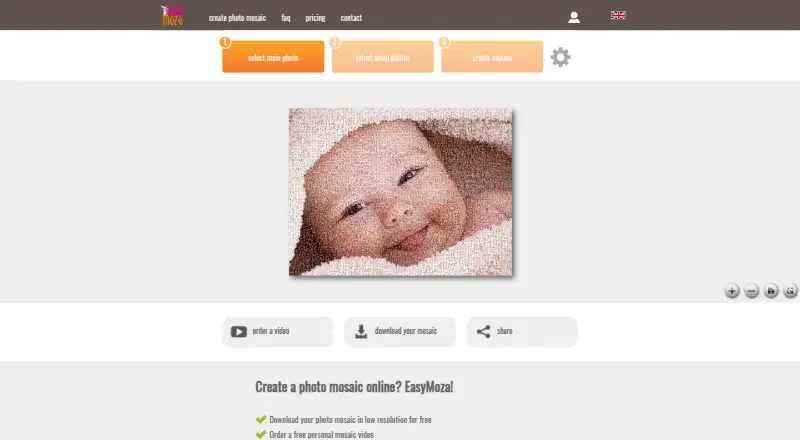
What EasyMoza is
EasyMoza is a web program for turning photos into a mosaic that users can download to a computer and print. It guides users to choose a main photo, add smaller photos and create the result. A low-resolution mosaic can be downloaded free, and the homepage says no account is needed. For high-resolution JPG downloads, the XL code costs $595, paid once and the XXL code costs $995, paid once; each code is valid for three months. Depending on the image ratio, listed maximum print sizes are up to 120 × 120 for XL and 240 × 240 for XXL. EasyMoza also offers video templates based on a mosaic. The listed templates cost $2,295, paid once and produce 1280×720 MP4 files; purchased videos are created within 24 hours of payment. Users can share a mosaic through a copied link. Uploaded photos are used to create a mosaic and automatically deleted from the server within 14 days. A high-resolution mosaic is stored for one month before deletion. The terms state that a customer's computer needs at least 2 GB of RAM.
Who it suits
EasyMoza suits people who want to make a photo mosaic online for download, printing or sharing. Its paid codes are for users who need high-resolution JPG output or a video made from a mosaic.
What it does well
- Free low-resolution mosaic download.
- Homepage says no account is needed.
- Share mosaics through a copied link.
- Photos are deleted within 14 days.
- High-resolution JPG codes remain valid for three months.
What to know first
- High-resolution codes cost 595.00 USD or $995, paid once.
- Listed video templates cost $2,295, paid once.
- Computer requires at least 2 GB of RAM.
- High-resolution mosaics are stored for one month.
Limits
The free plan provides a low-resolution download and online sharing. High-resolution JPGs require an XL or XXL code; the listed maximum print sizes are up to 120 × 120 and 240 × 240 respectively, depending on image ratio.
Plans
| Plan | Billed and limits | Price |
|---|---|---|
| Free low resolution | Low-resolution mosaic download · share online | Free |
| Free mosaic creation and preview | No account required · low-resolution sharing/download · one free 720p video per mosaic | Free |
| Acrylic print | one-time payment · 60 × 40 cm entry size · 5 mm glossy acrylic | €119, paid once |
| XXL digital file | one-time payment · About 15,600 × 10,400 pixels · download link valid 3 months | €12, paid once |
| Particles xxl video | 1280×720 MP4 · 68 seconds | $2,295, paid once |
| Slow Build xxl video | 1280×720 MP4 · 53 seconds · outro option | $2,295, paid once |
| Slow Zoom Out xxl video | 1280×720 MP4 · 40 seconds · outro option | $2,295, paid once |
| Full HD video | one-time payment · Six templates · optional text and music · online for one year | €24, paid once |
The first 8 of 16 plans, as easymoza.com lists them, read 30 Sept 2026. The maker's own page has the final word. Every plan
Getting started
- Open https://www.easymoza.com/
- Select a main photo and then select the smaller photos
- Create the mosaic
- Download the free low-resolution result or share it using its link
- Buy an XL or XXL code for a high-resolution JPG, or choose a video template
EasyMoza is a web-based photo-mosaic maker for turning a main image and your own photos into its tiles. It suits people who want a guided route to a shareable mosaic or a larger JPG for printing. Its free download is limited to low resolution, so print-ready output means a one-time purchase.
Overview
The creation flow takes you from choosing a main photo to selecting smaller photos and generating the mosaic. You can download a low-resolution result without an account or share it through a copied link. That makes the free option useful for a digital preview or share, but not for a large print.
XL and XXL codes unlock high-resolution JPG downloads. Depending on image ratio, their maximum listed print sizes are 120 × 120 and 240 × 240 respectively. Those limits give buyers a clear way to match output to a print, although the code is valid for only three months and the stored high-resolution mosaic is removed after one month.
Key features
- Custom tile library: Use your own photos as the smaller images, making EasyMoza appropriate for personal collections and memory-focused mosaics.
- Share page: A copied link offers a way to share the mosaic without sending a downloaded file.
- Video templates: The service offers one free template and three paid templates. Paid videos are delivered as 1280×720 MP4 files; the Slow Zoom Out and Slow Build options include an outro option and run 40 and 53 seconds, while Particles runs 68 seconds. Purchased templates are created within 24 hours of payment.
- Photo and mosaic retention: Uploaded photos are used to create the mosaic and deleted from the server within 14 days. High-resolution mosaics are stored for one month, so download a copy if you need to keep the result longer.
- Computer requirement: The terms require at least 2 GB of RAM, a practical constraint for anyone using an older machine.
Pricing
EasyMoza uses a freemium model. The free plan costs nothing and provides a low-resolution mosaic download and online sharing. It is the sensible starting point for experimenting or sharing digitally, but its resolution is the key trade-off.
| Plan | Price | What it includes |
|---|---|---|
| XL High Resolution | $595, paid once | Big JPG output, maximum listed print size up to 120 × 120 depending on image ratio; code valid for 3 months. |
| XXL High Resolution | $995, paid once | Super-big JPG output, maximum listed print size up to 240 × 240 depending on image ratio; code valid for 3 months. |
| Slow Zoom Out xxl video | $2,295, paid once | 1280×720 MP4, 40 seconds, with outro option. |
| Slow Build xxl video | $2,295, paid once | 1280×720 MP4, 53 seconds, with outro option. |
| Particles xxl video | $2,295, paid once | 1280×720 MP4, 68 seconds. |
Choose XL or XXL according to the print size you need; both are one-time code purchases, not recurring plans. Video templates are for buyers who want a moving presentation rather than a still image, and cost more than either JPG option. The stated paid-from price is 5.95 one-time.
Platforms
EasyMoza runs on the web. Its published sharing route is a copied link, and it requires a computer with at least 2 GB of RAM. The terms say appropriate security measures are taken against unauthorized access, alteration, destruction or loss of user data, without a guarantee. Users can contact StepFox through a contact form or at [email protected] for questions and complaints.
Who it's for
EasyMoza is a good fit for people who want to build a mosaic from their own photo collection, preview or share it at no cost, and pay only if they need higher-resolution output or a video. It is less suitable for anyone who needs a free large-format file, long-term online storage, or a workflow without the stated computer requirement.
Pros and cons
- Pro: The guided sequence of selecting a main image and tile photos gives newcomers a direct path to a finished mosaic.
- Pro: A free low-resolution download and share link let users create and circulate a result without an account.
- Pro: XL and XXL output have distinct print-size ceilings, helping buyers choose a paid file around their intended print.
- Con: The free download is low resolution, so it does not meet the stated high-resolution print use case.
- Con: Code validity is three months and online high-resolution storage lasts one month, requiring timely use and download.
- Con: Video templates are separate paid purchases, adding cost for users who want a moving result.
Alternatives
AndreaMosaic is a better fit for desktop users who want a free option with stated capacity of 200 megapixels, 30,000 tiles and 50,000 images, and support for Linux, macOS and Windows.
phomo suits users seeking a free Python package and CLI utility for Linux, macOS or Windows; CUDA acceleration requires a compatible GPU and CUDA toolkit.
Picture Mosaics Online Mosaic Tool may suit users who want an account-based online tool with paid downloads, prints and video files, and access across web, iOS and API.
Photo Mosaica is an iOS and macOS alternative from ZeMind, an independent game studio in Toronto.
PhotoMosaic.ai is worth considering for web users who want unlimited mosaic creation and a stated 4,800×4,800px free output.
PicTiler offers a free standard-quality web service and a paid HD service.
Rapid-Mosaic is the alternative to consider for Windows software that creates mosaics locally, with print ordering online.
Mosaicify Studio is another free web option.
For more options, browse Photo Mosaic Software.
Verdict
Choose EasyMoza if you want a guided, web-based way to turn personal photos into a mosaic and value a free low-resolution preview before buying a larger JPG or video. Look elsewhere if you need high-resolution output at no charge or prefer a desktop tool; the free file is limited, and paid codes and stored mosaics have time limits.
Verdict
EasyMoza provides a guided way to assemble photos into a mosaic, with a free low-resolution download and paid high-resolution and video options. Consider the output you need and the stated computer requirement before choosing it.
Questions
Is EasyMoza free?
Yes. The free plan includes a low-resolution mosaic download and online sharing.
How much do high-resolution downloads cost?
The XL code is $5.95 one-time and the XXL code is $9.95 one-time. Each code is valid for three months.
What platforms does EasyMoza support?
EasyMoza is a web app.
Can I create a video from my mosaic?
Yes. EasyMoza lists one free video template and three paid templates. Purchased videos are delivered as MP4 files and created within 24 hours of payment.
How long are photos and mosaics kept?
Uploaded photos are automatically deleted within 14 days. A high-resolution mosaic is stored for one month before deletion.
Facts from EasyMoza's own pages
- Account model
- Creation and viewing work without an account; optional passwordless email login stores up to three mosaics for 14 days. · easymoza.com, 15 Oct 2026
- Adjustment controls
- Settings include Natural, Balanced, Main photo stronger, colour adjustment, blending the main photo, mirroring repeated tiles, and tile-size choices. · easymoza.com, 15 Oct 2026
- Automatic matching
- Each tile is selected automatically to fit the colour of the corresponding area of the main image. · easymoza.com, 15 Oct 2026
- Browser processing
- The mosaic is generated in the user's browser and photos remain on the device until an order or voluntary account save. · easymoza.com, 15 Oct 2026
- Colour modes
- Users can choose Colour, Black & white, or Sepia output. · easymoza.com, 15 Oct 2026
- Company headquarters
- Crunchbase lists the private company in Veghel, Noord-Brabant, the Netherlands. · crunchbase.com, 15 Oct 2026
- Company legal name
- Crunchbase identifies StepFox as the legal name and EasyMoza as an alternate name. · crunchbase.com, 15 Oct 2026
- Company status
- Crunchbase describes StepFox as an active for-profit company and does not expose a founding year on the accessible profile. · crunchbase.com, 15 Oct 2026
- Creation steps
- The site guides users to select a main photo, select smaller photos, and create the mosaic. · easymoza.com, 30 Sept 2026
- Data retention
- Ordered photos are retained for 90 days, while photos for free videos or unpaid orders are retained for 14 days before automatic deletion. · easymoza.com, 15 Oct 2026
- Developer/API evidence
- The privacy policy names a Print API used for print fulfilment, but the reviewed maker pages provide no public developer API or SDK documentation. · easymoza.com, 15 Oct 2026
- Digital delivery
- Paid JPG files are delivered after payment through an email and order-page link that remains valid for three months. · easymoza.com, 15 Oct 2026
- Free download
- Users can download a low-resolution mosaic for free, and the homepage says no account is needed. · easymoza.com, 30 Sept 2026
- Headquarters
- Veghel, Netherlands · easymoza.com, 28 Sept 2026
- Integration
- An EasyMoza blog post describes embedding the maker in another website or blog through an iframe. · easymoza.blogspot.com, 15 Oct 2026
- Integrations
- The pages opened describe sharing by copied link and do not identify third-party software integrations. · easymoza.com, 30 Sept 2026
- Licence
- The terms reserve copyright in site materials and prohibit copying or redistribution without permission; no open-source licence is stated. · easymoza.com, 15 Oct 2026
- Limit: delivery failures
- Trustpilot reviewers report paying but not receiving a JPG or video, and one reviewer described delayed contact-form response. · trustpilot.com, 15 Oct 2026
- Limit: interface and workflow
- A French Trustpilot reviewer called the interface dated, while a competitor comparison says importing many photos individually is laborious. · fr.trustpilot.com, 15 Oct 2026
- Limit: printing
- An independent comparison says EasyMoza supplies a JPG rather than an integrated print service, leaving print-lab selection to the customer. · getmoza.com, 15 Oct 2026
- Limit: visual quality
- Independent reviews criticize harsh colour tinting, reduced source-photo clarity, and difficulty inspecting tile detail close up. · photomosaic.org, 15 Oct 2026
- Mosaic retention
- The privacy policy says a created high-resolution mosaic is stored for one month and then deleted; the terms similarly state online backup for one month. · easymoza.com, 30 Sept 2026
- Notable news
- EasyMoza's privacy statement was updated on October 14, 2026, adding current retention, processor, cookie, and security details. · easymoza.com, 15 Oct 2026
- Paid output
- The XL and XXL codes unlock high-resolution JPG mosaics for download after the mosaic is ready. · easymoza.com, 30 Sept 2026
Where EasyMoza stands on Freedom251
- Photo Mosaic Software#3 of 24