PhotoDiva
by PhotoDiva
What PhotoDiva is
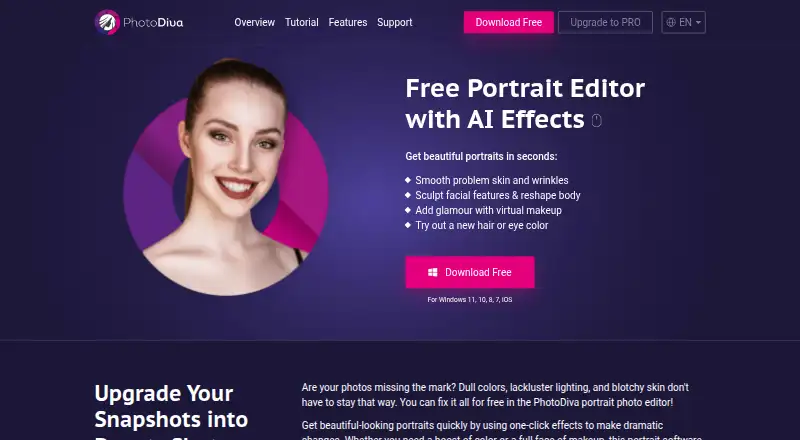
PhotoDiva is portrait-editing software for changing skin, facial structure, body shape, makeup, hair, eyes, backgrounds, lighting, and color. AI retouching handles automatic portrait improvements and blemish removal, while sculpting tools adjust facial and body features. Its makeup editor applies more than 50 eyeshadow, lipstick, and blush hues and effects according to detected facial features. Additional tools remove distracting people or objects, replace or blur backgrounds, and provide more than 100 filters and effects on the listed plans. PhotoDiva supports RAW photos and masking. The software is offered for Windows, with downloads listed for Windows 11, 10, 8, and 7; the maker also links to free iOS and Android body-sculpting apps. Edited portraits can be exported for Facebook or Instagram sharing. A free version includes automatic retouching, face sculpting, makeup, background blur or change, and 100+ filters. PRO and Ultimate are lifelong licenses for one computer, with purchased licenses including technical support and one year of updates. The maker, PhotoDiva, was founded in 2003.
Who it suits
It suits portrait photographers and casual editors who want AI retouching, makeup, facial or body sculpting, and background changes. Windows users needing RAW and masking support, plus mobile users seeking body-editing apps, can use its listed tools.
What it does well
- AI retouching and automatic blemish removal
- More than 50 makeup hues and effects
- Facial and body sculpting tools
- RAW photo and masking support
- Background replacement or blur
- Free version includes 100+ filters
What to know first
- Paid licenses are for one computer at a time
- Desktop support is listed for Windows versions
- Purchased licenses include updates for one year
Limits
The free version provides the listed portrait-editing tools and 100+ filters. PRO and Ultimate licenses apply to one computer at a time; purchased licenses include one year of free updates.
Plans
| Plan | Billed and limits | Price |
|---|---|---|
| PhotoDiva PRO | Lifelong license; the page shows $29.40 and $42.00 and says 30% off until October 15, 2026 · Essentials features · Change or blur background · Face contouring and dimension · One computer | $29.40, paid once |
| PhotoDiva Ultimate | Lifelong license; the page shows $39.20 and $56.00 and says 30% off until October 15, 2026 · PRO features · 100+ photo filter effects · One computer | $39.20, paid once |
| PhotoDiva (free) | Free portrait editing software; automatic retouching, face sculpting, makeup, background blur/change, 100+ filters | Free |
| PhotoDiva Essentials | Lifelong license; the page does not specify a billing interval · Automatic face retouching · Object erasing · Facial feature changes · Digital makeup · One computer | $19.25, paid once |
As photodiva.net lists them, read 11 Oct 2026. The maker's own page has the final word.
Getting started
- Open https://photodiva.net/
- Download the Windows desktop version for Windows 11, 10, 8, or 7
- Install the free version or choose PRO or Ultimate
- Use the portrait, makeup, sculpting, masking, or background tools
- Export the edited portrait for Facebook or Instagram sharing
- Use the linked free iOS or Android body-editor app if preferred
Verdict
Pick PhotoDiva for portrait-focused editing with AI retouching, makeup, sculpting, and background tools. The free edition covers core portrait work, while PRO and Ultimate add paid features under lifelong single-computer licenses. Consider another editor if you need a desktop platform outside the listed Windows versions.
Questions
Is PhotoDiva free?
Yes. A free portrait-editing version is available. Paid access is listed from $42, with PRO and Ultimate prices shown separately.
Which platforms does it support?
PhotoDiva is available on Windows, with support listed for Windows 11, 10, 8, and 7. Free iOS and Android body-sculpting apps are also linked.
What do PRO and Ultimate cost?
PhotoDiva PRO is listed at 29.40 USD once, and Ultimate at 39.20 USD once; both are described as lifelong licenses.
How many computers does a license cover?
A registered license is for one computer at a time.
Does PhotoDiva support RAW photos?
Yes. RAW photo support and masking tools are listed.
What support comes with a purchase?
Purchased licenses include free technical support and one year of free updates to future versions.
Facts from PhotoDiva's own pages
- AI retouching
- Yes · photodiva.net, 22 Sept 2026
- Founded
- 2003 · photodiva.net, 28 Sept 2026
- Free plan
- Yes · photodiva.net, 22 Sept 2026
- License
- A registered license is for one computer at a time and is described as lifelong for the purchased version. · photodiva.net, 11 Oct 2026
- Maker
- The About page identifies AMS Software as the maker and says it began as a small team in 2003; it does not state a headquarters location. · photodiva.net, 11 Oct 2026
- Makeup
- The makeup editor offers more than 50 virtual eyeshadow, lipstick, and blush hues and effects, applying them based on detected facial features. · photodiva.net, 11 Oct 2026
- Masking tools
- Yes · photodiva.net, 22 Sept 2026
- Mobile apps
- The maker’s body editor page links to free iOS and Android apps for body sculpting. · photodiva.net, 11 Oct 2026
- Platform
- desktop · photodiva.net, 22 Sept 2026
- Portrait editing
- The software can remove distracting people or objects, replace backgrounds, adjust lighting and color, and edit facial features. · photodiva.net, 11 Oct 2026
- Privacy
- The privacy policy says the site collects personal information and device and usage data, and may share personal information with service providers for business operations. · photodiva.net, 11 Oct 2026
- Product
- PhotoDiva is portrait editing software with AI effects for retouching skin, sculpting facial and body features, applying makeup, and changing hair or eye color. · photodiva.net, 11 Oct 2026
- RAW photo support
- Yes · photodiva.net, 22 Sept 2026
- Retouching
- The site lists automatic retouching, blemish removal, virtual makeup, digital plastic surgery, background blurring, and 100+ effects and filters among its features. · photodiva.net, 11 Oct 2026
- Security
- The privacy policy says PhotoDiva maintains administrative and technical safeguards to protect personal information. · photodiva.net, 11 Oct 2026
- Social sharing
- The maker describes exporting edited portraits to share on Facebook or Instagram. · photodiva.net, 11 Oct 2026
- Support
- The upgrade page says purchased licenses include free technical support, and the support page links to the PhotoDiva Support Center. · photodiva.net, 11 Oct 2026
- Updates
- A purchased license includes one year of free updates to future versions. · photodiva.net, 11 Oct 2026
- Windows support
- The maker lists Windows 11, 10, 8, and 7 for the desktop download. · photodiva.net, 11 Oct 2026
Where PhotoDiva stands on Freedom251
- Photo editors#36 of 96
- Photo Editing Software#66 of 159
- AI Photo Editors#42 of 96