Freedom251 › Photography Studio Management Software

PhotoCRM
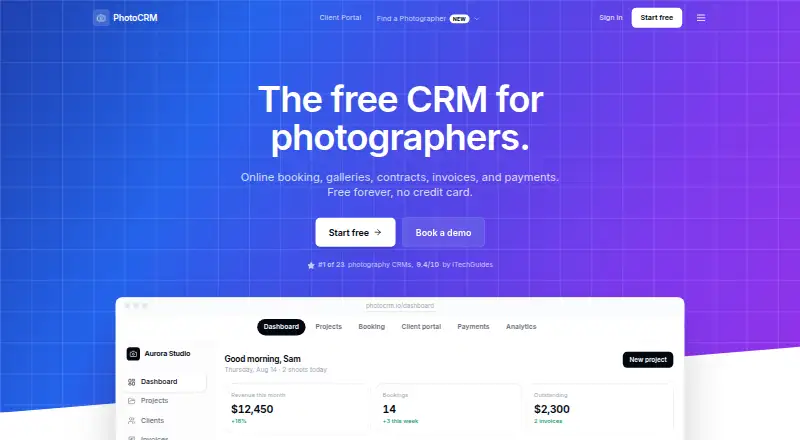
What PhotoCRM is
PhotoCRM brings photography business tasks together, including bookings, client and project management, invoicing, contracts, payments, and photo galleries. Clients can select a service and available time, pay a deposit, and have the booking added to the photographer’s pipeline and calendar. A branded portal lets clients view and download photos and provide feedback. Project tracking covers shoots, deadlines, deliverables, and status, with task management and automated reminders. Payments use Stripe Connect, with support for 135+ countries and 30+ currencies; PhotoCRM adds a 2% platform fee to Stripe processing fees. Listed integrations include Gmail, Google Drive, OneDrive, Google Calendar, and Stripe. The free plan includes core features and 20GB storage. Paid storage starts at $9/mo, and the White Label add-on is $35/month or $350/yr. PhotoCRM offers Android, iOS, and web access, along with email support and a tutorial knowledge base.
Who it suits
It suits photography studios, sole proprietorships, and partnerships looking to manage photography workflows in one service. Mobile apps are available for photographers who need on-the-go payments and notifications.
What it does well
- Booking adds appointments to a pipeline and calendar.
- Clients can review photos through a branded portal.
- Workflow tracks deadlines, deliverables, and project status.
- Integrations include Gmail, Drive, Calendar, and Stripe.
- Free plan includes 20GB storage.
What to know first
- Free plan payments incur a 2% platform fee.
- Storage upgrades start at $9/mo.
- Account data is deleted within 30 days of cancellation.
Limits
The free plan includes 20GB of storage and applies a 2% platform fee to client payments, in addition to Stripe processing fees. The listed storage upgrade starts at 100GB for $9 a month; storage upgrades scale up to 2TB.
Plans
| Plan | Billed and limits | Price |
|---|---|---|
| Free plan | Free forever; $0/month · 20GB storage · 2% platform fee on client payments · core features included | Free |
| Free | $0/month; free forever; no trial · 20GB storage · 3 team seats · 2% PhotoCRM fee on client payments · core features | Free |
| White Label add-on | $35/month or $350/yr · 1TB cloud storage · 20 team-member seats · custom portal domain · branding and branded email | $35 a month |
| Enterprise · White Label | $35/month or $350/year, 2 months free · 1TB storage · 20 team seats · custom portal domain · branded emails · no PhotoCRM payment fee | $35 a month |
| Storage upgrade (100GB) | Starts at $9/mo · 100GB starting tier · storage upgrades scale up to 2TB | $9 a month |
| Storage upgrade | starts at $9/month · 100GB starting tier · upgrades up to 2TB | $9 a month |
As photocrm.io lists them, read 30 Sept 2026. The maker's own page has the final word.
Getting started
- Visit https://photocrm.io/.
- Choose the free plan or a paid option.
- Use PhotoCRM on the web, or get its app for Android or iOS.
- Connect listed services such as Google Calendar or Stripe as needed.
Overview
PhotoCRM is a workflow platform for photographers, connecting booking and client administration with shoot tracking, payments, and photo delivery. It suits independent photographers and studios that want bookings to feed into project work; the free plan lowers the cost of starting, though its storage cap and payment fee matter.
Clients can book a service and time, pay a deposit, then use a branded portal to view, download, and comment on photos. For the photographer, the booking enters a pipeline and calendar, while project tools track shoots, deadlines, deliverables, and status. That joined-up path is the product’s strongest case: it is designed around the life of a photography job, rather than galleries or scheduling alone.
Key features
Booking and project management
Online booking ties service selection and availability to a deposit and adds the resulting reservation to the calendar and pipeline. This can reduce the gap between taking a booking and organizing the work. Task management and automated reminders support follow-through on deadlines and deliverables, while lead capture, contracts and e-signatures, invoicing, and calendar sync cover other parts of the client workflow.
Client galleries and integrations
The branded client portal gives clients a place to view and download images and provide feedback. Gmail, Google Drive, OneDrive, Google Calendar, and Stripe integrations connect PhotoCRM to commonly used communication, file, calendar, and payment services. The emphasis is on keeping client delivery alongside business administration, rather than requiring a gallery-only tool.
Payments, mobile, and data
Payments use Stripe Connect and support 135+ countries and 30+ currencies. PhotoCRM charges a 2% platform fee on client payments in addition to Stripe processing fees, so frequent or higher-value transactions make that cost a significant factor in choosing the service. The iOS and Android apps are described as syncing in real time and supporting on-the-go payments and notifications.
PhotoCRM says it uses encryption, access controls, regular security audits, and multi-tenant data isolation, and does not sell, share, rent, or remarket customer data. Users retain ownership of uploaded content, but account data is permanently deleted within 30 days after cancellation or termination. The free plan’s 20GB storage is a meaningful starting limit for image-heavy work. Individual files may be up to 5TB, and executable files are prohibited.
Pricing
The free plan costs $0/month, is free forever, and includes core features, 20GB storage, and the 2% platform fee on client payments. It is a sensible way for a new or low-volume business to begin, but photographers with growing image archives may outgrow its storage allowance.
The Storage upgrade starts at $9/mo for a 100GB tier, with storage upgrades scaling up to 2TB. This is the clearest next step for photographers who need more room without the white-label package. The White Label add-on costs $35/month or $350/yr and includes 1TB cloud storage, 20 team-member seats, a custom portal domain, branding, and branded email. It is a better fit for a team or studio that needs a branded client-facing presence; solo users who do not need those identity and seat features may find the extra spend unnecessary. There is no free trial.
Platforms
PhotoCRM is available on Android, iOS, and the web. The mobile apps’ real-time sync, payment support, and notifications suit photographers who need to keep up with bookings and clients away from a desk.
Who it's for
PhotoCRM is aimed specifically at photography workflows, including photography studios, sole proprietorships, and partnerships. It is most compelling for businesses that want booking, administration, project coordination, and client photo delivery in one system. A photographer primarily seeking storage for galleries, or one for whom a 2% platform charge is unattractive, should weigh other options.
Pros and cons
- Pros: Bookings feed directly into the calendar and project pipeline, linking deposits to the work that follows.
- Pros: Branded galleries, feedback, contracts, invoicing, and project tracking serve both client delivery and business administration.
- Pros: A free-forever plan includes core features, and paid storage starts at $9/mo.
- Cons: The 2% platform fee is charged on top of Stripe processing fees, which can weigh on transaction-heavy businesses.
- Cons: Free storage is limited to 20GB, a constraint for photographers accumulating large image libraries.
- Cons: The $35/month or $350/yr white-label add-on is aimed at businesses that need its branding, 1TB storage, or 20 seats, not every solo photographer.
Alternatives
Stoodio is worth considering for photographers who want a free plan with unlimited bookings, client and project CRM, finance and expense tracking, a public booking portal, and calendar availability across Android, iOS, macOS, web, and Windows.
Pixieset Studio Manager may fit a photographer who wants a free plan with unlimited invoices, basic booking and scheduling, and online payments, and can work within limits of three contracts, three quotes or questionnaires, and one active session type.
Sign&Shoot offers a free plan with two bookings per month, one service listing, and a 3% platform fee, so it may suit someone whose booking volume is very low and who values having a free trial.
KudosCRM is an alternative with a free plan for up to three users, 1,000 contacts, one pipeline, tasks, activities, and one email inbox.
17hats is a paid alternative with an all-features subscription at $60 a month and a free trial.
Captura is another freemium option with a free plan and web access.
Check Cherry is a paid alternative with a free trial; its Standard plan is $29 a month, billed $348 billed annually, and includes 30 upcoming bookings, two admin accounts, two brands, and unlimited staff accounts.
Iris Works is a paid alternative with a free trial; its Starter plan is $14.95 a month and includes online booking, a booking website, online payment processing, e-contracts, and invoice templates on booking.
For a broader category comparison, see Photography Studio Management Software.
Verdict
PhotoCRM is a strong fit for photographers who want bookings, project work, payments, and client galleries organized around each shoot, with a free tier that makes starting straightforward. Choose it when that connected workflow matters more than keeping transaction charges low; look elsewhere if the extra 2% platform fee or the free plan’s 20GB storage cap conflicts with your business.
Verdict
PhotoCRM combines client-facing galleries and booking with project tracking, contracts, invoicing, and payments for photography businesses. Check the 2% platform fee on client payments and storage options against your needs.
Questions
Is PhotoCRM free?
Yes. The Free plan costs nothing, billed Free forever, and includes core features, 20GB storage, and a 2% platform fee on client payments.
What do paid plans cost?
The Storage upgrade (100GB) costs $9 a month. The White Label add-on costs $35 a month or $350 a year.
Which platforms does PhotoCRM support?
PhotoCRM is available on Android, iOS, and the web.
What payment integrations and fees does it have?
PhotoCRM lists Stripe as an integration and uses Stripe Connect for payments. Client payments incur a 2% PhotoCRM platform fee in addition to Stripe processing fees.
What does the White Label add-on include?
It includes 1TB cloud storage, 20 team-member seats, a custom portal domain, branding, and branded email.
Who owns uploaded content, and what happens to account data after cancellation?
Users retain ownership of uploaded content. Account data is permanently deleted within 30 days after termination or cancellation.
Facts from PhotoCRM's own pages
- AI connector
- The optional Claude or ChatGPT connector can read permitted workspace records and create or update clients, leads, projects and invoice drafts, but cannot delete data, send invoices or take payments. · photocrm.io, 15 Oct 2026
- API and SDKs
- The official homepage describes no-developer integrations but does not publish a public API or SDK. · photocrm.io, 15 Oct 2026
- Audience
- PhotoCRM describes itself as built specifically for photography workflows and lists photography studios, sole proprietorships, and partnerships as users. · photocrm.io, 30 Sept 2026
- Booking
- Clients can choose a service and available time, pay a deposit, and have the booking added to the photographer’s pipeline and calendar. · photocrm.io, 30 Sept 2026
- Calendar integration
- Google Calendar synchronization checks free or busy times and can create, update and remove shoot events. · photocrm.io, 15 Oct 2026
- Client CRM
- Client records retain interaction history, preferences, projects, payments and outstanding balances. · photocrm.io, 15 Oct 2026
- Client portal
- The branded client portal lets clients view, download, and provide feedback on photos. · photocrm.io, 30 Sept 2026
- Company headquarters
- The Florida filing gives PhotoCRM LLC’s principal address as 215 Southeast 8th Avenue, suite 2510, Fort Lauderdale, Florida 33301. · bisprofiles.com, 15 Oct 2026
- Company legal entity
- Florida corporate records list PHOTOCRM LLC as an active Florida limited-liability company filed on March 23, 2026. · bisprofiles.com, 15 Oct 2026
- Company ownership
- The same filing names Lance E. Dragos as the company’s authorized member and registered agent. · bisprofiles.com, 15 Oct 2026
- Contracts
- Users can build section-based contracts, collect legally binding e-signatures and store generated signed PDFs with projects. · photocrm.io, 15 Oct 2026
- Data deletion
- Deleted accounts are scheduled for permanent data deletion within 30 days, while backup copies may persist for up to 90 days. · photocrm.io, 15 Oct 2026
- Data ownership
- Users retain ownership of uploaded content and client data, and PhotoCRM says it does not sell or remarket that data. · photocrm.io, 15 Oct 2026
- Data ownership and retention
- Users retain ownership of uploaded content, while the terms say account data is permanently deleted within 30 days after termination or cancellation. · photocrm.io, 30 Sept 2026
- Data use
- PhotoCRM says it does not sell, share, rent, or remarket customer data. · photocrm.io, 30 Sept 2026
- File limits
- The terms say individual uploads may be up to 5TB, while executable files such as EXE, BAT and DLL are prohibited. · photocrm.io, 15 Oct 2026
- GetApp listing
- GetApp lists PhotoCRM as a cloud and web CRM for freelancers, studios and small photography businesses, with web, Android and iPhone or iPad support and email, FAQ and knowledge-base support. · getapp.com, 15 Oct 2026
- Infrastructure
- Named service providers include Clerk, Stripe, Cloudflare R2, MongoDB Atlas, Vercel, Resend and Google Analytics. · photocrm.io, 15 Oct 2026
- Integrations
- Listed integrations include Gmail, Google Calendar, Google Drive, Microsoft OneDrive, Stripe and Claude. · photocrm.io, 15 Oct 2026
- Invoicing and analytics
- PhotoCRM supports branded invoices, payment reminders, estimates, discounts, revenue reporting, acquisition metrics and profitability tracking. · photocrm.io, 15 Oct 2026
- Licence
- The terms grant users a limited, non-exclusive, non-transferable and revocable right to use the service and prohibit reverse engineering, indicating proprietary software rather than open source. · photocrm.io, 15 Oct 2026
- Limit: interface polish
- The same G2 review said some fonts felt overly bold and some pages needed a visual redesign. · g2.com, 15 Oct 2026
- Limits
- The free plan includes 20GB storage; the terms state individual files may be up to 5TB and executable files are prohibited. · photocrm.io, 30 Sept 2026
- Limit: sparse independent evidence
- GetApp shows zero user reviews and 0.0 scores for ease of use, features, value and support, so its listing provides no measured customer consensus. · getapp.com, 15 Oct 2026