Freedom251 › Photography Studio Management Software
Captura
What Captura is
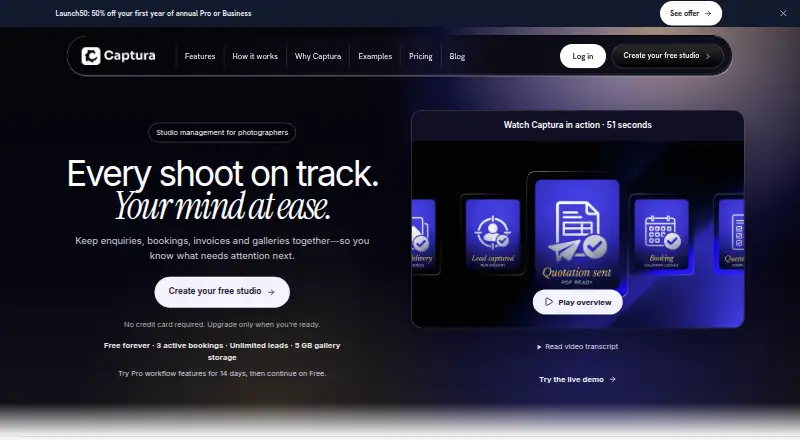
Captura is web-based studio management software for photographers, connecting enquiries, bookings, invoices and galleries. Its booking workflow follows a client from enquiry through booking, questionnaire and contract, shoot, payment and gallery. A pipeline tracks unlimited leads through New Enquiry, Contacted, Quote Sent and Booking Confirmed, with client history in a searchable record. The private, studio-branded portal brings dates, forms, invoices, messages and galleries together; clients can use it without an account or password. Studios can collect payment by UPI, net banking, cash or another method and record payments against invoices. The Free plan costs nothing and includes one user, three active bookings and 5 GB storage. Pro costs $19 a month and includes one user, 350 GB storage, unlimited events and galleries, workflow automation and 100 Message Copilot drafts monthly. Business costs $39 a month for up to five users, 1.3 TB storage, unlimited drafts, a custom studio domain and priority support. Business also offers approved beta People Grouping.
Who it suits
Captura is aimed at professional photography studios, particularly those managing enquiries, bookings, client documents, payments and galleries. Free and Pro support one owner, while Business supports up to five users.
What it does well
- Tracks unlimited enquiries through a lead pipeline
- Client portal works without an account or password
- Supports payments by UPI, net banking or cash
- Business includes up to five users
- Free plan includes 5 GB storage
What to know first
- Free plan allows three active bookings
- Free and Pro plans support one user
- New uploads pause at the storage limit
- Private WhatsApp and Instagram conversations are not imported
Limits
The Free plan supports one user, three active bookings, 5 GB of storage and 30 portfolio photos. When a studio reaches its storage limit, new uploads pause, while existing galleries, downloads and portal access remain available.
Plans
| Plan | Billed and limits | Price |
|---|---|---|
| Free | Free forever · 1 user · 3 active bookings · unlimited leads · 5 GB gallery storage · 30 portfolio photos · 10 Message Copilot drafts | Free |
| Pro | $19/mo · 1 user · 350 GB storage · unlimited events and galleries · 100 Message Copilot drafts/month · workflow automation · email support | $19 a month |
| Business annual Launch50 | $195 first year, then $390/year · 5 users · 1.3 TB storage · unlimited events and galleries · unlimited Message Copilot drafts · AI People Grouping beta · custom domain · priority support | $195 a year |
| 500 GB storage pack | $29/mo; active Pro or Business plan required · 500 GB additional recurring capacity | $29 a month |
| 25 GB storage pack | $3/mo; active Pro or Business plan required · 25 GB additional recurring capacity | $3 a month |
| Business | $39/mo · 5 users · 1.3 TB storage · unlimited events and galleries · unlimited Message Copilot drafts · AI People Grouping beta · custom domain · priority support | $39 a month |
| 100 GB storage pack | $9/mo; active Pro or Business plan required · 100 GB additional recurring capacity | $9 a month |
| Pro annual Launch50 | $95 first year, then $190/year · 1 user · 350 GB storage · unlimited events and galleries · 100 Message Copilot drafts/month · workflow automation | $95 a year |
As captura.pro lists them, read 15 Oct 2026. The maker's own page has the final word.
Getting started
- Open the Captura website.
- Choose Free, Pro or Business.
- Use the web-based service to manage enquiries and bookings.
- Set up the studio-branded client portal for dates, forms, invoices, messages and galleries.
- Record client payments against invoices.
Captura is web-based studio-management software for photographers who want client tracking, booking paperwork and gallery delivery in a shared workflow. It suits solo professionals and small studios, particularly those working in India. Its free tier offers a way to start, but the three-booking and 5 GB limits make it a constrained long-term home for an active studio.
Overview
Captura keeps a booking record moving from enquiry through questionnaire and contract to the shoot, payment and gallery. That joined-up record is valuable when a studio wants client history and delivery steps in one place instead of coordinating them across separate tools. The lead pipeline tracks unlimited enquiries through four stages—New Enquiry, Contacted, Quote Sent and Booking Confirmed—and stores searchable client history.
The private, studio-branded client portal combines dates, forms, invoices, messages and galleries without requiring clients to create an account or password. That makes sharing project details and finished work less cumbersome. Website enquiries can enter automatically, but private WhatsApp and Instagram conversations do not import; the studio must add those leads itself.
Key features
Captura supports contracts and e-signatures, invoicing, lead capture and workflow automation. Payments can be made by UPI, net banking, cash or another method, with each payment manually recorded against its invoice. The range of payment methods is practical for varied client arrangements, but the manual recordkeeping means this is not a fully hands-off payment workflow.
Message Copilot drafts WhatsApp or SMS messages in English and seven Indian languages. Users review, edit and send every draft themselves, so it can help with wording without taking over client communication. Draft quotas vary by plan: Pro includes 100 per month, while Business has no stated monthly cap.
Approved Business studios can enable beta People Grouping. It groups people within one gallery and does not build identity profiles across galleries, a narrower scope than persistent face-based organization. Captura says its service providers include Vercel, Supabase, Backblaze B2, Resend, Stripe, Razorpay, Mixpanel, Google Analytics and Amazon Rekognition for optional People Grouping. It also says authenticated access, organization-level permissions and database policies separate studio data, and that it does not sell studio or client data.
Storage is a practical constraint: when a studio reaches its plan limit, new uploads pause, although existing galleries, downloads and portal access remain available. Captura offers onboarding and migration help and prioritizes critical login, billing, studio website and client portal issues; Business adds priority support.
Pricing
Captura is freemium, with a free plan and a 14-day trial. Annual billing is offered on the paid plans at the equivalent of two months saved compared with monthly billing.
| Plan | Price | What it includes |
|---|---|---|
| Free | free | 3 active bookings, unlimited leads, 5 GB storage, 1 user and 30 portfolio photos |
| Pro | $19 a month; billed $19/mo or $190/year | 1 user, 350 GB storage, unlimited events and galleries, 100 Message Copilot drafts per month and workflow automation |
| Business | $39 a month; billed $39/mo or $390/year | 5 users, 1.3 TB storage, unlimited events and galleries, unlimited Message Copilot drafts, approved beta People Grouping, a custom studio domain and priority support |
Free is a sensible fit for one photographer testing the workflow or handling a few active jobs, but three active bookings and 5 GB can become limiting quickly. Pro is the natural step for a solo owner who needs substantially more storage, unlimited events and galleries, automation and a meaningful monthly draft allowance. Business costs more but is the only plan with five users, a custom domain, priority support and People Grouping; it fits a small team that will use those additions rather than a solo photographer who simply needs more room.
Platforms
Captura runs on the web. That keeps it accessible through a browser, but it is not a native mobile or desktop app.
Who it's for
Captura is aimed at professional photography studios, with its audience and payment options particularly aligned to studios in India. A solo photographer can start on Free and move to Pro as booking volume and storage needs rise; a team of up to five has a clear case for Business. It is less suited to studios that need private social-message imports or want payments recorded automatically rather than entered manually.
Pros and cons
Pros
- Connected client workflow: enquiries, contracts, booking, payment and galleries stay associated with the client journey.
- Low-friction portal: clients can reach forms, invoices, messages and galleries without another account or password.
- Useful free entry point: unlimited leads are available even though active bookings and storage are capped.
- Flexible payment recording: UPI, net banking, cash and other methods can be recorded against invoices.
Cons
- Manual payment updates: studios must record each payment themselves, adding an administrative step.
- Free capacity is limited: three active bookings and 5 GB may push a growing studio toward a paid plan.
- No private-message import: WhatsApp and Instagram enquiries from private conversations need manual entry.
- Web only: there are no listed native mobile or desktop platforms.
Alternatives
For a broader photography studio management software shortlist, compare tools by team size, platform and booking limits. Stoodio is worth considering if broad device support and unlimited bookings matter more than Captura’s specific workflow: it offers Android, iOS, macOS, web and Windows apps, plus a free plan with unlimited bookings, CRM, finance and expense tracking, a public booking portal, monthly wrapped and calendar availability.
KudosCRM is a better fit for a photographer prioritizing contact and pipeline capacity across devices: its free plan supports up to three users, 1,000 contacts, one pipeline, tasks, activities and one email inbox, and it runs on web, iOS and Android. PhotoCRM may suit someone seeking a mobile-oriented free option with more stated storage: its free plan includes 20 GB and core features, but takes a 2% platform fee on client payments and has no free trial.
Pixieset Studio Manager is an alternative for studios focused on booking basics and online payments: its free plan includes unlimited invoices, three contracts, three quotes or questionnaires, one active session type, basic booking and scheduling, and online payments. Sign&Shoot offers another free option for a very low booking volume, with two bookings per month, one service listing and a 3% platform fee on payments.
Lnsly is a web-based paid option with a Solo plan at 291 EGP a month, billed 3,490 EGP/year, including one team seat and 75 GB storage. 17hats may appeal to readers who prefer an all-inclusive paid subscription over a free tier; its stated subscription is $60 a month. Airstudio is another paid alternative, with a monthly Premium plan for up to 10 active users at $200 a month.
Verdict
Captura is a strong match for a solo photographer or small Indian studio that wants lead tracking, contracts, invoicing and a branded client portal tied to each booking. Its strongest reason to choose it is the connected client journey, with a genuinely useful free starting point. Look elsewhere if private WhatsApp or Instagram imports, automatic payment recording or native mobile apps are essential; otherwise, Free is a sensible trial of the workflow and Pro is the more realistic plan for an expanding solo practice.
Verdict
Captura brings lead tracking, booking workflows and client galleries into one studio-management service. Its plans differ in user capacity, storage and included Message Copilot drafts.
Questions
Is Captura free?
Yes. The Free plan costs nothing and includes one user, three active bookings, 5 GB of storage and 30 portfolio photos.
What do Pro and Business cost?
Pro costs $19 a month or $190 a year. Business costs $39 a month or $390 a year.
Is there a free trial?
Captura’s pricing note lists a 14-day trial.
What platforms does Captura support?
The listed platform is web.
How many users can use each plan?
Free and Pro support one user. Business supports five users.
Where is Captura based?
Its headquarters are in Kottayam, Kerala, India.
Facts from Captura's own pages
- AI data handling
- People Grouping optionally sends selected gallery photos to Amazon Rekognition and keeps groups limited to the individual gallery without cross-gallery identity profiles. · captura.pro, 15 Oct 2026
- AI message drafts
- Message Copilot prepares WhatsApp or SMS drafts in English and seven Indian languages, and users review, edit and send each message themselves. · captura.pro, 7 Oct 2026
- Audience
- Captura describes itself as built for professional photography studios across India, with Free and Pro for one owner and Business supporting up to five users. · captura.pro, 7 Oct 2026
- Cancellation
- After a paid plan ends, the studio returns to Free and existing client records are preserved. · captura.pro, 15 Oct 2026
- Client CRM
- Each client record can contain enquiry, quotation, bookings, documents and payments in one searchable history. · captura.pro, 15 Oct 2026
- Client portal
- The private studio-branded portal presents dates, forms, invoices, messages and galleries without requiring clients to create accounts. · captura.pro, 15 Oct 2026
- CRM and leads
- The lead pipeline tracks unlimited enquiries through New Enquiry, Contacted, Quote Sent and Booking Confirmed, with client history in a searchable record. · captura.pro, 7 Oct 2026
- Free limits
- Free includes one owner, three active bookings, unlimited leads, 5 GB gallery storage and unlimited galleries. · captura.pro, 15 Oct 2026
- Galleries
- Private online galleries support favourites and downloads, with 5 GB included on Free. · captura.pro, 15 Oct 2026
- Headquarters
- Kottayam, Kerala, India · captura.pro, 28 Sept 2026
- Independent AI description
- Richmond Pro Lab describes Captura as using AI image processing that can be tuned to a studio’s style and preferences. · richmondprolab.com, 15 Oct 2026
- Independent API claim
- Technicare’s product sheet says Captura Enhance offers API integration with existing studio software. · technicare.com, 15 Oct 2026
- Independent brand history
- Studio Ninja’s help centre says Captura is the new name for ImageQuix and that Studio Ninja became part of the Captura family. · help.studioninja.co, 15 Oct 2026
- Independent editing features
- Technicare’s Captura Enhance material lists AI retouching, colour correction, teeth whitening, glare removal, braces removal, background removal and automated cropping. · technicare.com, 15 Oct 2026
- Independent platform claim
- Technicare states that Captura Enhance works on both Mac and Windows. · technicare.com, 15 Oct 2026
- Independent product lineage
- Richmond Pro Lab says Captura brings together products and people from ImageQuix, PhotoLynx, Fotomerchant, Simplephoto and Skylab. · richmondprolab.com, 15 Oct 2026
- Independent scale claim
- Technicare says Enhance can batch-process thousands of images in minutes and handle workflows from 10 to 10,000 images. · technicare.com, 15 Oct 2026
- Independent target markets
- Richmond Pro Lab lists Captura for schools, sports, dance and senior photography. · richmondprolab.com, 15 Oct 2026
- Independent workflow positioning
- Richmond Pro Lab describes Captura as an end-to-end high-volume photography system covering capture, proof and sales. · richmondprolab.com, 15 Oct 2026
- Integrations
- Captura says its service providers include Vercel, Supabase, Backblaze B2, Resend, Stripe, Razorpay, Mixpanel, Google Analytics and Amazon Rekognition for optional People Grouping. · captura.pro, 7 Oct 2026
- Invoices and quotations
- An approved quotation can become an invoice that clients open through the portal, with payments recorded against it. · captura.pro, 15 Oct 2026
- Lead pipeline
- Leads can move through New Enquiry, Contacted, Quote Sent and Booking Confirmed stages, with follow-up tracking. · captura.pro, 15 Oct 2026
- Maker headquarters
- The operator’s stated address is Carithas Jn, Thellakom PO, Kottayam, Kerala 686630, India. · captura.pro, 15 Oct 2026
- Maker legal name
- Captura’s privacy policy identifies Creative Sparks as the operator. · captura.pro, 15 Oct 2026