Freedom251 › AI Pattern Generators

Pattern Weaver
What Pattern Weaver is
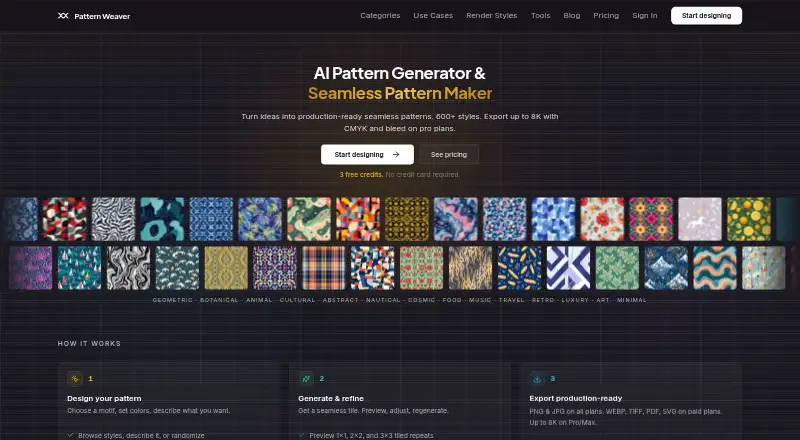
Pattern Weaver is a web-based AI tool for generating seamless repeating patterns for textile and surface design. It produces tiles for fabric, wallpaper, packaging, fashion, and print-on-demand. The site lists more than 40 motif families, over 600 substyles, and 29 render methods. Users can preview repeats, change density, scale, motif arrangement, and color, and choose layouts such as half-drop, grid, brick, mirror, scattered, and ditsy. PNG and JPG exports are included on all plans; Starter adds WEBP, while Pro and Max list TIFF, PDF, SVG, EPS, and DXF. Export resolution varies by plan from 2K to 8K. Pro includes print-ready CMYK with ICC profiles and color separations. The maker says generated patterns can be used commercially without extra fees or royalties. The free plan includes three credits. Paid plans are one-time purchases: Starter is $19.99, Pro is $39.99, and Max is $99.99. Credits do not expire; an 8K AI-enhanced export uses two credits, and a vector bundle uses eight.
Who it suits
The maker positions Starter for hobbyists and casual creators, Pro for professional designers and studios, and Max for textile production companies. It may suit people creating patterns for fabric, wallpaper, packaging, fashion, or print-on-demand.
What it does well
- Previews repeating tiles before export.
- Offers more than 40 motif families.
- Commercial use has no extra fees or royalties.
- Credits never expire and purchases are one-time.
What to know first
- Free plan includes only three credits.
- 8K AI-enhanced exports use two credits.
- Vector bundles cost eight credits.
- Maximum export resolution varies by plan.
Limits
The free plan includes three credits and 2K PNG or JPG patterns. Starter is a one-time $19.99 purchase with 100 credits and exports up to 4K; Pro is $39.99 once with 240 credits and exports up to 8K. An 8K AI-enhanced export costs two credits, and a vector bundle costs eight.
Plans
| Plan | Billed and limits | Price |
|---|---|---|
| Free | 3 credits · PNG/JPG · 2K generation · Tiling Fixer and AI enhance pay per use | Free |
| Starter | one-time · 100 credits · PNG/JPG/WEBP · up to 4K · AI seam blending · collections | $19.99, paid once |
| Pro | one-time · 240 credits · TIFF/PDF/SVG/EPS/DXF · up to 8K · AI upscale · reference-photo patterns · CMYK/ICC/color separations · collections | $39.99, paid once |
| Max | one-time · 640 credits · all Pro features · multi-colorway export · strike-off/sampling, sublimation/spot-color separations and Pantone TCX marked coming soon | $99.99, paid once |
As patternweaver.ai lists them, read 15 Oct 2026. The maker's own page has the final word.
Getting started
- Visit https://patternweaver.ai/.
- Start with the free plan and its three credits, or choose a paid plan.
- Choose Starter for 100 credits, Pro for 240, or Max for 640.
- Generate a pattern, then preview the tiled repeat and adjust its layout or colors.
- Export using the formats and maximum size included in your plan.
Pattern Weaver is a web-based AI generator for seamless textile and surface patterns, with tools to tune repeats, color, and motif placement. It fits illustrators, surface designers, and production teams that need pattern-specific controls rather than a general image generator. The best choice depends on whether you need only raster previews or professional print and vector deliverables.
Overview
Pattern Weaver turns prompts or reference images into repeating tiles for fabric, wallpaper, packaging, fashion, and print-on-demand. Its workflow is centered on making a repeat usable: you can inspect the tiled result, alter density and scale, rearrange motifs, and recolor before exporting. Commercial use is permitted without additional fees or royalties, which removes a common obstacle for products sold to customers.
The service runs in a browser and uses credit packs rather than subscriptions. Credits never expire, and purchases are one-time payments with no automatic renewal. That structure suits occasional projects, although heavy iteration can consume a pack faster than expected.
Key features
More than 40 motif families, over 600 substyles, and 29 render methods provide substantial starting variety. Repeat layouts include half-drop, grid, brick, mirror, scattered, and ditsy, so the tool can accommodate conventional textile arrangements as well as less regular compositions. Image-to-design support lets a reference image guide a generated pattern.
One credit pays for a generation, tiling fix, or enhancement. An 8K AI-enhanced export costs two credits, and a vector bundle costs eight. Those charges make the free tier useful for sampling, but not for extensive rounds of exploration. PNG and JPG are universal export formats; WEBP starts at Starter. TIFF, PDF, SVG, EPS, and DXF are available only on Pro and Max.
Resolution rises by tier from 2K on Free to as much as 8K on Pro and Max. Pro adds print-ready CMYK, ICC profiles, color separations, and print bleed with crop marks, features aimed at production handoff rather than casual sharing. Max adds multi-colorway export; strike-off and sampling, sublimation or spot-color separations, and Pantone TCX matching are marked as coming soon, so they should not drive a purchase decision today.
Pricing
| Plan | Price and allowance | What it suits |
|---|---|---|
| Free | free; 3 credits, PNG/JPG, 2K patterns. Tiling Fixer and AI enhance are pay per use. | A short, no-cost evaluation or very occasional low-resolution work. |
| Starter | $19.99, paid once; 100 credits, PNG/JPG/WEBP, up to 4K AI-enhanced resolution, AI seam blending, and pattern collections. | Hobbyists and casual creators who need more room than the three-credit cap. |
| Pro | $39.99, paid once; 240 credits, all listed production formats, up to 8K, reference-photo patterns, and print-ready CMYK. | Professional designers and studios requiring vectors, press files, or high-resolution output. |
| Max | $99.99, paid once; 640 credits and everything in Pro, plus multi-colorway export. | Textile production companies with sustained generation volume and multiple colorways. |
Starter gives up the advanced formats and CMYK workflow that justify Pro, while Free is capped at three credits and 2K. Because there is no free trial, the Free plan is the only way to assess the workflow before paying.
Platforms
Pattern Weaver is available on the web, making it accessible from a browser rather than a dedicated desktop or mobile application.
Who it's for
Choose it for surface-design work where repeat geometry, recoloring, and export requirements matter. Starter is sensible for personal projects and light commercial creation. Pro is the practical threshold for studios sending files to printers or manufacturers. Max is aimed at production organizations that need a larger credit reserve and multiple colorways. It is less suitable when you need a broad creative suite, ongoing monthly credits, or mobile-native editing.
Pros and cons
- Pros: Detailed repeat controls and six layout modes support genuine pattern refinement.
- Pros: Pro's CMYK, ICC, separations, bleed, and crop marks address print production directly.
- Pros: One-time purchases and non-expiring credits avoid subscription renewal pressure.
- Pros: Commercial use carries no extra royalties, and privacy terms exclude training on prompts or generated content without consent.
- Cons: High-cost actions consume credits quickly: 8K enhancement uses two and a vector bundle eight.
- Cons: The Free plan is limited to three credits and 2K output, while key vector and print formats require Pro.
- Cons: Several Max production functions are not yet available.
Alternatives
AI Pattern Generators is the broader directory choice when you want to compare pattern-focused tools. For fashion-specific generation, see AI Fashion Design Generators.
Repper is worth choosing for Android or iOS access, a free trial, and a mobile workflow, though its free mobile version has simplified exports and a limited image-upload period. AIT AI Tools suits users wanting a wider web AI toolkit with daily credits and monthly billing rather than pattern-only features. Image to Pattern is preferable when an API or browser extension and monthly pattern quotas are more useful than one-time packs. Mew Design AI Product Mockup Maker fits product mockup creation with inexpensive monthly plans. Nano Banana 2 AI Pattern Generator offers free daily generation and low-cost monthly credits. Patternful.ai is a broader subscription suite spanning image, video, and editing tools. Seamlessify is an option for browser stitching with limited free AI credits. Texloom Studio is another web or extension-based textile toolkit with monthly plans.
Verdict
Pattern Weaver is a strong fit for designers who need controllable seamless repeats and, at Pro or Max, production-oriented exports without a recurring subscription. Choose it when one-time credit packs and textile-specific layout controls match your workflow. Look elsewhere if you need mobile apps, unlimited or monthly usage, or Max features that are still forthcoming.
Verdict
Pattern Weaver combines pattern generation with controls for layout, color, and repeat refinement. Check each plan’s export formats and resolution limits before choosing; the listed paid plans are one-time purchases.
Questions
Is Pattern Weaver free?
Yes. The Free plan costs nothing and includes three credits, PNG/JPG export, and 2K patterns.
How much do paid plans cost?
Starter costs $19.99 once, Pro costs $39.99 once, and Max costs $99.99 once. These are one-time payments, with no auto-renewal.
Does Pattern Weaver offer a free trial?
No. The listed free option is a plan with three credits, and the facts say there is no free trial.
Which export formats are available?
PNG and JPG are listed on all plans. Starter adds WEBP; Pro and Max list TIFF, PDF, SVG, EPS, and DXF.
Can patterns be used commercially?
The maker says patterns created with Pattern Weaver can be used commercially without extra fees or royalties.
Who is Pattern Weaver for?
The maker describes Starter as suited to hobbyists and casual creators, Pro to professional designers and studios, and Max to textile production companies.
Facts from Pattern Weaver's own pages
- API and documentation
- The Terms define the Service as including associated APIs, tools and documentation, but no separate public developer portal or SDK is identified on the cited pages. · patternweaver.ai, 15 Oct 2026
- Commercial rights
- The maker says users own their patterns and may use them commercially without royalties or extra fees. · patternweaver.ai, 15 Oct 2026
- Commercial use
- The maker says patterns created with Pattern Weaver can be used for commercial purposes without extra fees or royalties. · patternweaver.ai, 3 Oct 2026
- Company location listed
- Trustpilot lists Anguilla as the contact location for Pattern Weaver. · trustpilot.com, 15 Oct 2026
- Credit accounting
- One credit covers one pattern generation, tiling fix or enhancement; 8K enhancement costs two credits and a vector bundle costs eight. · patternweaver.ai, 15 Oct 2026
- Credit expiry
- Credits remain available indefinitely and paid packs do not auto-renew. · patternweaver.ai, 15 Oct 2026
- Credit limits
- One credit covers a pattern generation, tiling fix, or enhance; 8K AI-enhanced export costs two credits and a vector bundle costs eight credits. · patternweaver.ai, 3 Oct 2026
- Export
- The site lists PNG and JPG on all plans, WEBP on Starter, and TIFF, PDF, SVG, EPS, and DXF on Pro and Max; maximum export sizes range from 2K to 8K by plan. · patternweaver.ai, 3 Oct 2026
- Exports
- PNG and JPG are available on all plans; paid tiers add WEBP, TIFF, PDF, SVG, EPS and DXF depending on tier. · patternweaver.ai, 15 Oct 2026
- Failed generations
- Credits are not deducted when generation fails because of a system error, timeout or infrastructure problem. · patternweaver.ai, 15 Oct 2026
- Integrations
- Terms identify AI image-generation providers, Stripe-style payment processing, authentication services and cloud infrastructure as third-party service categories. · patternweaver.ai, 15 Oct 2026
- Intended users
- The maker describes Starter as for hobbyists and casual creators, Pro for professional designers and studios, and Max for textile production companies. · patternweaver.ai, 3 Oct 2026
- Licence
- The software, source code, algorithms, models, configurations and documentation are described as the company’s or licensors’ exclusive intellectual property, indicating a proprietary product. · patternweaver.ai, 15 Oct 2026
- Limit: community
- The maker describes itself as early, without the tutorial ecosystem or community gallery of established platforms. · patternweaver.ai, 15 Oct 2026
- Limit: free tier
- The maker acknowledges that three free credits are insufficient for serious experimentation and says it is considering a larger free allowance. · patternweaver.ai, 15 Oct 2026
- Limit: mobile workflow
- The studio works on mobile but is designed for desktop, and the maker says touch optimization needs improvement. · patternweaver.ai, 15 Oct 2026
- Limit: motif uploads
- Users cannot currently upload their own motifs for remixing or restyling; generation is parameter-based. · patternweaver.ai, 15 Oct 2026
- Limit: vector output
- The maker says current output is raster and that editable vector paths remain on its roadmap. · patternweaver.ai, 15 Oct 2026
- Maker legal name
- The Terms and privacy policy identify UKA Equities Ltd as the company that owns and operates Pattern Weaver. · patternweaver.ai, 15 Oct 2026
- Pattern choices
- The site describes 40+ motif families, 600+ substyles, and 29 render methods. · patternweaver.ai, 3 Oct 2026
- Pattern controls
- Users can set motif density, scale, arrangement, colors and palette presets before generating. · patternweaver.ai, 15 Oct 2026
- Pattern refinement
- Users can preview tiled repeats, adjust density, scale and motif arrangement, recolor patterns, and select layouts such as half-drop, grid, brick, mirror, scattered, and ditsy. · patternweaver.ai, 3 Oct 2026
- Pattern styles
- The studio offers more than 600 pattern styles across 40-plus motif families and thousands of substyles. · patternweaver.ai, 15 Oct 2026
- Praise: ease of use
- A Trustpilot reviewer described Pattern Weaver as very easy to use for generating patterns for T-shirt printing. · trustpilot.com, 15 Oct 2026
Where Pattern Weaver stands on Freedom251
- AI Pattern Generators#8 of 22
- AI Fashion Design Generators#13 of 28