Freedom251 › AI Pattern Generators

AIT AI Tools
What AIT AI Tools is
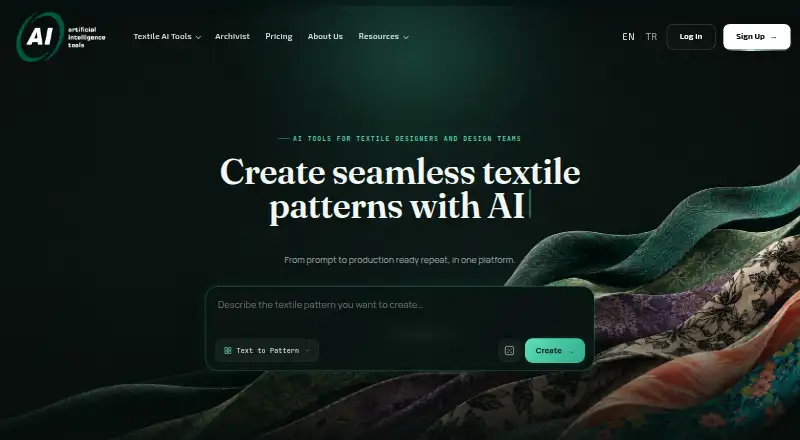
AIT AI Tools is a web platform for creating textile patterns and preparing designs for production. Pattern work includes text-based or reference-based creation, style transfer, extraction, expansion, inpainting and editing. Production tools cover repeat repair, upscaling, color separation, vectorization, background removal and colorway development. Designs can be previewed on 2D and 3D wear designs, product mockups and AI-generated scenes. Archivist indexes an existing pattern archive for natural-language, code, tag and visual-similarity search, without requiring folder reorganization. Access permissions can be set by user and collection, and collection access can be revoked. AIT says generated designs stay private to the account and are not used to train its models; it also says its models are developed in-house and user data is hosted on its own local servers. The free plan provides 20 credits per day, with one to two uses per tool in a rolling four-hour window. Individual costs $39 a month; unused monthly credits do not roll over.
Who it suits
AIT AI Tools suits textile designers, freelancers, studios, design teams and larger organizations that create patterns or prepare designs for production. Teams considering enterprise workflows can discuss integrations where supported.
What it does well
- Includes production preparation and pattern editing tools.
- Archivist supports visual-similarity and text-based search.
- Collection access permissions can be revoked.
- Generated designs are private to the account, according to AIT.
What to know first
- Free accounts have a rolling four-hour tool-use limit.
- Unused monthly credits do not roll over.
- Individual costs $39 a month.
Limits
Free accounts receive 20 credits per day and are limited to one to two uses per tool in a rolling four-hour window. Individual, the cheapest paid plan, is for one user and uses monthly credit-based production; unused monthly credits do not roll over.
Plans
| Plan | Billed and limits | Price |
|---|---|---|
| Free | 20 credits/day · free accounts limited to 1–2 uses per tool in a rolling 4-hour window | Free |
| Professional | Billed monthly · Higher production capacity · 1 user · priority processing · expanded asset storage · priority support | $350 a month |
| Individual | Billed monthly · Monthly credit-based production · 1 user · standard processing · personal workspace · standard support | $39 a month |
| Business | Billed monthly · 5 users · shared workspace · role-based collaboration · expanded team storage · dedicated onboarding · business support | $495 a month |
| Enterprise & Partnerships | Custom pricing · Custom users and usage · tailored workflow · onboarding · enterprise support planning · integration discussions where supported | On request |
As ai.ait.com.tr lists them, read 3 Oct 2026. The maker's own page has the final word.
Getting started
- Visit the AIT AI Tools website.
- Choose the Free plan or a paid plan, starting at $39 per month.
- Open the web platform and use text or reference-based pattern creation.
- Use the production tools to refine and prepare designs.
- Preview designs on wear designs, product mockups, or AI-generated scenes.
- Index an existing pattern archive in Archivist to search its collection.
AIT AI Tools brings textile pattern creation, production preparation and archive search together for designers and teams working across those stages. Its strongest case is a textile-specific workflow; its credit and usage limits make it less compelling for anyone who needs predictable, high-volume output.
Overview
AIT combines pattern-making tools with steps for preparing designs for production. Users can start from text or a reference, transfer a style, extract or expand a pattern, and edit it with inpainting. They can then repair repeats, upscale artwork, separate colors, vectorize, remove backgrounds and develop colorways. This breadth suits textile work better than a general image-generation tool, especially when creation and production preparation are both part of the job.
Designs can be previewed on 2D and 3D wear designs, product mockups and AI-generated scenes. Archivist serves a separate but practical need: it indexes an existing pattern archive for natural-language, code, tag and visual-similarity searches without requiring folder reorganization. User- and collection-level permissions, including the ability to revoke collection access, make that feature relevant to teams managing shared work.
Key features
Pattern creation and production
The toolset covers text-to-pattern generation, reference-based creation, style transfer, pattern extraction, expansion and editing. SVG and PNG exports support vector and raster workflows. The value is in having generation and several preparation steps in one platform; users seeking a broad, unrestricted image studio may find the textile focus too narrow.
Visualization and archive search
Previewing designs on wear designs, mockups and generated scenes helps users consider presentation alongside the pattern itself. Archivist can make an existing collection searchable by meaning, code, tag or visual similarity, without first reorganizing folders. That combination is particularly useful for studios that need to retrieve and reuse older work as well as create new designs.
Privacy and infrastructure
AIT says generated designs remain private to the account and are not shared publicly or used to train its AI models. It also says its models are developed in-house and user data is hosted on its own local servers without third-party APIs. Those commitments may matter to teams handling proprietary designs.
Pricing
The free plan costs nothing and provides 20 credits per day. Free accounts are limited to 1–2 uses per tool in a rolling four-hour window, so the tier is better for occasional exploration than steady production. Unused monthly credits do not roll over, and credits and tool usage vary.
Individual costs $39 a month, billed monthly. It includes monthly credit-based production, one user, standard processing, a personal workspace and standard support. It is the entry paid option for a solo designer, but the single-user workspace and standard processing limit its fit for team collaboration.
Professional costs $350 a month, billed monthly, for one user. Higher production capacity, priority processing, expanded asset storage and priority support make it the stronger solo plan for heavier work, though it remains a single-user subscription.
Business costs $495 a month, billed monthly, and includes five users, a shared workspace, role-based collaboration, expanded team storage, dedicated onboarding and business support. This is the clearest fit for a small design team; larger or more specialized deployments can discuss custom pricing through Enterprise & Partnerships, which includes custom users and usage, tailored workflow, onboarding, enterprise support planning and integration discussions where supported.
Platforms
AIT is available on the web. It offers a 20-minute live demo, and says contact enquiries receive a reply within one working day.
Who it's for
AIT is best suited to textile designers, freelancers, studios and design teams that need both pattern creation and production preparation, or organizations that want searchable archives alongside new design work. A freelancer can start with Individual; teams needing shared access and role-based collaboration should look at Business. Those who only need occasional pattern experiments may find the free tier's per-tool limits restrictive, while users seeking other fashion-design workflows should compare alternatives.
Pros and cons
- Pro: Creation, repeat repair, color separation and vectorization sit in one textile-focused workflow, reducing the need to split those tasks across separate tools.
- Pro: Archivist searches existing collections in several ways without requiring folder reorganization, a useful distinction for teams with established archives.
- Pro: Account privacy and collection-level access controls address concerns around proprietary designs and shared assets.
- Con: Free use is capped at 1–2 uses per tool in a rolling four-hour window, which constrains regular work.
- Con: Individual and Professional are limited to one user; collaboration requires the $495 a month Business plan.
- Con: Monthly credits do not roll over, so unused capacity cannot be carried into a later billing period.
Alternatives
For broader category browsing, see AI Fashion Design Generators or AI Pattern Generators.
- Style3D AI is another freemium option, available on macOS and the web; its free tier includes 50 credits, approximately 50 images, one image generation at a time and 15-day asset storage.
- Fabra offers a free web plan with 300 AI credits updated yearly, up to three replaceable designs, editor access and generation tools; consider it when those design and export terms suit your needs.
- Mew Design AI Product Mockup Maker is a web alternative with a free plan, free trial and 50 signup credits; it is worth comparing for mockup-focused work.
- Pattern Weaver has a web free tier with three credits, PNG/JPG export and 2K patterns; consider it for a narrower pattern-making option.
- Resleeve is a freemium web alternative whose free plan includes $25 in credits with no credit card required.
- Texloom Studio is available as a web app and extension; its free tier includes 100 starting credits and 27 tool pages free without signup.
- Fashion Diffusion spans Android, iOS, macOS, web and API, with a free trial and free plan; it is an option for readers prioritizing broad platform availability.
- The New Black AI offers Android, iOS, web and API access, plus a free trial and free plan; compare it if those platforms fit your workflow.
Verdict
Choose AIT AI Tools if textile pattern creation, production preparation and searchable archives belong in the same workflow. Its specialized toolset and archive controls are the main reasons to choose it; the rolling free-use cap, non-rolling monthly credits and substantial jump to a five-seat Business plan are reasons to look elsewhere if you need inexpensive, predictable output or collaboration at a lower price.
Verdict
AIT AI Tools brings pattern generation, production preparation and archive search into one textile-focused platform. The free tier has usage limits, while paid plans begin with Individual at $39 a month.
Questions
Is there a free plan?
Yes. Free includes 20 credits per day, with one to two uses per tool in a rolling four-hour window.
How much do the paid plans cost?
Individual is $39 per month, Professional is $350 per month, and Business is $495 per month. Enterprise & Partnerships has custom pricing.
Which platforms does AIT AI Tools support?
The listed platform is web.
Can I use it to prepare patterns for production?
Yes. The workflow includes repeat repair, upscaling, color separation, vectorization, background removal, and colorway development.
Does it support teams?
Business costs $495 per month and includes five users, a shared workspace, and role-based collaboration. Enterprise & Partnerships offers custom users and usage.
What does AIT say about generated design privacy?
AIT says designs are private to the account, are not shared publicly, and are not used to train its AI models.
Facts from AIT AI Tools's own pages
- Archivist
- Archivist indexes an existing pattern archive and supports natural-language, code, tag and visual-similarity search without requiring folder reorganization. · ai.ait.com.tr, 3 Oct 2026
- Archivist access controls
- Archivist supports access permissions by user and collection, and says collection access can be revoked at any time. · ai.ait.com.tr, 3 Oct 2026
- Company and location
- The maker is A.I.T. Bilgisayar Sistemleri Makine San. ve Tic. Ltd. Şti., with an address in Nilüfer, Bursa, Türkiye. · ai.ait.com.tr, 3 Oct 2026
- Generated design privacy
- The FAQ says generated designs are private to the account and are not shared publicly or used to train AIT’s AI models. · ai.ait.com.tr, 3 Oct 2026
- Headquarters
- Bursa, Türkiye · ai.ait.com.tr, 23 Sept 2026
- Infrastructure
- AIT says its models are developed in-house and user data is hosted on its own local servers without third-party APIs. · ai.ait.com.tr, 3 Oct 2026
- Integrations
- The pricing page offers enterprise integration discussions where supported but does not name specific third-party integrations. · ai.ait.com.tr, 3 Oct 2026
- Intended users
- AIT positions the product for textile designers, freelancers, studios, design teams and larger organizations. · ai.ait.com.tr, 3 Oct 2026
- Limits
- Credits and tool usage vary; free accounts have 1–2 uses per tool in a rolling four-hour window, and unused monthly credits do not roll over. · ai.ait.com.tr, 3 Oct 2026
- Pattern tools
- Its tools include text-to-pattern generation, reference-based creation, style transfer, pattern extraction, expansion, inpainting and pattern editing. · ai.ait.com.tr, 3 Oct 2026
- Production preparation
- The workflow includes repeat repair, upscaling, color separation, vectorization, background removal and colorway development. · ai.ait.com.tr, 3 Oct 2026
- Purpose
- AIT AI Tools is a textile-focused platform for creating seamless patterns and preparing designs for production. · ai.ait.com.tr, 3 Oct 2026
- Support
- AIT says contact enquiries receive a reply within one working day and offers a 20-minute live demo. · ai.ait.com.tr, 3 Oct 2026
- Visualization
- Users can preview textile designs on 2D and 3D wear designs, product mockups and AI-generated scenes. · ai.ait.com.tr, 3 Oct 2026
Where AIT AI Tools stands on Freedom251
- AI Pattern Generators#2 of 22
- AI Fashion Design Generators#5 of 28