Freedom251 › AI Pattern Generators
Image to Pattern
What Image to Pattern is
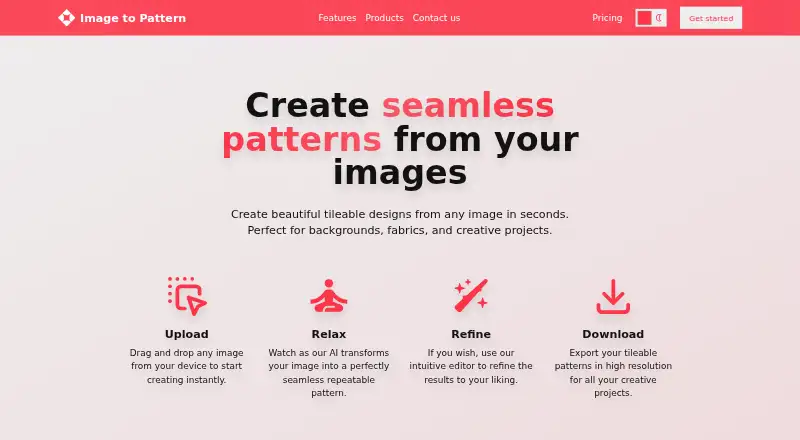
Image to Pattern turns uploaded images into seamless, tileable designs for backgrounds, fabrics, and creative projects. Users upload an image, let AI transform it, refine the result in an editor, and download a high-resolution pattern. The web app accepts drag-and-drop uploads and works without installation. Image to Pattern is also available as an add-on inside Adobe Express, while an API lets teams connect pattern generation to other apps and workflows. Plans include a Free option with up to 20 patterns, Pro at $19 a month for up to 80 patterns, Premium at $39 a month for up to 240 patterns, and Business at $290 a month for up to 2400 patterns. Its terms permit personal, non-commercial use or internal business purposes unless express written permission grants otherwise. The privacy notice identifies third-party AI providers including OpenAI, Stability AI, Amazon Web Services AI, and Google Cloud AI. Subscription fees are generally non-refundable, with case-by-case exceptions for materially faulty service or applicable consumer-protection requirements requested within 7 days. The service is offered on web, as an extension, and through an API.
Who it suits
Image to Pattern suits people creating repeatable designs for backgrounds, fabrics, or other creative work. It may also suit teams seeking an API or Adobe Express add-on for pattern generation.
What it does well
- Creates seamless, tileable patterns from images.
- Includes an editor and high-resolution downloads.
- Web editor requires no installation.
- Free plan supports up to 20 patterns.
- Available as an Adobe Express add-on and API.
What to know first
- Terms limit use to non-commercial personal or internal business purposes absent permission.
- Subscription fees are generally non-refundable.
- Paid plans have monthly pattern limits.
Limits
The free plan allows up to 20 patterns. Pro allows up to 80 patterns for $19 a month; Premium allows up to 240 for $39 a month; Business allows up to 2400 for $290 a month.
Plans
| Plan | Billed and limits | Price |
|---|---|---|
| Free | billed monthly · up to 20 patterns | Free |
| Pro | billed monthly · up to 80 patterns | $19 a month |
| Business | billed monthly · up to 2400 patterns | $290 a month |
| Premium | billed monthly · up to 240 patterns | $39 a month |
As imagetopattern.com lists them, read 15 Oct 2026. The maker's own page has the final word.
Getting started
- Open the Image to Pattern website.
- Drag and drop an image from your device into the web app.
- Let the AI transform the image.
- Refine the generated pattern in the editor.
- Download the high-resolution pattern.
Overview
Image to Pattern turns source images into seamless, repeatable designs for creative work such as fabric and backgrounds. It is most compelling for people who want a focused image-to-pattern workflow in a browser or Adobe Express; its monthly pattern caps and limited commercial-use terms are important constraints.
Key features
Start by uploading an image, including by dragging and dropping it into the web app. AI transforms it into a tileable pattern, which users can refine in an editor and download at high resolution. Seamless repeats and image references make the workflow useful when a design needs to grow from existing imagery rather than start from scratch. The editor adds room to adjust the output, though this remains a dedicated pattern tool rather than a broad image-editing suite.
The browser app needs no installation and includes the full editor. An Adobe Express add-on offers a route for people already working in that app, while an API lets teams connect pattern generation to other apps and workflows. These are useful access options, but the paid quotas are the practical limit for frequent or shared production.
The privacy notice names OpenAI, Stability AI, Amazon Web Services AI and Google Cloud AI among the third-party providers used by its AI products. It describes technical and organizational security measures but does not promise absolute security. Stripe or Paddle handles and stores payment data. Subscription fees are generally non-refundable; case-by-case exceptions apply for materially faulty service or consumer-protection requirements, with requests made within seven days.
Pricing
The Free plan costs $0 and allows up to 20 patterns per month. It is a sensible way to see whether the workflow fits occasional personal use, but the cap makes it a poor choice for recurring production.
Pro costs $19 a month, billed monthly, for up to 80 patterns. It suits an individual with steady but limited output. Premium costs $39 a month, billed monthly, for up to 240 patterns; that higher ceiling is better for regular work, though it still calls for tracking usage. Business costs $290 a month, billed monthly, for up to 2400 patterns, a much larger allowance for high-volume workflows. The plan figures specify pattern quotas but do not establish separate seats, so teams should not assume a particular user allocation.
All paid tiers are monthly subscriptions, and their larger quotas do not change the use restrictions: the terms allow personal, non-commercial use or internal business purposes unless the maker gives express written permission. That makes the service a risky fit for publishing or selling pattern-based work without permission.
Platforms
Image to Pattern is offered on the web, as an Adobe Express extension, and through an API. The browser option avoids installation, the add-on keeps the workflow inside Adobe Express, and the API is the relevant route for integration. The maker provides support and feedback contact at [email protected].
Who it's for
Choose Image to Pattern if you need to turn your own imagery into repeat patterns and value an editor plus several ways to access the workflow. It is less suitable if you need broad image tools, quotas beyond the plan caps, or commercial publication rights as a standard part of the license.
Pros and cons
- Pros: Seamless tiling, image references and high-resolution downloads make the core workflow specific to producing repeat designs from source images.
- Pros: A full browser editor, Adobe Express add-on and API cover individual use as well as integration needs.
- Cons: Monthly pattern caps rise from 20 on Free to 2400 on Business, so sustained output requires a paid tier and quota planning.
- Cons: Commercial use is not included by default, limiting straightforward use for products or published work.
Alternatives
AI Pattern Generators is a useful place to compare pattern-focused options. Consider Repper if you want a free mobile option with a trial, while keeping in mind that its free mobile plan limits image uploads to the first two weeks and offers simplified exports. AIT AI Tools may fit better if you want a wider set of web tools, though its free accounts are limited to 20 daily credits and 1–2 uses per tool in a rolling four-hour window. Mew Design AI Product Mockup Maker is the more relevant option when product mockups are the priority; its free plan starts with 50 credits and 100MB of storage.
Nano Banana 2 AI Pattern Generator is worth considering for daily free pattern generation without signup or a credit card. Pattern Weaver may suit lighter experimentation: its free tier gives three credits, while a one-time Starter plan avoids a recurring subscription. Patternful.ai is a broader AI toolkit, with its Starter plan including image generators, editors, an upscaler and video generators. Seamlessify offers unlimited browser-based direct stitching alongside two one-time AI credits after email verification, making it an option when stitching rather than recurring AI generations is central. Texloom Studio combines web and extension access with a free starting-credit allowance and free tool pages, which may suit someone who wants a wider textile-tool workflow.
Verdict
Image to Pattern is a focused choice for designers who want to turn source imagery into seamless patterns and refine them without installing an editor. Its browser, Adobe Express and API options are the main reasons to choose it; look elsewhere if you need uncapped production or commercial publication rights built into the license.
Verdict
Image to Pattern provides an image-to-pattern workflow with editing and several ways to access it. Check the plan limits and usage terms, especially if you need commercial publication rights.
Questions
Is Image to Pattern free?
Yes. Its free plan supports up to 20 patterns; paid plans start with Pro at $19 a month.
Which platforms are available?
It is available on the web, as an extension, and through an API. It is also offered as an add-on inside Adobe Express.
Can I use the patterns commercially?
The terms license the service and content for personal, non-commercial use or internal business purposes unless express written permission is granted.
What are the paid plans?
Pro is $19 a month for up to 80 patterns, Premium is $39 a month for up to 240, and Business is $290 a month for up to 2400.
How does the image workflow work?
Upload an image, let the AI transform it, refine the result in the editor, then download a high-resolution pattern.
How can I contact support?
The maker provides support and feedback contact through [email protected].
Facts from Image to Pattern's own pages
- Adobe Express
- Image to Pattern is available directly inside Adobe Express as an add-on. · imagetopattern.com, 30 Sept 2026
- Adobe integration
- Image to Pattern is offered as an add-on that runs inside Adobe Express. · imagetopattern.com, 15 Oct 2026
- Age restriction
- The company says it does not knowingly collect or market to children under 18. · imagetopattern.com, 15 Oct 2026
- AI data sharing
- Inputs, outputs and personal information may be shared with those AI providers to operate the AI products. · imagetopattern.com, 15 Oct 2026
- AI providers
- The privacy notice names OpenAI, Stability AI, Amazon Web Services AI and Google Cloud AI as providers used for AI features. · imagetopattern.com, 15 Oct 2026
- AI transformation
- The product applies AI to transform the uploaded image into a repeatable pattern. · imagetopattern.com, 15 Oct 2026
- API
- The site offers an API for integrating pattern generation into other apps and workflows. · imagetopattern.com, 30 Sept 2026
- API availability
- An API is advertised for integrating pattern generation into other applications and workflows. · imagetopattern.com, 15 Oct 2026
- API documentation
- The maker provides no public endpoint, authentication guide or SDK details on its accessible pages and directs API users to email contact. · imagetopattern.com, 15 Oct 2026
- Browser app
- The web app is a full-featured editor that needs no installation. · imagetopattern.com, 30 Sept 2026
- Browser deployment
- The full editor runs in a browser and requires no installation. · imagetopattern.com, 15 Oct 2026
- Commercial use
- The terms license the service and content for personal, non-commercial use or internal business purposes unless express written permission is granted. · imagetopattern.com, 30 Sept 2026
- Commercial-use limit
- Commercial exploitation of the service or its content requires express prior written permission. · imagetopattern.com, 15 Oct 2026
- Company ownership
- The same registry entry names Cristian Perez Rodriguez as sole partner and sole administrator at incorporation. · boe.es, 15 Oct 2026
- Company registry
- Spain's BORME entry records WTG SOLUTIONS SOCIEDAD LIMITADA as beginning operations on February 20, 2023, with €16,000 capital and Barakaldo domicile. · boe.es, 15 Oct 2026
- Core function
- Image to Pattern creates seamless, tileable designs from images. · imagetopattern.com, 30 Sept 2026
- Downtime limit
- The terms warn that interruptions, delays and errors may occur and disclaim an obligation to maintain uptime or provide updates. · imagetopattern.com, 15 Oct 2026
- Gartner status
- The opened Gartner Peer Insights page is a general product-search home and displayed no Image to Pattern result. · gartner.com, 15 Oct 2026
- Headquarters
- Barakaldo, Vizcaya, Spain · imagetopattern.com, 28 Sept 2026
- High-resolution export
- Generated tileable patterns can be downloaded in high resolution. · imagetopattern.com, 15 Oct 2026
- Image upload
- The web app supports dragging and dropping an image from the user's device to start creating. · imagetopattern.com, 30 Sept 2026
- Independent comparison scope
- CrochetPop's August 19, 2026 comparison covers eight crochet photo-to-pattern tools and states that prices and limits should be rechecked before payment. · learn.crochetpop.app, 15 Oct 2026
- Independent coverage
- SeamlessCanvas published a September 20, 2026 comparison of seven image-to-pattern tools, but its visible comparison table does not include Image to Pattern as a row. · seamlesscanvas.com, 15 Oct 2026
- Independent testing scope
- Pattern Weaver's April 1, 2026 article says it tested seven AI pattern generators and discusses general criteria such as seamlessness, resolution, exports and commercial licensing. · patternweaver.ai, 15 Oct 2026
Where Image to Pattern stands on Freedom251
- AI Pattern Generators#1 of 22