Freedom251 › Pattern Design Software
Seamlessify
What Seamlessify is
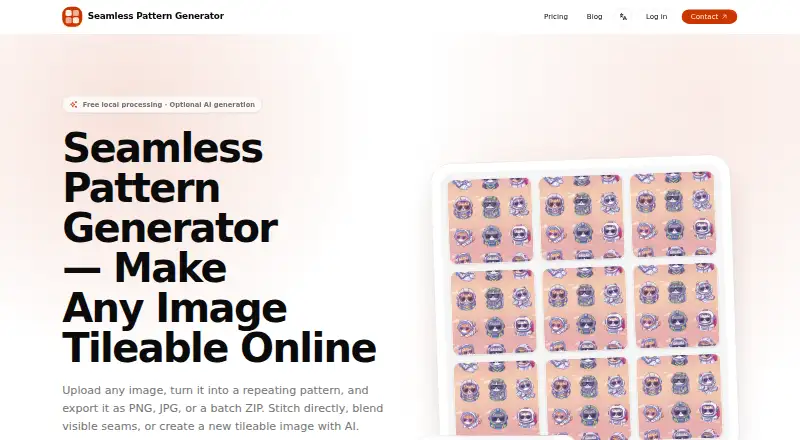
Seamlessify is a web tool for turning images into repeating patterns and exporting them as PNG, JPG, or a batch ZIP. Direct stitching runs locally in the browser, and supported source images are not uploaded to the maker’s image-processing servers. It accepts PNG, JPG, and WEBP inputs, with batches up to 100 images or 500 MB. The tool overlaps and feathers opposite edges to reduce visible seams and abrupt color changes. Users can set rows and columns separately and preview a 3 × 3 repeat; repeat formats include seamless tiles, horizontal rolls, and vertical panels. Downloads are rendered from the original image. AI generation can use a text prompt or a prompt inferred from a reference image, but requires an account and credits. The free plan includes unlimited direct stitching and two one-time AI credits after email verification, with no monthly credit refill. AI generations and related records are kept privately for up to 30 days before scheduled deletion. Prompts, optional reference images, and generated images undergo automated safety review and may be blocked or withheld. Paid plans are billed yearly, with the listed starting price of $8.25/mo (annual).
Who it suits
Seamlessify suits people who need to create repeat patterns from images in a browser. Its Studio audience is high-volume professional workflows, while Creator is described for regular pattern creation and exploration.
What it does well
- Direct stitching runs locally in the browser.
- Accepts PNG, JPG, and WEBP inputs.
- Batch processing supports up to 100 images or 500 MB.
- Exports PNG, JPG, or batch ZIP.
- Offers separate row and column controls with a 3 × 3 preview.
What to know first
- Free plan has only two one-time AI credits.
- AI generation requires an account and credits.
- AI records are retained for up to 30 days.
- Safety review may block or withhold content.
Limits
The Free plan provides two one-time AI credits after email verification, with no monthly refill; AI generations and history are available for 30 days. Direct stitching is unlimited in the Free plan. The Starter plan has 100 AI credits each month, while Creator has 250 and Studio has 600; monthly credits do not roll over.
Plans
| Plan | Billed and limits | Price |
|---|---|---|
| Free | After email verification · 2 one-time AI credits · up to 2 Z-Image generations · unlimited browser direct stitching · 30-day private history · no monthly credit refill | Free |
| Creator | $199 yearly ($16.58/month equivalent) · 250 AI credits/month · up to 250 Z-Image, 83 Ideogram Balanced, or 50 Ideogram Quality images · text and reference-image workflows · unlimited direct stitching · credits do not roll over | $19.99 a month |
| Studio | $399 yearly ($33.25/month equivalent) · 600 AI credits/month · up to 600 Z-Image, 200 Ideogram Balanced, or 120 Ideogram Quality images · text and reference-image workflows · unlimited direct stitching · credits do not roll over | $39.99 a month |
| Starter | $99 yearly ($8.25/month equivalent) · 100 AI credits/month · up to 100 Z-Image, 33 Ideogram Balanced, or 20 Ideogram Quality images · text and reference-image workflows · unlimited direct stitching · credits do not roll over | $9.99 a month |
As seamlessify.com lists them, read 15 Oct 2026. The maker's own page has the final word.
Getting started
- Open https://seamlessify.com/ in a web browser.
- Upload PNG, JPG, or WEBP images for direct stitching.
- Adjust rows and columns and inspect the 3 × 3 repeat preview.
- Download the result as PNG, JPG, or a batch ZIP.
- For AI generation, create an account and use credits; the Free plan requires email verification for its two one-time credits.
Seamlessify is a browser tool for converting artwork into repeatable surface patterns and, separately, generating pattern imagery with AI. It is a strong fit for designers who already have source images and want local processing, while frequent AI experimentation requires a paid credit allowance. The main trade-off is clear: unlimited stitching is generous, but AI use is metered and account-bound.
Overview
Seamlessify divides its workflow into two distinct jobs. Direct stitching happens locally in the browser, so supported source images are not sent to the maker’s image-processing servers. AI generation instead needs an account and credits, with generation records and resulting images kept private for up to 30 days before scheduled deletion. Automated safety review can block, withhold, delete, or escalate prompts, reference images, and generated results, which matters when working with sensitive or commercially important material.
Key features
Local stitching and repeat layouts
PNG, JPG, and WEBP inputs are accepted, up to 100 images or 500 MB per batch. The stitching process overlaps and feathers opposite edges to reduce hard joins, visible seams, and sudden colour changes. Independent column and row controls let you shape the repeat rather than accept a fixed arrangement, and a 3 × 3 preview reveals how the tile behaves across multiple repetitions. Seamless tiles, horizontal rolls, and vertical panels cover common textile, wallpaper, and surface-design layouts.
Exports and AI generation
Finished work can be exported as PNG or JPG, or delivered as a batch ZIP. Downloads are rendered from the original image, not merely captured from the repeat preview, which is the appropriate approach when output quality matters. AI generation accepts a text prompt or can infer a prompt from a reference image. The service identifies Z-Image Turbo and Ideogram V4 Tiling as generation models through fal.ai, and uses DeepSeek V4 Flash Vision Experimental to analyse reduced reference images. Z-Image costs one credit; Ideogram costs three credits in Balanced mode or five in Quality mode, so model choice directly affects how quickly an allowance is consumed.
Pricing
Seamlessify uses a freemium structure. The Free plan costs 0.00 USD and gives unlimited browser-based direct stitching plus two one-time AI credits after email verification. AI generations and history remain available for 30 days, but there is no monthly credit refill. It is the right entry point for repeat construction from existing images and only occasional AI trials, not a continuing generation workflow.
Starter is billed at $99 yearly and includes 100 AI credits each month, unlimited local stitching, and no rollover of unused monthly credits. It suits lighter recurring generation, provided your usage fits a modest monthly quota. Creator is billed at $199 yearly with 250 monthly credits and the same unlimited stitching; it is aimed at regular pattern creation and exploration. Studio is billed at $399 yearly and supplies 600 monthly credits, positioning it for high-volume professional workflows. Paid credits reset monthly rather than accumulating, so each tier rewards predictable use and can penalise uneven workloads. The published entry point is $8.25/mo on annual billing, while the plans themselves are presented with yearly billing terms.
Platforms
Seamlessify runs in a web browser. That keeps the stitching workflow broadly accessible across desktop systems, with processing performed in the browser for direct uploads.
Who it's for
Choose Seamlessify if you need to turn your own images into repeat tiles while keeping those source files away from the stitching service, or if you need multiple repeat orientations and batch exports. It also fits designers who want optional AI generation and can budget credits by month. It is less suitable for sustained, unpredictable AI exploration, where non-rolling quotas can run out or leave paid capacity unused.
Pros and cons
Pros
- Unlimited local stitching on every plan: the core repeat workflow does not consume AI credits.
- Privacy-conscious direct processing: source images used for stitching stay in the browser rather than going to image-processing servers.
- Useful production controls: batch input, independent rows and columns, several repeat layouts, and PNG, JPG, and ZIP output support practical delivery.
- Clear AI model pricing: one-credit Z-Image generations and three- or five-credit Ideogram modes make quota planning possible.
Cons
- Free AI access is brief: only two one-time credits follow email verification, with no ongoing refill.
- Monthly credits do not roll over: Starter, Creator, and Studio users can lose unused capacity when workloads vary.
- AI requires an account and safety screening: prompts and images may be withheld or blocked, which can interrupt some projects.
- Short retention window: AI images and generation records are scheduled for deletion after up to 30 days.
Alternatives
For broader category browsing, see Pattern Design Software and AI Pattern Generators.
ArahWeave is the better choice for Linux, macOS, or Windows users seeking weaving-focused CAD/CAM; its free demo cannot save projects. Pick Repper if you want Android, iOS, and web access, accepting simplified mobile exports and a two-week image-upload window. JUMI PatternMaker suits users wanting no sign-up, no subscription, no watermark, and SVG or PNG exports up to 8000px for personal or commercial use. Loocie Design is a free beta spanning desktop, tablet, and phone, though files auto-delete after a short time. Raspberry AI Prints & Patterns offers 50 one-time credits free or 120 monthly credits for $49 per user, with seven-day history on its Individual plan. Texloom Studio combines a browser extension with web tools, starting with 100 credits and 27 free tool pages without signup. Tiler is a free web option without stated paid features or usage limits. Patternly uses one-time credit packs, including 10 credits for £3 and 20 credits for £5.
Verdict
Seamlessify is a strong recommendation for designers who primarily need private, unlimited browser stitching and dependable repeat exports, with AI as an occasional extra. Choose a paid tier when your generation volume is regular and predictable. Look elsewhere if you need desktop-native software, permanent AI history, or credits that carry forward between busy and quiet months.
Verdict
Seamlessify pairs browser-based stitching with optional AI generation and several repeat layouts. The free plan provides unlimited direct stitching, while ongoing AI credits are not included there.
Questions
Is Seamlessify free?
Yes. The Free plan costs nothing and includes unlimited browser-based direct stitching. It also provides two one-time AI credits after email verification.
What does paid Seamlessify cost?
Paid plans start at $8.25/mo (annual). The listed Starter, Creator, and Studio plans are billed yearly at $99, $199, and $399, respectively.
Which image formats can I upload and export?
Inputs can be PNG, JPG, or WEBP. Exports are PNG, JPG, and ZIP.
Does Seamlessify upload images for direct stitching?
Direct stitching processes supported source images locally in the browser; they are not uploaded to the maker's image-processing servers.
What platforms does Seamlessify support?
Seamlessify is available in a web browser.
How does AI generation work?
It accepts a text prompt or can infer a prompt from a reference image. AI generation requires an account and credits; listed models include Z-Image Turbo and Ideogram V4 Tiling, delivered through fal.ai.
Facts from Seamlessify's own pages
- AI credit pricing
- Z-Image costs one credit per generation, while Ideogram costs three credits for Balanced and five for Quality. · seamlessify.com, 15 Oct 2026
- AI data providers
- AI workflows use Microsoft Azure AI Content Safety, DeepSeek, fal.ai, and Cloudflare Workers, D1, and R2. · seamlessify.com, 15 Oct 2026
- AI generation
- AI generation supports text prompts or a prompt inferred from a reference image and requires an account and credits. · seamlessify.com, 7 Oct 2026
- AI inputs
- AI generation accepts text prompts, reference images, or a reference image with written instructions. · dev.to, 15 Oct 2026
- AI models
- The selectable generation models are Z-Image Turbo and Ideogram V4 Tiling, delivered through fal.ai. · seamlessify.com, 15 Oct 2026
- AI providers
- The terms identify Z-Image Turbo and Ideogram V4 Tiling as generation models delivered through fal.ai, and DeepSeek V4 Flash Vision Experimental for analyzing reduced reference images. · seamlessify.com, 7 Oct 2026
- API and SDKs
- The opened official pages document browser workflows and third-party AI providers but do not describe a public API or SDK. · seamlessify.com, 15 Oct 2026
- Audience
- The site presents Studio for high-volume professional workflows and Creator for regular pattern creation and exploration. · seamlessify.com, 7 Oct 2026
- Batch limit
- The homepage states a maximum of 100 images or 500 MB for uploads. · seamlessify.com, 15 Oct 2026
- Blending
- The tool overlaps and feathers opposite edges to reduce visible seams, hard joins, and abrupt color changes. · seamlessify.com, 7 Oct 2026
- Creator profile
- A DEV Community profile under the seamlessifycom account says Rohann created Seamlessify and describes the work as AI SaaS development. · dev.to, 15 Oct 2026
- Credits
- The pricing page says Z-Image costs 1 credit and Ideogram costs 3 credits for Balanced or 5 for Quality. · seamlessify.com, 7 Oct 2026
- Direct stitching
- The direct-stitching workflow uploads, blends, crops, previews, and exports images in the browser. · seamlessify.com, 15 Oct 2026
- Edge blending
- An edge-aware blending control overlaps and feathers opposite edges to reduce visible seams and color changes. · seamlessify.com, 15 Oct 2026
- Exports
- The service exports PNG and JPG files and can package batch results into ZIP archives. · seamlessify.com, 15 Oct 2026
- History retention
- AI-generated images and generation records are kept privately for up to 30 days and then scheduled for deletion. · seamlessify.com, 15 Oct 2026
- Independent account requirement
- The DEV article states that free direct stitching runs in the browser without requiring an account. · dev.to, 15 Oct 2026
- Independent description
- A DEV Community article describes Seamlessify as a browser-based tool for making ordinary images into seamless tileable patterns. · dev.to, 15 Oct 2026
- Independent use cases
- The DEV article positions the product for print-on-demand, textile work, wallpaper, backgrounds, packaging, and game assets. · dev.to, 15 Oct 2026
- Independent workflow
- The same DEV article reports 3×3 previews, boundary zooming, repeat-count and output-dimension controls, batch processing, and PNG/JPG/ZIP export. · dev.to, 15 Oct 2026
- Input formats
- The tool accepts PNG, JPG, and WEBP files. · seamlessify.com, 15 Oct 2026
- Licence
- The opened official pages do not state an open-source licence or provide source-code licensing terms. · seamlessify.com, 15 Oct 2026
- Limit: AI reliability
- The terms say AI outputs are probabilistic and are not guaranteed to match prompts, be unique, error-free, seamless in every use case, or commercially suitable. · seamlessify.com, 15 Oct 2026
- Limit: content rules
- The acceptable-use policy prohibits pornography, gore, hate speech, child-unsafe content, impersonation, and copyright or trademark infringement. · seamlessify.com, 15 Oct 2026
Where Seamlessify stands on Freedom251
- Pattern Design Software#7 of 23
- AI Pattern Generators#13 of 22