Freedom251 › Pattern Design Software
JUMI PatternMaker
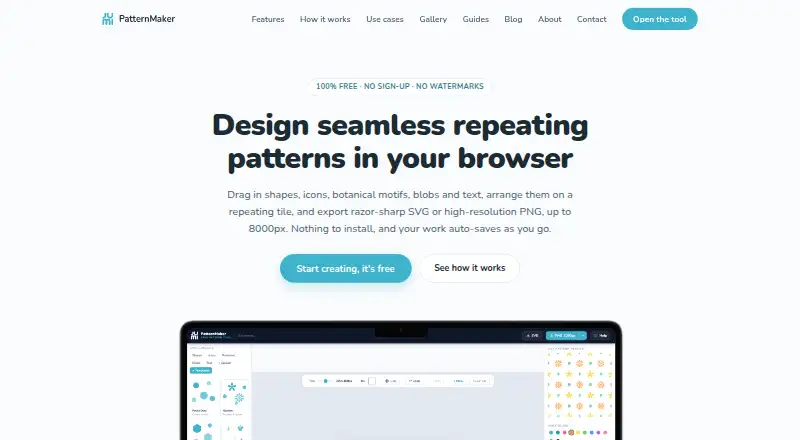
What JUMI PatternMaker is
JUMI PatternMaker is a free browser-based tool for designing seamless repeating patterns. When a design crosses a tile edge, the editor carries it onto the opposite side, including when the element is rotated. Users can build designs from shapes, lines, searchable icons, animal and food motifs, stickers, botanical motifs, blobs, text, uploads and templates. Styling options include solid or gradient fills, strokes, stroke styles and opacity. Users can add SVG or PNG artwork as tileable elements and recolour SVG fills. Patterns export as scalable SVG or PNG at 1000, 2000, 4000 or 8000 pixels, with an option for a transparent PNG background. Work auto-saves in the browser; editable projects can also be saved as JSON and reopened. Artwork and saved patterns stay in the user's browser rather than being sent to JUMI. That keeps saved work tied to its device and browser: it does not sync and cannot be recovered by JUMI if browser data is cleared or the device is lost. The tool is optimized for desktop and tablet; a larger screen is needed to create patterns on a phone.
Who it suits
It suits surface and textile designers, print-on-demand sellers, crafters, web and app designers, students and educators who want a browser-based pattern editor. It is also suited to users who can work on desktop, laptop or tablet screens.
What it does well
- Free to use with no sign-up or subscription.
- Wraps tile-edge elements, including rotated elements.
- Exports SVG and PNG up to 8000 pixels.
- Saves editable projects as JSON.
- Created patterns may be used commercially.
What to know first
- Saved work does not sync across devices.
- Cleared browser data or lost devices can mean unrecoverable work.
- A larger screen is needed to create on a phone.
- JUMI library elements cannot be redistributed as standalone assets.
Limits
The free plan is available without sign-up or subscription and has no watermark. Exports are offered at 1000, 2000, 4000, or 8000 pixels. Saved work stays with the browser and device, does not sync, and may be lost if browser data is cleared or the device is lost.
Plans
| Plan | Billed and limits | Price |
|---|---|---|
| Free | No sign-up · no subscription · no watermark · SVG and PNG exports up to 8000px · personal and commercial use | Free |
As jumipatternmaker.com lists them, read 30 Sept 2026. The maker's own page has the final word.
Getting started
- Open the JUMI PatternMaker website in a browser on a desktop or tablet.
- Create a pattern using the editor’s design elements, templates, or your own SVG or PNG artwork.
- Style elements with fills, strokes, stroke styles, or opacity.
- Let the browser save your work automatically, or save an editable project as JSON.
- Export the finished pattern as SVG or PNG at 1000, 2000, 4000, or 8000 pixels.
JUMI PatternMaker is a free web editor for making seamless repeating patterns. It suits surface and textile designers, crafters, students and anyone who needs a straightforward tile-to-export workflow. Its appeal is a capable free tool with no signup; its trade-off is that projects stay in one browser on one device.
Overview
JUMI handles the fussy part of repeat design well: elements crossing a tile edge are redrawn on the opposite side, including rotated elements. That makes it useful for building a continuous repeat without manually aligning both edges. It supports single-tile work as well as edge-wrapped repeats, with colorway tools and vector editing.
The editor combines shapes, lines, searchable icons, animal and food motifs, stickers, botanical motifs, blobs, text and templates. Users can also bring in SVG or PNG artwork as tileable elements, and recolour SVG fills. Solid or gradient fills, strokes, stroke styles and opacity give a useful range of visual control, though the feature set is focused on pattern-making rather than a general illustration workflow.
Key features
- Edge wrapping: Crossing elements appear on the opposite edge, including when rotated, which helps preserve continuity across the repeat.
- Built-in and uploaded elements: The mix of motifs, templates and SVG or PNG uploads gives designers a way to start quickly or use their own artwork. SVG fills can be recoloured.
- Flexible exports: Patterns can be exported as SVG or as PNG at 1000, 2000, 4000 or 8000 pixels; PNG can have a transparent background. This accommodates vector workflows and several raster output sizes.
- Local project saving: Work auto-saves in the browser, and editable projects can be saved as JSON and reopened later. Artwork and saved patterns remain in the browser rather than being sent to JUMI, but that privacy choice also means no syncing or recovery if browser data is cleared or a device is lost. Keep JSON copies somewhere safe.
- Commercial use: Created patterns may be used for lawful personal or commercial purposes. JUMI library elements cannot be redistributed as standalone assets, so that permission does not extend to reselling the motifs themselves.
Pricing
The Free plan costs nothing. It requires no sign-up or subscription and adds no watermark; SVG and PNG exports are included up to 8000px, with personal and commercial use permitted for created patterns. With no paid tier or trial to weigh against it, JUMI is a strong fit for budget-conscious makers and designers whose needs stay within its pattern-focused editor. The cost is less about money than workflow: no cloud sync or project recovery, and library assets cannot be redistributed on their own.
The service is funded by Google AdSense advertising and affiliate links. Advertising and analytics cookies are subject to user consent.
Platforms
JUMI runs in a web browser and is optimized for desktop and laptop, with tablet support. The site says a larger screen is needed to create patterns on a phone, so it is not the right choice for phone-first design work.
Who it's for
JUMI names surface and textile designers, print-on-demand sellers, crafters, web and app designers, students and educators among its intended users. Its free access, edge wrapping and high-resolution exports make it especially practical for people developing repeat artwork without a subscription. It is less suitable for teams or anyone who relies on synced, recoverable projects. Support is available by email for help, bug reports, feedback and feature requests; JUMI aims to reply within a few working days.
Pros and cons
Pros
- Free without sign-up or watermark: Users can move from design to SVG or PNG export without a subscription gate.
- Automatic, rotation-aware wrapping: The editor handles edge crossings for a more direct seamless-repeat workflow.
- Useful output choices: SVG and PNG sizes up to 8000 pixels, including transparent PNG, cover both scalable and raster needs.
- Private local processing: Artwork and uploads stay in the user's browser rather than being sent to JUMI.
Cons
- No sync or recovery: Browser- and device-specific saving makes it important to export JSON backups; lost browser data or a device cannot be recovered by JUMI.
- Small screens are a poor fit: The editor is optimized for desktop and tablet, and phone pattern creation requires a larger screen.
- Library assets have a boundary: Finished patterns may be used commercially, but the built-in elements cannot be redistributed as standalone assets.
Alternatives
For a broader shortlist, see Pattern Design Software.
- ArahWeave is worth considering for weaving CAD/CAM on Linux, macOS or Windows; its free demo cannot save projects.
- Repper is a better candidate for mobile use, with Android, iOS and web support. Its free mobile app has simplified exports and limits image uploads to the first two weeks.
- Loocie Design supports desktop, tablet and phone, but its beta tools may change and files auto-delete after a short time.
- Raspberry AI Prints & Patterns offers a free tier with 50 one-time credits and a paid Individual plan at $49 a month for users who prefer a credit-based option.
- Seamlessify pairs unlimited browser-based direct stitching with two one-time AI credits after email verification; it does not refill those credits monthly.
- Texloom Studio has 27 free tool pages without signup and 100 starting credits, making it an option for exploring a wider set of tools.
- Tiler is another free web option for pattern work.
- KXStitch is another free option for Linux users.
Verdict
Choose JUMI PatternMaker if you want a free, browser-based way to build seamless repeats and export them as SVG or high-resolution PNG without signing up. Its edge handling, flexible elements and commercial-use allowance make it a practical choice for independent designers and makers. Look elsewhere if you need phone-first editing, synced projects or recovery after device or browser loss.
Verdict
JUMI PatternMaker offers a browser-based workflow with flexible pattern elements, edge wrapping and SVG or PNG exports. Its local-only saving keeps artwork in the browser, but users should save project files and account for the lack of syncing and recovery.
Questions
How much does JUMI PatternMaker cost?
The Free plan costs nothing and requires no sign-up or subscription.
What platforms can I use it on?
It runs in a web browser and is optimized for desktop and tablet. The site says a larger screen is needed to create patterns on a phone.
What file formats can I export?
Patterns export as SVG or PNG at 1000, 2000, 4000, or 8000 pixels. PNG can have a transparent background.
Can I use patterns commercially?
Patterns you create may be used for lawful personal or commercial purposes. JUMI library elements cannot be redistributed as standalone assets.
Does my work sync or leave my browser?
Artwork, uploads, and saved patterns are processed and stored in your browser, and saved work does not sync. JUMI cannot recover it if browser data is cleared or the device is lost.
Who makes JUMI PatternMaker?
The listed facts identify JUMI as the service name but do not identify a maker.
Facts from JUMI PatternMaker's own pages
- Commercial use
- Patterns users create may be used for lawful personal or commercial purposes, but JUMI library elements cannot be redistributed as standalone assets. · jumipatternmaker.com, 30 Sept 2026
- Design elements
- The editor includes shapes, lines, searchable icons, animal and food motifs, stickers, botanical motifs, blobs, text, uploads, and templates. · jumipatternmaker.com, 30 Sept 2026
- Exports
- Patterns export as scalable SVG or PNG at 1000, 2000, 4000, or 8000 pixels, with an option for a transparent PNG background. · jumipatternmaker.com, 30 Sept 2026
- Funding and cookies
- The service is funded by Google AdSense advertising and affiliate links; advertising and analytics cookies are subject to user consent. · jumipatternmaker.com, 30 Sept 2026
- Headquarters
- Farnham, England, GU9 7QE, United Kingdom · jumipatternmaker.com, 28 Sept 2026
- Platform limit
- The tool is optimised for desktop and tablet; the site says a larger screen is needed to create patterns on a phone. · jumipatternmaker.com, 30 Sept 2026
- Privacy
- Artwork, uploads, and saved patterns are processed and stored in the user's browser and are not sent to JUMI's servers. · jumipatternmaker.com, 30 Sept 2026
- Privacy limits
- Saved work is device- and browser-specific, does not sync, and cannot be recovered by JUMI if browser data is cleared or the device is lost. · jumipatternmaker.com, 30 Sept 2026
- Project saving
- Work auto-saves in the browser; users can also save editable project files as JSON and reopen them later. · jumipatternmaker.com, 30 Sept 2026
- Purpose
- JUMI PatternMaker is a free browser-based tool for designing seamless repeating patterns. · jumipatternmaker.com, 30 Sept 2026
- Seamless tiling
- Elements crossing a tile edge are automatically redrawn on the opposite side, with rotation-aware wrapping. · jumipatternmaker.com, 30 Sept 2026
- Styling
- Elements can be styled with solid or gradient fills, strokes, stroke styles, and opacity. · jumipatternmaker.com, 30 Sept 2026
- Support
- Users can email [email protected] for support, bug reports, feedback, and feature requests; JUMI says it aims to reply within a few working days. · jumipatternmaker.com, 30 Sept 2026
- Uploads
- Users can upload SVG or PNG artwork as tileable elements, and SVG fills can be recoloured. · jumipatternmaker.com, 30 Sept 2026
- Who it is for
- JUMI describes the tool for surface and textile designers, print-on-demand sellers, crafters, web and app designers, students, and educators. · jumipatternmaker.com, 30 Sept 2026
Where JUMI PatternMaker stands on Freedom251
- Pattern Design Software#1 of 23