Freedom251 › AI Fashion Design Generators

Fabra
What Fabra is
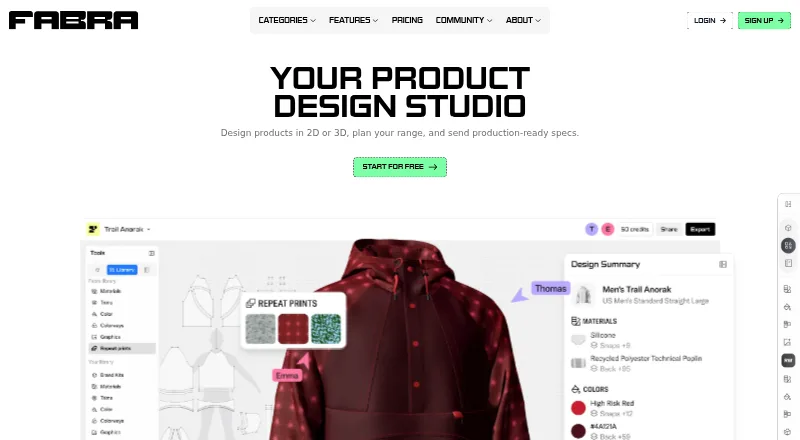
Fabra is a web-based product design studio for developing ideas in 2D or 3D, planning collections, and preparing production specifications. Its Design Editor keeps the 2D pattern, 3D design, and Tech Pack connected as work changes. A design can begin with a template or base product, a pattern made from scratch, or an uploaded DXF. Each design generates a Tech Pack with measurement lines, materials and trims in a Bill of Materials, and construction callouts. Packs can be exported to Excel or shared through a live link, and artwork can be downloaded. Generation tools make materials and trims from prompts and create flat-lay or on-model images using plan credits. Range Plan displays styles and colorways side by side. The Free plan permits up to three replaceable designs and 300 AI credits updated yearly, but Tech Pack and high-resolution design exports require a paid plan. Pattern Editing, Range Plan, Repeat Print Maker, and AI Tools are labeled beta. Paid plans start at $16.50/mo (annual).
Who it suits
Fabra suits designers and makers developing product ideas who need to work with patterns, 3D designs, production specifications, or collection plans. Its audience also includes people developing business or label ideas.
What it does well
- 2D patterns, 3D designs, and Tech Packs stay in sync.
- Accepts patterns drafted from scratch or uploaded as DXF.
- Tech Packs include measurements, materials, trims, and callouts.
- Free plan includes up to three replaceable designs.
- Range Plan places styles and colorways side by side.
What to know first
- Tech Pack exports require a paid plan.
- High-resolution design exports require a paid plan.
- Several features are labeled beta.
- Free-plan designs are limited to three replaceable designs.
Limits
The Free plan allows up to three replaceable designs and 300 AI credits updated yearly. Tech Pack exports and high-resolution design exports require a paid plan; viewing or downloading a shared Tech Pack also requires a paid plan.
Plans
| Plan | Billed and limits | Price |
|---|---|---|
| Free | forever · 300 AI credits, updated yearly · Up to 3 replaceable designs · Design Editor access · Generation tools · Tech Pack exports and high-res design exports not included | Free |
| Starter | $144 billed yearly • 20% off; yearly display also shows $12 per month · 2,000 AI credits/month · Unlimited designs · 5 Tech Pack exports/month · 1 Range Plan board · Pattern import and export · Repeat Print Maker · High-res design exports | $15 a month |
| Pro | $396 billed yearly • 34% off; yearly display also shows $33 per month · 5,000 AI credits/month · Unlimited designs · 30 Tech Pack exports/month · Unlimited Range Plan boards · Unlimited custom Brand Kits | $50 a month |
As fabra.com lists them, read 28 Sept 2026. The maker's own page has the final word.
Getting started
- Visit Fabra’s website and create an account to view or work with designs.
- Start a design from a template or base product, draft a pattern, or upload a DXF.
- Use the Design Editor to develop the 2D pattern and 3D design alongside its Tech Pack.
- Choose the Free plan or a paid plan for additional designs, credits, and exports.
- Share a design through a live link; viewers can use a free account to view it.
Fabra is a web-based product design studio for people turning product ideas into patterns, 3D designs, collection plans and production specifications. It suits designers and product teams that need those stages connected. The key trade-off is that free users cannot export Tech Packs or high-resolution designs.
Overview
Fabra links a 2D pattern, 3D design and Tech Pack in one Design Editor, so a design change carries through to its production specification. That connected workflow makes it a stronger fit for developing products toward production than for people who only need concept images.
Users can start from a template or base product, draft a pattern from scratch or upload a DXF. Each design generates a Tech Pack with measurement lines, a Bill of Materials for materials and trims, and construction callouts. Packs update with the design and can be shared by live link or exported to Excel; artwork can also be downloaded. These handoff tools are useful, but export quotas on paid plans can constrain production teams with many designs.
Key features
Patterns, 3D designs and Tech Packs
Keeping the pattern, 3D design and specification together reduces the gap between a visual concept and its production document. Fabra supports DXF import and export, and Excel export for Tech Packs. Free users can work in the editor, but cannot export Tech Packs or high-resolution designs. People viewing a shared design can use a free account; viewing or downloading its Tech Pack requires a paid plan.
Collection planning
Range Plan puts styles and colorways side by side, which is useful for comparing a collection rather than managing designs one at a time. Free and Starter include one board; Pro removes that cap with unlimited boards.
AI tools and beta features
Generation tools can create materials and trims from prompts and produce flat-lay or on-model images using credits. AI-generated visuals may help explore a concept, but their credit allowance is a recurring constraint on subscriptions. Pattern Editing, Range Plan, Repeat Print Maker and AI Tools are labeled beta, so users relying on those workflows should allow for their beta status.
Pricing
Fabra is freemium. Free costs nothing, billed forever, and includes 300 AI credits updated yearly, up to three replaceable designs, Design Editor access and generation tools. It is a useful way to explore the editor, but the design cap and lack of Tech Pack and high-resolution exports make it a poor fit for ongoing production work.
Starter costs $15 a month, or $144 billed yearly, with the yearly display also showing $12 per month and 20% off. It includes 2,000 AI credits per month, unlimited designs, five Tech Pack exports per month, one Range Plan board, pattern import and export, Repeat Print Maker and high-resolution exports. This is the practical entry tier for a solo designer who needs export access, though five Tech Pack exports may be restrictive for regular production.
Pro costs $50 a month, or $396 billed yearly, with the yearly display also showing $33 per month and 34% off. It includes 5,000 AI credits per month, unlimited designs, 30 Tech Pack exports per month, unlimited Range Plan boards and unlimited custom Brand Kits. It better fits teams managing larger collections or more frequent handoffs, though the 30-export cap remains relevant.
Subscription credits reset each billing cycle and do not roll over; free-plan credits never expire, and only subscribers can buy top-ups. Choose a tier based on both its export quota and credit cadence, not simply its design limit.
Platforms
Fabra runs on the web. That suits people who want a browser-based workspace, but it is not the choice for someone specifically seeking a native mobile app.
Who it's for
Fabra is best for independent designers, labels and product teams that need to move from patterns and 3D design into collection planning and production specifications. It is less compelling for image generation alone, or for users who need unrestricted Tech Pack exports on a free plan.
Pros and cons
- Connected design-to-production workflow: patterns, 3D designs and Tech Packs stay in sync, with measurements, materials, trims and construction callouts in the pack.
- Useful handoff options: Tech Packs can be shared by live link or exported to Excel, and pattern workflows support DXF.
- Free access to explore: the free plan includes editor access and 300 yearly updated credits, but limits users to three replaceable designs and excludes key exports.
- Paid quotas can shape the workflow: Starter allows five Tech Pack exports monthly and Pro allows 30; subscription credits also expire at the end of each billing cycle.
- Some workflows are beta: Pattern Editing, Range Plan, Repeat Print Maker and AI Tools carry beta labels.
Alternatives
For a broader set of fashion-design options, browse AI Fashion Design Generators. Choose Catwalk.AI instead if you want an iOS or macOS app centered on try-ons, with one-time packs priced at 9.99 USD for 10 try-ons or 99.99 USD for 100. Clearly Logo Maker is another freemium option for readers seeking a logo maker.
Style3D AI may suit someone focused on generated fashion images: its free plan provides 50 credits, approximately 50 images, one image generation at a time and 15 days of asset storage. AIT AI Tools is a web alternative with 20 free credits per day, though free accounts are limited to one or two uses per tool in a rolling four-hour window.
Mew Design AI Product Mockup Maker offers a web-based mockup route, with 50 signup credits, five to seven designs, 100MB storage and standard download on its free plan. For textile patterns, Pattern Weaver offers three free credits, PNG/JPG export and 2K patterns; its Tiling Fixer and AI enhance are pay per use. Resleeve may fit users who want an image- and video-generation credit balance: its free plan includes $25 in credits and requires no credit card.
Texloom Studio is another web-based option for textile work, with 100 starting credits and 27 tool pages free without signup.
Verdict
Choose Fabra if your work needs patterns, 3D design, collection planning and production specifications in one workspace. Its strongest case is the synchronized Tech Pack workflow; its main drawback is that exports are paid and capped by tier, while several features remain beta. If you mainly need fashion imagery or pattern generation, a narrower alternative may fit better.
Verdict
Fabra brings pattern work, 3D design, collection planning, and production specifications into one web product. Check its free-plan export limits and beta labels against the work you need to do.
Questions
Is Fabra free?
Yes. Its Free plan costs nothing and includes 300 AI credits updated yearly and up to three replaceable designs.
What do paid plans cost?
Starter is listed at $15 a month, billed $144 yearly, with a yearly display of $12 per month. Pro is $50 a month, billed $396 yearly, with a yearly display of $33 per month. The listed paid-from price is $16.50/mo with annual billing.
Which platforms does Fabra support?
Fabra is available on the web.
Can I export a Tech Pack on the Free plan?
No. Tech Pack exports require a paid plan. The Free plan includes Design Editor access, but not Tech Pack or high-resolution design exports.
Can people view a shared design without paying?
Yes. A free account can view a shared design. Viewing or downloading its Tech Pack requires a paid plan.
Do Fabra credits roll over?
Subscription credits reset each billing cycle and do not roll over. Free plan credits never expire, and credit top-ups are available only on subscription plans.
Facts from Fabra's own pages
- AI tools
- Generation tools create materials and trims from prompts and can export AI-generated flat-lay or on-model images using plan credits. · fabra.com, 28 Sept 2026
- Audience
- Fabra says its tool is for people developing product ideas, including business, label, and product ideas, and describes its team as designers, developers, and makers. · fabra.com, 28 Sept 2026
- Beta features
- The site labels Pattern Editing, Range Plan, Repeat Print Maker, and AI Tools as beta features. · fabra.com, 28 Sept 2026
- Collection planning
- Range Plan lets users plan a collection with styles and colorways side by side; the Free and Starter plans include one board, while Pro includes unlimited boards. · fabra.com, 28 Sept 2026
- Credit limits
- Subscription credits reset each billing cycle and do not roll over, while Free plan credits never expire; credit top-ups are available only on subscription plans. · fabra.com, 28 Sept 2026
- Design editor
- The Design Editor keeps the 2D pattern, 3D design, and Tech Pack in sync. · fabra.com, 28 Sept 2026
- Free-plan limit
- The Free plan allows up to three replaceable designs and 300 AI credits that are updated yearly; Tech Pack exports and high-resolution design exports require a paid plan. · fabra.com, 28 Sept 2026
- Headquarters
- Surry Hills, New South Wales, Australia · fabra.com, 28 Sept 2026
- Pattern workflows
- Users can start from a template or base product, draft a pattern from scratch, or upload a DXF. · fabra.com, 28 Sept 2026
- Product
- Fabra describes itself as a product design studio for designing in 2D or 3D, planning collections, and sending production-ready specifications. · fabra.com, 28 Sept 2026
- Production details
- Tech Packs support measurement lines, materials and trims in the Bill of Materials, and construction callouts; exports include Excel or cloud sharing. · fabra.com, 28 Sept 2026
- Sharing
- People can view a shared design with a free account, but viewing and downloading its Tech Pack requires a paid plan. · fabra.com, 28 Sept 2026
- Support
- Fabra directs users to its Help Center and lists [email protected] as a contact email. · fabra.com, 28 Sept 2026
- Tech Packs
- Each design generates a Tech Pack that updates as the design changes, with Excel export, artwork download, and live-link sharing. · fabra.com, 28 Sept 2026
Where Fabra stands on Freedom251
- AI Fashion Design Generators#6 of 28