Freedom251 › File Integrity Monitoring Software

Paessler PRTG Network Monitor
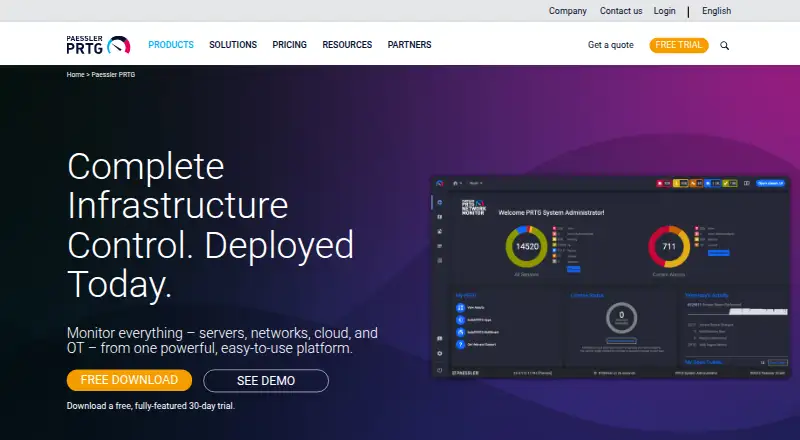
What Paessler PRTG Network Monitor is
Paessler PRTG Network Monitor tracks systems, devices, network traffic, applications, and other infrastructure metrics from an on-premises installation running on Windows servers. It has more than 250 preconfigured sensors, each measuring one or more aspects of a device. Customizable alerts, scheduled reports, distributed monitoring, and live-status dashboards help teams follow infrastructure. Paessler also lists adaptive AI-based anomaly detection and smart sensor recommendations. Alerts can use email, SMS, webhooks, or mobile notifications; webhooks can connect to Slack and Microsoft Teams. An API provides access to monitoring data and supports custom features. Free iOS and Android apps display monitoring data and send push notifications, but do not support cluster setups. Paessler describes PRTG as suited to small and medium IT infrastructures, with features for OT and IoT environments. The free plan covers up to 100 sensors. Paid plans start at $200/mo billed annually. Each server accepts one license key, so license sizes cannot be combined on a server.
Who it suits
It suits teams monitoring small or medium IT infrastructure, including environments with OT or IoT. It may also suit teams that need on-premises monitoring and configurable alerts or reports.
What it does well
- More than 250 preconfigured sensors
- Customizable alerts and scheduled reports
- API for monitoring data and custom features
- Free iOS and Android monitoring apps
What to know first
- Mobile apps do not support cluster setups
- License sizes cannot be combined on one server
- Paid plans start at $200/mo billed annually
Limits
The Freeware Edition supports up to 100 sensors, about 10 devices. The paid PRTG 500 plan supports up to 500 sensors, about 50 devices, and paid plans start at $200/mo when billed annually. Each server accepts one license key, and different license sizes cannot be combined on one server.
Plans
| Plan | Billed and limits | Price |
|---|---|---|
| Freeware Edition | Up to 100 sensors · About 10 devices | Free |
| PRTG 5000 | $1,300 per month paid annually · Up to 5,000 sensors · About 500 devices | $1,300 a month |
| PRTG 10000 | $1,642 per month paid annually · Up to 10,000 sensors · About 1,000 devices | $1,642 a month |
| PRTG 500 | $200 per month paid annually · Up to 500 sensors · About 50 devices | $200 a month |
| PRTG 1000 | $358 per month paid annually · Up to 1,000 sensors · About 100 devices | $358 a month |
| PRTG 2500 | $742 per month paid annually · Up to 2,500 sensors · About 250 devices | $742 a month |
As paessler.com lists them, read 30 Sept 2026. The maker's own page has the final word.
Getting started
- Visit https://www.paessler.com/prtg.
- Install PRTG Network Monitor on a Windows server for on-premises monitoring.
- Choose the Freeware Edition or a paid plan; a 30-day trial is available.
- Configure sensors for the systems and devices you want to monitor.
- Set up dashboards, reports, and alert channels such as email, SMS, or webhooks.
- Use the iOS or Android app to view monitoring data and receive push notifications.
Overview
Paessler PRTG Network Monitor is self-hosted software for monitoring networks, systems, applications and other infrastructure. It is best suited to small and medium IT teams that want broad coverage from a Windows server; its sensor-based licensing makes monitoring scale a key buying decision. The broad alerting and reporting toolkit is useful, but teams should check sensor needs and the one-license-per-server limit before committing.
Key features
- Sensor-based monitoring: More than 250 preconfigured sensors measure one or more aspects of a device. That supports varied infrastructure coverage, but makes sensor capacity more relevant than device count alone when choosing a tier.
- Dashboards and reports: Live-status dashboards and scheduled reports give teams both current visibility and a way to review monitoring over time.
- Alerts and integrations: Customizable alerts can use email, SMS, webhooks or mobile push. Webhooks can send notifications to Slack and Microsoft Teams; compatibility also includes ServiceNow, Jira Service Management, PagerDuty and OpsGenie.
- Distributed monitoring and maps: Distributed monitoring and topology maps help present monitoring across infrastructure, while the API provides access to monitoring data and a basis for custom features.
- AI-assisted monitoring: Paessler lists adaptive AI-driven baselines for anomaly detection and smart sensor recommendations. These may help teams identify unusual readings and configure coverage, though the value depends on how well recommendations fit their environment.
- Security and updates: Component communications use TLS, and interfaces support local and remote access secured via SSL/TLS. Subscriptions include the latest version, new features, security improvements and email support through the ticket system. Paessler's Trust Center covers SOC 2 Type II, ISO 27001, ISO 9001 and GDPR.
- Mobile access: Free iOS and Android apps display monitoring data and send push notifications, but do not support PRTG cluster setups.
Pricing
PRTG offers a free plan, paid plans billed annually and a 30-day trial. Sensor capacity is the main price-to-scale tradeoff; the approximate device counts are guides, not a substitute for estimating what each device needs to monitor.
- Freeware Edition: free, up to 100 sensors and about 10 devices. A sensible starting point for a small environment, but the cap may be restrictive as monitoring expands.
- PRTG 500: $200 a year, billed $200 per month paid annually; up to 500 sensors and about 50 devices. This is the entry paid tier for a modest deployment.
- PRTG 1000: $358 a year, billed $358 per month paid annually; up to 1,000 sensors and about 100 devices. It doubles the sensor ceiling for teams whose coverage outgrows the 500 tier.
- PRTG 2500: $742 a year, billed $742 per month paid annually; up to 2,500 sensors and about 250 devices. It suits a broader installation that needs more monitoring headroom.
- PRTG 5000: $1,300 a year, billed $1,300 per month paid annually; up to 5,000 sensors and about 500 devices. This tier is for larger deployments with substantial sensor requirements.
- PRTG 10000: $1,642 a year, billed $1,642 per month paid annually; up to 10,000 sensors and about 1,000 devices. It provides the largest stated capacity for the widest environments in this range.
Each PRTG Network Monitor server accepts one license key, so license sizes cannot be combined on the same server. That makes selecting enough capacity up front important for teams that might otherwise try to pool tiers.
Platforms
PRTG Network Monitor is deployed on-premises and runs on Windows servers. Its listed platforms include web, Windows, Linux, macOS, Android, iOS and API; mobile apps provide monitoring data and push alerts on iOS and Android, subject to the cluster limitation above.
Who it's for
PRTG is a strong fit for small and medium IT infrastructures that need to monitor devices, network traffic, applications and other infrastructure metrics from an on-premises installation. Its stated support for OT and IoT environments may also suit teams monitoring those settings. It is a weaker choice for organizations seeking cloud-only deployment or needing to combine multiple license sizes on one server.
Pros and cons
- Pros
- More than 250 preconfigured sensors and multiple sensor tiers support coverage across varied infrastructure.
- Live dashboards, scheduled reports and four alert channels bring status visibility and notifications into one setup.
- API access and compatibility with common service-management and incident tools allow custom access and connected alert workflows.
- A free tier and 30-day trial provide a way to assess fit before moving to paid capacity.
- Cons
- The Windows-server, on-premises core excludes teams that require a cloud-hosted monitoring service.
- Sensor ceilings mean buyers need to estimate monitoring demand rather than choose by device count alone.
- One license key per server prevents combining license sizes on a single server.
- The mobile apps do not support PRTG cluster setups.
Alternatives
Consider Dotcom-Monitor instead if a smaller target-based allowance is a better fit: its free plan covers up to 25 targets, five-minute monitoring frequency, two monitoring locations and email alerts.
Checkmate may suit teams seeking a self-hosted free option with no monitor limits and 12 alert channels.
Choose Visual Sentinel if its stated Solo plan fits a small visual-monitoring setup: $6 a month for one monitor, one server, one visual site, three sub-pages per monitor and one team member.
Zabbix is another freemium option with a free plan and trial, for readers comparing alternatives across Linux, macOS, self-hosted, web, Windows and API platforms.
ManageEngine Applications Manager may be a better match for a very small app or server estate, with a free plan for up to five apps or servers.
Nagios XI is an alternative for readers comparing a free tier capped at seven nodes or 100 services, whichever comes first, with most standard features and self-support.
For narrower needs, consider DNS Check for DNS records and history limits or DomainWarn for domain checks and history.
Explore Network Monitoring and Network Performance Monitoring Software for related categories, or compare DNS Monitoring Software, File Integrity Monitoring Software, Hardware Monitoring Software and Container Monitoring.
Verdict
PRTG is a strong choice for small and medium IT teams that want self-hosted infrastructure monitoring with sensors, dashboards, reports and several alert routes in one product. Its broad monitoring toolkit is the main reason to choose it; the Windows-server deployment, sensor-based capacity planning and single-license-per-server rule are the reasons to look elsewhere if those constraints do not fit.
Verdict
PRTG combines on-premises infrastructure monitoring with alerts, reports, dashboards, and an API. Check sensor needs and the single-license-per-server limit when choosing a plan.
Questions
How much does PRTG cost?
There is a free plan, and paid plans start at $200/mo when billed annually. A 30-day trial is available.
What does the free plan include?
The Freeware Edition allows up to 100 sensors, about 10 devices.
What is the cheapest paid plan?
PRTG 500 is listed at $200 per year and as billed at $200 per month paid annually. It allows up to 500 sensors, about 50 devices.
Which platforms does PRTG support?
The listed platforms include Android, iOS, API, Linux, macOS, self-hosted, web, and Windows. The core PRTG Network Monitor installation runs on Windows servers.
Can PRTG send alerts to Slack or Microsoft Teams?
Yes. PRTG can send notifications to Slack and Microsoft Teams through webhooks.
Can I combine license sizes on one server?
No. Each PRTG Network Monitor server accepts one license key, so different license sizes cannot be combined on that server.
Facts from Paessler PRTG Network Monitor's own pages
- AI features
- Paessler lists automated anomaly detection using adaptive AI-driven baselines and smart sensor recommendations among PRTG features. · paessler.com, 30 Sept 2026
- API
- PRTG provides an API for accessing monitoring data and developing custom features. · paessler.com, 30 Sept 2026
- Compliance
- Paessler's Trust Center lists SOC 2 Type II, ISO 27001, ISO 9001, and GDPR compliance information. · paessler.com, 30 Sept 2026
- Core platform
- PRTG Network Monitor runs on Windows servers as an on-premises monitoring solution. · paessler.com, 30 Sept 2026
- Founded
- 1997 · paessler.com, 28 Sept 2026
- Headquarters
- Nuremberg, Germany · paessler.com, 28 Sept 2026
- Integrations
- PRTG can send notifications to Slack and Microsoft Teams through webhooks; Paessler also lists compatibility with tools including ServiceNow, Jira Service Management, PagerDuty, and OpsGenie. · helpdesk.paessler.com, 30 Sept 2026
- Intended users
- Paessler describes PRTG Network Monitor as best suited to small and medium IT infrastructures, with features also for OT and IoT environments. · paessler.com, 30 Sept 2026
- License limit
- Each PRTG Network Monitor server accepts one license key, so different license sizes cannot be combined on one server. · paessler.com, 30 Sept 2026
- Mobile apps
- Free PRTG apps for iOS and Android can display monitoring data and send push notifications, but Paessler says they do not support PRTG cluster setups. · paessler.com, 30 Sept 2026
- Monitoring features
- PRTG offers customizable alerts, scheduled reports, distributed monitoring, and dashboards with live status information. · paessler.com, 30 Sept 2026
- Purpose
- PRTG Network Monitor monitors systems, devices, network traffic, applications, and other infrastructure metrics from an on-premises installation. · paessler.com, 30 Sept 2026
- Security
- Paessler says PRTG component communications use TLS encryption and its interfaces support local and remote access secured via SSL/TLS. · paessler.com, 30 Sept 2026
- Sensors
- The product includes more than 250 preconfigured sensors, and a sensor measures one or more aspects of a device. · paessler.com, 30 Sept 2026
- Support and updates
- PRTG subscriptions include access to the latest version, new features and security improvements, and email support through the support ticket system. · paessler.com, 30 Sept 2026
Where Paessler PRTG Network Monitor stands on Freedom251
- File Integrity Monitoring Software#9 of 34
- Network Performance Monitoring Software#8 of 26
- Network Monitoring#21 of 55
- DNS Monitoring Software#15 of 37
- Container Monitoring#22 of 49
- Server Monitoring#18 of 38
- Network Monitoring - Midmarket Software#12 of 25
- Hardware Monitoring Software#29 of 59
- Network Monitoring - Enterprise Software#11 of 22
- Hardware monitoring tools#37 of 59