Freedom251 › File Integrity Monitoring Software
Open Source Tripwire
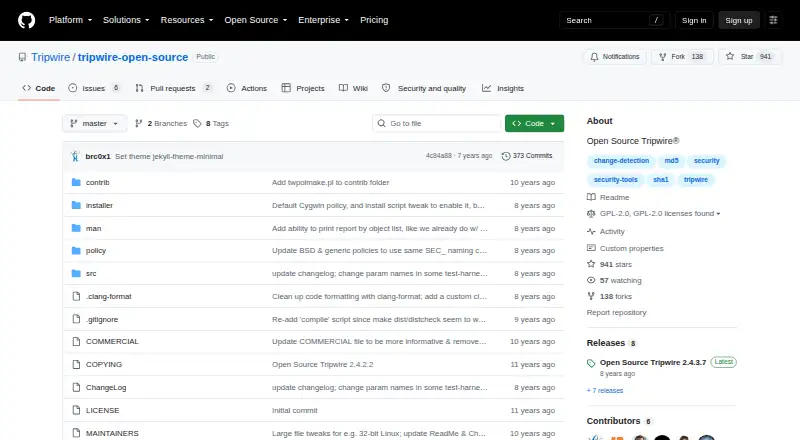
What Open Source Tripwire is
Open Source Tripwire checks files and directories against a known baseline, reporting when the current filesystem has changed. A policy file lets an administrator choose what to monitor and which properties to check, such as hashes, permissions and ownership. It runs on the user's system rather than as a managed service, with command-line setup, configuration, baseline creation and checks. Policy, configuration and database files are signed by default, and report files may also be signed. Checks can send email reports when enabled in the configuration. The project suggests scheduling checks periodically with cron, but the install script does not set up cron jobs. It supports POSIX-like systems including Linux, macOS, BSD variants, Solaris, AIX, HP-UX, Minix, Haiku and GNU/Hurd. Windows users can build it with Cygwin, though this does not support Registry monitoring or Windows-specific file attributes. The software costs nothing under GNU GPL version 2 or any later version. Tripwire also offers separate commercial supported products.
Who it suits
It suits system administrators who want to monitor filesystem changes on systems they manage. Users should be comfortable handling setup, configuration and scheduled checks themselves.
What it does well
- Policies select files and attributes to monitor.
- Policy, configuration and database files are signed by default.
- Email reports are available when enabled.
- Free under GNU GPL version 2 or later.
What to know first
- Not a managed service; checks run on the user's system.
- The install script does not create cron jobs.
- Cygwin does not support Registry monitoring.
- Cygwin omits Windows-specific file attributes.
Plans
| Plan | Billed and limits | Price |
|---|---|---|
| Open Source Tripwire | GPL-2.0; open-source file and directory integrity monitoring | Free |
As github.com lists them, read 5 Oct 2026. The maker's own page has the final word.
Getting started
- Visit the Open Source Tripwire project website.
- Install an RPM or Debian package, or use `make install`.
- Run the setup script for initial key generation and policy creation.
- Configure the policy to select files or directories and attributes to check.
- Create a baseline and run checks on your system.
- Schedule recurring checks with cron if needed.
Open Source Tripwire is a self-hosted, command-line tool for checking files and directories against a known baseline. It suits administrators who want configurable integrity checks and can handle setup, scheduling, and review of reports.
Overview
The software compares the current filesystem with a baseline, reporting changes to the files and directories selected in its policy. That makes it a focused choice for detecting filesystem drift, not a managed monitoring service: setup, configuration, baselining, and checks run on the user's system.
Policies can specify which attributes to check, including hashes, permissions, and ownership. Policy, configuration, and database files are signed by default; report files can also be signed. Checks can send email reports when email reporting is enabled, but the project does not provide real-time alerts.
Key features
- Configurable policies: Select the paths and attributes to monitor. This gives administrators control over what counts as a change, but requires them to define and maintain the policy.
- Signed files: Default signatures for policy, configuration, and database files help protect these core integrity-monitoring inputs. Reports may also be signed.
- Scheduled checks: The project recommends periodic runs with cron. Its install script does not create cron jobs, so scheduling is an administrator's responsibility.
- Email reports: Checks can send reports if email reporting is enabled in the configuration. This is useful for periodic notifications, but does not make the tool a real-time alerting system.
Pricing
Open Source Tripwire is free: its plan costs nothing and is distributed under GNU GPL version 2 or, at the user's option, any later version. It is self-hosted, so administrators manage its installation and operation on their own systems.
| Plan | Price | What it includes |
|---|---|---|
| Open Source Tripwire | free | Open-source file and directory integrity monitoring under GPL-2.0. |
There are no paid tiers in this plan. Tripwire also offers separate commercial supported products, including Tripwire for Servers and Tripwire Enterprise; those are distinct from this free, self-managed tool.
Platforms
Open Source Tripwire supports Linux, macOS, BSD variants, Solaris, AIX, HP-UX, Minix, Haiku, GNU/Hurd, and Cygwin. Windows users can build it under Cygwin, but that route does not support Registry monitoring or Windows-specific file attributes. It is therefore a limited fit for Windows environments that need those checks.
Who it's for
Choose Open Source Tripwire if you need free, policy-driven checks on a POSIX-like system and have the skills to generate keys, create a baseline, configure policies, and schedule runs. It is less suitable if you need a managed service, real-time alerts, or Windows Registry and platform-specific attribute monitoring.
Pros and cons
Pros
- No software charge: The plan is free and open source under GPL-2.0.
- Policy-level control: Administrators can choose paths and check hashes, permissions, and ownership rather than relying on a fixed scope.
- Broad POSIX support: The supported systems include Linux, macOS, BSD variants, and several Unix-like platforms.
- Signed core files: Policy, configuration, and database files are signed by default.
Cons
- Administrator-run operations: Setup, baselining, configuration, and checks happen on the user's system; the install script also leaves cron scheduling to the administrator.
- No real-time alerts: Periodic checks and optional email reports do not provide real-time notification.
- Windows gaps: The Cygwin build cannot monitor the Registry or Windows-specific file attributes.
Alternatives
For a broader comparison, see File Integrity Monitoring Software.
- Paessler PRTG Network Monitor is worth considering if you want a freemium network-monitoring product with a free tier capped at 100 sensors, or a wider platform range including web and mobile. Its Freeware Edition is free.
- EventSentry File Monitoring may suit teams looking for a Windows-capable option with a free tier for five machines. EventSentry Light includes basic log monitoring and community support, but no SIEM capability or dashboards.
- Wazuh is an alternative for readers seeking a broader self-hosted, open-source security platform; its open-source plan is free.
- FIM is another free, open-source option if you want software its maker describes as having no usage limits.
- OSSEC is an alternative if you want a command-line option with core OSSEC rules; its free OSSEC plan has no dedicated support staff.
- OWASP Amass is a free open-source framework under Apache License 2.0.
- AIDE is another free, GPL-2.0-licensed option for Linux, macOS, and self-hosted environments.
- Elastic Security is another alternative.
Verdict
Open Source Tripwire is a strong fit for administrators who want free, configurable file-integrity checks on systems they manage themselves. Its policy control and broad POSIX support are the main reasons to choose it; look elsewhere if you need real-time alerts, managed operation, or fuller Windows monitoring.
Verdict
Open Source Tripwire provides configurable file-integrity checks for administrators who can manage the software on their own systems. Windows users should note the stated Cygwin limitations.
Questions
How much does Open Source Tripwire cost?
It is free. The listed plan is free.
Is Open Source Tripwire open source?
Yes. It is distributed under GNU GPL version 2 or, at the user's option, any later version.
Which platforms does it support?
The project supports Linux, macOS, BSD variants, Solaris, AIX, HP-UX, Minix, Haiku, and GNU/Hurd. Windows users can build it under Cygwin, with limitations for Registry monitoring and Windows-specific file attributes.
Is it a managed service?
No. Setup, configuration, baseline creation, and checks take place on the user's system.
Can it email check reports?
Yes. Checks can send email reports when email reporting is enabled in the configuration.
Does installation schedule checks automatically?
No. The project suggests periodic checks with cron, and its install script does not create cron jobs.
Facts from Open Source Tripwire's own pages
- Commercial alternatives
- Tripwire says it offers separate commercial supported products, including Tripwire for Servers and Tripwire Enterprise. · github.com, 5 Oct 2026
- Email reporting
- Checks can send email reports when email reporting is enabled in the configuration. · github.com, 5 Oct 2026
- License
- The software is distributed under GNU GPL version 2 or, at the user's option, any later version. · github.com, 5 Oct 2026
- Maker history
- Tripwire says Gene Kim founded Tripwire, Inc. in 1997 to bring file integrity monitoring to the commercial market. · tripwire.com, 5 Oct 2026
- Not a managed service
- The README describes command-line setup, configuration, baselining, and checks on the user's system. · github.com, 5 Oct 2026
- Operating systems
- The project says it supports POSIX-like systems including Linux, macOS, BSD, Solaris, AIX, HP-UX, Minix, Haiku, and GNU/Hurd. · github.com, 5 Oct 2026
- Policy controls
- A policy file specifies which files or directories to monitor and which attributes to check, including hashes, permissions, and ownership. · github.com, 5 Oct 2026
- Purpose
- Open Source Tripwire monitors files and directories for changes and alerts when the current filesystem differs from a known baseline. · github.com, 5 Oct 2026
- Scheduling
- The project suggests running checks periodically with cron, and says its install script does not create cron jobs. · github.com, 5 Oct 2026
- Setup
- RPM and Debian package installation and make install use a setup script for initial key generation and policy creation. · github.com, 5 Oct 2026
- Signed files
- Policy, configuration, and database files are signed by default, and report files may also be signed. · github.com, 5 Oct 2026
- Windows limitation
- Windows users can build it under Cygwin, but this does not support Registry monitoring or Windows-specific file attributes. · github.com, 5 Oct 2026