Freedom251 › Revenue Planning Software
ORAGO Planning
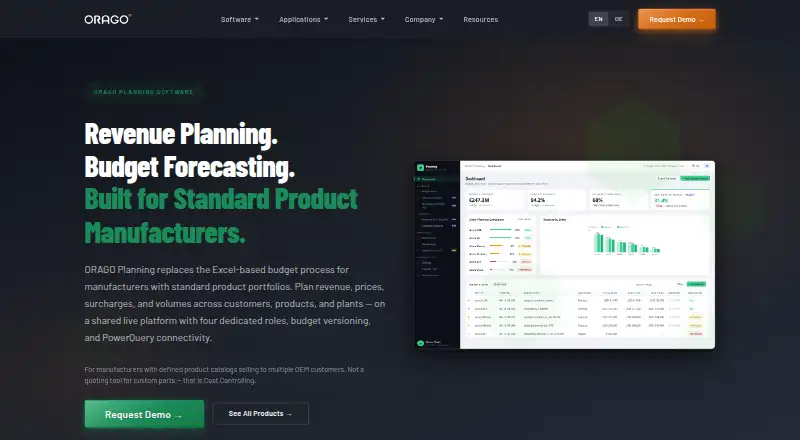
What ORAGO Planning is
ORAGO Planning supports revenue and budget planning for manufacturers with standard product portfolios. Budget lines use base price, surcharges, and quantity to calculate revenue, with monthly planning across a three-year horizon. Users can make named budget versions by copying and adjusting; published versions cannot be changed. The product supports rolling monthly or quarterly forecasts and plan-versus-actual comparisons using actuals imported from SAP exchange tables or Excel. Forecast dimensions include customers, products, plants, and months. A shared workspace assigns Controller, Sales or Product Manager, Plant Manager, and Finance or CFO roles, with data-layer access controls that scope Sales and Plant Managers to assigned customers, products, or plants. PowerQuery supports Excel and Power BI reporting, while a REST API with JWT authentication exposes planning data. Deployment options are Microsoft Azure cloud and on-premise Windows Server with IIS. The product supports 50,000+ budget lines and 50 concurrent users. It is not designed for custom-part RFQ costing, ERP financial accounting, production scheduling, procurement, or inventory management. Pricing is available on request.
Who it suits
It is designed for standard-product manufacturers with defined catalogs and multiple OEM customers, including companies with 2 to 20 production plants. It is not intended for custom-parts suppliers calculating costs per RFQ or for the listed ERP and operational functions.
What it does well
- Plans monthly budgets across a three-year horizon
- Supports rolling forecasts and plan-versus-actual comparisons
- Imports actuals from Excel or SAP exchange tables
- Offers Azure cloud and on-premise deployment
What to know first
- Not designed for custom-part RFQ costing
- Does not cover ERP financial accounting
- Does not handle production scheduling, procurement, or inventory
Limits
The product supports 50,000+ budget lines and 50 concurrent users. ERP accounting, production scheduling, procurement, inventory management, and custom-part RFQ costing are outside its intended scope.
Getting started
- Visit the ORAGO Planning website.
- Request a demo or contact ORAGO about pricing.
- Choose Microsoft Azure cloud or on-premise Windows Server with IIS.
- Enter planning data manually or import it from Excel or SAP exchange tables.
- Set up workspace roles and assigned data access.
ORAGO Planning is a focused revenue and budgeting system for manufacturers with repeatable product catalogs, multiple OEM customers, and planning responsibilities spread across plants. It suits organizations that need controlled, multi-dimensional forecasts rather than a general-purpose ERP. Its strongest case is structured planning with governed versions and data access; its scope is narrower than an operational finance or production suite.
Overview
The planning model builds each budget line from base price, surcharges, and quantity, then calculates revenue across monthly periods. Teams can plan up to three years ahead, create named scenarios by copying and adjusting budget versions, and run rolling monthly or quarterly forecasts. Plan-versus-actual analysis uses actuals imported from Excel or SAP exchange tables, so finance teams can work with existing data flows instead of rekeying every result.
Published budget versions are immutable, preserving an agreed baseline while later scenarios remain editable. Dimensions cover customers, products, plants, and months, which fits standard-product manufacturers with several production sites. Approval workflows and scenario planning add governance, but the product is not intended for custom-part costing by RFQ, CRM synchronization, or operational execution.
Key features
Roles, security, and audit
A shared workspace defines Controller, Sales or Product Manager, Plant Manager, and Finance roles. Data-layer permissions can restrict Sales and Plant Managers to assigned customers, products, or plants, making the system practical when regional or plant teams should not see the full plan. SSO, Azure AD, and JWT authentication are supported, while an audit trail records the user, timestamp, and old and new values for each change. These controls suit organizations that need accountable planning, although they do not turn the product into a broader identity or governance platform.
Data, reporting, and integration
Users can enter data directly or import Excel files and SAP exchange tables. PowerQuery connectivity feeds Excel and Power BI reporting, and the documented REST API exposes budget versions, revenue, master data, and actuals through JWT authentication. The connection to ORAGO Cost Controlling is useful for organizations already using that product. The absence of CRM data synchronization means sales teams relying on automated pipeline feeds will need another process.
Scale and roadmap
ORAGO states support for more than 50,000 budget lines and 50 concurrent users, a sensible ceiling for mid-sized planning groups rather than a global, high-concurrency platform. Full variance-bridge decomposition, top-down/bottom-up reconciliation, profitability reporting, and capacity planning are described as in development or coming soon, so teams requiring those analyses now should not make them purchase assumptions.
Pricing
Pricing is custom: ORAGO asks prospects to discuss it and offers a demo, without publishing a plan price, seat rate, or trial term. That sales-led approach may fit manufacturers needing deployment and support discussion, but it prevents straightforward budget comparison. Support is tiered, with guaranteed response times tied to issue severity; support-plan terms are provided during the sales conversation.
Platforms
ORAGO Planning is offered through a Microsoft Azure cloud deployment or on-premise Windows Server with IIS. It also lists web, Windows, self-hosted, and API access. The combination suits companies balancing cloud adoption with plant or corporate hosting requirements.
Who it's for
The clearest fit is a standard-product manufacturer with a defined catalog, multiple OEM customers, and roughly two to 20 production plants. Controllers, finance leaders, sales or product managers, and plant managers can work in one governed model across customers, products, plants, and months. Choose another category of system if you need custom-part RFQ costing, ERP financial accounting, production scheduling, procurement, or inventory management.
Pros and cons
- Pros: Price, surcharge, and quantity drivers create a transparent revenue model for repeatable products.
- Pros: Three-year monthly planning, rolling forecasts, scenarios, immutable published versions, and approvals support disciplined planning cycles.
- Pros: Data-layer role scoping, authentication options, and change logging provide strong control for multi-plant teams.
- Pros: Excel, SAP exchange-table, PowerQuery, Power BI, REST API, and ORAGO Cost Controlling connections reduce isolated-data risk.
- Cons: Custom RFQ costing and core ERP, production, procurement, and inventory functions are outside its remit.
- Cons: No CRM synchronization means pipeline data cannot flow directly into forecasts.
- Cons: Several advanced analyses remain on the roadmap, and custom pricing makes total cost hard to assess upfront.
Alternatives
For a broader directory of options, see Revenue Planning Software.
- Clive is a better comparison for teams wanting a paid API and web tool with a free plan, trial, and published usage credits.
- Predict.ai suits buyers seeking a freemium API, self-hosted, and web option with a permanent free tier and workspace, seat, and ingestion limits.
- Salesforce Sales Cloud is the alternative when CRM-led sales management matters more than plant-focused budgeting, with a free suite and per-user starter plan.
- Fintastic is an enterprise subscription with unlimited users and data, support included, and company-size-based pricing.
- Kepion is another paid API, self-hosted, web, and Windows planning option sold through sales and demos.
- ModusCPG Scout is a paid web product with demo-led pricing.
- Pyplan Quota Planning offers paid API, self-hosted, and web tiers with defined administrator, creator, and collaborator allocations.
- Workday Adaptive Planning is a paid planning suite with a 30-day trial and broad desktop and mobile platform coverage.
Verdict
Choose ORAGO Planning if you are a standard-product manufacturer that needs governed revenue forecasts across customers, products, plants, and monthly periods, especially with Azure or on-premise deployment and controlled SAP/Excel data flows. Look elsewhere if your priority is RFQ-level custom costing, CRM-driven forecasting, or a complete ERP and operations system, or if you need roadmap reporting capabilities immediately.
Verdict
ORAGO Planning focuses on revenue planning and forecasting for standard-product manufacturers, with role-based access and multiple deployment options. Its stated exclusions make fit assessment important for teams needing RFQ costing or broader ERP operations.
Questions
How much does ORAGO Planning cost?
It is paid software, and pricing is available on request.
Who is the product designed for?
It targets standard-product manufacturers with defined catalogs and multiple OEM customers, including companies with 2 to 20 production plants.
What deployment options are available?
The listed options are Microsoft Azure cloud and on-premise Windows Server with IIS.
Can planning data be imported or reported elsewhere?
Data can be imported from Excel and SAP exchange tables. PowerQuery supports Excel and Power BI reporting, and a REST API exposes planning data.
Does it support CRM data sync?
No. CRM data sync is not supported.
What features are described as forthcoming?
Full variance bridge decomposition, top-down and bottom-up reconciliation, profitability reporting, and capacity planning are described as in development or coming soon.
Facts from ORAGO Planning's own pages
- Access controls
- Role-based access is enforced at the data layer, with Sales and Plant Managers scoped to assigned customers, products, or plants. · orago.de, 7 Oct 2026
- API
- A documented REST API with JWT authentication exposes budget versions, revenue data, master data, and actuals. · orago.de, 8 Oct 2026
- Budget model
- Budget lines use base price, surcharges, and quantity, with revenue calculated from those drivers across monthly periods in a three-year horizon. · orago.de, 8 Oct 2026
- Budget versions
- Users can create named versions through copy-and-adjust, and published versions are immutable. · orago.de, 8 Oct 2026
- Capacity
- The page says the product supports 50,000+ budget lines and 50 concurrent users. · orago.de, 7 Oct 2026
- Collaboration
- The shared workspace has four roles: Controller, Sales or Product Manager, Plant Manager, and Finance or CFO. · orago.de, 7 Oct 2026
- Company
- ORAGO GmbH says its platform has been developed since 2010 and lists its address in Frankfurt am Main, Germany. · orago.de, 8 Oct 2026
- Deployment
- The planning page lists Microsoft Azure cloud and on-premise deployment on Windows Server with IIS. · orago.de, 8 Oct 2026
- Forecasting
- The product supports monthly planning across a three-year horizon and rolling forecasts using copy-and-adjust budget versions. · orago.de, 7 Oct 2026
- Forecasting and actuals
- It supports rolling monthly or quarterly forecasts and plan-versus-actual comparisons using actuals imported from SAP exchange tables or Excel. · orago.de, 8 Oct 2026
- Founded
- 2010 · orago.de, 28 Sept 2026
- Headquarters
- Frankfurt am Main, Germany · orago.de, 28 Sept 2026
- Integrations
- Data can be entered manually or imported from Excel and SAP exchange tables; PowerQuery connects Excel or Power BI to planning data. · orago.de, 8 Oct 2026
- Intended users
- The product is designed for standard-product manufacturers with defined catalogs and multiple OEM customers, including companies with 2 to 20 production plants. · orago.de, 8 Oct 2026
- Notable limits
- It is not designed for custom-part RFQ costing, ERP financial accounting, production scheduling, procurement, or inventory management. · orago.de, 7 Oct 2026
- Not designed for
- The page says it is not designed for custom-parts suppliers calculating costs per RFQ or for ERP accounting, production scheduling, procurement, or inventory management. · orago.de, 8 Oct 2026
- Planning model
- Budget lines combine base price, surcharges, and quantity, with revenue calculated from those drivers. · orago.de, 7 Oct 2026
- Pricing
- The contact page invites prospective customers to discuss pricing; it does not state a price. · orago.de, 7 Oct 2026
- Pricing availability
- The contact page invites prospective customers to discuss pricing, and the planning page offers a demo; neither page states a price. · orago.de, 8 Oct 2026
- Purpose
- ORAGO Planning replaces Excel-based budgeting for manufacturers with standard product portfolios, planning revenue, prices, surcharges, and volumes across customers, products, and plants. · orago.de, 8 Oct 2026
- Reporting and API
- PowerQuery connectivity supports Excel and Power BI reporting, and a REST API with JWT authentication exposes planning data. · orago.de, 7 Oct 2026
- Roadmap
- Full variance bridge decomposition, top-down/bottom-up reconciliation, profitability reporting, and capacity planning are described as in development or coming soon. · orago.de, 7 Oct 2026
- Roles and access
- The product describes four roles—Controller, Sales or Product Manager, Plant Manager, and Finance—with role-based access controls enforced at the data layer. · orago.de, 8 Oct 2026
- Security
- The Planning page lists SSO, Azure AD, and JWT authentication and says changes are logged with user, timestamp, and old and new values. · orago.de, 7 Oct 2026
Where ORAGO Planning stands on Freedom251
- Revenue Planning Software#18 of 26