Freedom251 › Speaker Management Software

OpenRostrum
What OpenRostrum is
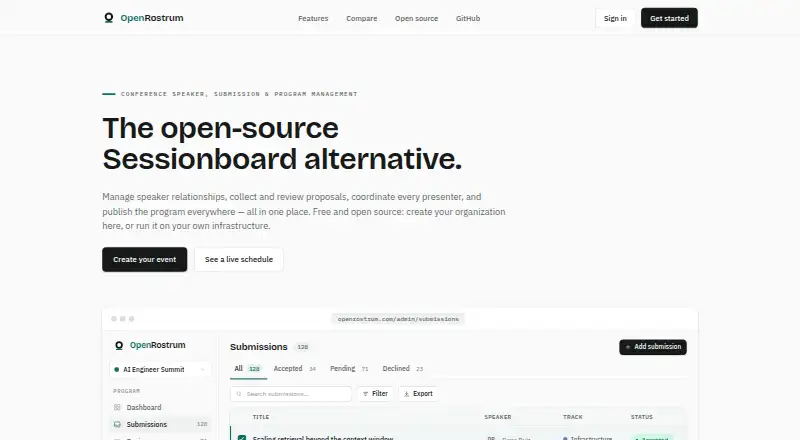
OpenRostrum is conference software for managing speakers, submissions, and programs from initial outreach through a public agenda. Organizers can maintain a searchable speaker directory, group contacts into segments, assign them to events, and track prospects through an eight-stage pipeline with scores, notes, and history. Calls for speakers can be built as multi-step forms with reusable fields, conditional questions, deadlines, draft rules, and configurable limits for speakers, chairs, and moderators. Submissions can be routed by track for approve, maybe, or deny decisions; optional AI scoring supplies a rationale for an initial assessment, which reviewers can override.
Speakers use a portal to update bios, headshots, slides, and task forms and check submission status. Accepted sessions can be laid out in a day-and-room grid, with conflicts for speakers or rooms flagged. Published materials can include schedule, speaker, session, gallery, and itinerary views, styled embeds, and filtered HTML, JSON, XML, and iCal feeds. Acceptance and schedule-change emails can carry .ics invitations for Gmail, Outlook, and Apple Calendar. OpenRostrum also lists Airtable sync, CSV exports, and ZIP downloads of uploaded files. It is MIT licensed, available on the web or self-hosted, and its free plan includes all features.
Who it suits
OpenRostrum suits conference organizers who need to coordinate speaker outreach, proposal review, and agenda publication in one system. It also fits teams that want speakers to manage their own materials and submission status, or that need self-hosting and export options.
What it does well
- Tracks speaker prospects through eight stages with notes and scores.
- Supports configurable, multi-step calls for speakers.
- Routes proposals by track and allows human overrides of AI scores.
- Flags speaker and room conflicts in the agenda grid.
- Offers hosted and self-hosted editions with all features on the free plan.
What to know first
- Organizers must build and configure their own CFP forms.
- Self-hosting requires users to host the software themselves.
Plans
| Plan | Billed and limits | Price |
|---|---|---|
| OpenRostrum | Free · MIT · all features on hosted and self-hosted editions | Free |
As openrostrum.com lists them, read 8 Oct 2026. The maker's own page has the final word.
Getting started
- Visit https://openrostrum.com/.
- Use the hosted web edition or choose to self-host OpenRostrum.
- Start with the free OpenRostrum plan, which includes all features.
- Set up the speaker directory, CFP forms, and event workflow.
Verdict
Choose OpenRostrum if you need an all-in-one workflow for speaker management, proposal review, and publishing a conference agenda. Its MIT license, self-hosting option, and free plan with all features make it a fit for teams seeking control over hosting and data. Look elsewhere if you need a workflow that does not require setting up forms or hosting a self-managed edition.
Questions
How much does OpenRostrum cost?
The OpenRostrum plan is free. The free plan includes all features on hosted and self-hosted editions.
Can OpenRostrum be self-hosted?
Yes. OpenRostrum is available as a hosted web edition and can also be self-hosted.
Is OpenRostrum open source?
It is MIT licensed.
Can reviewers use AI to assess proposals?
Optional AI first-pass scoring provides a rationale. Human reviewers can override the result.
What can organizers export or sync?
OpenRostrum lists Airtable sync, CSV data exports, ZIP downloads of uploaded files, and JSON, XML, and iCal feeds.
Facts from OpenRostrum's own pages
- Agenda
- The agenda builder places accepted sessions on a day-by-room grid and flags double-booked speakers and rooms. · openrostrum.com, 8 Oct 2026
- Airtable
- The product comparison page lists Airtable sync as an OpenRostrum capability. · openrostrum.com, 8 Oct 2026
- Calendar integration
- Acceptance and schedule-change emails can include .ics invitations, which the site says work with Gmail, Outlook, and Apple Calendar. · openrostrum.com, 8 Oct 2026
- Calls for speakers
- Organizers can build multi-step CFP forms with reusable fields, conditional questions, deadlines, draft rules, and configurable speaker, chair, and moderator limits. · openrostrum.com, 8 Oct 2026
- Data portability
- The site says users can export CSV data, download uploaded files in a ZIP, and use JSON, XML, and iCal feeds. · openrostrum.com, 8 Oct 2026
- Intended users
- The site describes OpenRostrum as conference speaker, submission, and program management software. · openrostrum.com, 8 Oct 2026
- License and hosting
- OpenRostrum states that it is MIT licensed, can be self-hosted, and has no paid tier that unlocks features. · openrostrum.com, 8 Oct 2026
- Publishing
- Published content includes schedule, speaker, session, gallery, and itinerary views, plus styled embeds and filtered HTML, JSON, XML, and iCal feeds. · openrostrum.com, 8 Oct 2026
- Purpose
- OpenRostrum manages conference speakers, submissions, and programs from speaker outreach through published agenda. · openrostrum.com, 8 Oct 2026
- Review
- Proposals can be routed by track and reviewed with approve, maybe, or deny decisions; optional AI first-pass scoring includes rationale, and humans can override results. · openrostrum.com, 8 Oct 2026
- Speaker CRM
- Its searchable speaker directory supports segments, event assignments, and an eight-stage prospect pipeline with scores, notes, and history. · openrostrum.com, 8 Oct 2026
- Speaker portal
- Speakers can manage bios, headshots, slides, task forms, and see the status of each submission in a self-service portal. · openrostrum.com, 8 Oct 2026
Where OpenRostrum stands on Freedom251
- Speaker Management Software#12 of 28
- Call for Papers Software#12 of 24