Freedom251 › AI Coding Assistants

OpenHands
by OpenHands
What OpenHands is
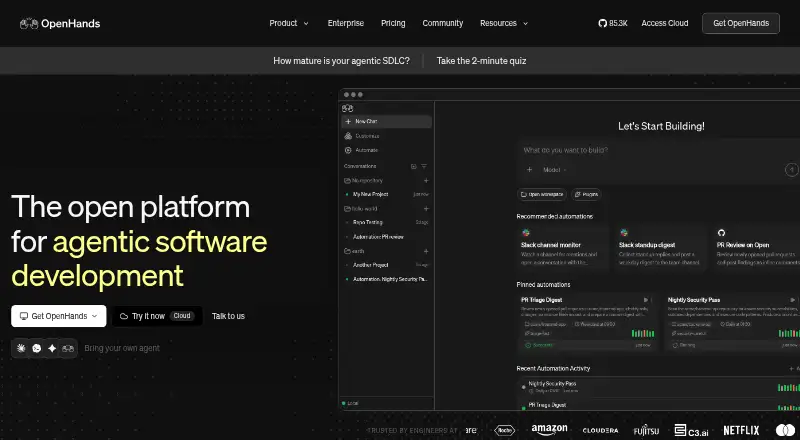
OpenHands is an open-source platform for building and running AI coding agents. It provides a terminal or CLI, a collaborative web interface, and an SDK for creating agents and coordinating workflows in code. Agents can be started by events from GitHub, Slack, Jira, Linear, schedules, and supported integrations. Listed engineering tasks include reviewing pull requests, sorting issues, investigating incidents, and opening pull requests with suggested fixes. OpenHands supports several agent stacks, including Claude Code, Codex, Gemini CLI, and its own agents, as well as closed models and open weights. It can run locally, in the cloud, or in an organization’s VPC; enterprise deployments can be self-hosted on Kubernetes. Enterprise controls include isolated runtimes, secret and tool access controls, audit logs, and prompt-injection detection that can halt activity. The free Open Source plan covers one user with unlimited daily conversations. Individual lists one user and 10 daily conversations; Enterprise lists unlimited users and conversations. An early-preview Agent Canvas desktop app is available for macOS, Windows, and Linux.
Who it suits
It suits individual developers and organizations looking to build, run, or automate coding-agent workflows. Teams needing enterprise governance or self-hosting can consider its enterprise deployment options.
What it does well
- Terminal, collaborative web GUI, and SDK interfaces
- Agents can launch from named services and schedules
- Supports multiple agent stacks and model types
- Free Open Source plan lists unlimited daily conversations
What to know first
- Individual plan lists 10 daily conversations
- Agent Canvas is an early preview
- Canvas itself does not provide isolation
Limits
The Open Source plan lists one user and unlimited daily conversations. Individual lists one user and 10 daily conversations. Agent Canvas itself does not provide isolation for agents running commands or accessing files and connected tools in their execution environment.
Plans
| Plan | Billed and limits | Price |
|---|---|---|
| Individual | SaaS · 1 user · 10 daily conversations · BYOK or OpenHands models at cost | Free |
| Open Source | Runs locally · 1 user · Unlimited daily conversations · Community support | Free |
| Enterprise | Custom pricing · SaaS or self-hosted · Unlimited users · Unlimited daily conversations · SAML/SSO · Priority support | On request |
As openhands.dev lists them, read 11 Oct 2026. The maker's own page has the final word.
Getting started
- Open the OpenHands website.
- Choose the Open Source, Individual, or Enterprise plan.
- Select a terminal or CLI, the collaborative web interface, or the SDK.
- Run OpenHands locally, in the cloud, or in an organization’s VPC.
- Connect an automation source such as GitHub, Slack, Jira, or Linear, or use a schedule.
- For a desktop preview, use Agent Canvas on macOS, Windows, or Linux.
Overview
OpenHands is an open-source platform for building and operating AI coding agents through a terminal, collaborative web interface, or SDK. It is a strong fit for developers who want programmable workflow automation and for organizations that need deployment and governance choices. The trade-off is that the broad platform asks more of its users than a focused editor assistant, and Agent Canvas does not isolate agent activity.
Key features
Chat assistance, codebase indexing, terminal access, and coding-agent operation cover the practical foundations of AI-assisted development. The CLI suits terminal-oriented developers, while the web GUI supports collaboration. The SDK is the more consequential differentiator for teams: it lets them create agents and orchestrate workflows programmatically instead of treating the product as a single chat window.
Automations can launch agents from GitHub, Slack, Jira, Linear, schedules, and supported integrations. OpenHands describes workflows for pull-request review, issue triage, incident investigation, and opening pull requests with proposed fixes. Those triggers make it a candidate for repeatable engineering operations, particularly where work already moves through these services; they are less relevant to an individual seeking only inline coding help.
The platform supports Claude Code, Codex, Gemini CLI, OpenHands, and other agent stacks, including closed models and open weights. That breadth can reduce dependence on one model or runtime, but it also makes OpenHands a platform choice rather than a narrowly defined assistant.
Deployment can be local, cloud-based, or inside an organization’s VPC. Enterprise self-hosting on Kubernetes, isolated container runtimes, prompt-injection detection with automatic halt, controls over secrets and tools, and audit logs address operational risk. The enterprise control plane adds RBAC, guardrails, reporting, observability, budgeting, and an LLM gateway. GitHub, GitLab, Slack, Jira, and Linear integrations are provided out of the box for enterprise use.
Agent Canvas has an early-preview desktop app for macOS, Windows, and Linux. Its documentation warns that agents can run commands and access files and connected tools in their execution environment, and that Canvas itself does not provide isolation. Treat that as a deployment concern, not a minor interface limitation: teams should provide their own boundaries before granting agents access to sensitive environments.
Pricing
OpenHands uses a freemium model, with a free option and three plans whose published prices are custom pricing.
| Plan | Price | Allowance | Best fit |
|---|---|---|---|
| Open Source | Custom pricing | 1 user; unlimited daily conversations | Individual users who want the broadest stated conversation allowance and an open-source deployment path. |
| Individual | Custom pricing | 1 user; 10 daily conversations | A single user whose daily usage fits a defined cap. |
| Enterprise | Custom pricing | Unlimited users; unlimited daily conversations | Organizations needing governance, integrations, deployment control, and support. |
The Individual plan’s ten-conversation limit can constrain frequent agent work, while the Open Source plan keeps one seat despite unlimited daily conversations. Enterprise removes both stated user and conversation limits and includes priority support, a shared Slack channel, and direct access to the research team through the contract. Choose it for organizational control rather than simply for more usage.
Platforms
OpenHands supports Android, iOS, Linux, macOS, Windows, web, API access, and self-hosting. The combination covers mobile access, browser use, desktop development, programmatic integration, and controlled infrastructure. Agent Canvas’s early-preview desktop application is specifically available on macOS, Windows, and Linux.
Who it's for
OpenHands is suited to developers who want terminal and web agent interfaces, teams automating work around repositories and issue trackers, and organizations that need VPC or Kubernetes deployment with enterprise controls. It is less suitable when the goal is a lightweight editor companion with no workflow or infrastructure decisions. Anyone using Canvas should also be prepared to establish isolation independently.
Pros and cons
Pros
- Multiple ways to operate agents: CLI, collaborative web GUI, and SDK cover personal use and programmatic orchestration.
- Workflow triggers: GitHub, Slack, Jira, Linear, schedules, and supported integrations can connect agents to recurring engineering work.
- Deployment flexibility: Local, cloud, VPC, and enterprise Kubernetes options support different infrastructure requirements.
- Enterprise governance: RBAC, guardrails, audit logs, observability, budgeting, and an LLM gateway provide controls beyond a standalone assistant.
- Model choice: Support for several agent stacks, closed models, and open weights avoids a single-stack commitment.
Cons
- Canvas is not isolated: Agents can reach commands, files, and connected tools in their environment, so users must supply their own safeguards.
- Uneven plan allowances: Individual is limited to 10 daily conversations and both individual plans cover only one user.
- Platform complexity: SDK orchestration, integrations, and deployment controls are unnecessary overhead for simple code-completion needs.
- Custom pricing: No fixed public price is provided for any plan, making budget comparison harder.
Alternatives
GitHub Copilot is a better choice when you want a familiar coding assistant with a free plan and broad desktop, mobile, web, and extension support rather than an agent-orchestration platform.
Kilo Code suits users seeking open-source VS Code, JetBrains, and CLI extensions, with usage billed separately.
Replit is preferable for browser-based building with a free Starter plan that includes daily usage, one live project, and one background task at a time.
Claude Code is the narrower paid option for users who specifically want Claude’s coding workflow, with a free tier where Claude Code itself is not included and a Pro plan at $17 a month billed annually.
GitHub Codespaces is the alternative when hosted development environments and usage-based compute are the priority.
AskCodi is an option for token-metered coding assistance with a free monthly allowance and paid Pro tier.
Cline is a choice for an open-source VS Code and CLI agent with an MCP marketplace.
CodeGPT is an alternative for extension-based assistance with a free tier and daily interaction allowance.
For broader comparisons, see AI Code Generators and AI Coding Assistants.
Verdict
Choose OpenHands if you need coding agents that can be automated, orchestrated, and deployed under organizational controls, especially across repository and project-management workflows. Look elsewhere if you only need straightforward editor assistance, if a ten-conversation daily cap is too restrictive, or if you cannot provide isolation around Canvas execution.
Verdict
OpenHands combines coding-agent interfaces, workflow triggers, and deployment choices in one platform. The listed plan limits and Canvas isolation caveat are worth weighing against its enterprise controls.
Questions
What does OpenHands do?
It provides a platform for building and running AI coding agents, with interfaces, automations, and controls for individual and organizational use.
Is OpenHands open source?
Yes. It has an Open Source plan and is described as an open-source platform.
What are the plan limits?
Open Source lists one user and unlimited daily conversations; Individual lists one user and 10 daily conversations; Enterprise lists unlimited users and conversations.
Which integrations are listed for Enterprise?
GitHub, GitLab, Slack, Jira, and Linear are listed as out-of-the-box integrations.
Where can OpenHands run?
It can run locally, in the cloud, or in an organization’s VPC. Enterprise self-hosting on Kubernetes is also described.
What platforms have the Agent Canvas desktop preview?
The early-preview desktop app is available for macOS, Windows, and Linux.
Facts from OpenHands's own pages
- Agent interfaces
- The product includes terminal/CLI, a collaborative web GUI, and an SDK for creating agents and orchestrating workflows programmatically. · openhands.dev, 11 Oct 2026
- Coding agent
- Yes · openhands.dev, 20 Sept 2026
- Automations
- Automations can trigger agents from GitHub, Slack, Jira, Linear, schedules, and supported integrations to carry out engineering workflows. · openhands.dev, 11 Oct 2026
- Chat assistance
- Yes · openhands.dev, 20 Sept 2026
- Codebase indexing
- Yes · openhands.dev, 20 Sept 2026
- Deployment
- OpenHands can run locally, in the cloud, or in an organization’s VPC; the enterprise page describes self-hosting on Kubernetes. · openhands.dev, 11 Oct 2026
- Desktop availability
- Agent Canvas has an early preview desktop app for macOS, Windows, and Linux. · docs.openhands.dev, 11 Oct 2026
- Enterprise governance
- The enterprise control plane includes RBAC, guardrails, reporting, observability, budgeting, and an LLM gateway. · openhands.dev, 11 Oct 2026
- Founded
- 2024 · openhands.dev, 28 Sept 2026
- Free plan
- Yes · openhands.dev, 20 Sept 2026
- Integrations
- The enterprise page lists GitHub, GitLab, Slack, Jira, and Linear integrations out of the box. · openhands.dev, 11 Oct 2026
- Local runtime caveat
- The Agent Canvas documentation warns that agents can run commands and access files and connected tools in their execution environment, and says Canvas itself does not provide isolation. · docs.openhands.dev, 11 Oct 2026
- Models and agents
- OpenHands says it supports Claude Code, Codex, Gemini CLI, OpenHands, and other agent stacks, as well as closed models and open weights. · openhands.dev, 11 Oct 2026
- Plan limits
- The pricing comparison lists one user and unlimited daily conversations for Open Source, one user and 10 daily conversations for Individual, and unlimited users and conversations for Enterprise. · openhands.dev, 11 Oct 2026
- Pull requests
- OpenHands describes workflows that review pull requests, triage issues, investigate incidents, and open pull requests with proposed fixes. · openhands.dev, 11 Oct 2026
- Security controls
- Enterprise features include isolated container runtimes, prompt-injection detection with automatic halt, access controls for secrets and tools, and audit logs. · openhands.dev, 11 Oct 2026
- Support
- The Enterprise plan includes priority support and a shared Slack channel, and the enterprise page says contracts include direct access to the research team. · openhands.dev, 11 Oct 2026
- Terminal access
- Yes · openhands.dev, 20 Sept 2026
- What it does
- OpenHands is an open-source platform for building and running AI coding agents, with interfaces, automations, and controls for individual and organizational use. · openhands.dev, 11 Oct 2026
Where OpenHands stands on Freedom251
- AI Coding Assistants#25 of 102
- Ai Development Tools#8 of 26
- AI Code Generators#29 of 54
- AI Code Generation Software#15 of 27
- Ai Agents Assistants#15 of 26